



Question: Go to the SEC Web site (http://www.sec.gov). Under Filings & Forms (EDGAR), click on Search for Company Filings. Click on Companies & Other Filers. Under
Go to the SEC Web site (http://www.sec.gov).
Under “Filings & Forms (EDGAR),” click on
“Search for Company Filings.” Click on
“Companies & Other Filers.” Under Company Name, enter “Cabot Oil & Gas Corp” (or under Ticker Symbol, enter “COG”). Select the 10-K filed February 28, 2007.
a. Determine the standard industrial classification.
b. Go to the “Reserves” subsection from the
“Item 1. Business” section. Find the
“Historical Reserves” table.
Complete the following table for estimated proved reserves for the periods indicated:
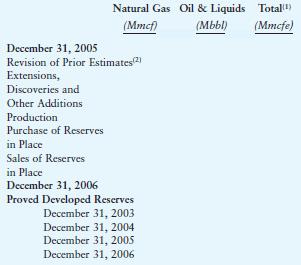
(1)Includes natural gas and natural gas equivalents determined by using the ratio of Gmcf of natural gas to 1Bbl of crude oil, condensate or natural gas liquids.
(2)The majority of the revisions were the result of the decrease in the natural gas price on December 31, 2006, from the price on December 31, 2005.
c. Comment on the trend in reserves.
December 31, 2005 Natural Gas Oil & Liquids Total() (Mmcf) Revision of Prior Estimates(2) Extensions, Discoveries and Other Additions Production Purchase of Reserves in Place Sales of Reserves in Place December 31, 2006 Proved Developed Reserves December 31, 2003 December 31, 2004 December 31, 2005 December 31, 2006 (Mbbl) (Mmcfe)
Step by Step Solution
There are 3 Steps involved in it

Get step-by-step solutions from verified subject matter experts