







Question: Modify Htree (Program 2.3.4) to animate the drawing of the (mathrm{H})-tree. Next, rearrange the order of the recursive calls (and the base case), view the
Modify Htree (Program 2.3.4) to animate the drawing of the \(\mathrm{H}\)-tree. Next, rearrange the order of the recursive calls (and the base case), view the resulting animation, and explain each outcome.
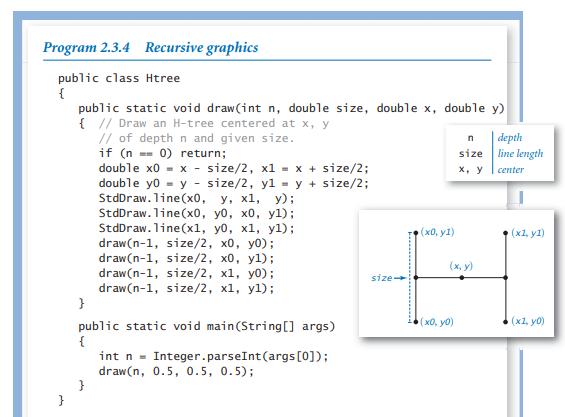

Program 2.3.4 Recursive graphics public class Htree { } public static void draw(int n, double size, double x, double y) { // Draw an H-tree centered at x, y // of depth n and given size. if (n = 0) return; double x0 = x - size/2, x1 = x + size/2; double yo y size/2, y1 = y + size/2; StdDraw. line(x0, y, x1, y); StdDraw. line (x0, y0, x0, y1); StdDraw. line(x1, yo, x1, yl); draw(n-1, size/2, x0, y0); draw(n-1, size/2, x0, y1); draw(n-1, size/2, x1, y0); draw(n-1, size/2, x1, yl); } public static void main(String[] args) { } int n = Integer.parseInt (args [0]); draw(n, 0.5, 0.5, 0.5); size- ,{x, y1) n size x, y (x, y) (x0, y0) depth line length center (x1, y1) (x1, y0)
Step by Step Solution
3.54 Rating (154 Votes )
There are 3 Steps involved in it
To animate the drawing of the Htree we can introduce a delay after each drawing of the individual lines In Java you can use StdDrawpauseint t where t ... View full answer

Get step-by-step solutions from verified subject matter experts
 Study Help