



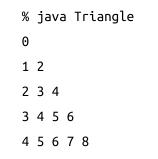
Question: If youre up for a bit more of a challenge, try arranging the output in a visual triangle. The statement above prints one element on
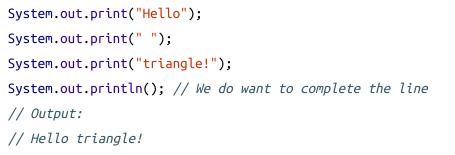
If you’re up for a bit more of a challenge, try arranging the output in a visual triangle. The statement above prints one element on a line by itself. The built-in System. out object has another output method: print(). This method does not print a newline after it prints whatever argument was passed in. You can chain together several System.out.print() calls to produce one line of output:
Your final output should look similar to this:
System.out.print("Hello"); System.out.print(" "); System.out.print("triangle!"); System.out.println(); // We do want to complete the line // Output: // Hello triangle!
Step by Step Solution
3.49 Rating (149 Votes )
There are 3 Steps involved in it
To achieve the desired output of a visual triangle you can use nested loops to generate the numbers ... View full answer

Get step-by-step solutions from verified subject matter experts