







Question: Listing 7.9, Calculator.java, is a simple commandline calculator. Note that the program terminates if any operand is nonnumeric. Write a program with an exception handler
Listing 7.9, Calculator.java, is a simple commandline calculator. Note that the program terminates if any operand is nonnumeric. Write a program with an exception handler that deals with nonnumeric operands; then write another program without using an exception handler to achieve the same objective. Your program should display a message that informs the user of the wrong operand type before exiting (see Figure 12.12).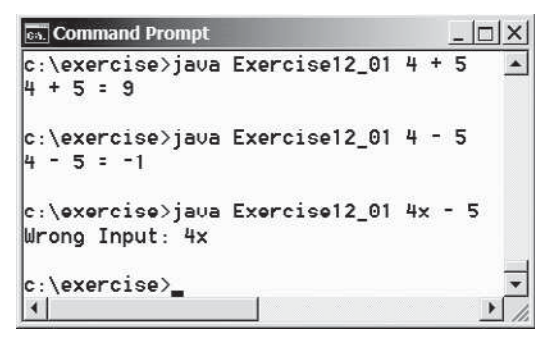
Listing
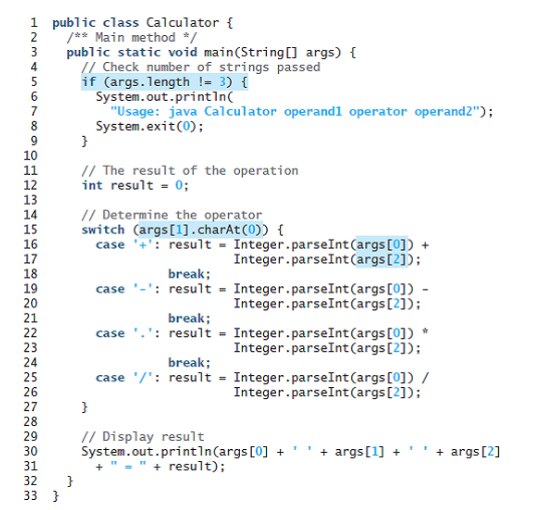
Command Prompt c:\exercise>java Exercise12_01 4 + 5 4 + 5 : 9 c:\exercise>java Exercise12_01 4 - 5 4 - 5 = -1 e:\oxorcise>java Exorciso12_01 4x - 5 Wrong Input: 4x c:\exercise>. 1 public class Calculator { /** Main method */ public static void main(String[] args) { // Check number of strings passed if (args.length != 3) { System.out.printIn( "Usage: java Calculator operand1 operator operand2"); System.exit(0); 3 8. 10 11 12 13 14 15 16 17 18 19 20 21 22 23 24 25 26 // The result of the operation int result = 0; // Determine the operator switch (args[1].charAt(0)) { case '+': result = Integer.parseInt(args[0]) + Integer.parseInt(args[2]); break; case '-': result = Integer.parseInt(args[0]) - Integer.parseInt(args[2]); break; case '.': result = Integer.parseInt(args[0]) * Integer.parseInt(args[2]); break; case '/': result = Integer.parseInt(args[0]) / Integer.parseInt(args[2]); 27 28 29 30 31 // Display result System.out.println(args [0] + + result); + args[1] + + args[2] 32 33 }
Step by Step Solution
3.31 Rating (163 Votes )
There are 3 Steps involved in it
Program plan Enter two operators with one operand Convert string object to integer Enter into except... View full answer

Get step-by-step solutions from verified subject matter experts
 Study Help