







Question: Complete the C++ instructions column in Figure 4-32. IPO chart information C++ instructions Input quantity sold item cost int quantity = 0; double cost =
Complete the C++ instructions column in Figure 4-32.
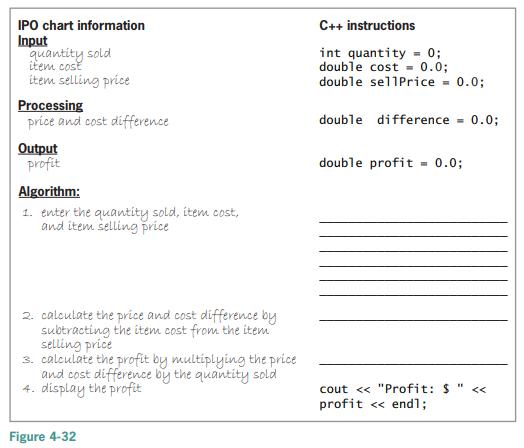
IPO chart information C++ instructions Input quantity sold item cost int quantity = 0; double cost = 0.0; double sellPrice item selling price = 0.0; Processing price and cost difference double difference = 0.0; Output profit double profit = 0.0; Algorithm: 1. enter the quantity sold, item cost, and item selling price 2. calculate the price and cost difference by subtracting the item cost from the item selling price 3. calculate the profit by multiplying the price and cost difference by the quantity sold 4. display the profit cout < < "Profit: $ profit endl; < < Figure 4-32
Step by Step Solution
3.55 Rating (159 Votes )
There are 3 Steps involved in it
IPO chart information Input quantity sold tem cost item selling price ... View full answer

Get step-by-step solutions from verified subject matter experts
 Study Help