







Question: Credit card companies typically assign a special digit, called a check digit, to the end of each customers credit card number. The check digit allows
Credit card companies typically assign a special digit, called a check digit, to the end of each customer’s credit card number. The check digit allows companies to verify that the credit card number was entered accurately. Many methods for creating the check digit have been developed, including the one you will use in this exercise. Create an application, using the following names for the solution and project, respectively: Merryweather Solution and Merryweather Project. Save the application in the VB2015\Chap08 folder. Create the interface shown in Figure 8-41. Make the Verify button the default button. The interface provides a text box for entering a five digit credit card number, with the fifth digit being the check digit. The btnVerify_Click procedure should use the method shown and illustrated in Figure 8-42 to verify the credit card number. It should then display a message indicating whether the credit card number is valid or invalid. For example, if the user enters 18531 as the credit card number, the application should indicate that the credit card number is valid. However, if the user enters 1853 followed by either the number 0 or any number from 2 through 9, the application should indicate that the credit card number is not valid. Test the application appropriately.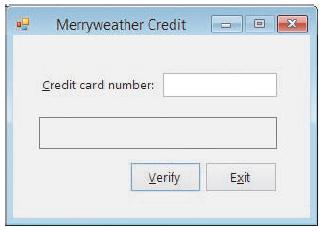
Figure 8-41
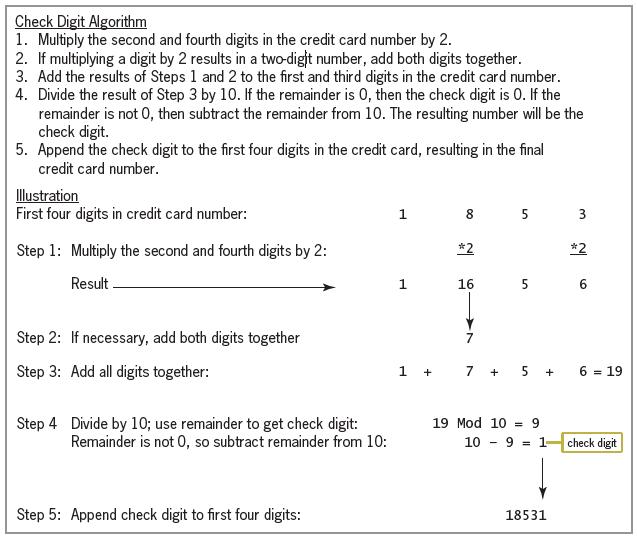
Figure 8-42
Check Digit Algorithm 1. Multiply the second and fourth digits in the credit card number by 2. 2. If multiplying a digit by 2 results in a two-dight number, add both digits together. 3. Add the results of Steps 1 and 2 to the first and third digits in the credit card number. 4. Divide the result of Step 3 by 10. If the remainder is 0, then the check digit is 0. If the remainder is not 0, then subtract the remainder from 10. The resulting number will be the check digit. 5. Append the check digit to the first four digits in the credit card, resulting in the final credit card number. Illustration First four digits in credit card number: 1. 8 5 3 Step 1: Multiply the second and fourth digits by 2: *2 *2 Result . 1 16 6. Step 2: If necessary, add both digits together Step 3: Add all digits together: 1 + 7 + 5 + 6 = 19 Step 4 Divide by 10; use remainder to get check digit: Remainder is not 0, so subtract remainder from 10: 19 Mod 10 = 9 10 9 = 1 check digit Step 5: Append check digit to first four digits: 18531
Step by Step Solution
3.38 Rating (167 Votes )
There are 3 Steps involved in it
Microsoft Visual Studio Solution File Format Version 1200 Visual Studio 14 VisualStudioVersion 140225120 MinimumVisualStudioVersion 100402191 ProjectF184B08FC81C45F6A57F5ABD9991F28F Merryweather Proje... View full answer

Get step-by-step solutions from verified subject matter experts
 Study Help