



Question: 1. Carefully copy/paste your code from w8p1.h and w&p1.c and INSERT it into the respective provided Part-2 source files w8p2.h and w8p2.c where the
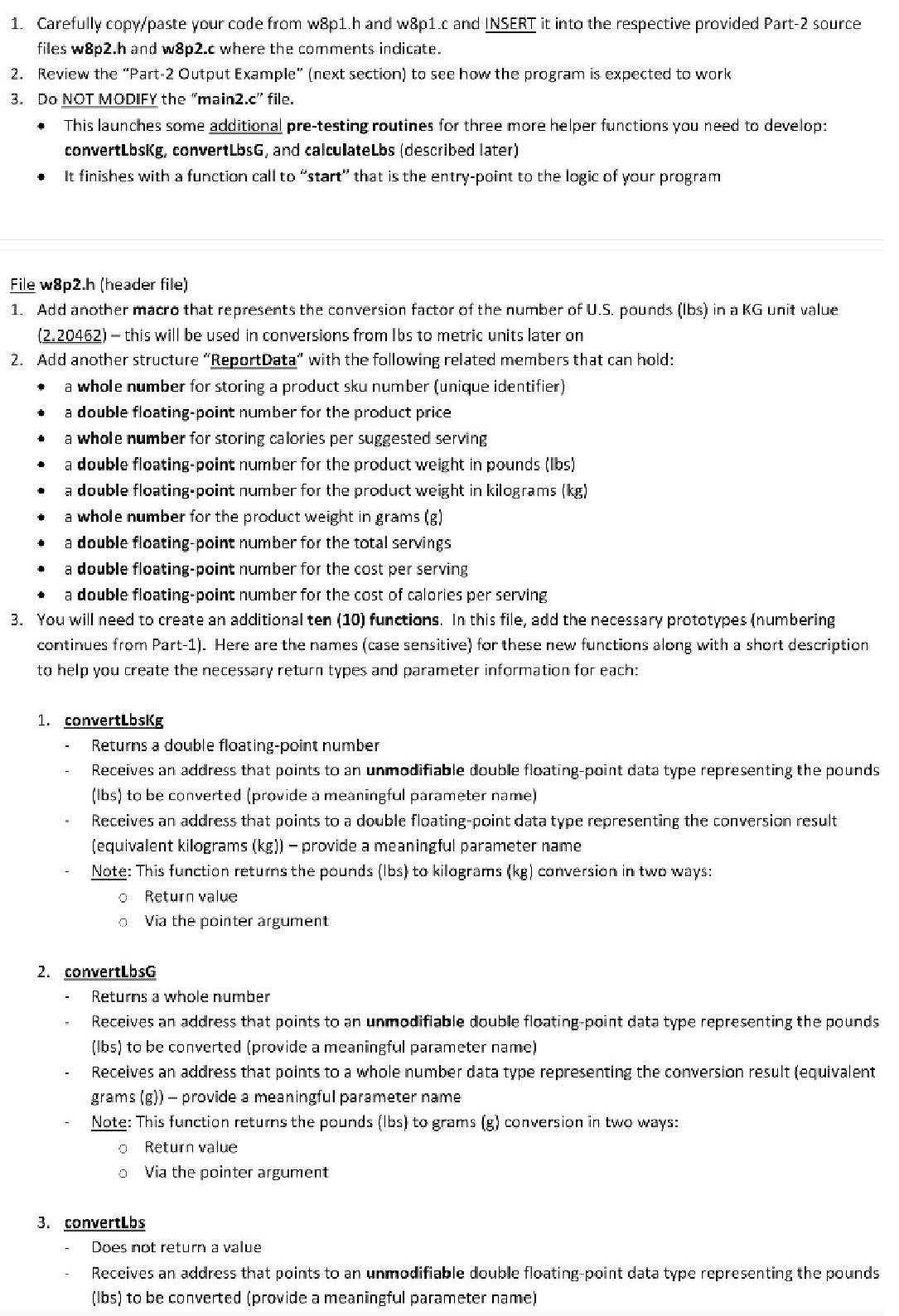
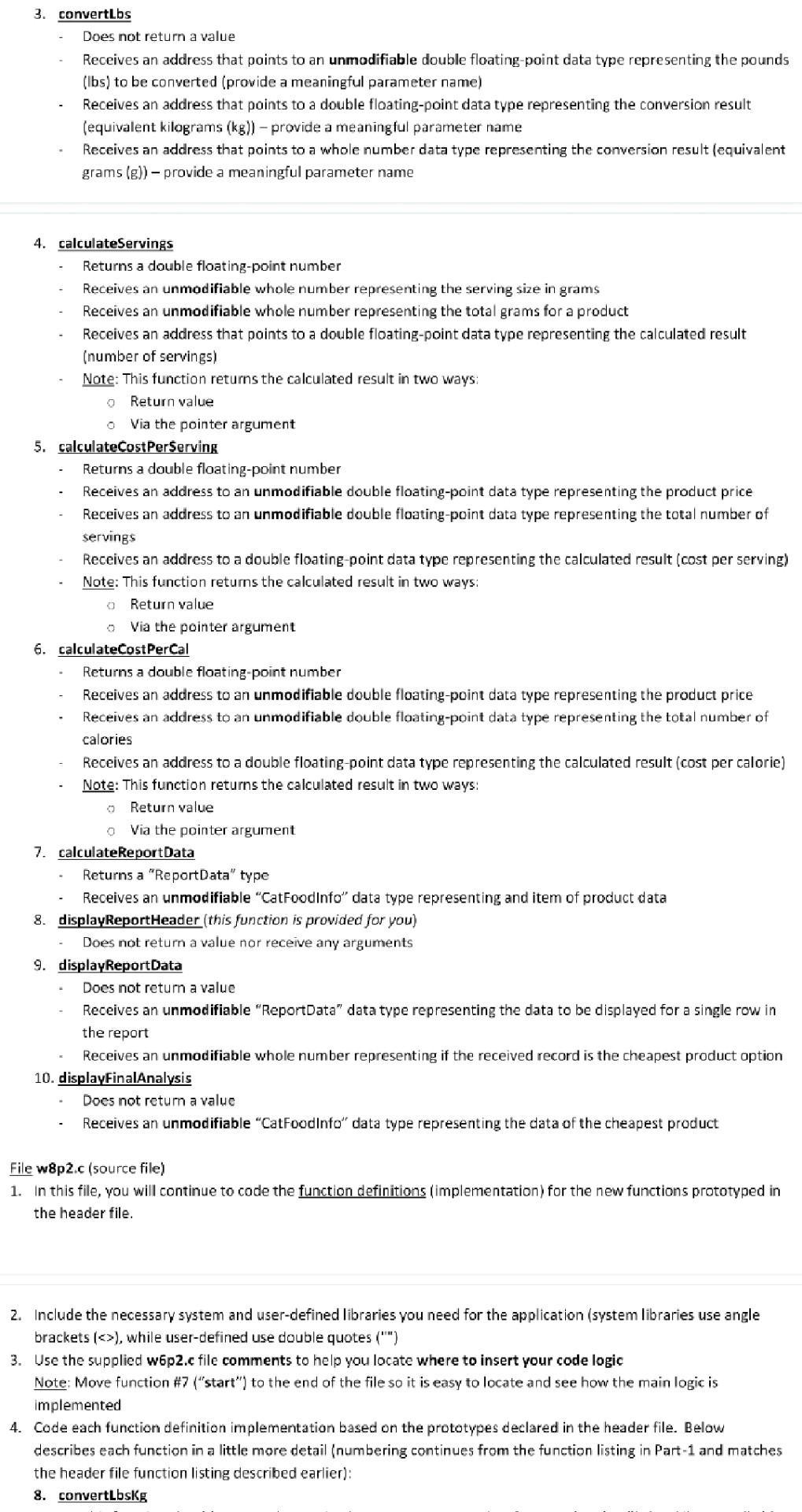
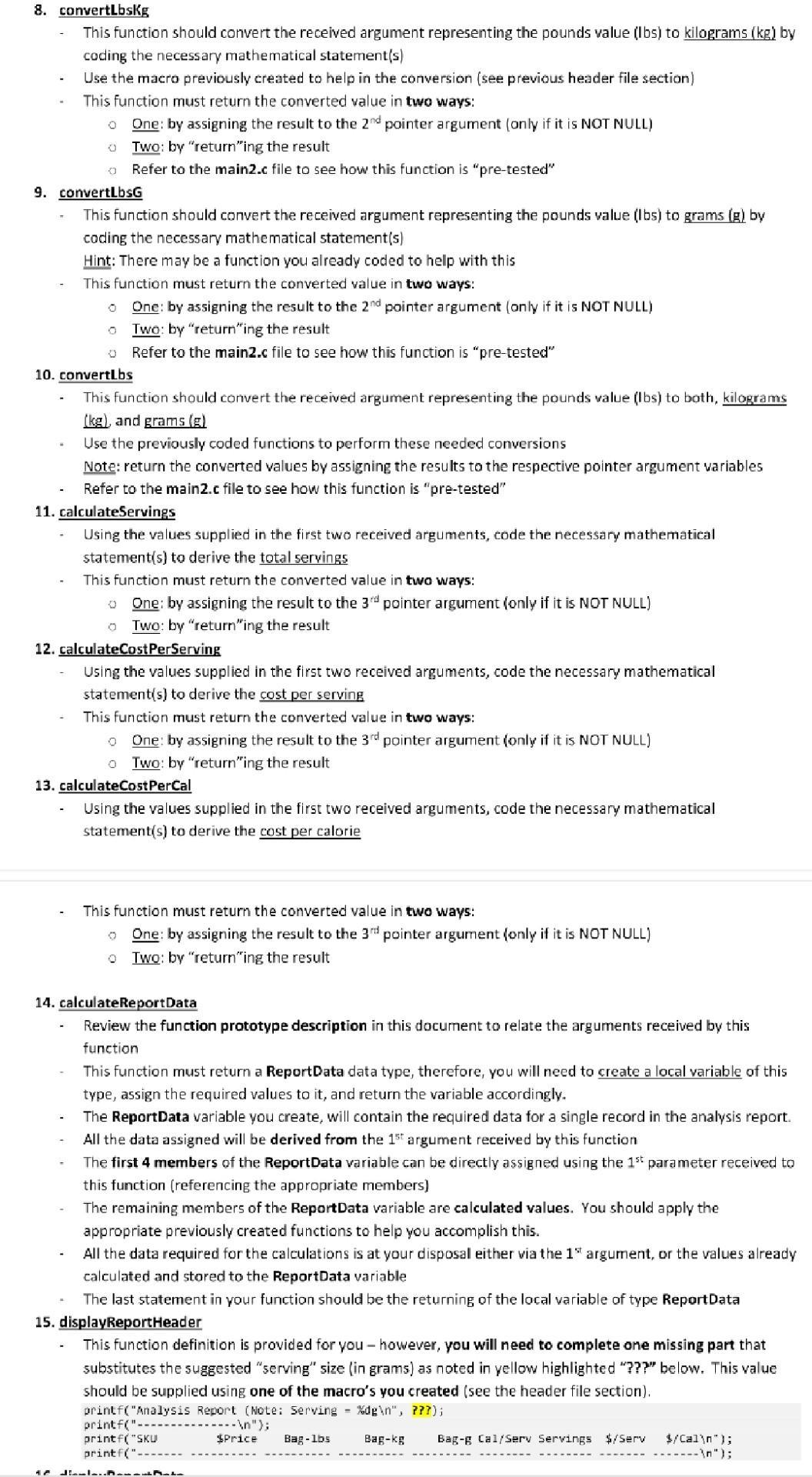
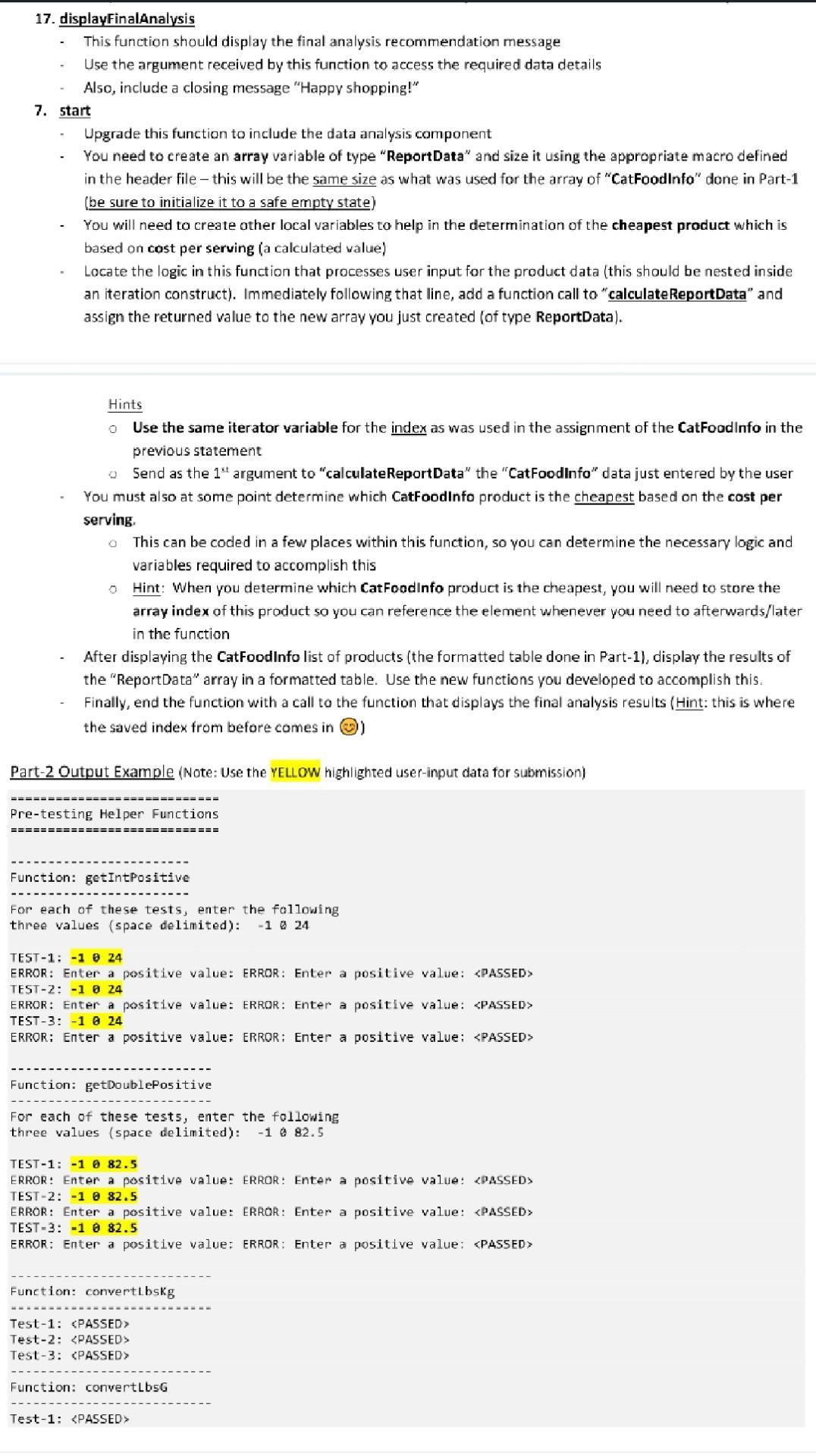
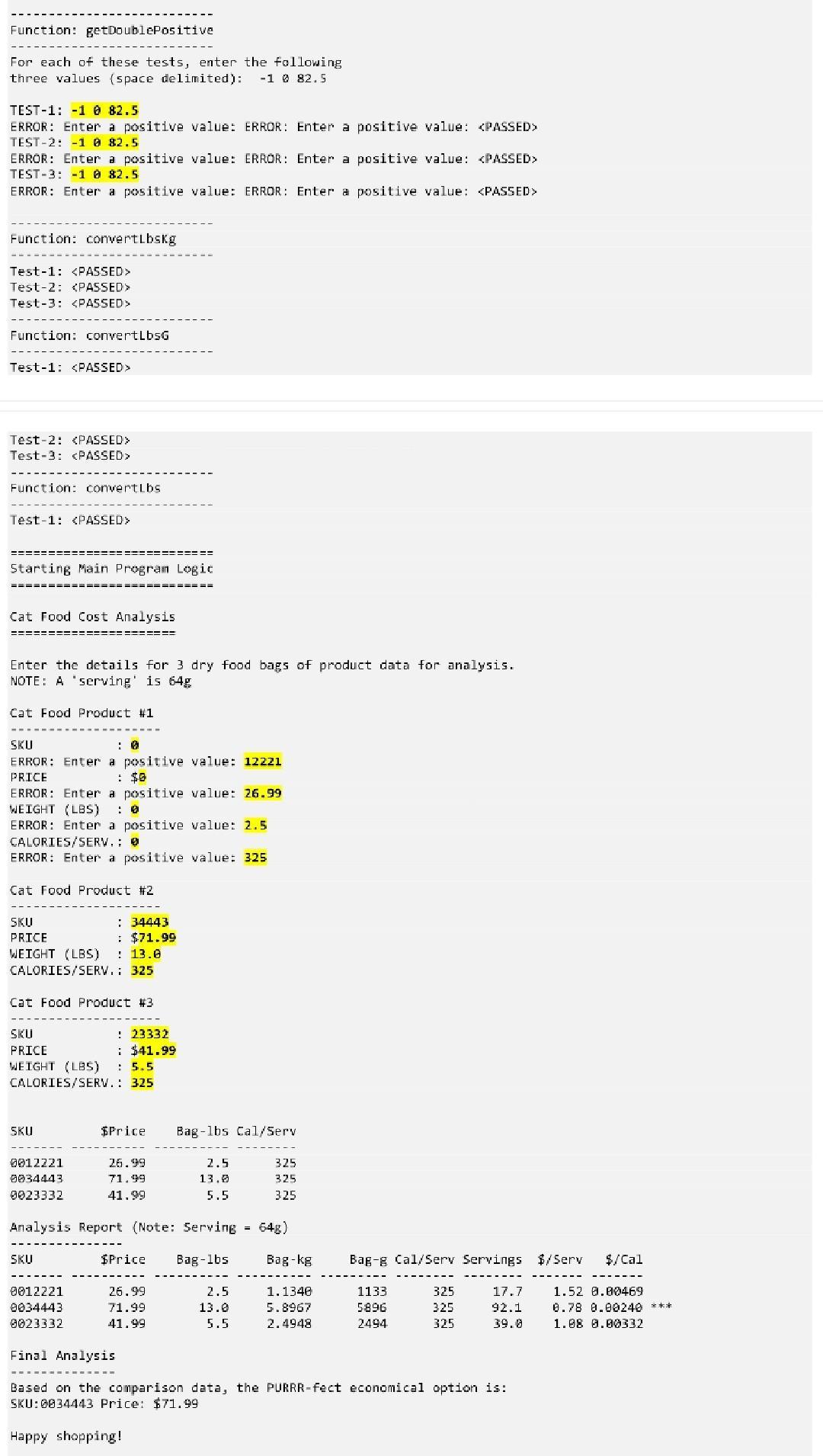
1. Carefully copy/paste your code from w8p1.h and w&p1.c and INSERT it into the respective provided Part-2 source files w8p2.h and w8p2.c where the comments indicate. 2. Review the "Part-2 Output Example" (next section) to see how the program is expected to work 3. Do NOT MODIFY the "main2.c" file. This launches some additional pre-testing routines for three more helper functions you need to develop: convertLbskg, convertLbsG, and calculateLbs (described later) It finishes with a function call to "start" that is the entry-point to the logic of your program File w8p2.h (header file) 1. Add another macro that represents the conversion factor of the number of U.S. pounds (lbs) in a KG unit value (2.20462) - this will be used in conversions from Ibs to metric units later on 2. Add another structure "ReportData" with the following related members that can hold: a whole number for storing a product sku number (unique identifier) a double floating-point number for the product price a whole number for storing calories per suggested serving a double floating-point number for the product weight in pounds (lbs) a double floating-point number for the product weight in kilograms (kg) a whole number for the product weight in grams (g) a double floating-point number for the total servings a double floating-point number for the cost per serving a double floating-point number for the cost of calories per serving 3. You will need to create an additional ten (10) functions. In this file, add the necessary prototypes (numbering continues from Part-1). Here are the names (case sensitive) for these new functions along with a short description to help you create the necessary return types and parameter information for each: + * . . 1. convertLbsKg Returns a double floating-point number Receives an address that points to an unmodifiable double floating-point data type representing the pounds (lbs) to be converted (provide a meaningful parameter name) Receives an address that points to a double floating-point data type representing the conversion result (equivalent kilograms (kg)) - provide a meaningful parameter name Note: This function returns the pounds (lbs) to kilograms (kg) conversion in two ways: 0 Return value Via the pointer argument 2. convertLbsG Returns a whole number Receives an address that points to an unmodifiable double floating-point data type representing the pounds (lbs) to be converted (provide a meaningful parameter name) Receives an address that points to a whole number data type representing the conversion result (equivalent grams (g)) - provide a meaningful parameter name Note: This function returns the pounds (lbs) to grams (g) conversion in two ways: 0 Return value 0 Via the pointer argument 3. convertLbs Does not return a value Receives an address that points to an unmodifiable double floating-point data type representing the pounds (lbs) to be converted (provide a meaningful parameter name) 3. convertLbs Does not return a value Receives an address that points to an unmodifiable double floating-point data type representing the pounds (lbs) to be converted (provide a meaningful parameter name) Receives an address that points to a double floating-point data type representing the conversion result (equivalent kilograms (kg)) - provide a meaningful parameter name Receives an address that points to a whole number data type representing the conversion result (equivalent grams (g)) - provide a meaningful parameter name 4. calculateServings Returns a double floating-point number Receives an unmodifiable whole number representing the serving size in grams Receives an unmodifiable whole number representing the total grams for a product Receives an address that points to a double floating-point data type representing the calculated result (number of servings) Note: This function returns the calculated result in two ways: - 0 O 5. calculateCost PerServing Return value Via the pointer argument Returns a double floating-point number Receives an address to an unmodifiable double floating-point data type representing the product price Receives an address to an unmodifiable double floating-point data type representing the total number of servings Receives an address to a double floating-point data type representing the calculated result (cost per serving) Note: This function returns the calculated result in two ways: 0 Return value Via the pointer argument 6. calculateCost PerCal Returns a double floating-point number Receives an address to an unmodifiable double floating-point data type representing the product price Receives an address to an unmodifiable double floating-point data type representing the total number of calories ( Receives an address to a double floating-point data type representing the calculated result (cost per calorie) Note: This function returns the calculated result in two ways: Return value Via the pointer argument 0 7. calculateReportData Returns a "ReportData" type Receives an unmodifiable "CatFoodInfo" data type representing and item of product data 8. displayReportHeader (this function is provided for you) Does not return a value nor receive any arguments 9. displayReportData Does not return a value Receives an unmodifiable "ReportData" data type representing the data to be displayed for a single row in the report Receives an unmodifiable whole number representing if the received record is the cheapest product option 10. displayFinalAnalysis Does not return a value Receives an unmodifiable "CatFoodInfo" data type representing the data of the cheapest product File w8p2.c (source file) 1. In this file, you will continue to code the function definitions (implementation) for the new functions prototyped in the header file. 2. Include the necessary system and user-defined libraries you need for the application (system libraries use angle rackets ( ), while user-defined use double quotes ("") 3. Use the supplied w6p2.c file comments to help you locate where to insert your code logic Note: Move function #7 ("start") to the end of the file so it is easy to locate and see how the main logic is implemented 4. Code each function definition implementation based on the prototypes declared in the header file. Below describes each function in a little more detail (numbering continues from the function listing in Part-1 and matches the header file function listing described earlier): 8. convertLbsKg 8. convertLbsKg This function should convert the received argument representing the pounds value (lbs) to kilograms (kg) by coding the necessary mathematical statement(s) Use the macro previously created to help in the conversion (see previous header file section) This function must return the converted value in two ways: One: by assigning the result to the 2nd pointer argument (only if it is NOT NULL) Two: by "return"ing the result Refer to the main2.c file to see how this function is "pre-tested" 0 9. convertLbsG This function should convert the received argument representing the pounds value (lbs) coding the necessary mathematical statement(s) Hint: There may be a function you already coded to help with this This function must return the converted value in two ways: One: by assigning the result to the 2nd pointer argument (only if it is NOT NULL) Two: by "returning the result Refer to the main2.c file to see how this function is "pre-tested" O 0 0 10. convertLbs This function should convert the received argument representing the pounds value (lbs) to both, kilograms (kg), and grams (g) Use the previously coded functions to perform these needed conversions Note: return the converted values by assigning the results to the respective pointer argument variables Refer to the main2.c file to see how this function is "pre-tested" 11. calculateServings 17 Using the values supplied in the first two received arguments, code the necessary mathematical statement(s) to derive the total servings This function must return the converted value in two ways: o One: by assigning the result to the 3rd pointer argument (only if it is NOT NULL) O Two: by "return"ing the result 12. calculateCost PerServing Using the values supplied in the first two received arguments, code the necessary mathematical statement(s) to derive the cost per serving This function must return the converted value in two ways: One: by assigning the result to the 3rd pointer argument (only if it is NOT NULL) 0 13. calculateCost PerCal Two: by "return"ing the result Using the values supplied in the first two received arguments, code the necessary mathematical statement(s) to derive the cost per calorie This function must return the converted value in two ways: One: by assigning the result to the 3rd pointer argument (only if it is NOT NULL) Two: by "return"ing the result O grams (g) by 14. calculateReportData Review the function prototype description in this document to relate the arguments received by this function This function must return a Report Data data type, therefore, you will need to create a local variable of this type, assign the required values to it, and return the variable accordingly. The ReportData variable you create, will contain the required data for a single record in the analysis report. All the data assigned will be derived from the 1st argument received by this function The first 4 members of the Report Data variable can be directly assigned using the 1st parameter received to this function (referencing the appropriate members) The remaining members of the Report Data variable are calculated values. You should apply the appropriate previously created functions to help you accomplish this. All the data required for the calculations is at your disposall either via the 1st argument, or the values already calculated and stored to the ReportData variable The last statement in your function should be the returning of the local variable of type ReportData 15. displayReportHeader This function definition is provided for you however, you will need to complete one missing part that substitutes the suggested "serving" size (in grams) as noted in yellow highlighted "???" below. This value should be supplied using one of the macro's you created (see the header file section). printf("Analysis Report (Note: Serving %dg ", ???); printf("-- printf("SKU printf(". JULIA- --- "); $Price Bag-lbs Bag-kg Bag-g Cal/Serv Servings $/Serv $/Cal "); ------ "); 17. displayFinalAnalysis - This function should display the final analysis recommendation message Use the argument received by this function to access the required data details Also, include a closing message "Happy shopping!" 7. start - Upgrade this function to include the data analysis component You need to create an array variable of type "ReportData" and size it using the appropriate macro defined in the header file - this will be the same size as what was used for the array of "CatFoodInfo" done in Part-1 (be sure to initialize it to a safe empty state) You will need to create other local variables to help in the determination of the cheapest product which is based on cost per serving (a calculated value) Locate the logic in this function that processes user input for the product data (this should be nested inside an iteration construct). Immediately following that line, add a function call to "calculate ReportData" and assign the returned value to the new array you just created (of type ReportData). Hints 0 Use the same iterator variable for the index as was used in the assignment of the CatFoodInfo in the previous statement Send as the 1st argument to "calculate ReportData" the "CatFoodInfo" data just entered by the user You must also at some point determine which CatFoodInfo product is the cheapest based on the cost per serving. O 0 This can be coded in a few places within this function, so you can determine the necessary logic and variables required to accomplish this Hint: When you determine which CatFoodInfo product is the cheapest, you will need to store the array index of this product so you can reference the element whenever you need to afterwards/later in the function After displaying the CatFoodInfo list of products (the formatted table done in Part-1), display the results of the "ReportData" array in a formatted table. Use the new functions you developed to accomplish this. Finally, end the function with a call to the function that displays the final analysis results (Hint: this is where the saved index from before comes in ) Part-2 Output Example (Note: Use the YELLOW highlighted user-input data for submission) Pre-testing Helper Functions ============================ Function: getIntPositive For each of these tests, enter the following three values (space delimited): -1 @ 24 TEST-1 -1 0 24 ERROR: Enter a positive value: ERROR: Enter a positive value: TEST-2: -1 0 24 ERROR: Enter a positive value: ERROR: Enter a positive value: TEST-3: -1 0 24 ERROR: Enter a positive value: ERROR: Enter a positive value: Function: getDoublePositive For each of these tests, enter the following three values (space delimited): -1 @ 82.5 TEST-1 -1 0 82.5 ERROR: Enter a positive value: ERROR: Enter a positive value: TEST-2 -1 0 82.5 ERROR: Enter a positive value: ERROR: Enter a positive value: TEST-3: -1 0 82.5 ERROR: Enter a positive value: ERROR: Enter a positive value: Function: convertLbskg Test-1: Test-2: Test-3: Function: convertLbsG Test-1: Function: getDoublePositive For each of these tests, enter the following three values (space delimited): -182.5 TEST-1: -1 0 82.5 ERROR: Enter a positive value: ERROR: Enter a positive value: TEST-2: -1 0 82.5 ERROR: Enter a positive value: ERROR: Enter a positive value: TEST-3: -1 0 82.5 ERROR: Enter a positive value: ERROR: Enter a positive value: Function: convertLbskg Test-1: Test-2: Test-3: Function: convertLbsG Test-1: Test-2: Test-3: Function: convertLbs Test-1: Starting Main Program Logic Cat Food Cost Analysis Enter the details for 3 dry food NOTE: A "serving' is 64g Cat Food Product #1 ============ SKU : 0 ERROR: Enter a positive value: 12221 PRICE : $0 ERROR: Enter a positive value: 26.99 WEIGHT (LBS) : 0 ERROR: Enter a positive value: 2.5 CALORIES/SERV.: @ ERROR: Enter a positive value: 325 Cat Food Product #2 SKU PRICE WEIGHT (LBS) : 34443 : $71.99 : 13.0 CALORIES/SERV.: 325 Cat Food Product #3 SKU PRICE WEIGHT (LBS) : 5.5 CALORIES/SERV.: 325 SKU 0012221 0034443 0023332 SKU 0012221 0034443 8023332 : 23332 $41.99 $Price Bag-lbs Cal/Serv 26.99 71.99 41.99 Analysis Report (Note: Serving = 64g) $Price Bag-lbs 2.5 13.0 5.5 26.99 71.99 41.99 2.5 13.0 5.5 of product data for analysis. 325 325 325 Bag-kg 1.1340 5.8967 2.4948 Bag-g Cal/Serv Servings $/Serv $/Cal 1133 5896 2494 325 325 325 17.7 92.1 39.0 Final Analysis Based on the comparison data, the PURRR-fect economical option is: SKU: 0034443 Price: $71.99 Happy shopping! 1.52 0.00469 0.78 0.00240 *** 1.88 8.80332
Step by Step Solution
3.53 Rating (156 Votes )
There are 3 Steps involved in it
Code is implemented in C Source code is attached below File name w8p2h define MAXPRODUCT 3 define NU... View full answer

Get step-by-step solutions from verified subject matter experts