







Question: 2 3 4 On the SalesData worksheet in cell B4, use an XLOOKUP function to retrieve the product name for the ProductID in cell
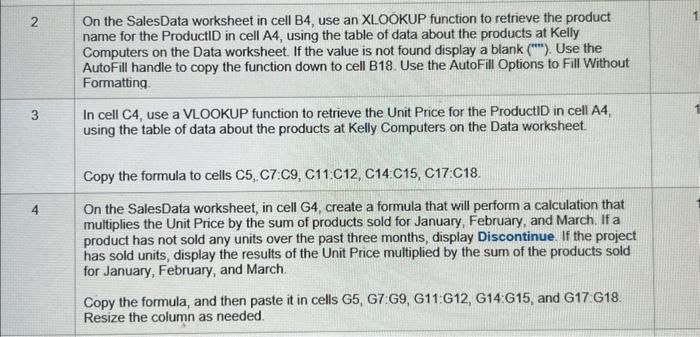
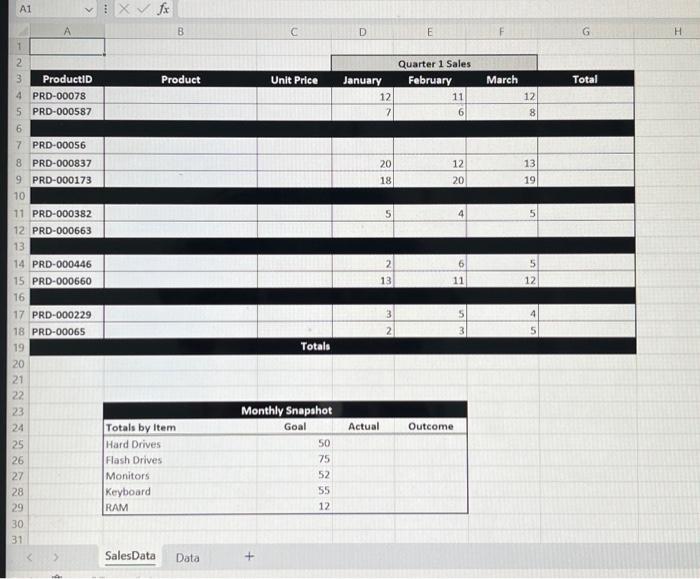
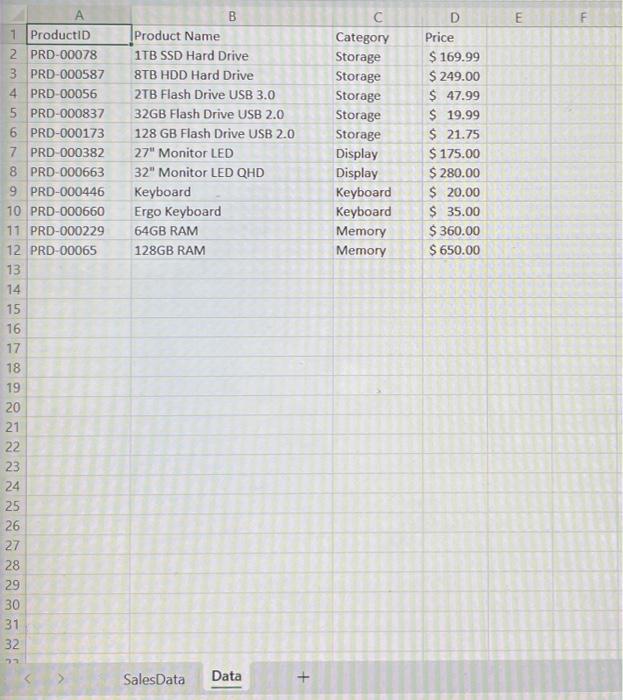
2 3 4 On the SalesData worksheet in cell B4, use an XLOOKUP function to retrieve the product name for the ProductID in cell A4, using the table of data about the products at Kelly Computers on the Data worksheet. If the value is not found display a blank (""). Use the AutoFill handle to copy the function down to cell B18. Use the AutoFill Options to Fill Without Formatting. In cell C4, use a VLOOKUP function to retrieve the Unit Price for the ProductID in cell A4, using the table of data about the products at Kelly Computers on the Data worksheet. Copy the formula to cells C5, C7:C9, C11 C12, C14 C15, C17:C18. On the SalesData worksheet, in cell G4, create a formula that will perform a calculation that multiplies the Unit Price by the sum of products sold for January, February, and March. If a product has not sold any units over the past three months, display Discontinue. If the project has sold units, display the results of the Unit Price multiplied by the sum of the products sold for January, February, and March. Copy the formula, and then paste it in cells G5, G7:G9, G11:G12, G14 G15, and G17 G18. Resize the column as needed. A1 1 2 3 ProductID 4 PRD-00078 5 PRD-000587 6 7 PRD-00056 8 PRD-000837 9 PRD-000173 10 11 PRD-000382 12 PRD-000663 13 14 PRD-000446 15 PRD-000660 16 17 PRD-000229 18 PRD-00065 19 20 21 22 23 24 25 26 27 28 29 30 31 X fx Totals by Item Hard Drives Flash Drives Monitors Keyboard RAM Sales Data B Product Data Unit Price Totals Monthly Snapshot Goal 50 75 52 55 12 D January 12 7 20 18 Actual 5 2 13 3 2 E Quarter 1 Sales February 11 6 12 20 Outcome 4 6 11 5 March 12 8 13 19 5 5 12 4 G Total H 1 ProductID 2 PRD-00078 3 PRD-000587 4 PRD-00056 5 PRD-000837 6 PRD-000173 7 PRD-000382 8 PRD-000663 9 PRD-000446 10 PRD-000660 11 PRD-000229 12 PRD-00065 13 14 15 16 17 18 19 20 722742788 21 23 25 26 29 30. 31 32 B Product Name 1TB SSD Hard Drive 8TB HDD Hard Drive 2TB Flash Drive USB 3.0 32GB Flash Drive USB 2.0 128 GB Flash Drive USB 2.0 27" Monitor LED 32" Monitor LED QHD Keyboard Ergo Keyboard 64GB RAM 128GB RAM SalesData Data Category Storage Storage Storage Storage Storage Display Display Keyboard Keyboard Memory Memory D Price $ 169.99 $ 249.00 $ 47.99 $19.99 $ 21.75 $ 175.00 $ 280.00 $ 20.00 $ 35.00 $360.00 $ 650.00 E F
Step by Step Solution
3.51 Rating (158 Votes )
There are 3 Steps involved in it
The answer provided below has been developed in a clear step by step manner Step 1 2On the SalesData worksheet in cell B4 use an XLOOKUP function to r... View full answer

Get step-by-step solutions from verified subject matter experts
 Study Help