Question: 4. Write an Excel formula in cell Customers!I5 to be copied down to determine the Base price for the specific model home the first customer
- 4. Write an Excel formula in cell Customers!I5 to be copied down to determine the Base price for the specific model home the first customer has purchased. When copied down, the formula will determine the total value of each home for the corresponding customer. (Do not use an IF function for this formula.)
- 5. Write an Excel formula in cell Customers!J5 to determine the location surcharge (not total cost), if applicable, for the home purchased by the first customer. Remember that the surcharge percentage is applied to the home price including options. Write the formula so that it can be copied down the column to determine the surcharge for each corresponding customer. (Do not use an IF function for this formula.)
- 6. Write an Excel formula in cell Customers!K5 to be copied down to determine the total price of the home that the first person will purchase. Write the formula so that it can be copied down the column to determine the total home price for each corresponding customer. This should include options total, the base price and location charges.
- 7. In order to increase the number of customers who are purchasing the various options (Jacuzzi, basement walkout, larger plot, bay window in dining room), you have decided to offer an options package special for a limited time- Customers who purchase all of the options listed will get the highest priced option for free. Currently the larger plot is the most expensive option at $11,000 but keep in mind that prices are always subject to change. Write an Excel formula for cell Customers!L5, which can be copied down the column, to calculate the new total price of each home, taking into consideration any discounts for the options package, if applicable.
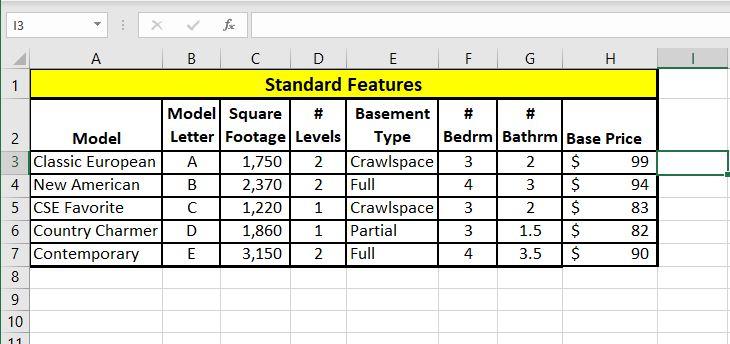
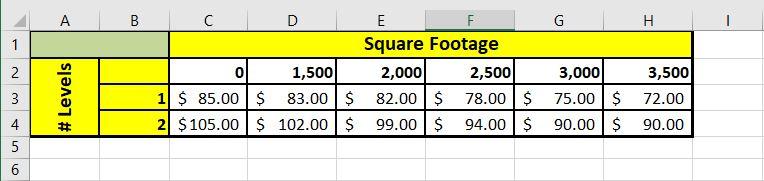
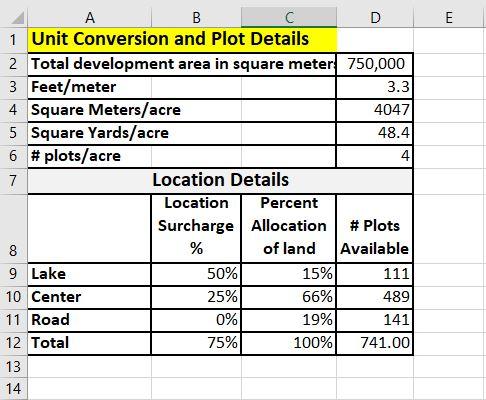
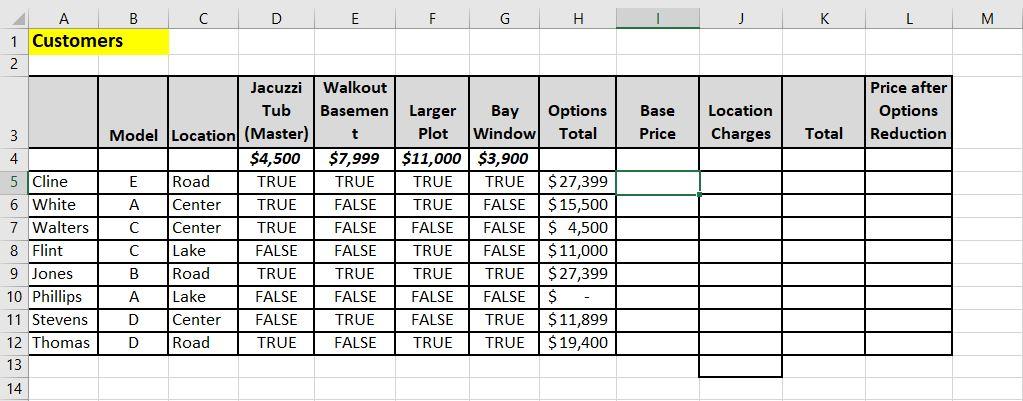
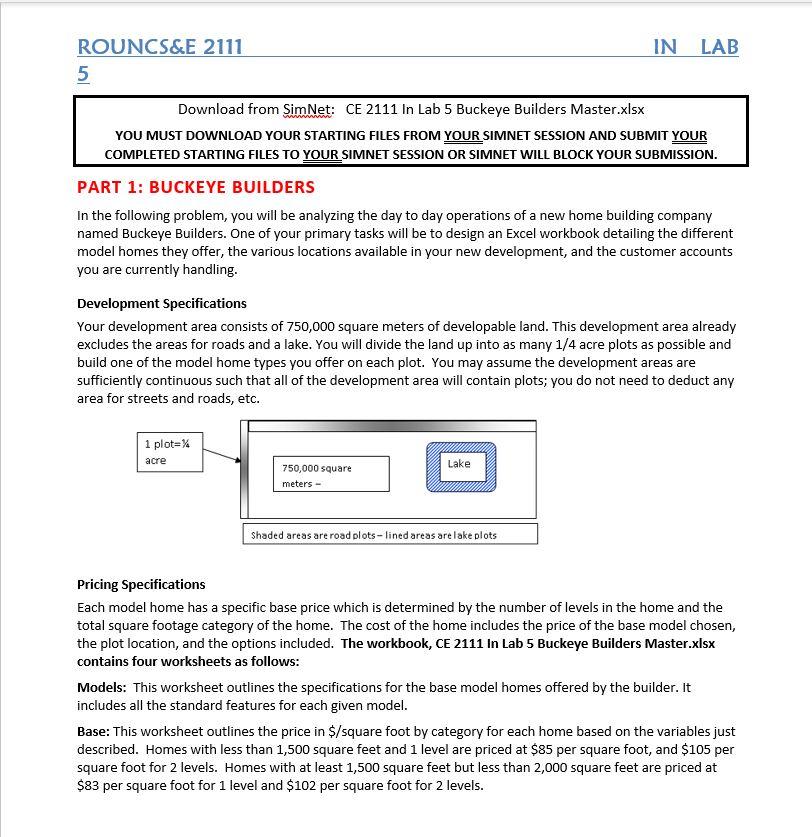
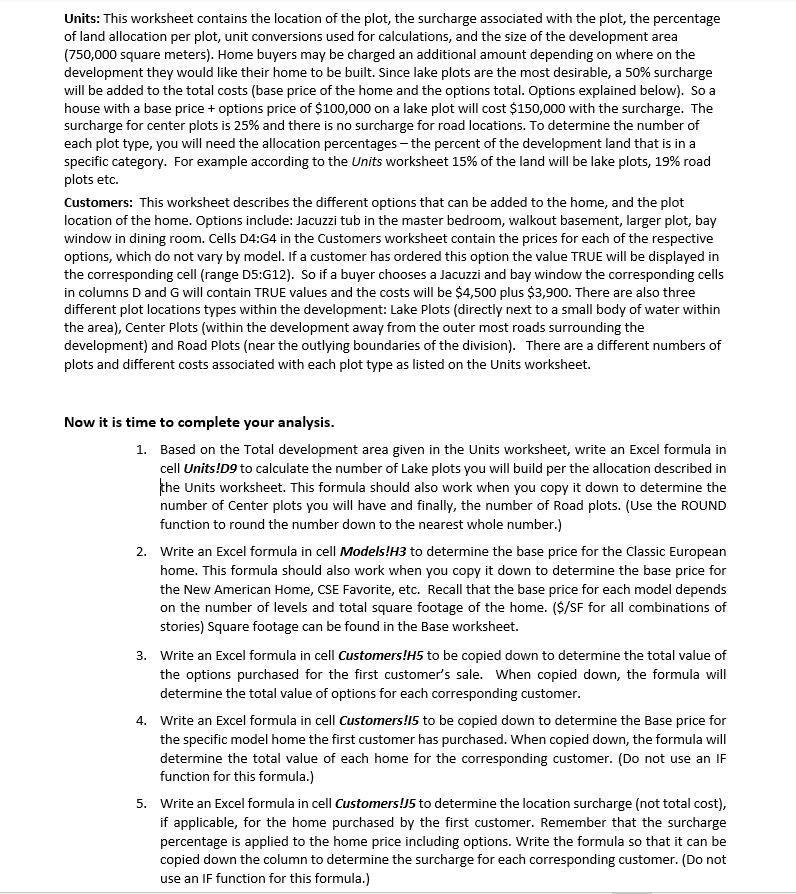
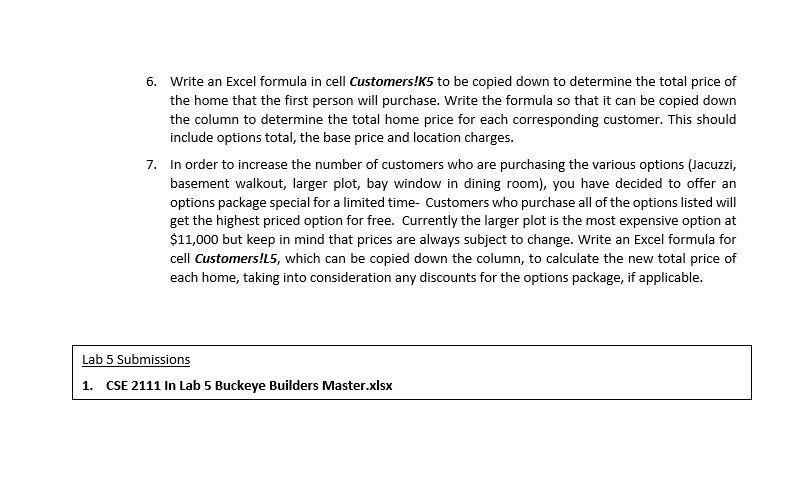
13 fox F G H 2 B C D E 1 Standard Features Model Square # Basement 2 Model Letter Footage Levels Type 3 Classic European . 1,750 2 Crawlspace 4 New American B 2,370 2 Full 5 CSE Favorite C 1,220 1 Crawlspace 6 Country Charmer D 1,860 1 Partial 7 Contemporary E 3,150 2 Full 8 # # Bedrm Bathrm Base Price 3 2 $ 99 4 3 $ 94 3 2 $ 83 3 1.5 $ 82 4 3.5 $ 90 10 11 A B G H 1 D E F Square Footage 0 1,500 2,000 2,500 1 $ 85.00 $ 83.00 $ 82.00 $ 78.00 $ 2 $105.00 $ 102.00 $ 99.00 $ 94.00 $ N 3 # Levels 3,500 72.00 3 3,000 75.00 $ 90.00 $ 4 4 90.00 5 6 E A B D 1 Unit Conversion and Plot Details 2 Total development area in square meter 750,000 3 Feet/meter 3.3 4 Square Meters/acre 4047 5 Square Yards/acre 48.4 6 #plots/acre 4 7 Location Details Location Percent Surcharge Allocation # Plots 8 % of land Available 9 Lake 50% 15% 111 10 Center 25% 66% 489 11 Road 0% 19% 141 12 Total 75% 100% 741.00 13 14 8 E F G H K L M Walkout Basemen Base Price Location Charges Price after Options Reduction t Total B D 1 Customers 2 Jacuzzi Tub 3 Model Location (Master) 4 $4,500 5 Cline E Road TRUE 6 White A Center TRUE 7 Walters C Center TRUE 8 Flint Lake FALSE 9 Jones B Road TRUE 10 Phillips A Lake FALSE 11 Stevens D Center FALSE 12 Thomas D Road TRUE 13 $7,999 TRUE FALSE FALSE FALSE TRUE FALSE TRUE FALSE Larger Bay Options Plot Window Total $11,000 $3,900 TRUE TRUE $ 27,399 TRUE FALSE $ 15,500 FALSE FALSE $ 4,500 TRUE FALSE $ 11,000 TRUE TRUE $ 27,399 FALSE FALSE $ FALSE TRUE $ 11,899 TRUE TRUE $ 19,400 14 ROUNCS&E 2111 IN LAB 5 Download from SimNet: CE 2111 In Lab 5 Buckeye Builders Master.xlsx YOU MUST DOWNLOAD YOUR STARTING FILES FROM YOUR SIMNET SESSION AND SUBMIT YOUR COMPLETED STARTING FILES TO YOUR SIMNET SESSION OR SIMNET WILL BLOCK YOUR SUBMISSION. PART 1: BUCKEYE BUILDERS In the following problem, you will be analyzing the day to day operations of a new home building company named Buckeye Builders. One of your primary tasks will be to design an Excel workbook detailing the different model homes they offer, the various locations available in your new development, and the customer accounts you are currently handling. Development Specifications Your development area consists of 750,000 square meters of developable land. This development are already excludes the areas for roads and a lake. You will divide the land up into as many 1/4 acre plots as possible and build one of the model home types you offer on each plot. You may assume the development areas are sufficiently continuous such that all of the development area will contain plots; you do not need to deduct any area for streets and roads, etc. 1 plot=% acre Lake 750,000 square meters - Shaded areas are road plots - lined areas are lake plots Pricing Specifications Each model home has a specific base price which is determined by the number of levels in the home and the total square footage category of the home. The cost of the home includes the price of the base model chosen, the plot location, and the options included. The workbook, CE 2111 In Lab 5 Buckeye Builders Master.xlsx contains four worksheets as follows: Models: This worksheet outlines the specifications for the base model homes offered by the builder. It includes all the standard features for each given model. Base: This worksheet outlines the price in $/square foot by category for each home based on the variables just described. Homes with less than 1,500 square feet and 1 level are priced at $85 per square foot, and $105 per square foot for 2 levels. Homes with at least 1,500 square feet but less than 2,000 square feet are priced at $83 per square foot for 1 level and $102 per square foot for 2 levels. Units: This worksheet contains the location of the plot, the surcharge associated with the plot, the percentage of land allocation per plot, unit conversions used for calculations, and the size of the development area (750,000 square meters). Home buyers may be charged an additional amount depending on where on the development they would like their home to be built. Since lake plots are the most desirable, a 50% surcharge will be added to the total costs (base price of the home and the options total. Options explained below). So a house with a base price + options price of $100,000 on a lake plot will cost $150,000 with the surcharge. The surcharge for center plots is 25% and there is no surcharge for road locations. To determine the number of each plot type, you will need the allocation percentages - the percent of the development land that is in a specific category. For example according to the Units worksheet 15% of the land will be lake plots, 19% road plots etc. Customers: This worksheet describes the different options that can be added to the home, and the plot location of the home. Options include: Jacuzzi tub in the master bedroom, walkout basement, larger plot, bay window in dining room. Cells D4:G4 in the Customers worksheet contain the prices for each of the respective options, which do not vary by model. If a customer has ordered this option the value TRUE will be displayed in the corresponding cell (range 05:G12). So if a buyer chooses a Jacuzzi and bay window the corresponding cells in columns D and G will contain TRUE values and the costs will be $4,500 plus $3,900. There are also three different plot locations types within the development: Lake Plots (directly next to a small body of water within the area), Center Plots (within the development away from the outer most roads surrounding the development) and Road Plots (near the outlying boundaries of the division). There are a different numbers of plots and different costs associated with each plot type as listed on the Units worksheet. Now it is time to complete your analysis. 1. Based on the Total development area given in the Units worksheet, write an Excel formula in cell Units!09 to calculate the number of Lake plots you will build per the allocation described in the Units worksheet. This formula should also work when you copy it down to determine the number of Center plots you will have and finally, the number of Road plots. (Use the ROUND function to round the number down to the nearest whole number.) 2. Write an Excel formula in cell Models!H3 to determine the base price for the Classic European home. This formula should also work when you copy it down to determine the base price for the New American Home, CSE Favorite, etc. Recall that the base price for each model depends on the number of levels and total square footage of the home. ($/SF for all combinations of stories) Square footage can be found in the Base worksheet. 3. Write an Excel formula in cell Customers!H5 to be copied down to determine the total value of the options purchased for the first customer's sale. When copied down, the formula will determine the total value of options for each corresponding customer. 4. Write an Excel formula in cell Customers!15 to be copied down to determine the Base price for the specific model home the first customer has purchased. When copied down, the formula will determine the total value of each home for the corresponding customer. (Do not use an IF function for this formula.) 5. Write an Excel formula in cell Customers!5 to determine the location surcharge (not total cost), if applicable, for the home purchased by the first customer. Remember that the surcharge percentage is applied to the home price including options. Write the formula so that it can be copied down the column to determine the surcharge for each corresponding customer. (Do not use an IF function for this formula.) 6. Write an Excel formula in cell Customers!K5 to be copied down to determine the total price of the home that the first person will purchase. Write the formula so that it can be copied down the column to determine the total home price for each corresponding customer. This should include options total, the base price and location charges. 7. In order to increase the number of customers who are purchasing the various options (Jacuzzi, basement walkout, larger plot, bay window in dining room), you have decided to offer an options package special for a limited time- Customers who purchase all of the options listed will get the highest priced option for free. Currently the larger plot is the most expensive option at $11,000 but keep in mind that prices are always subject to change. Write an Excel formula for cell Customers!L5, which can be copied down the column, to calculate the new total price of each home, taking into consideration any discounts for the options package, if applicable. Lab 5 Submissions 1. CSE 2111 In Lab 5 Buckeye Builders Master.xlsx 13 fox F G H 2 B C D E 1 Standard Features Model Square # Basement 2 Model Letter Footage Levels Type 3 Classic European . 1,750 2 Crawlspace 4 New American B 2,370 2 Full 5 CSE Favorite C 1,220 1 Crawlspace 6 Country Charmer D 1,860 1 Partial 7 Contemporary E 3,150 2 Full 8 # # Bedrm Bathrm Base Price 3 2 $ 99 4 3 $ 94 3 2 $ 83 3 1.5 $ 82 4 3.5 $ 90 10 11 A B G H 1 D E F Square Footage 0 1,500 2,000 2,500 1 $ 85.00 $ 83.00 $ 82.00 $ 78.00 $ 2 $105.00 $ 102.00 $ 99.00 $ 94.00 $ N 3 # Levels 3,500 72.00 3 3,000 75.00 $ 90.00 $ 4 4 90.00 5 6 E A B D 1 Unit Conversion and Plot Details 2 Total development area in square meter 750,000 3 Feet/meter 3.3 4 Square Meters/acre 4047 5 Square Yards/acre 48.4 6 #plots/acre 4 7 Location Details Location Percent Surcharge Allocation # Plots 8 % of land Available 9 Lake 50% 15% 111 10 Center 25% 66% 489 11 Road 0% 19% 141 12 Total 75% 100% 741.00 13 14 8 E F G H K L M Walkout Basemen Base Price Location Charges Price after Options Reduction t Total B D 1 Customers 2 Jacuzzi Tub 3 Model Location (Master) 4 $4,500 5 Cline E Road TRUE 6 White A Center TRUE 7 Walters C Center TRUE 8 Flint Lake FALSE 9 Jones B Road TRUE 10 Phillips A Lake FALSE 11 Stevens D Center FALSE 12 Thomas D Road TRUE 13 $7,999 TRUE FALSE FALSE FALSE TRUE FALSE TRUE FALSE Larger Bay Options Plot Window Total $11,000 $3,900 TRUE TRUE $ 27,399 TRUE FALSE $ 15,500 FALSE FALSE $ 4,500 TRUE FALSE $ 11,000 TRUE TRUE $ 27,399 FALSE FALSE $ FALSE TRUE $ 11,899 TRUE TRUE $ 19,400 14 ROUNCS&E 2111 IN LAB 5 Download from SimNet: CE 2111 In Lab 5 Buckeye Builders Master.xlsx YOU MUST DOWNLOAD YOUR STARTING FILES FROM YOUR SIMNET SESSION AND SUBMIT YOUR COMPLETED STARTING FILES TO YOUR SIMNET SESSION OR SIMNET WILL BLOCK YOUR SUBMISSION. PART 1: BUCKEYE BUILDERS In the following problem, you will be analyzing the day to day operations of a new home building company named Buckeye Builders. One of your primary tasks will be to design an Excel workbook detailing the different model homes they offer, the various locations available in your new development, and the customer accounts you are currently handling. Development Specifications Your development area consists of 750,000 square meters of developable land. This development are already excludes the areas for roads and a lake. You will divide the land up into as many 1/4 acre plots as possible and build one of the model home types you offer on each plot. You may assume the development areas are sufficiently continuous such that all of the development area will contain plots; you do not need to deduct any area for streets and roads, etc. 1 plot=% acre Lake 750,000 square meters - Shaded areas are road plots - lined areas are lake plots Pricing Specifications Each model home has a specific base price which is determined by the number of levels in the home and the total square footage category of the home. The cost of the home includes the price of the base model chosen, the plot location, and the options included. The workbook, CE 2111 In Lab 5 Buckeye Builders Master.xlsx contains four worksheets as follows: Models: This worksheet outlines the specifications for the base model homes offered by the builder. It includes all the standard features for each given model. Base: This worksheet outlines the price in $/square foot by category for each home based on the variables just described. Homes with less than 1,500 square feet and 1 level are priced at $85 per square foot, and $105 per square foot for 2 levels. Homes with at least 1,500 square feet but less than 2,000 square feet are priced at $83 per square foot for 1 level and $102 per square foot for 2 levels. Units: This worksheet contains the location of the plot, the surcharge associated with the plot, the percentage of land allocation per plot, unit conversions used for calculations, and the size of the development area (750,000 square meters). Home buyers may be charged an additional amount depending on where on the development they would like their home to be built. Since lake plots are the most desirable, a 50% surcharge will be added to the total costs (base price of the home and the options total. Options explained below). So a house with a base price + options price of $100,000 on a lake plot will cost $150,000 with the surcharge. The surcharge for center plots is 25% and there is no surcharge for road locations. To determine the number of each plot type, you will need the allocation percentages - the percent of the development land that is in a specific category. For example according to the Units worksheet 15% of the land will be lake plots, 19% road plots etc. Customers: This worksheet describes the different options that can be added to the home, and the plot location of the home. Options include: Jacuzzi tub in the master bedroom, walkout basement, larger plot, bay window in dining room. Cells D4:G4 in the Customers worksheet contain the prices for each of the respective options, which do not vary by model. If a customer has ordered this option the value TRUE will be displayed in the corresponding cell (range 05:G12). So if a buyer chooses a Jacuzzi and bay window the corresponding cells in columns D and G will contain TRUE values and the costs will be $4,500 plus $3,900. There are also three different plot locations types within the development: Lake Plots (directly next to a small body of water within the area), Center Plots (within the development away from the outer most roads surrounding the development) and Road Plots (near the outlying boundaries of the division). There are a different numbers of plots and different costs associated with each plot type as listed on the Units worksheet. Now it is time to complete your analysis. 1. Based on the Total development area given in the Units worksheet, write an Excel formula in cell Units!09 to calculate the number of Lake plots you will build per the allocation described in the Units worksheet. This formula should also work when you copy it down to determine the number of Center plots you will have and finally, the number of Road plots. (Use the ROUND function to round the number down to the nearest whole number.) 2. Write an Excel formula in cell Models!H3 to determine the base price for the Classic European home. This formula should also work when you copy it down to determine the base price for the New American Home, CSE Favorite, etc. Recall that the base price for each model depends on the number of levels and total square footage of the home. ($/SF for all combinations of stories) Square footage can be found in the Base worksheet. 3. Write an Excel formula in cell Customers!H5 to be copied down to determine the total value of the options purchased for the first customer's sale. When copied down, the formula will determine the total value of options for each corresponding customer. 4. Write an Excel formula in cell Customers!15 to be copied down to determine the Base price for the specific model home the first customer has purchased. When copied down, the formula will determine the total value of each home for the corresponding customer. (Do not use an IF function for this formula.) 5. Write an Excel formula in cell Customers!5 to determine the location surcharge (not total cost), if applicable, for the home purchased by the first customer. Remember that the surcharge percentage is applied to the home price including options. Write the formula so that it can be copied down the column to determine the surcharge for each corresponding customer. (Do not use an IF function for this formula.) 6. Write an Excel formula in cell Customers!K5 to be copied down to determine the total price of the home that the first person will purchase. Write the formula so that it can be copied down the column to determine the total home price for each corresponding customer. This should include options total, the base price and location charges. 7. In order to increase the number of customers who are purchasing the various options (Jacuzzi, basement walkout, larger plot, bay window in dining room), you have decided to offer an options package special for a limited time- Customers who purchase all of the options listed will get the highest priced option for free. Currently the larger plot is the most expensive option at $11,000 but keep in mind that prices are always subject to change. Write an Excel formula for cell Customers!L5, which can be copied down the column, to calculate the new total price of each home, taking into consideration any discounts for the options package, if applicable. Lab 5 Submissions 1. CSE 2111 In Lab 5 Buckeye Builders Master.xlsx









 Study Help