Question: 5 CASE THE VOLUNTEER FIRE COMPANY DATABASE Designing a Relational Database to Create Tables, Forms, Queries, and Reports PREVIEW In this case, you will design
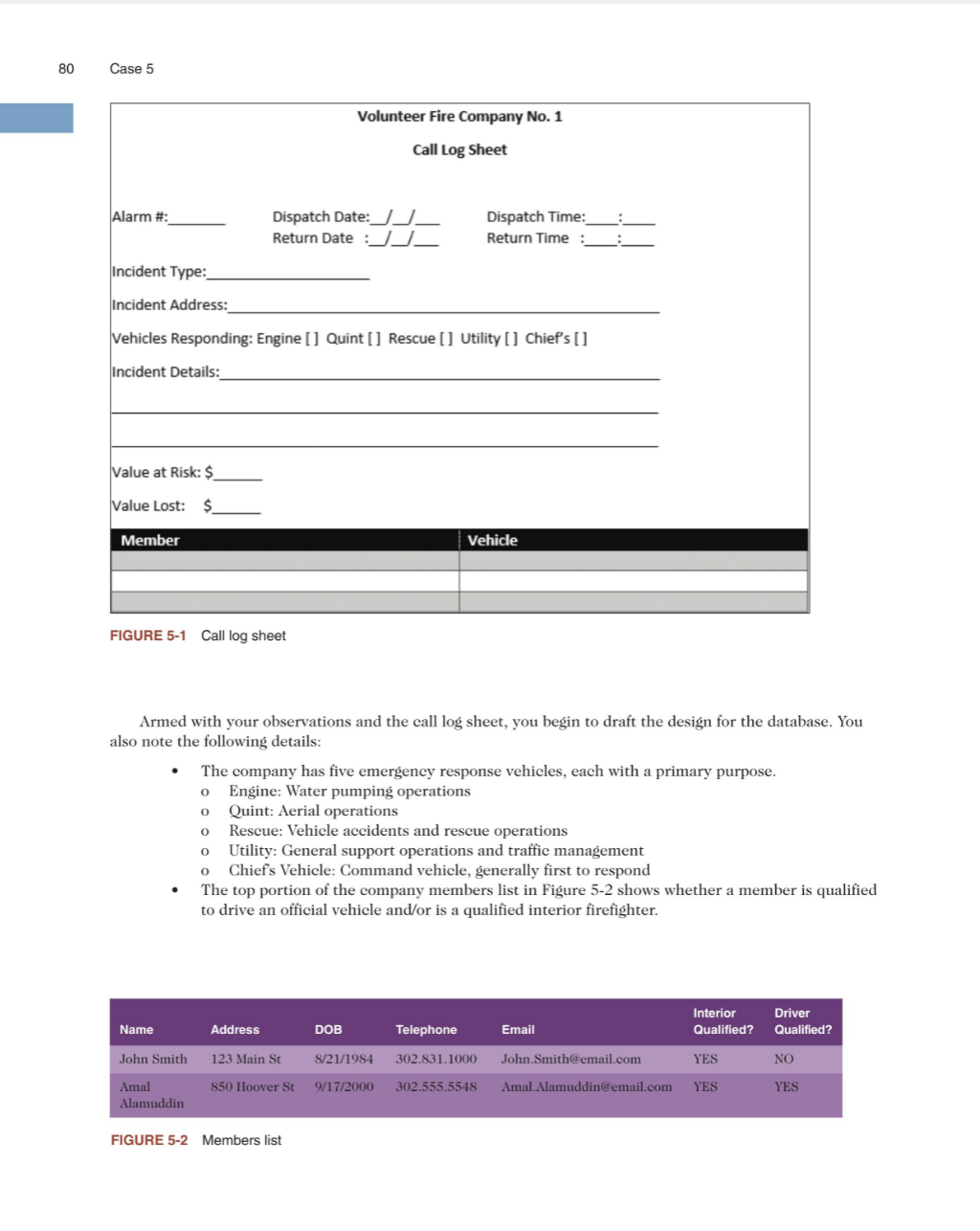
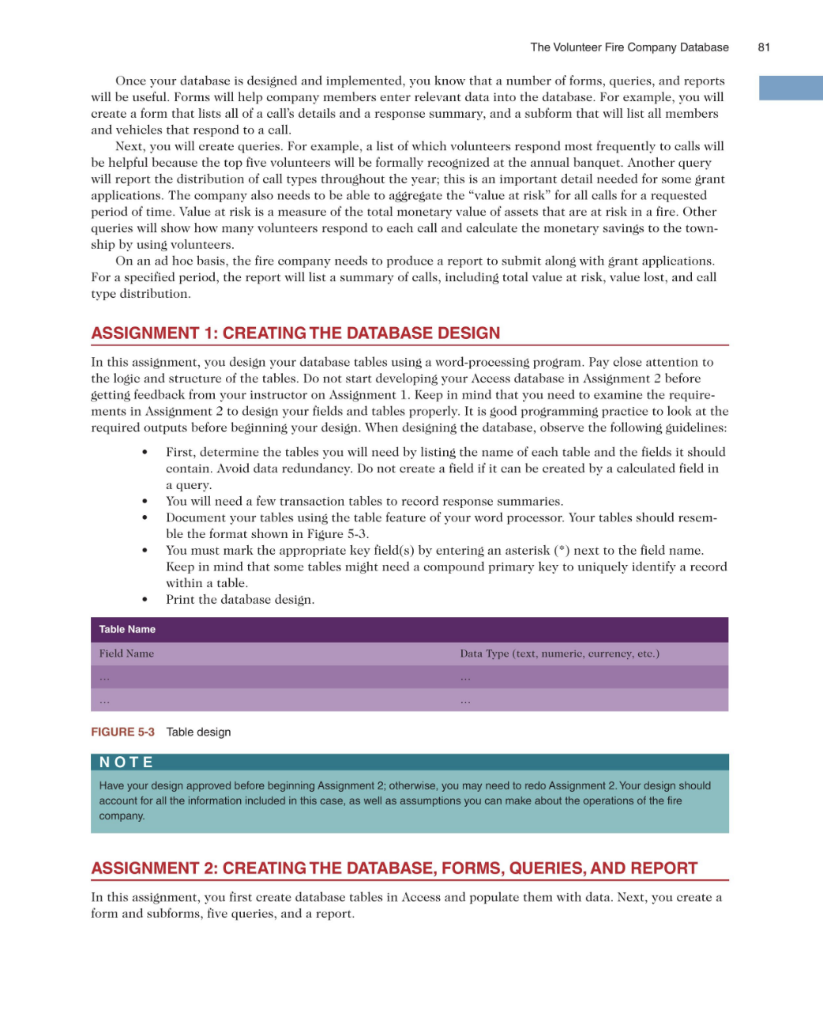
5 CASE THE VOLUNTEER FIRE COMPANY DATABASE Designing a Relational Database to Create Tables, Forms, Queries, and Reports PREVIEW In this case, you will design a relational database for your local volunteer fire company. After your tables are designed and created, you will populate the database and create a form with subforms, five queries, and a report. The form and subforms will allow for easy logging of dispatches, response details, and member infor- mation. The queries will address the following questions: What types of fire calls are most frequent? Which volunteers respond to the most fire calls? What is the total value of the properties at risk? How many volun- teers respond to each call? A fifth query will calculate the amount of money saved by the township by using volunteers. The report will summarize the call details. PREPARATION . Before attempting this case, you should have some experience in database design and in using Microsoft Access Complete any part of Tutorial A that your instructor assigns. Complete any part of Tutorial B that your instructor assigns, or refer to the tutorial as necessary. BACKGROUND In 1736, Benjamin Franklin co-founded the Union Fire Company, also known as the "Bucket Brigade." It was the first formally organized, all-volunteer fire company in the American colonies, and it was shaped after Boston's Mutual Fire Societies. The difference between the fire societies of Boston and Franklin's Union Fire Company was that the former protected its members only, while the latter protected the entire community. A lot has changed since colonial times, but volunteer fire companies remain a cornerstone of emergency services in our country. You met with the president of your local fire company, Hester Ordonez, and she explained the need to create an information system to track dispatches and call details. The system is needed in order to better nage the company and allow it to apply for various grants at the state and federal levels. For years, the fire company has been logging calls and their details using paper forms. All volunteer fire companies rely heavily on grants to fund their operations, so any grant application needs to demonstrate compliance with any new requirements in the application process. Hester understands the need to modernize record keeping for data gathering and analysis; however, the most pressing driver behind the need to modernize the information sys- tem is the state and federal reporting requirements for grant eligibility. Since you've been taking your information systems class, you've realized that a lot of the work involved in managing a fire company is keeping the information logically organized. You have experience in database design, so you decided to volunteer your time to solve this problem. You have spent a week observing the day-to-day operations of the fire company to get acquainted with its inner workings and procedures, and you have also reviewed their paper process to log each call. Hester has provided you with a blank copy of the call log sheet, as shown in Figure 5-1. 80 Case 5 Volunteer Fire Company No. 1 Call Log Sheet Alarm #: : Dispatch Date: JJ_ Return Date JJ_ Dispatch Time: Return Time Incident Type: Incident Address: Vehicles Responding: Engine [] Quint[] Rescue [] Utility [] Chief's [] Incident Details: Value at Risk: $ Value Lost: $ Member Vehicle FIGURE 5-1 Call log sheet 0 O Armed with your observations and the call log sheet, you begin to draft the design for the database. You also note the following details: The company has five emergency response vehicles, each with a primary purpose. Engine: Water pumping operations Quint: Aerial operations Rescue: Vehicle accidents and rescue operations Utility: General support operations and traffic management Chief's Vehicle: Command vehicle, generally first to respond The top portion of the company members list in Figure 5-2 shows whether a member is qualified to drive an official vehicle and/or is a qualified interior firefighter. o O Interior Qualified? Driver Qualified? Name Address DOB Telephone Email John Smith 123 Main St 8/21/1984 302.831.1000 John Smith@email.com YES NO 850 Hoover St 9/17/2000 302.555.5548 Amal Alamuddin@email.com YES YES Amal Alamuddin FIGURE 5-2 Members list The Volunteer Fire Company Database 81 Once your database designed and implemented, you know that a number of forms, queries, and reports will be useful. Forms will help company members enter relevant data into the database. For example, you will create a form that lists all of a call's details and a response summary, and a subform that will list all members and vehicles that respond to a call. Next, you will create queries. For example, a list of which volunteers respond most frequently to calls will be helpful because the top five volunteers will be formally recognized at the annual banquet. Another query will report the distribution of call types throughout the year, this is an important detail needed for some grant applications. The company also needs to be able to aggregate the "value at risk" for all calls for a requested period of time. Value at risk is a measure of the total monetary value of assets that are at risk in a fire. Other queries will show how many volunteers respond to each call and calculate the monetary savings to the town- ship by using volunteers. On an ad hoc basis, the fire company needs to produce a report to submit along with grant applications. For a specified period, the report will list a summary of calls, including total value at risk, value lost, and call type distribution. ASSIGNMENT 1: CREATING THE DATABASE DESIGN In this assignment, you design your database tables using a word-processing program. Pay close attention to the logic and structure of the tables. Do not start developing your Access database in Assignment 2 before getting feedback from your instructor on Assignment 1. Keep in mind that you need to examine the require- ments in Assignment 2 to design your fields and tables properly. It is good programming practice to look at the required outputs before beginning your design. When designing the database, observe the following guidelines: First, determine the tables you will need by listing the name of each table and the fields it should contain. Avoid data redundancy. Do not create a field if it can be created by a calculated field in a query. You will need a few transaction tables to record response summaries. Document your tables using the table feature of your word processor. Your tables should resem- ble the format shown in Figure 5-3. You must mark the appropriate key field(s) by entering an asterisk (*) next to the field name. Keep in mind that some tables might need a compound primary key to uniquely identify a record within a table Print the database design. Table Name Field Name Data Type (text, numerie, currency, etc.) FIGURE 5-3 Table design NOTE Have your design approved before beginning Assignment 2; otherwise, you may need to redo Assignment 2. Your design should account for all the information included in this case, as well as assumptions you can make about the operations of the fire company ASSIGNMENT 2: CREATING THE DATABASE, FORMS, QUERIES, AND REPORT In this assignment, you first create database tables in Access and populate them with data. Next, you create a form and subforms, five queries, and a report









 Study Help