







Question: Assignment 3 oh Assignments 3 and 4 will give you practice applying what you learned in module 2 to actually create and query a small
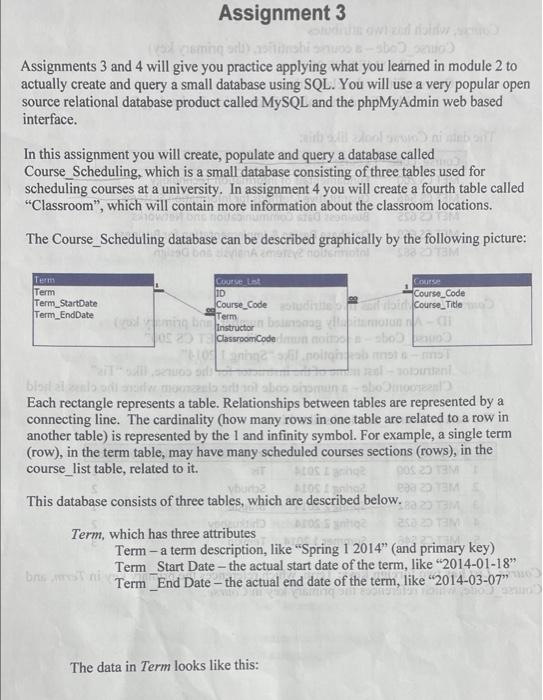
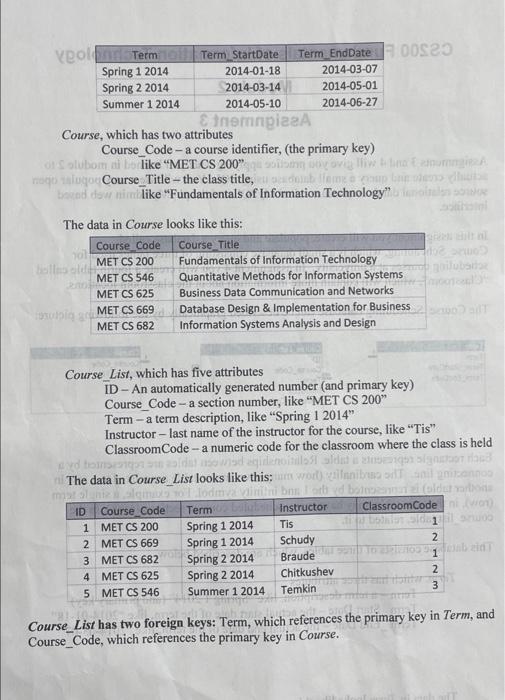
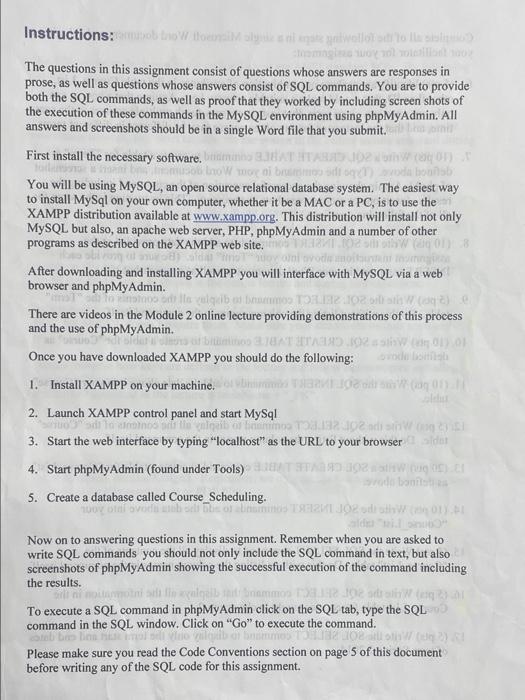
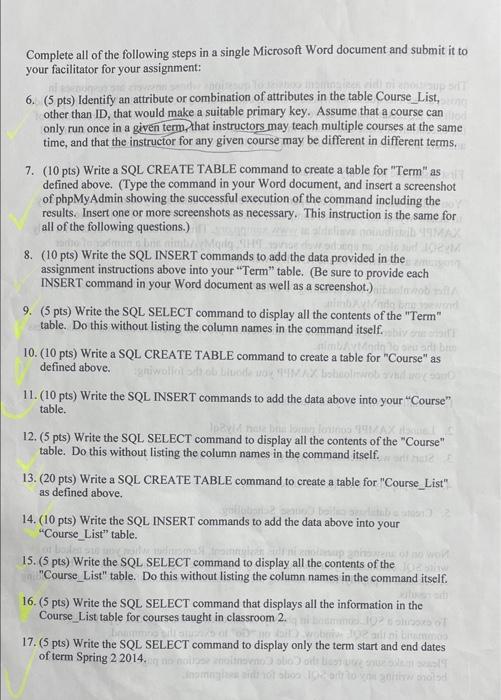
Assignment 3 oh Assignments 3 and 4 will give you practice applying what you learned in module 2 to actually create and query a small database using SQL. You will use a very popular open source relational database product called MySQL and the phpMyAdmin web based interface. In this assignment you will create, populate and query a database called Course_Scheduling, which is a small database consisting of three tables used for scheduling courses at a university. In assignment 4 you will create a fourth table called "Classroom", which will contain more information about the classroom locations. The Course_Scheduling database can be described graphically by the following picture: Term Term TermStartDate Term_EndDate Course Cat ID Course_Code Term olib Instructor banna JOE Classroom Code COUTS Course Code for course_Title boral Each rectangle represents a table. Relationships between tables are represented by a connecting line. The cardinality (how many rows in one table are related to a row in another table) is represented by the 1 and infinity symbol. For example, a single term (row), in the term table, may have many scheduled courses sections (rows), in the course_list table, related to it. This database consists of three tables, which are described below. Term, which has three attributes Term - a term description, like "Spring 1 2014" (and primary key) Term_Start Date - the actual start date of the term, like "2014-01-18" bre Term_End Date - the actual end date of the term, like "2014-03-07" The data in Term looks like this: veolen Term Term StartDate Term_EndDate 00323 Spring 1 2014 2014-01-18 2014-03-07 Spring 2 2014 2014-03-14 2014-05-01 Summer 1 2014 2014-05-10 2014-06-27 Sinergiza Course, which has two attributes Course_Code - a course identifier, (the primary key) on olubom i like MET CS 200" Don Doovi listanum Togo talogo Course_Title - the class title, odolnbow uploader bazad do like "Fundamentals of Information Technology" The data in Course looks like this: Course Code ol Course Title MET CS 200 Fundamentals of Information Technology olla oli MET CS 546 Quantitative Methods for Information Systems 20 MET CS 625 Business Data Communication and Networks Database Design & Implementation for Business MET CS 682 Information Systems Analysis and Design tubig a MET CS 669 Course List, which has five attributes ID - An automatically generated number (and primary key) Course_Code -a section number, like "MET CS 200" Term - a term description, like "Spring 1 2014" Instructor - last name of the instructor for the course, like "Tis" Classroom Code -a numeric code for the classroom where the class is held 11551 aldi The data in Course_List looks like this: worlannist Todman beto bom ID Course Code Term Instructor Classroom Code 1 MET CS 200 Spring 1 2014 Tis - 1 2 MET CS 669 Spring 1 2014 Schudy 2 3 MET CS 682 Spring 2 2014 Braude 4 MET CS 625 Spring 2 2014 Chitkushev 2 5 MET CS 546 Summer 1 2014 Temkin 3 Course_List has two foreign keys: Term, which references the primary key in Term, and Course_Code, which references the primary key in Course. Instructions: ob tro oyunlar The questions in this assignment consist of questions whose answers are responses in prose, as well as questions whose answers consist of SQL commands. You are to provide both the SQL commands, as well as proof that they worked by including screen shots of the execution of these commands in the MySQL environment using phpMyAdmin. All answers and screenshots should be in a single Word file that you submit First install the necessary software. On onb You will be using MySQL, an open source relational database system. The easiest way to install MySql on your own computer, whether it be a MAC or a PC, is to use the XAMPP distribution available at www.xampp.org. This distribution will install not only MySQL but also, an apache web server, PHP, phpMyAdmin and a number of other programs as described on the XAMPP web site. 018 After downloading and installing XAMPP you will interface with MySQL via a web browser and phpMyAdmin. algodbo o tom 0251 There are videos in the Module 2 online lecture providing demonstrations of this process and the use of phpMyAdmin. JETTA 102 a slow mol Once you have downloaded XAMPP you should do the following: 1. Install XAMPP on your machine. 1 (10 (11) 2. Launch XAMPP control panel and start MySql do 492 3. Start the web interface by typing "localhost" as the URL to your browser 4. Start phpMyAdmin (found under Tools) MODE bonit 5. Create a database called Course_Scheduling. BODY OVO DE SELJOR Now on to answering questions in this assignment. Remember when you are asked to write SQL commands you should not only include the SQL command in text, but also screenshots of phpMyAdmin showing the successful execution of the command including the results. To execute a SQL command in phpMyAdmin click on the SQL tab, type the SQL command in the SQL window. Click on "Go" to execute the command. lela Please make sure you read the Code Conventions section on page 5 of this document before writing any of the SQL code for this assignment. Complete all of the following steps in a single Microsoft Word document and submit it to your facilitator for your assignment: 6. (5 pts) Identify an attribute or combination of attributes in the table Course_List, other than ID, that would make a suitable primary key. Assume that a course can only run once in a given term, that instructors may teach multiple courses at the same time, and that the instructor for any given course may be different in different terms, 7. (10 pts) Write a SQL CREATE TABLE command to create a table for "Term" as defined above. (Type the command in your Word document, and insert a screenshot of phpMyAdmin showing the successful execution of the command including the results. Insert one or more screenshots as necessary. This instruction is the same for all of the following questions.) 8. (10 pts) Write the SQL INSERT commands to add the data provided in the assignment instructions above into your "Term" table. (Be sure to provide each INSERT command in your Word document as well as a screenshot.) 9. (5 pts) Write the SQL SELECT command to display all the contents of the "Term" table. Do this without listing the column names in the command itself. 10. (10 pts) Write a SQL CREATE TABLE command to create a table for "Course" as defined above. gniwo dobro 11. (10 pts) Write the SQL INSERT commands to add the data above into your Course" table. DER 12.(5 pts) Write the SQL SELECT command to display all the contents of the "Course" table. Do this without listing the column names in the command itself. 13. (20 pts) Write a SQL CREATE TABLE command to create a table for "Course_List" as defined above. Da 14. (10 pts) Write the SQL INSERT commands to add the data above into your "Course_List" table. 15. (5 pts) Write the SQL SELECT command to display all the contents of the "Course_List" table. Do this without listing the column names in the command itself. 16. (5 pts) Write the SQL SELECT command that displays all the information in the Course_List table for courses taught in classroom 2. 17. (5 pts) Write the SQL SELECT command to display only the term start and end dates of term Spring 2 2014. toisen Toto
Step by Step Solution
There are 3 Steps involved in it

Get step-by-step solutions from verified subject matter experts
 Study Help