







Question: Be aware that some of the problems are dependent on each other; therefore, completing the requirements out of order can create errors. Use comments
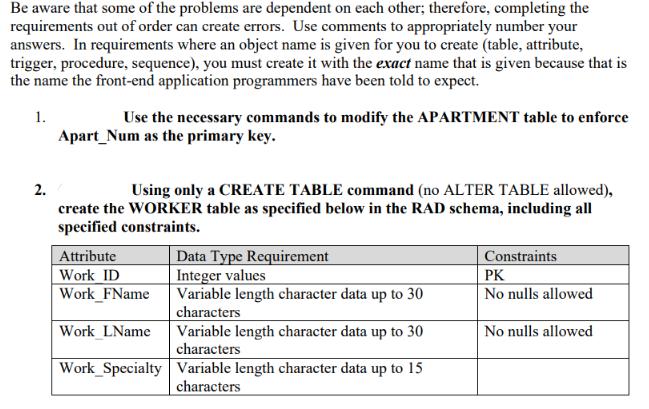
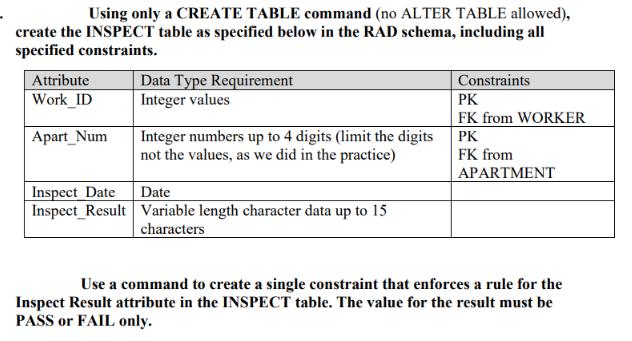
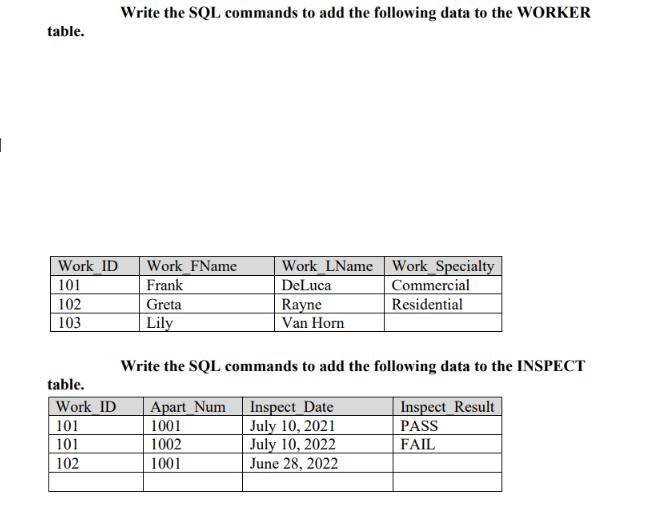
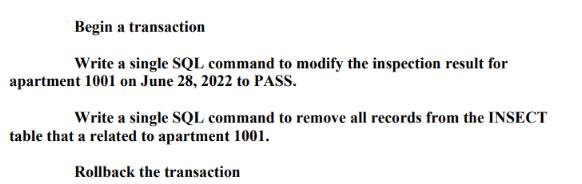
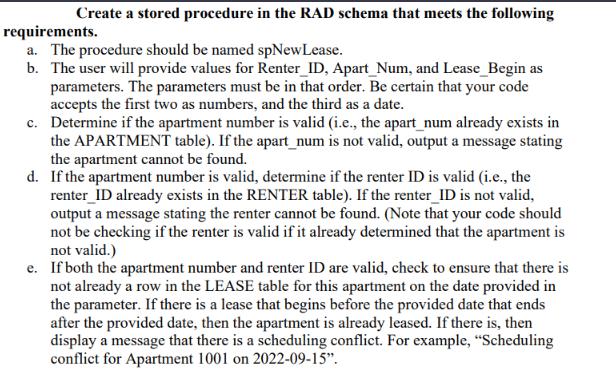
Be aware that some of the problems are dependent on each other; therefore, completing the requirements out of order can create errors. Use comments to appropriately number your answers. In requirements where an object name is given for you to create (table, attribute, trigger, procedure, sequence), you must create it with the exact name that is given because that is the name the front-end application programmers have been told to expect. 1. 2. Use the necessary commands to modify the APARTMENT table to enforce Apart_Num as the primary key. Using only a CREATE TABLE command (no ALTER TABLE allowed), create the WORKER table as specified below in the RAD schema, including all specified constraints. Attribute Work ID Work FName Work LName Data Type Requirement Integer values Variable length character data up to 30 characters Variable length character data up to 30 characters Work Specialty Variable length character data up to 15 characters Constraints PK No nulls allowed No nulls allowed Using only a CREATE TABLE command (no ALTER TABLE allowed), create the INSPECT table as specified below in the RAD schema, including all specified constraints. Attribute Work_ID Apart_Num Inspect Date Inspect_Result Data Type Requirement Integer values Integer numbers up to 4 digits (limit the digits not the values, as we did in the practice) Date Variable length character data up to 15 characters Constraints PK FK from WORKER PK FK from APARTMENT Use a command to create a single constraint that enforces a rule for the Inspect Result attribute in the INSPECT table. The value for the result must be PASS or FAIL only. table. Work ID 101 102 103 table. Work ID 101 101 102 Write the SQL commands to add the following data to the WORKER Work FName Frank Greta Lily Work LName Work Specialty DeLuca Rayne Van Horn Commercial Residential Write the SQL commands to add the following data to the INSPECT Apart Num 1001 Inspect Result PASS 1002 FAIL 1001 Inspect Date July 10, 2021 July 10, 2022 June 28, 2022 Begin a transaction Write a single SQL command to modify the inspection result for apartment 1001 on June 28, 2022 to PASS. Write a single SQL command to remove all records from the INSECT table that a related to apartment 1001. Rollback the transaction Create a stored procedure in the RAD schema that meets the following requirements. a. The procedure should be named spNew Lease. b. The user will provide values for Renter_ID, Apart_Num, and Lease_Begin as parameters. The parameters must be in that order. Be certain that your code accepts the first two as numbers, and the third as a date. c. Determine if the apartment number is valid (i.e., the apart_num already exists in the APARTMENT table). If the apart_num is not valid, output a message stating the apartment cannot be found. d. If the apartment number is valid, determine if the renter ID is valid (i.e., the renter_ID already exists in the RENTER table). If the renter_ID is not valid, output a message stating the renter cannot be found. (Note that your code should not be checking if the renter is valid if it already determined that the apartment is not valid.) e. If both the apartment number and renter ID are valid, check to ensure that there is not already a row in the LEASE table for this apartment on the date provided in the parameter. If there is a lease that begins before the provided date that ends after the provided date, then the apartment is already leased. If there is, then display a message that there is a scheduling conflict. For example, "Scheduling conflict for Apartment 1001 on 2022-09-15".
Step by Step Solution
3.50 Rating (170 Votes )
There are 3 Steps involved in it
I suppose that the INSPECT and WORKER table is already create... View full answer

Get step-by-step solutions from verified subject matter experts
 Study Help