







Question: Can I please get some help with this lab? I started but got stuck. This may help: Modifier and Type Method Description void add(int newx,
Can I please get some help with this lab? I started but got stuck.
This may help:
| Modifier and Type | Method | Description |
|---|---|---|
| void | add(int newx, int newy) | Adds a point, specified by the integer arguments newx,newy to the bounds of this Rectangle. |
| void | add(Point pt) | Adds the specified Point to the bounds of this Rectangle. |
| void | add(Rectangle r) | Adds a Rectangle to this Rectangle. |
| boolean | contains(int x, int y) | Checks whether or not this Rectangle contains the point at the specified location (x,y). |
| boolean | contains(int X, int Y, int W, int H) | Checks whether this Rectangle entirely contains the Rectangle at the specified location (X,Y) with the specified dimensions (W,H). |
| boolean | contains(Point p) | Checks whether or not this Rectangle contains the specified Point. |
| boolean | contains(Rectangle r) | Checks whether or not this Rectangle entirely contains the specified Rectangle. |
| Rectangle2D | createIntersection(Rectangle2D r) | Returns a new Rectangle2D object representing the intersection of this Rectangle2D with the specified Rectangle2D. |
| Rectangle2D | createUnion(Rectangle2D r) | Returns a new Rectangle2D object representing the union of this Rectangle2D with the specified Rectangle2D. |
| boolean | equals(Object obj) | Checks whether two rectangles are equal. |
| Rectangle | getBounds() | Gets the bounding Rectangle of this Rectangle. |
| Rectangle2D | getBounds2D() | Returns a high precision and more accurate bounding box of the Shape than the getBounds method. |
| double | getHeight() | Returns the height of the bounding Rectangle in double precision. |
| Point | getLocation() | Returns the location of this Rectangle. |
| Dimension | getSize() | Gets the size of this Rectangle, represented by the returned Dimension. |
| double | getWidth() | Returns the width of the bounding Rectangle in double precision. |
| double | getX() | Returns the X coordinate of the bounding Rectangle in double precision. |
| double | getY() | Returns the Y coordinate of the bounding Rectangle in double precision. |
| void | grow(int h, int v) | Resizes the Rectangle both horizontally and vertically. |
| boolean | inside(int X, int Y) | Deprecated. As of JDK version 1.1, replaced by contains(int, int). |
| Rectangle | intersection(Rectangle r) | Computes the intersection of this Rectangle with the specified Rectangle. |
| boolean | intersects(Rectangle r) | Determines whether or not this Rectangle and the specified Rectangle intersect. |
| boolean | isEmpty() | Determines whether the RectangularShape is empty. |
| void | move(int x, int y) | Deprecated. As of JDK version 1.1, replaced by setLocation(int, int). |
| int | outcode(double x, double y) | Determines where the specified coordinates lie with respect to this Rectangle2D. |
| void | reshape(int x, int y, int width, int height) | Deprecated. As of JDK version 1.1, replaced by setBounds(int, int, int, int). |
| void | resize(int width, int height) | Deprecated. As of JDK version 1.1, replaced by setSize(int, int). |
| void | setBounds(int x, int y, int width, int height) | Sets the bounding Rectangle of this Rectangle to the specified x, y, width, and height. |
| void | setBounds(Rectangle r) | Sets the bounding Rectangle of this Rectangle to match the specified Rectangle. |
| void | setLocation(int x, int y) | Moves this Rectangle to the specified location. |
| void | setLocation(Point p) | Moves this Rectangle to the specified location. |
| void | setRect(double x, double y, double width, double height) | Sets the bounds of this Rectangle to the integer bounds which encompass the specified x, y, width, and height. |
| void | setSize(int width, int height) | Sets the size of this Rectangle to the specified width and height. |
| void | setSize(Dimension d) | Sets the size of this Rectangle to match the specified Dimension. |
| String | toString() | Returns a String representing this Rectangle and its values. |
| void | translate(int dx, int dy) | Translates this Rectangle the indicated distance, to the right along the X coordinate axis, and downward along the Y coordinate axis. |
| Rectangle | union(Rectangle r) | Computes the union of this Rectangle with the specified Rectangle. |
Will leave a great review and rating. Thank you!
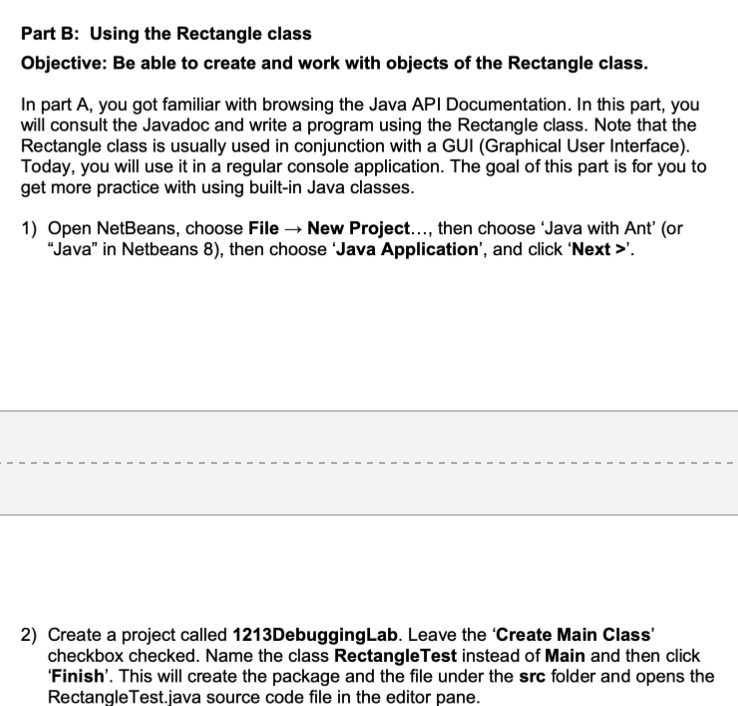
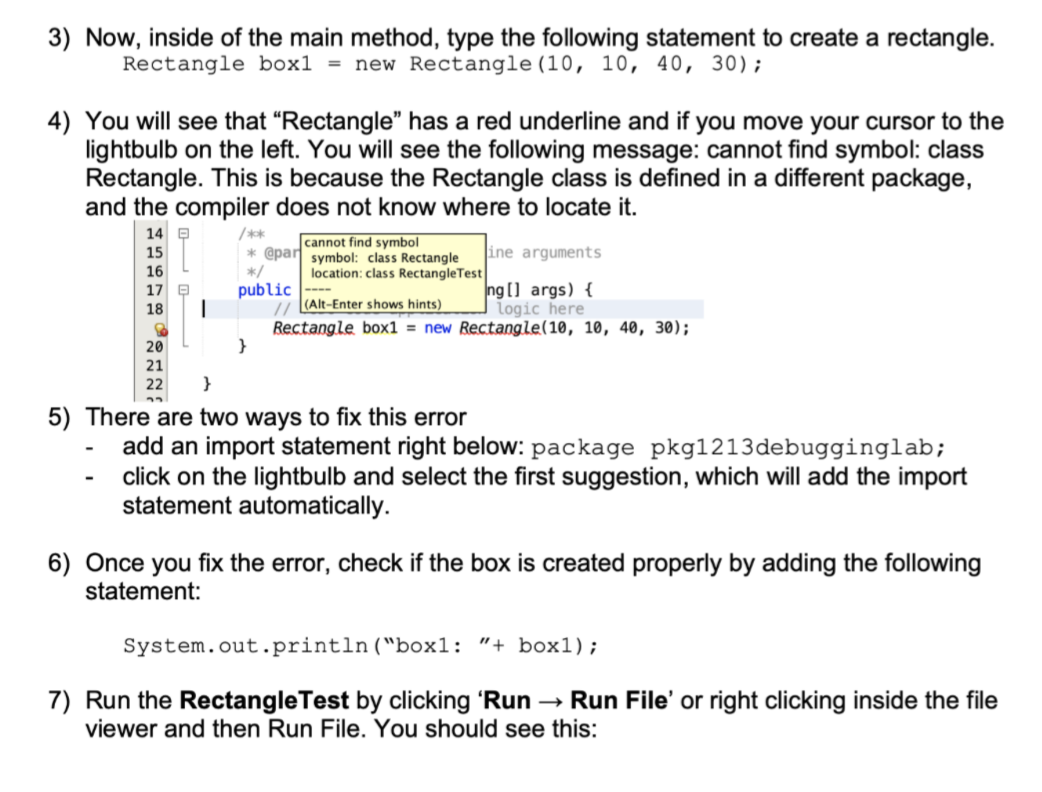
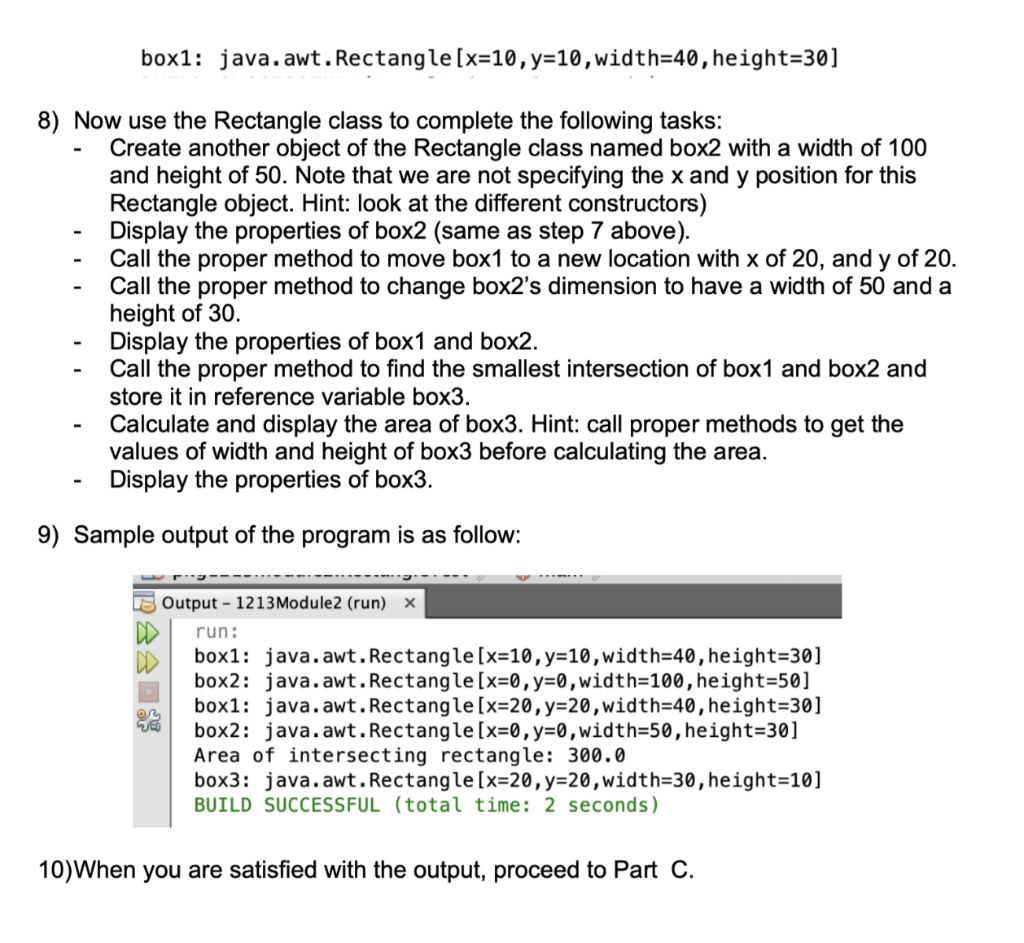
Part B: Using the Rectangle class Objective: Be able to create and work with objects of the Rectangle class. In part A, you got familiar with browsing the Java API Documentation. In this part, you will consult the Javadoc and write a program using the Rectangle class. Note that the Rectangle class is usually used in conjunction with a GUI (Graphical User Interface). Today, you will use it in a regular console application. The goal of this part is for you to get more practice with using built-in Java classes. 1) Open NetBeans, choose File New Project..., then choose Java with Ant' (or "Java" in Netbeans 8), then choose 'Java Application', and click 'Next >'. - 1 1 1 1 1 1 1 1 1 - 2) Create a project called 1213DebuggingLab. Leave the 'Create Main Class' checkbox checked. Name the class Rectangle Test instead of Main and then click 'Finish'. This will create the package and the file under the src folder and opens the Rectangle Test.java source code file in the editor pane. 3) Now, inside of the main method, type the following statement to create a rectangle. Rectangle box1 = new Rectangle (10, 10, 40, 30); 4) You will see that Rectangle has a red underline and if you move your cursor to the lightbulb on the left. You will see the following message: cannot find symbol: class Rectangle. This is because the Rectangle class is defined in a different package, and the compiler does not know where to locate it. cannot find symbol * @part symbol: class Rectangle ine arguments */ location: class Rectangle Test public Ing[] args) { // (Alt-Enter shows hints) logic here Rectangle box1 = new Rectangle(10, 10, 40, 30); } 14 15 16 17 18 20 21 } 5) There are two ways to fix this error add an import statement right below: package pkg1213debugginglab; click on the lightbulb and select the first suggestion, which will add the import statement automatically. 6) Once you fix the error, check if the box is created properly by adding the following statement: System.out.println("boxl: "+ box1); 7) Run the Rectangle Test by clicking 'Run Run File' or right clicking inside the file viewer and then Run File. You should see this: box1: java.awt. Rectangle[x=10, y=10, width=40, height=30] - 8) Now use the Rectangle class to complete the following tasks: Create another object of the Rectangle class named box2 with a width of 100 and height of 50. Note that we are not specifying the x and y position for this Rectangle object. Hint: look at the different constructors) Display the properties of box2 (same as step 7 above). Call the proper method to move box1 to a new location with x of 20, and y of 20. Call the proper method to change box2s dimension to have a width of 50 and a height of 30. Display the properties of box1 and box2. Call the proper method to find the smallest intersection of box1 and box2 and store it in reference variable box3. Calculate and display the area of box3. Hint: call proper methods to get the values of width and height of box3 before calculating the area. Display the properties of box3. 9) Sample output of the program is as follow: Output - 1213 Module2 (run) X run: box1: java.awt. Rectangle[x=10, y=10,width=40, height=30] box2: java.awt. Rectangle[x=0, y=0,width=100,height=50] box1: java.awt. Rectangle [x=20, y=20,width=40, height=30] box2: java.awt. Rectangle[x=0, y=0,width=50, height=30] Area of intersecting rectangle: 300.0 box3: java.awt. Rectangle[x=20, y=20,width=30, height=10] BUILD SUCCESSFUL (total time: 2 seconds) 10)When you are satisfied with the output, proceed to Part C
Step by Step Solution
There are 3 Steps involved in it

Get step-by-step solutions from verified subject matter experts
 Study Help