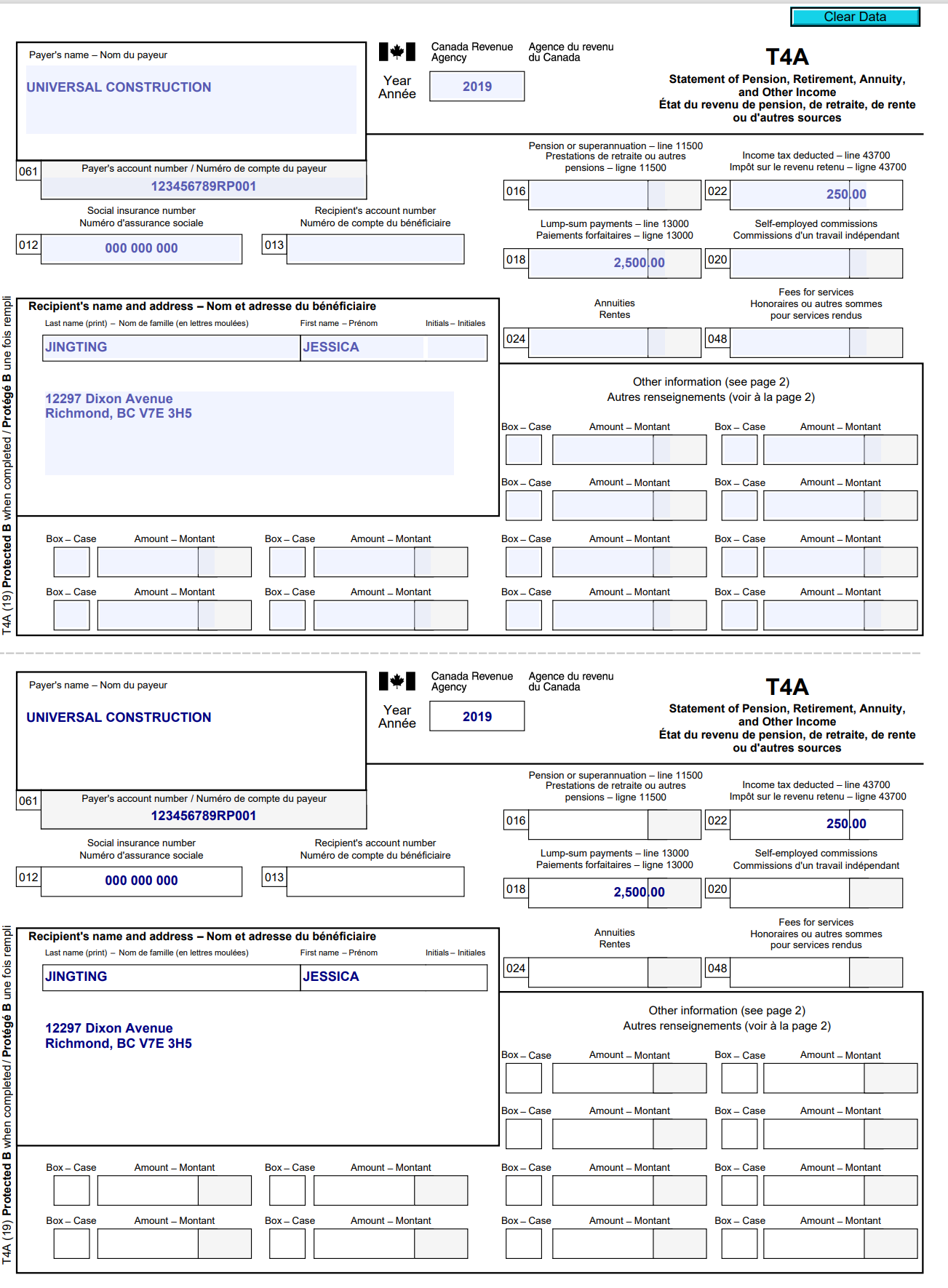
Question: Clear Data Payer's name - Nom du payeur I+I Canada Revenue Agence du revenu Agency du Canada T4A UNIVERSAL CONSTRUCTION Year 2019 Statement of Pension,
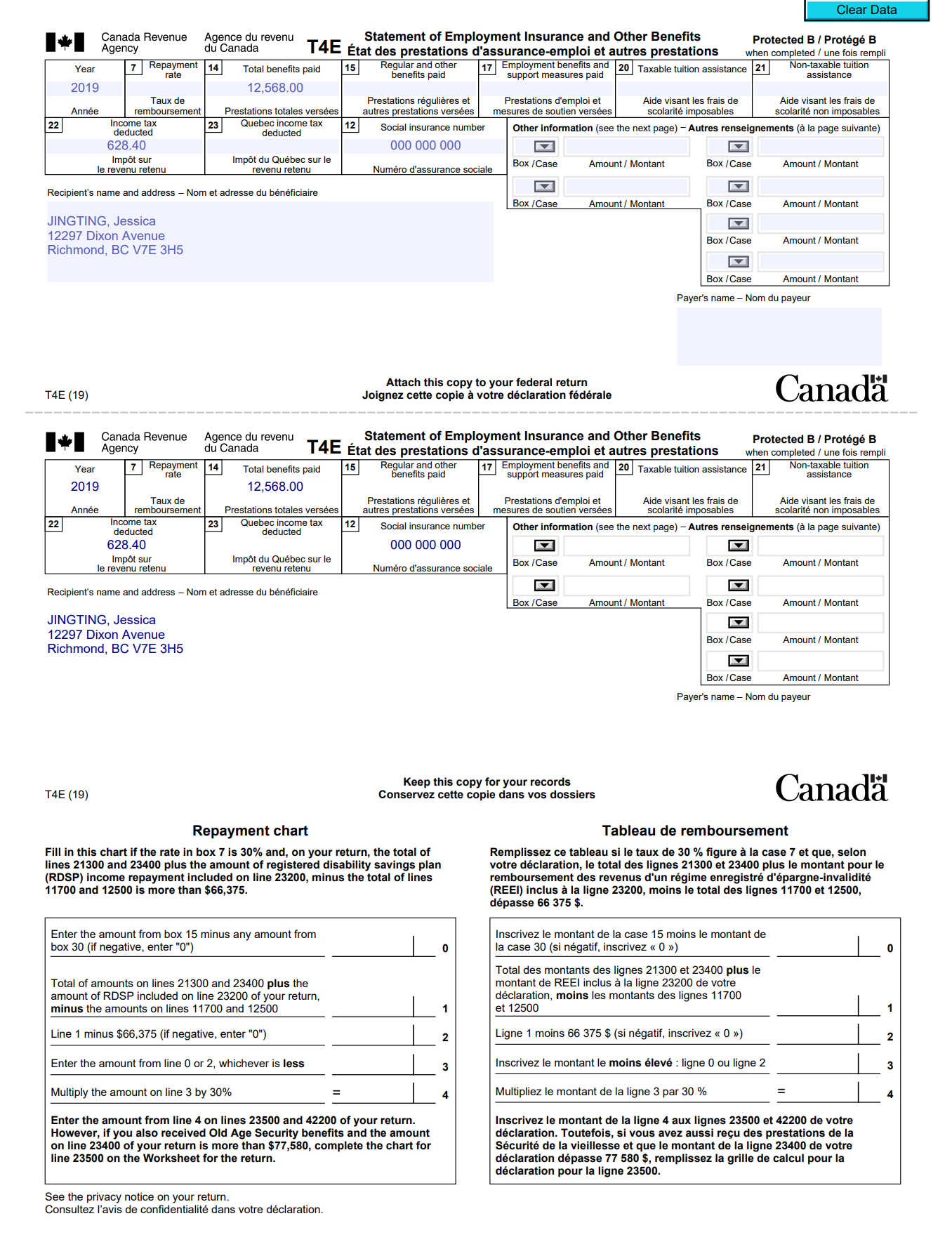
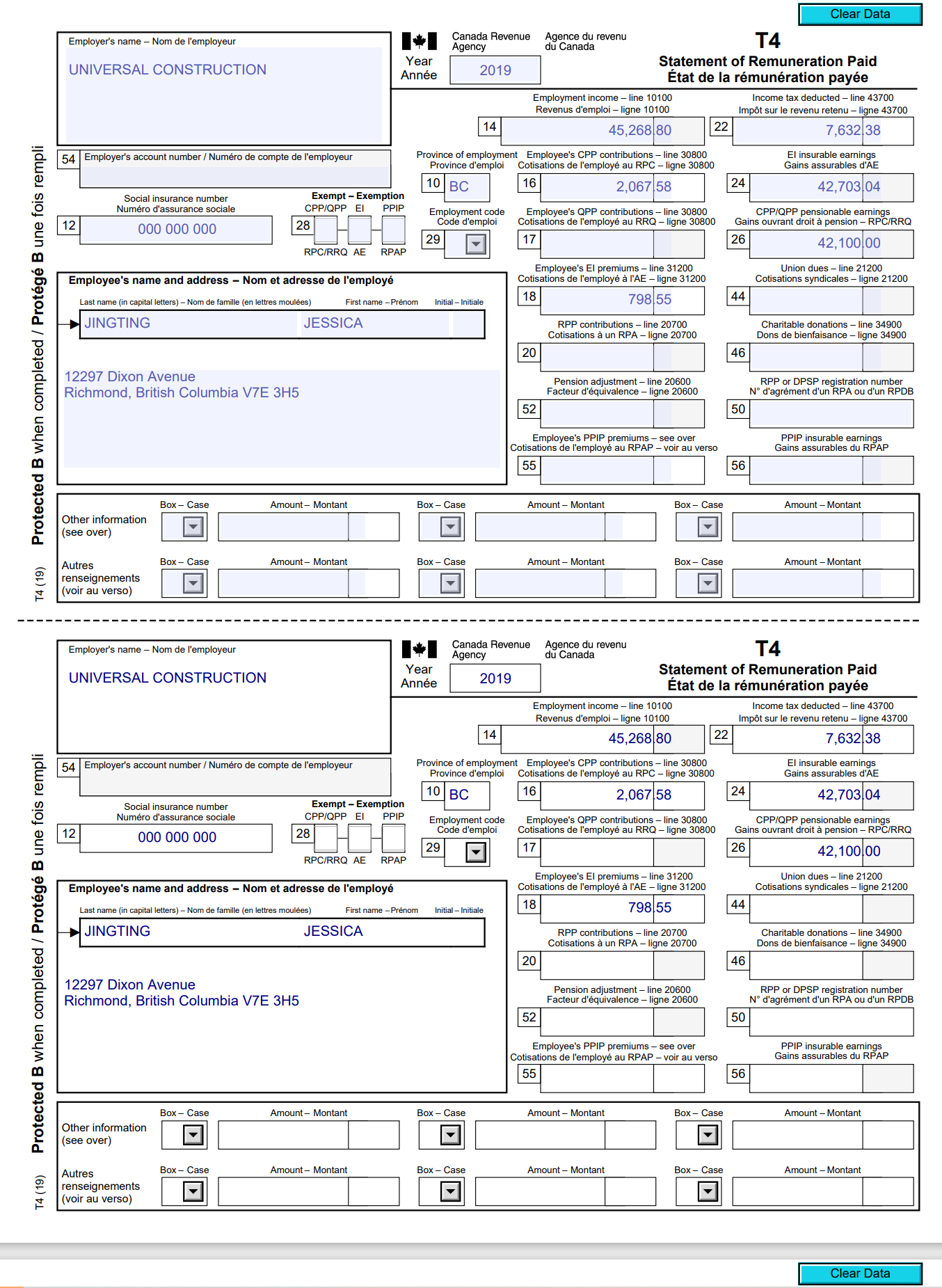
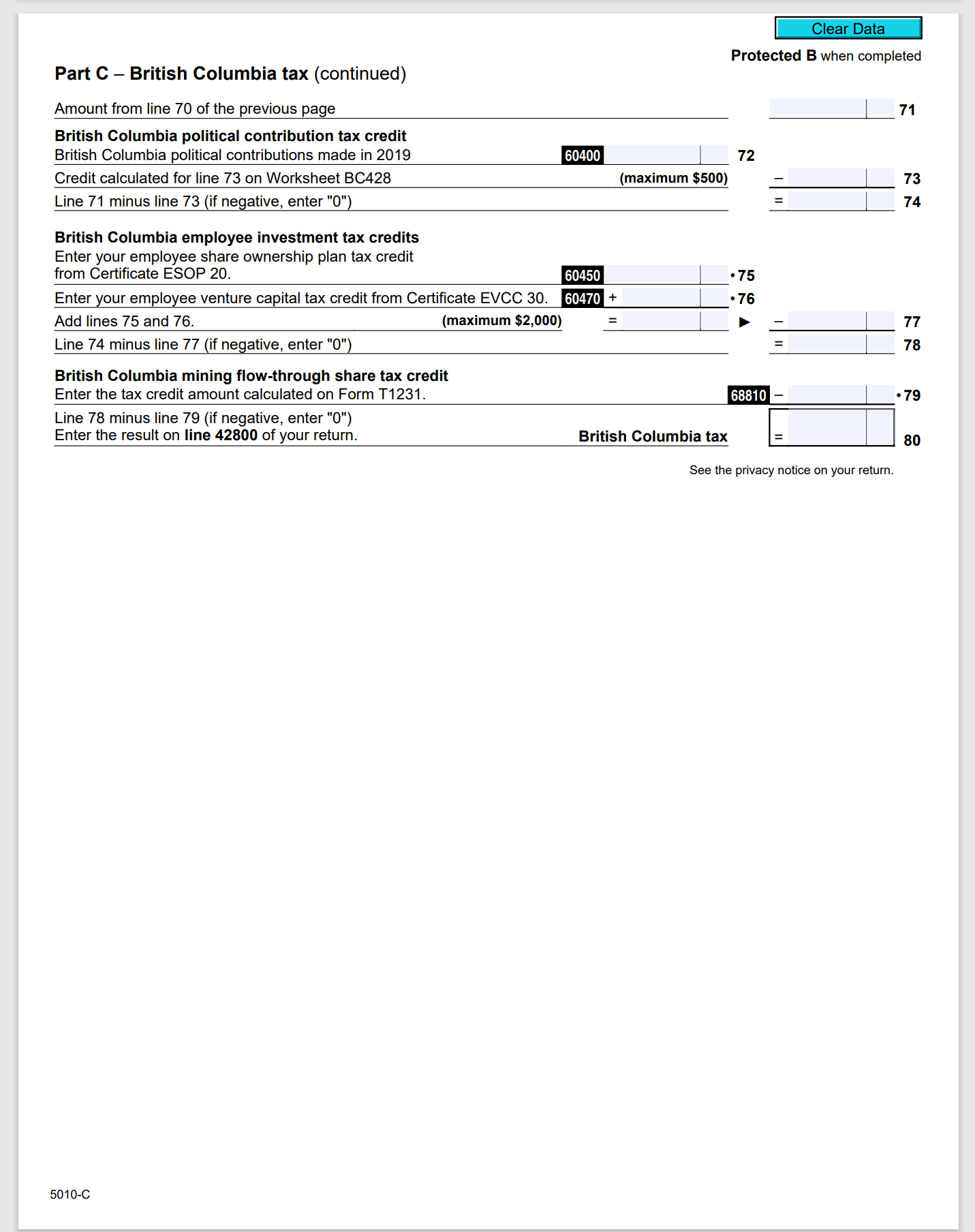
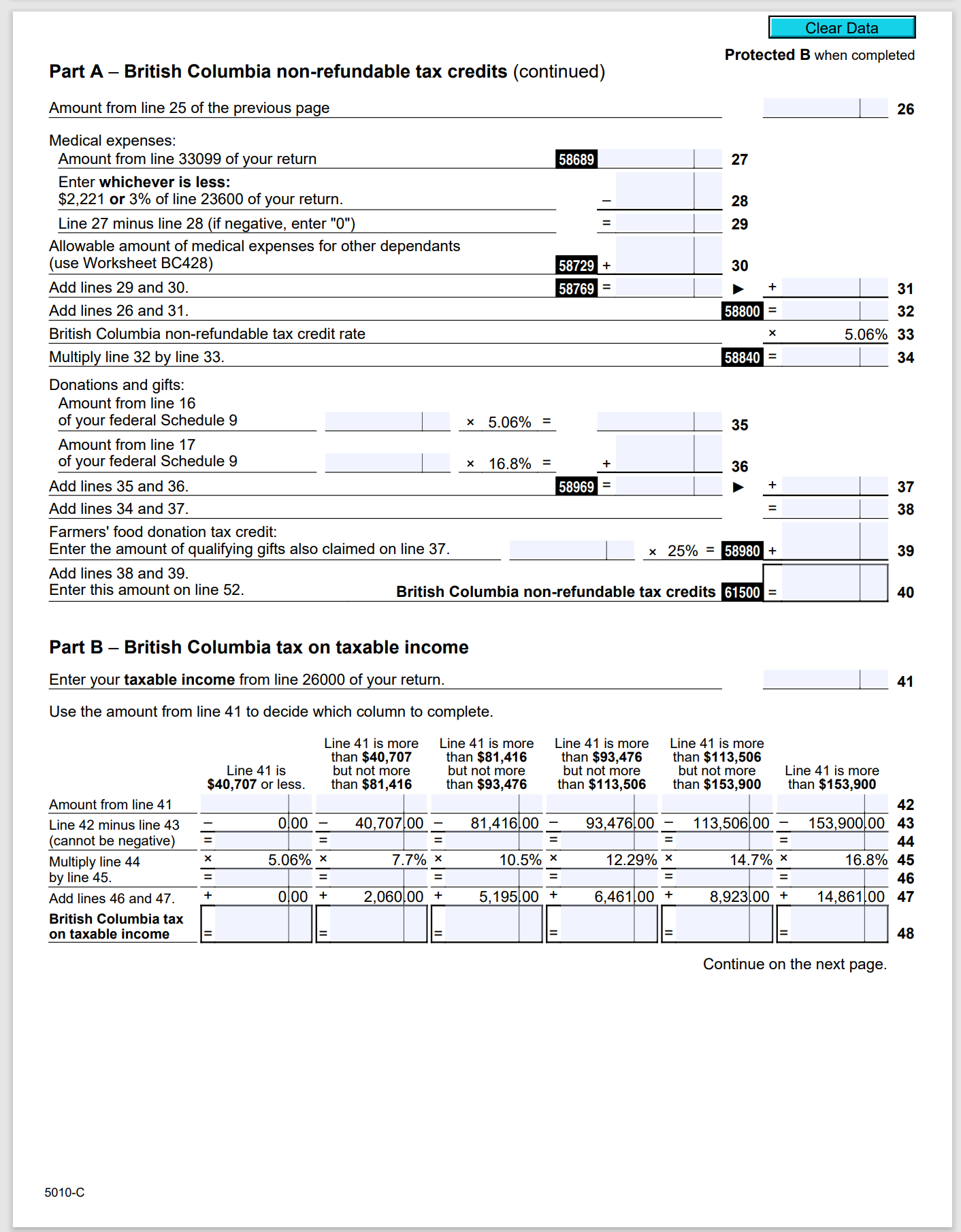
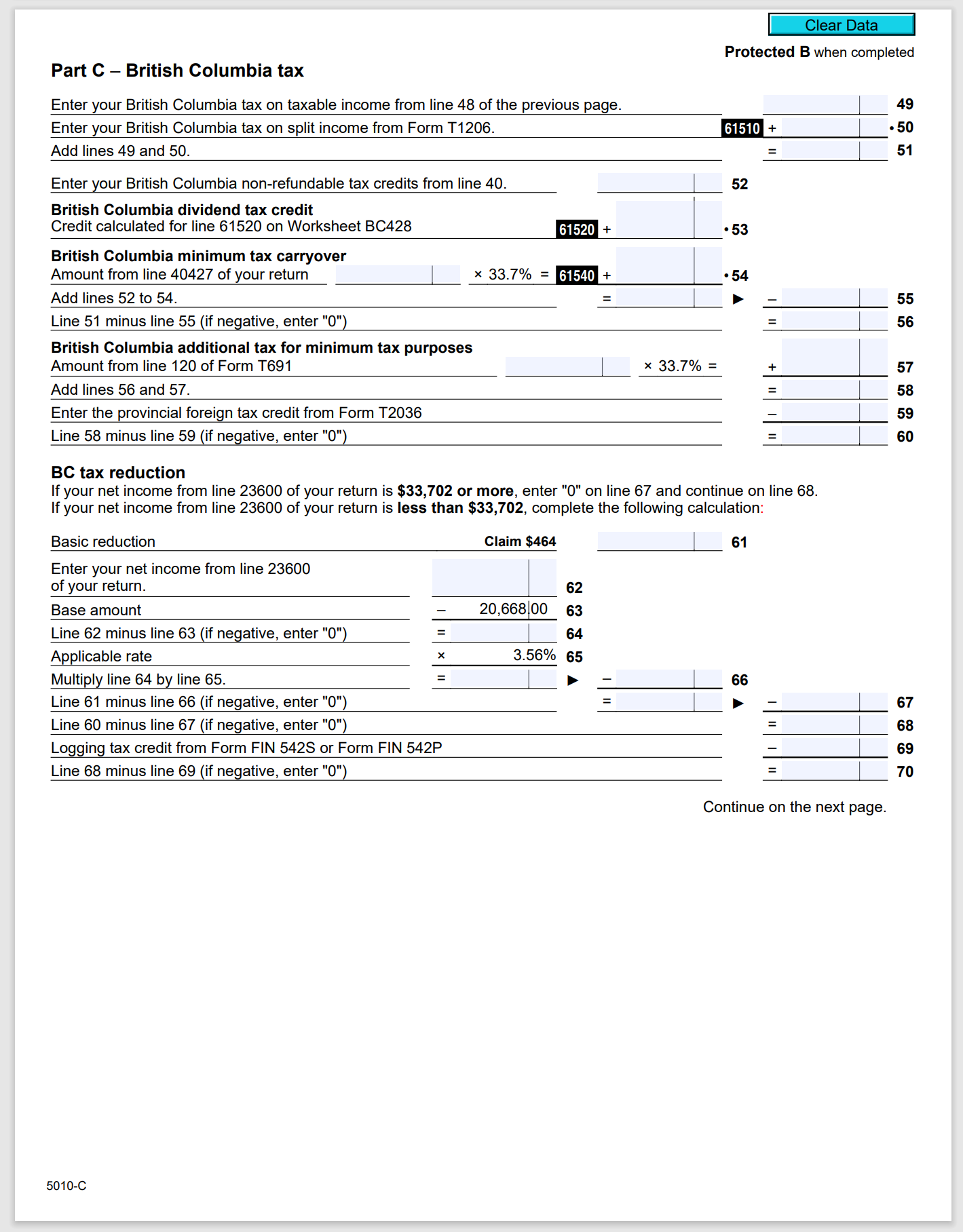
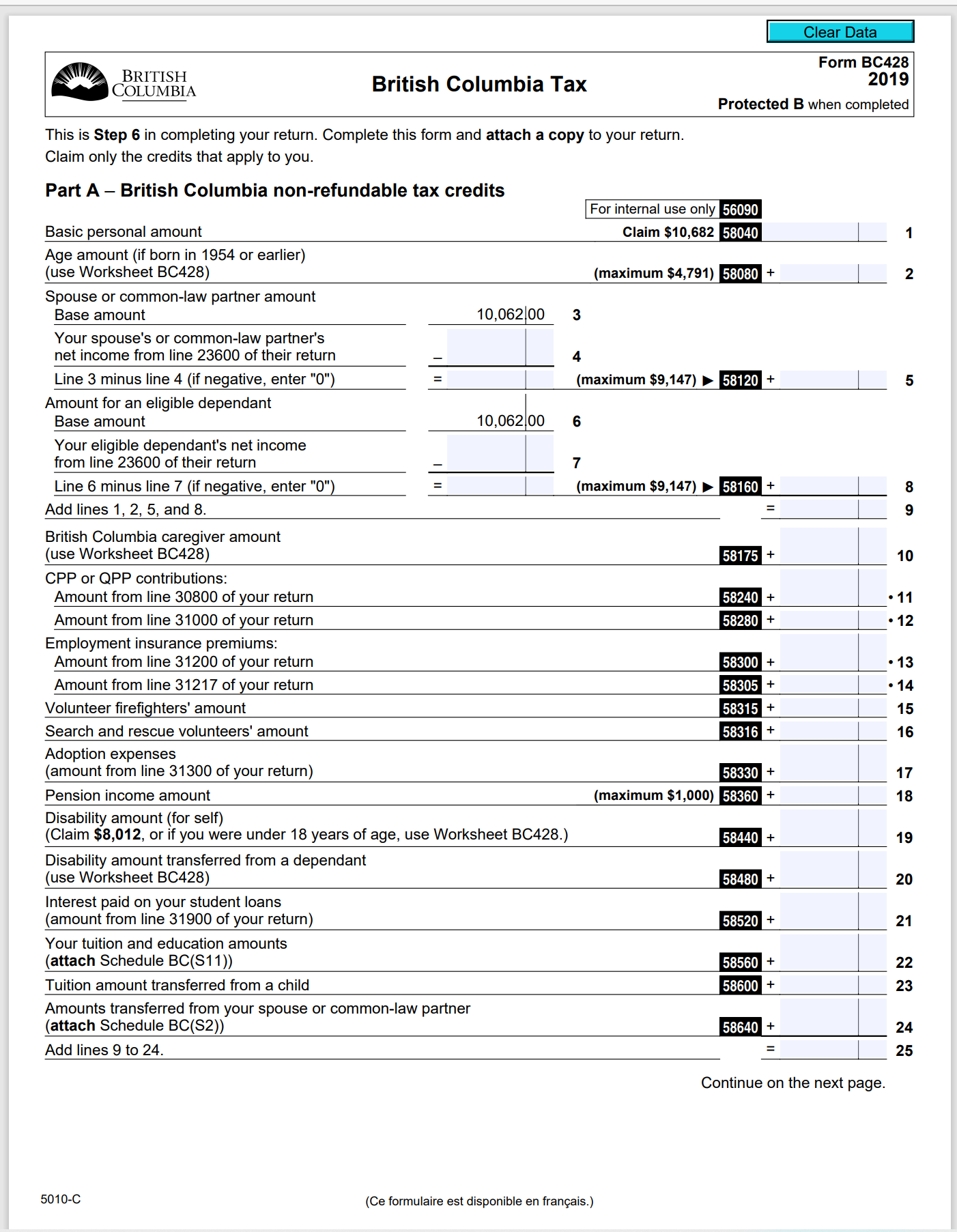
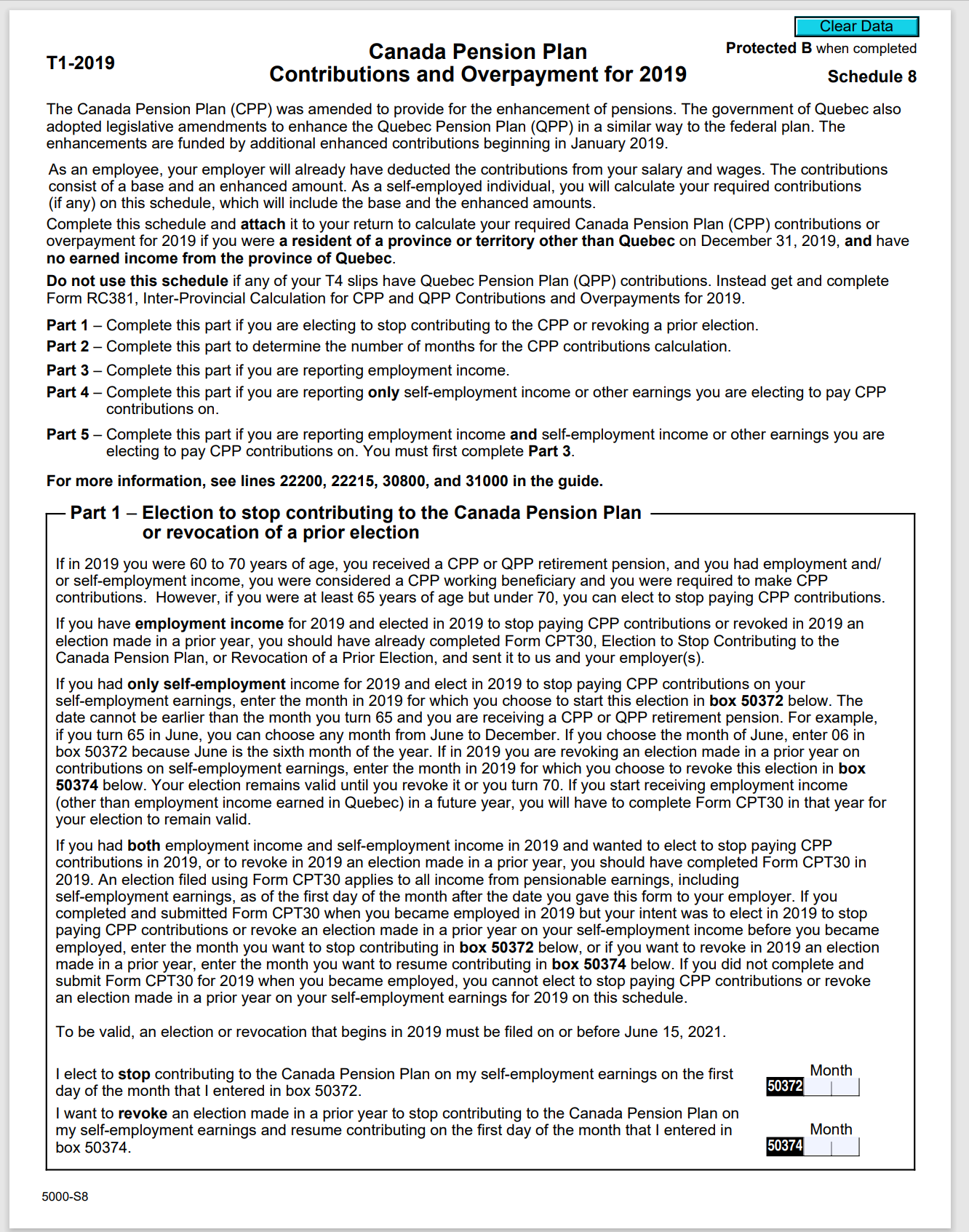
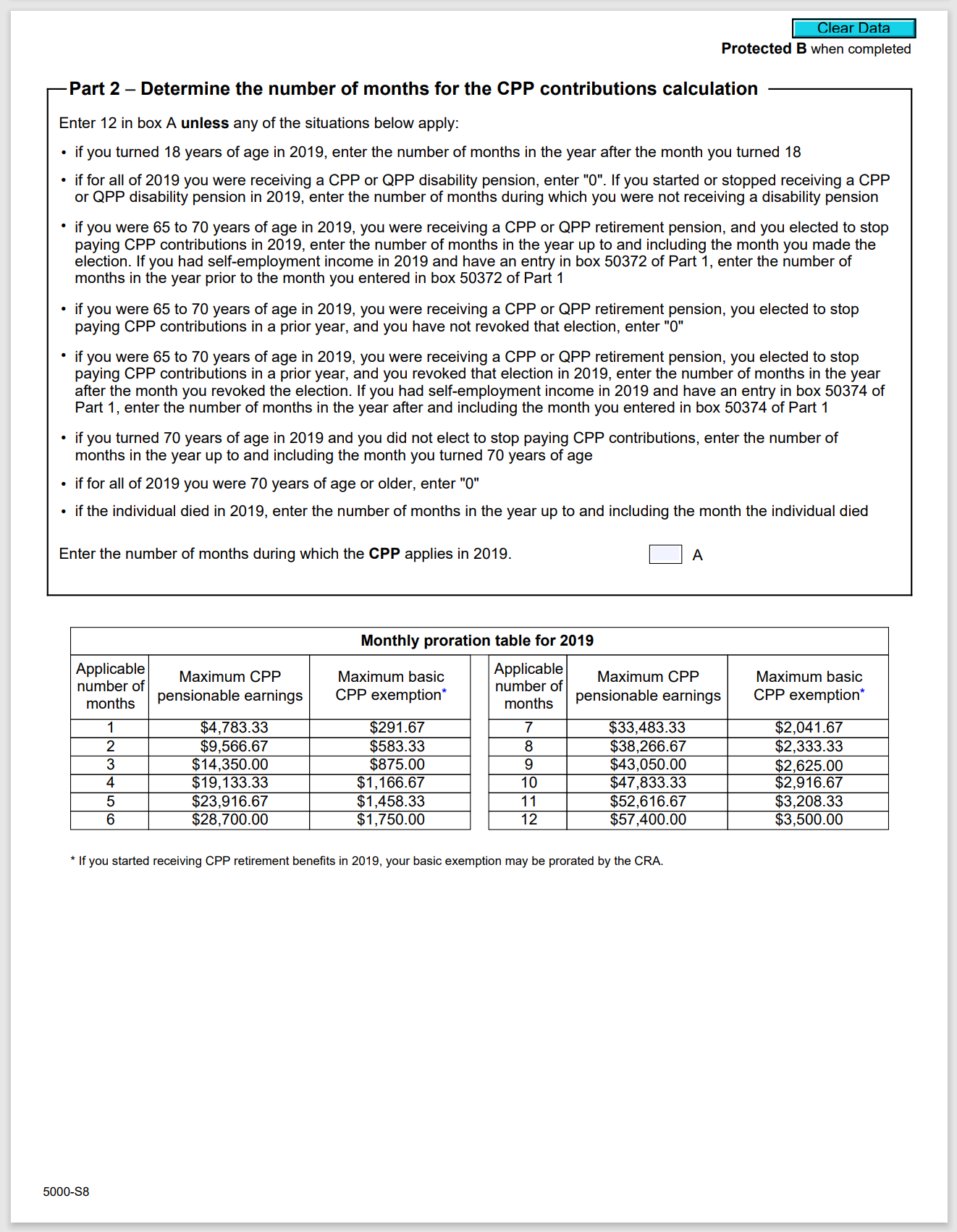
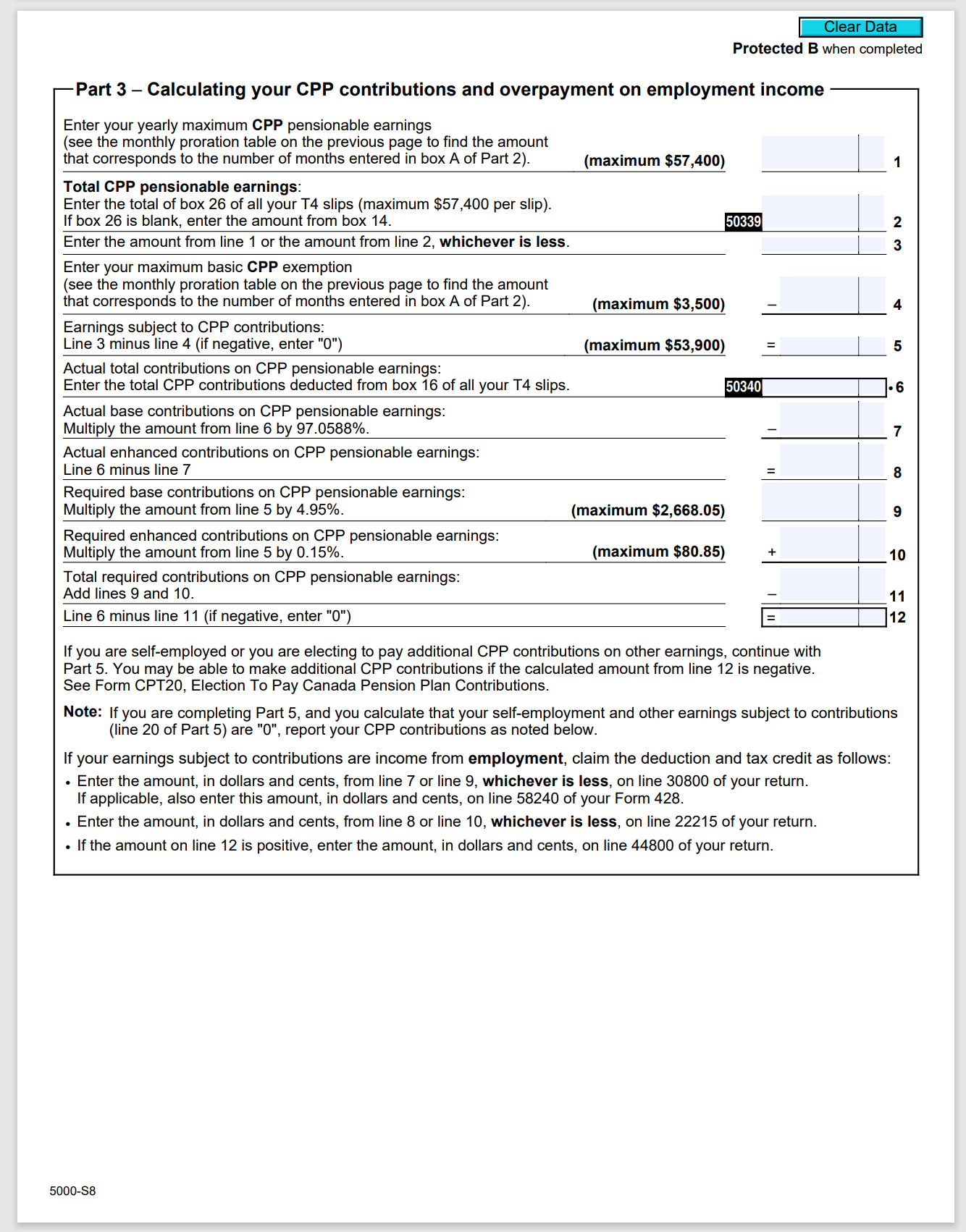
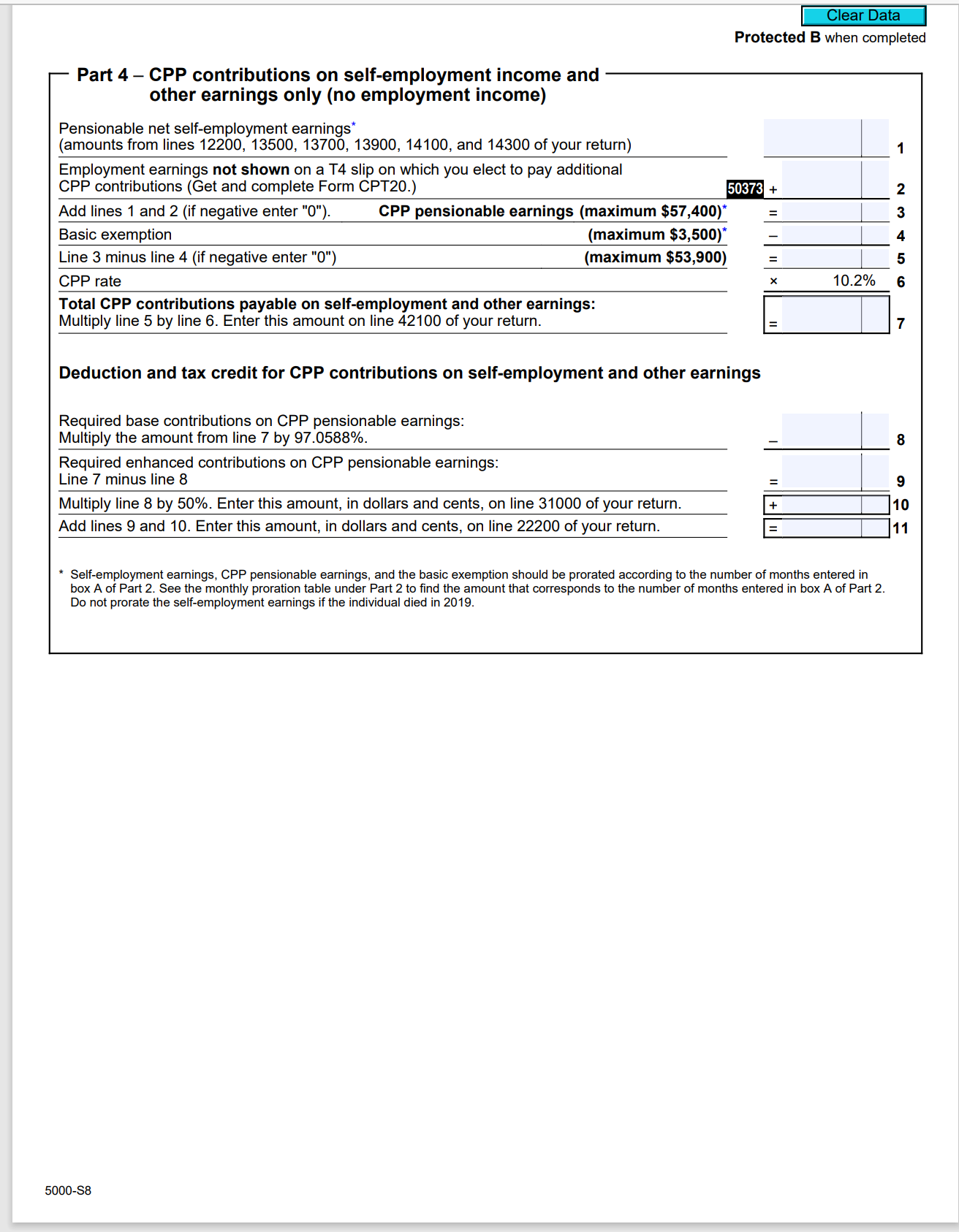
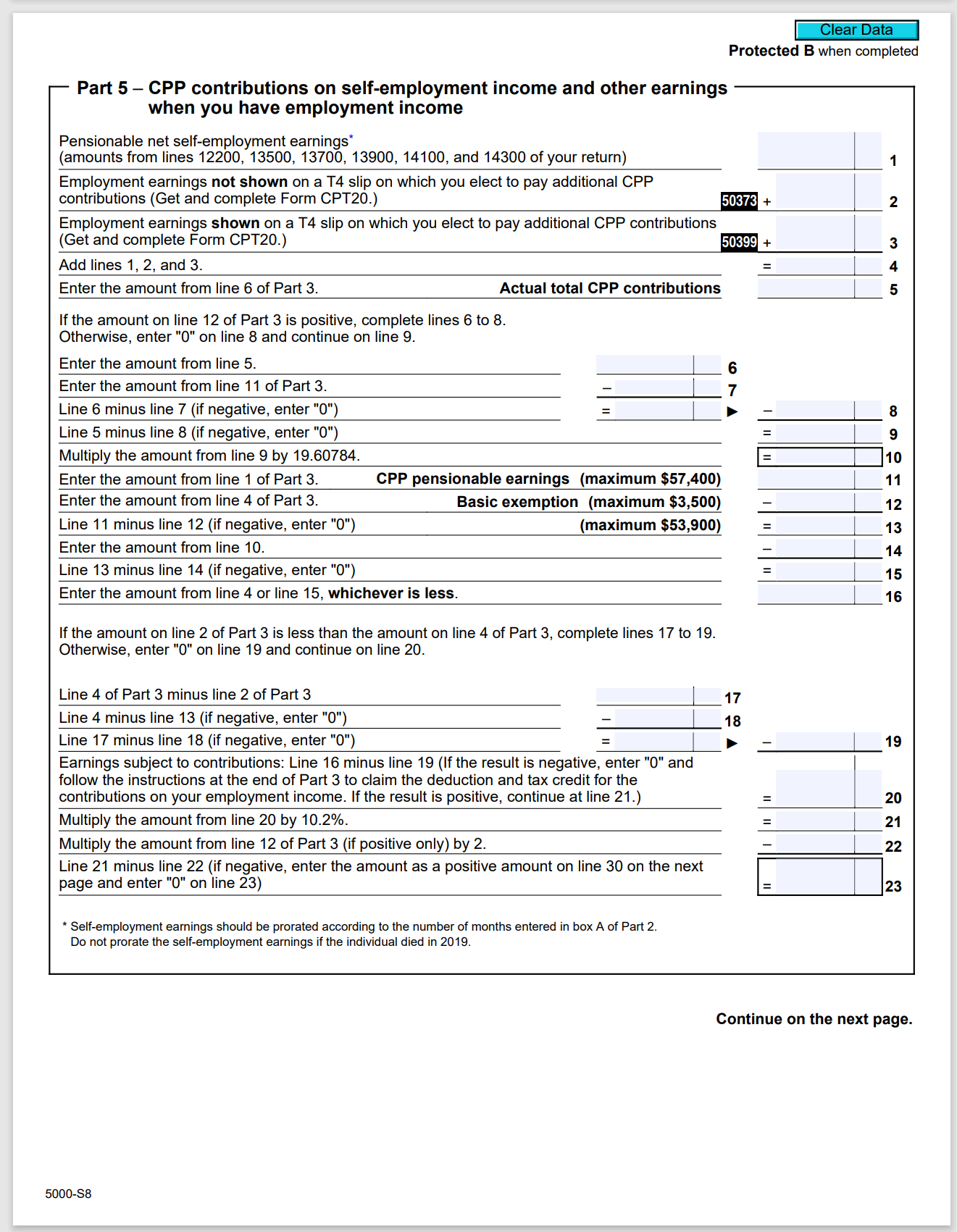
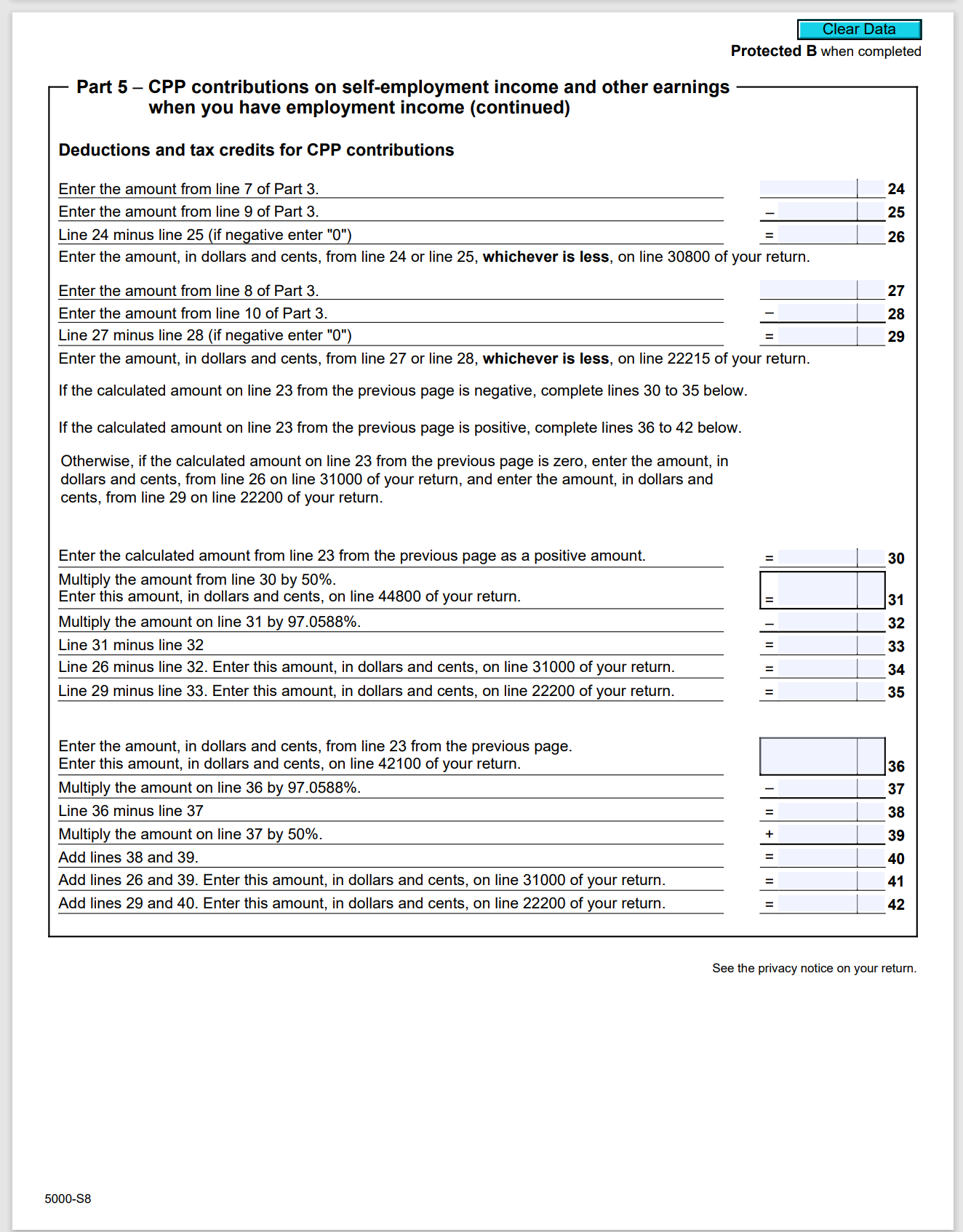
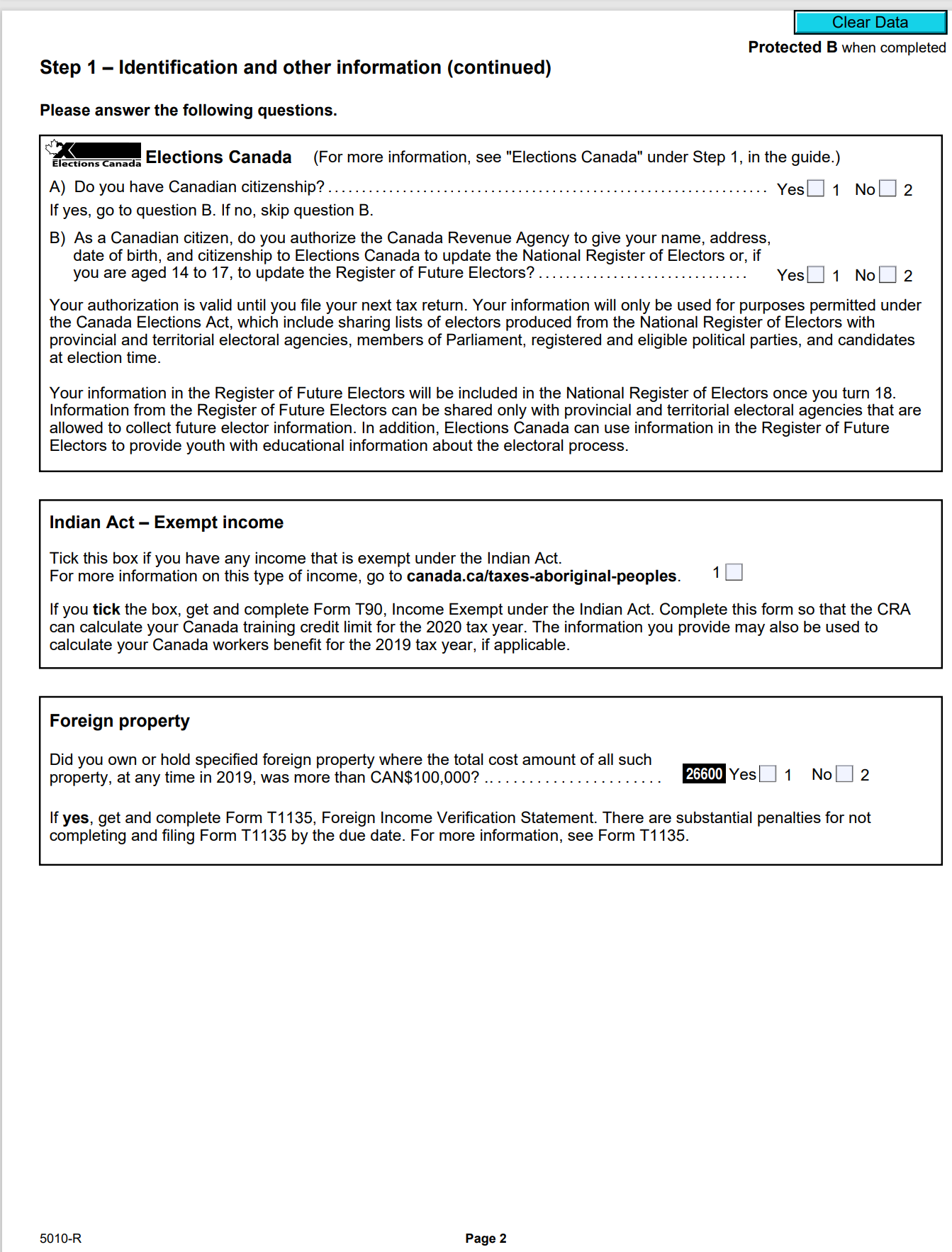
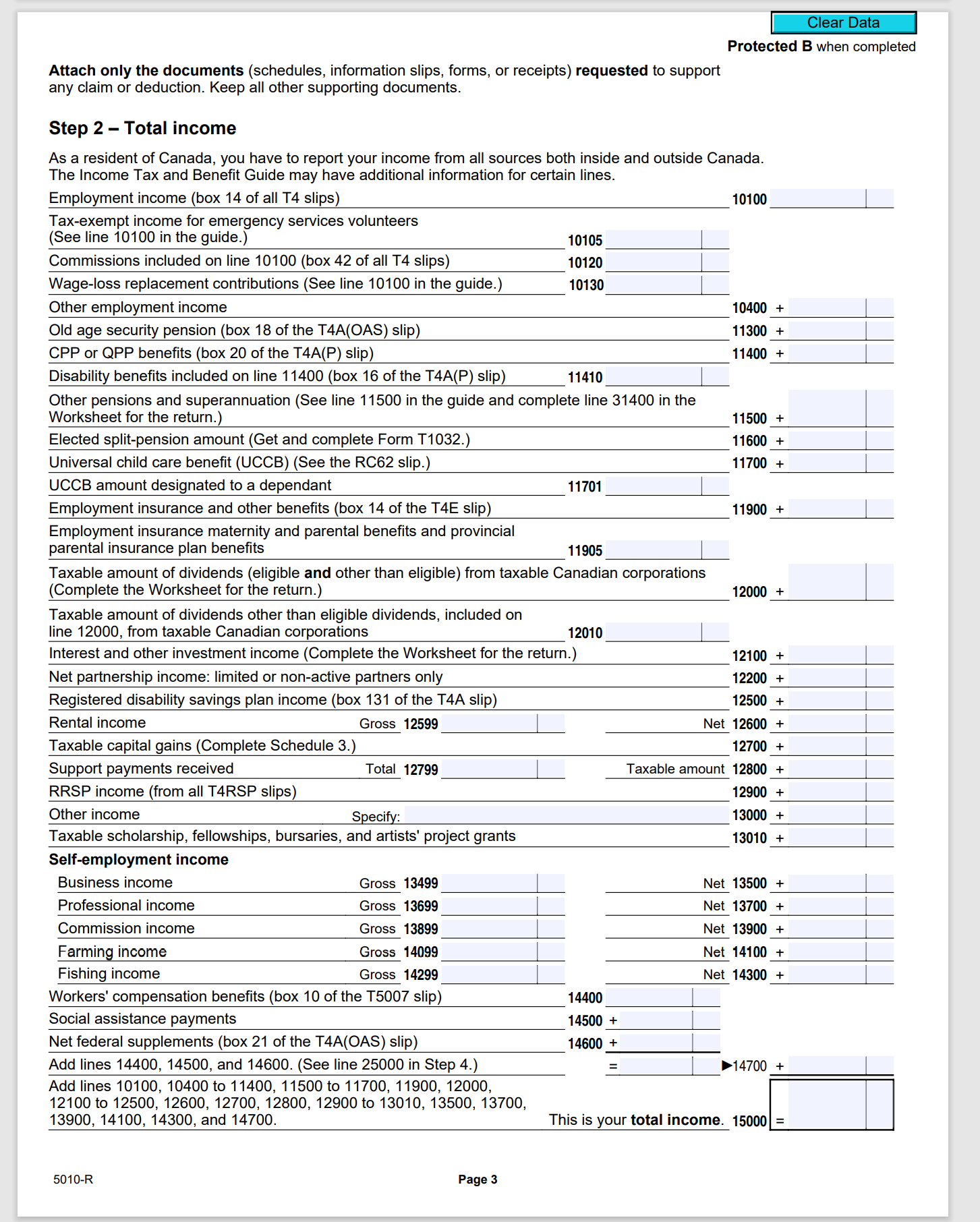
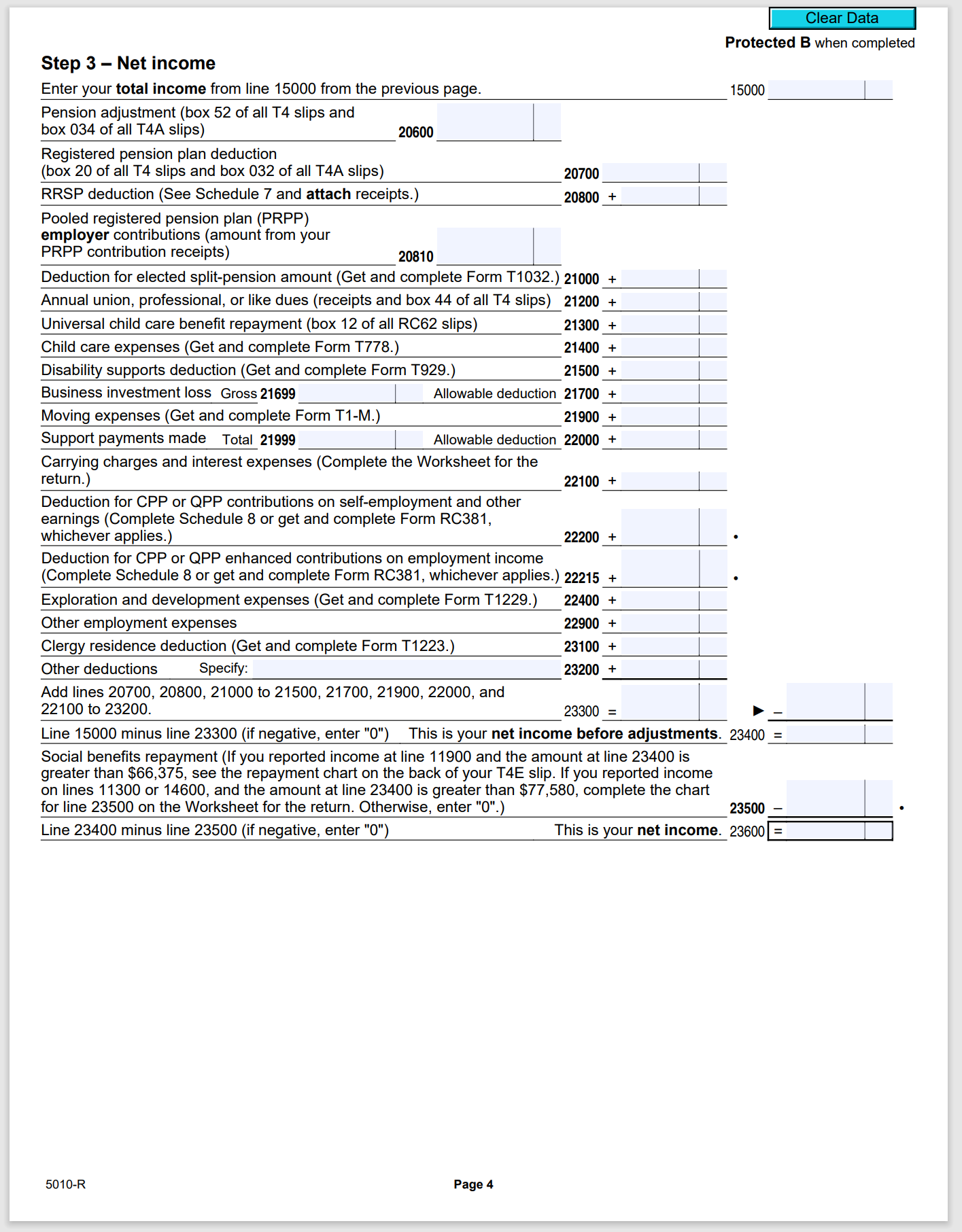
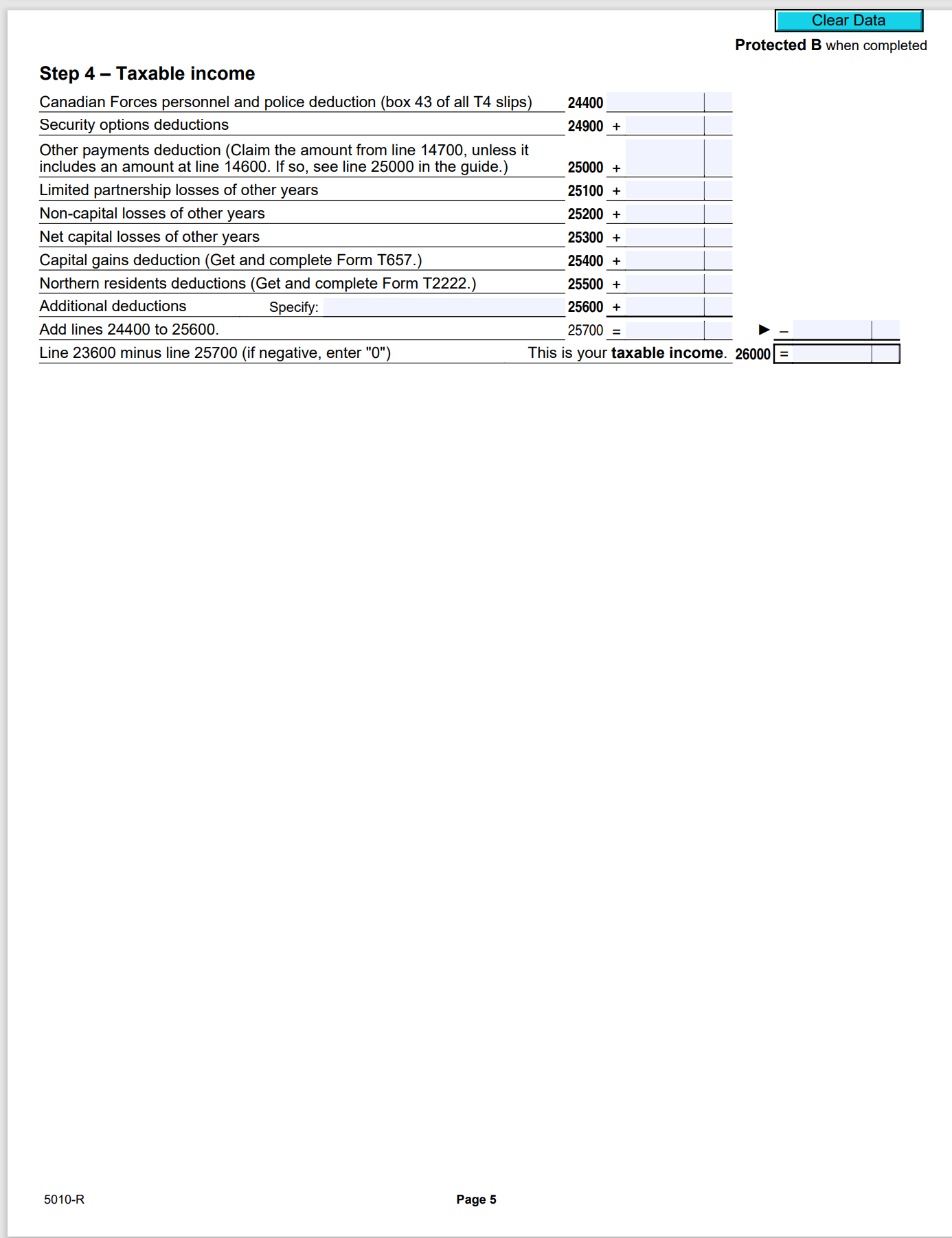
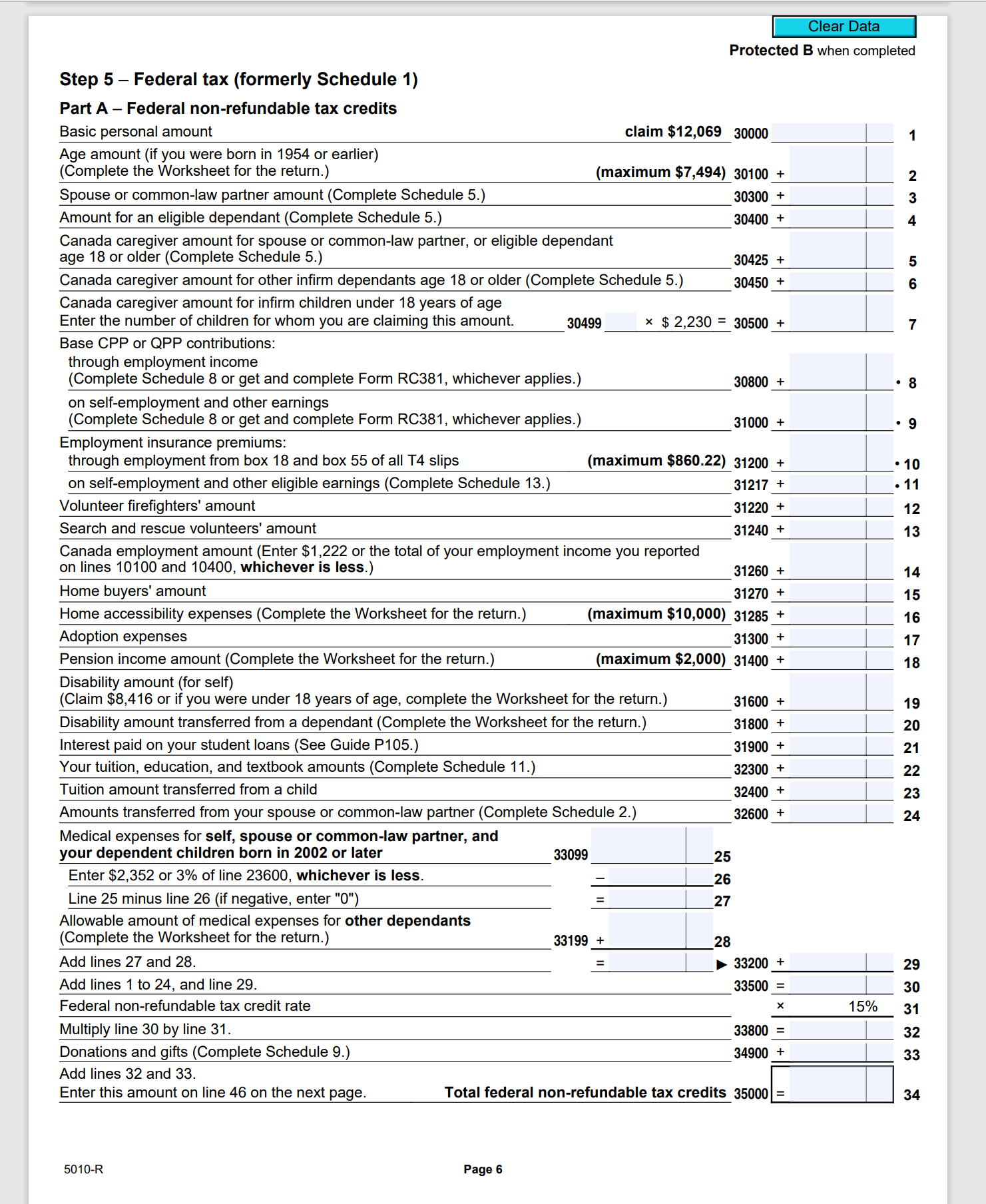
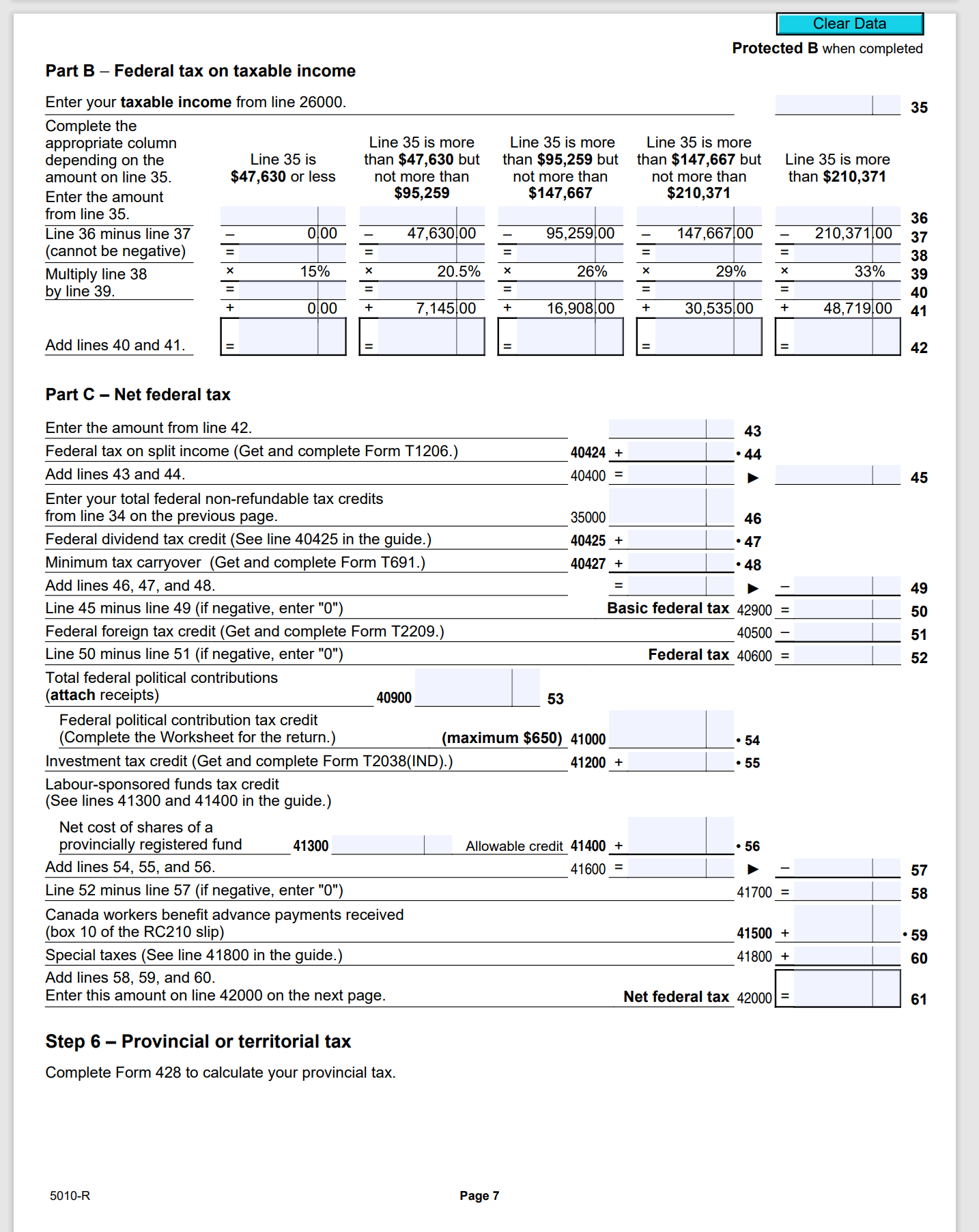
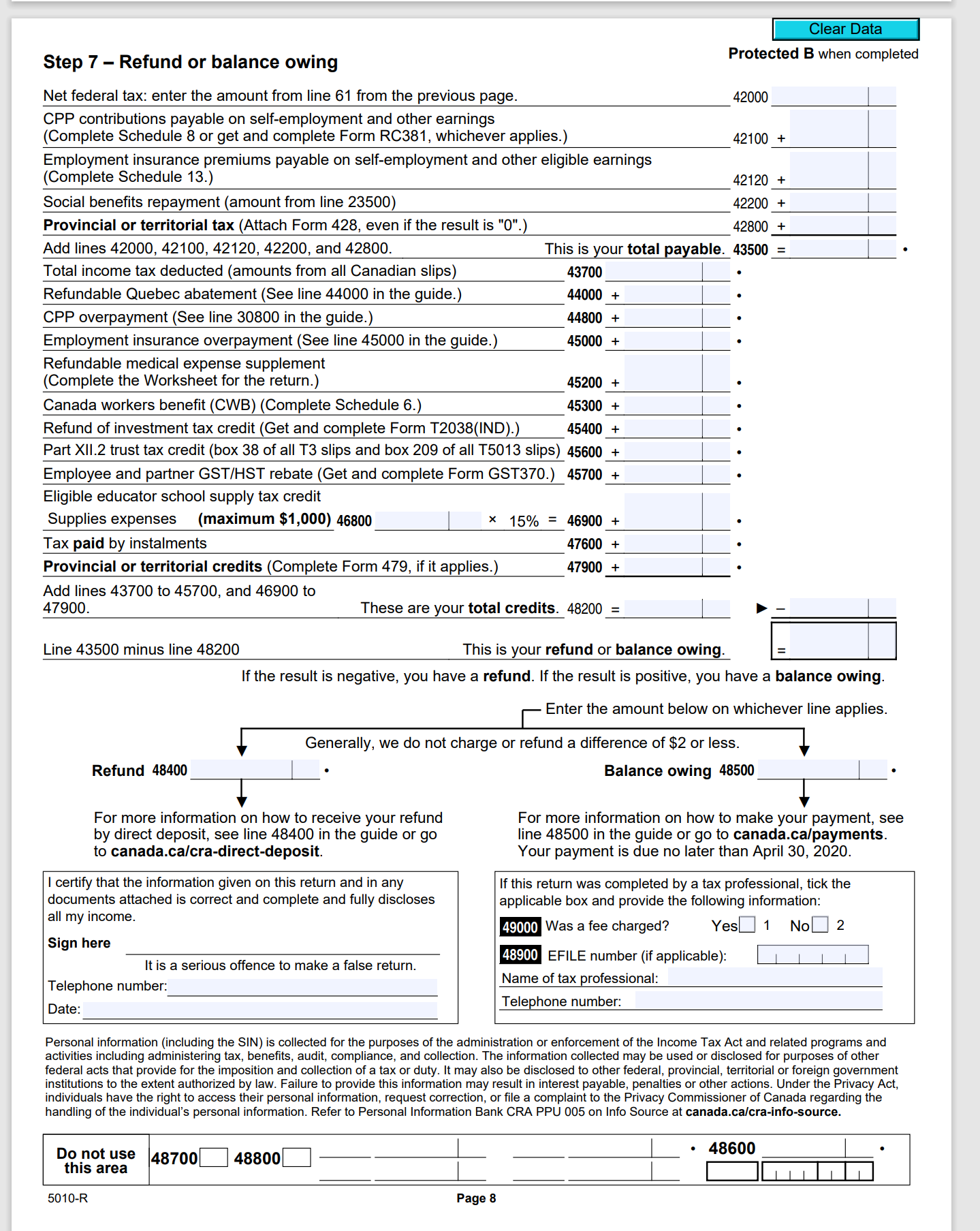
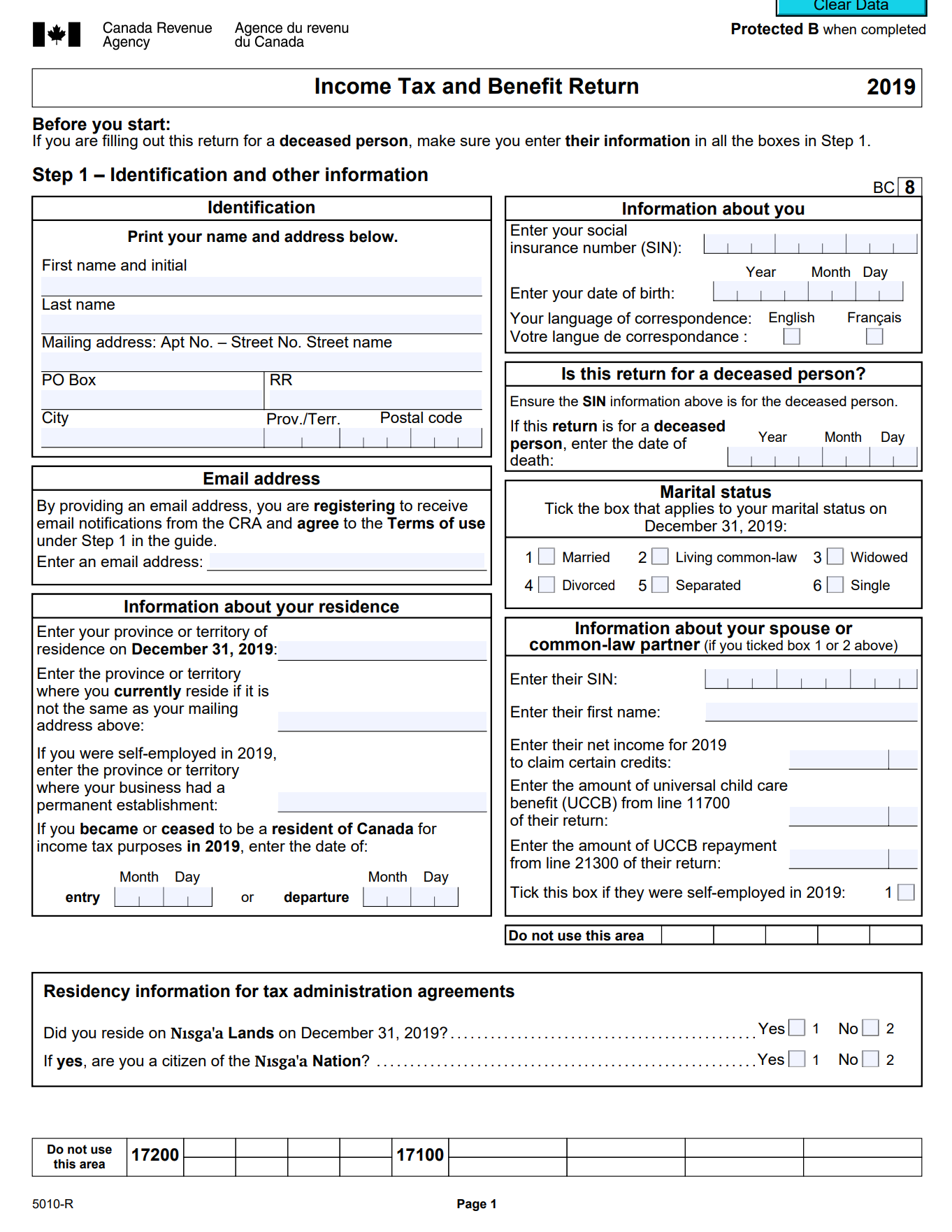
Clear Data Payer's name - Nom du payeur I+I Canada Revenue Agence du revenu Agency du Canada T4A UNIVERSAL CONSTRUCTION Year 2019 Statement of Pension, Retirement, Annuity, Annee and Other Income Etat du revenude pension, de retraite, de rente ou d'autres source Pension or superannuateon - line 11500 Prestations de retraite ou autres Income tax deducted - line 43700 061 Payer's account number / Numero de compte du payeur pensions - ligne 11500 mpot sur le revenuretenu - ligne 43700 123456789RP001 016 022 250 00 Social insurance number Recipient's account number Numero d'assurance sociale Numero de compte du beneficiaire Lump-sum payments - line 13000 Self-employed commissions Paiements forfaitaires - ligne 13000 Commissions d'un travail independant 012 000 000 000 013 018 2,500 00 020 Fees for services Recipient's name and address - Nom et adresse du beneficiaire Annuities Honoraires ou autres sommes Rentes pour services rendus Last name (print) - Nom de famille (en lettres moulees) First name - Prenom Initials - Initiales 024 048 JINGTING JESSICA Other information (see page 2) 12297 Dixon Avenue Autres renseignements (voir a la page 2) Richmond, BC V7E 3H5 Box - Case Amount - Montant Box - Case Amount - Montant Protected B when completed / Protege B une fois remp Box _ _ Case Amount - Montant Box - Case Amount - Montant Box - Case Amount - Montant Box - Case Amount - Montant Box - Case Amount - Montant Box - Case Amount - Montant Box _ Case Amount - Montant Box - Case Amount - Montant Box - Case Amount - Montant Box - Case Amount - Montant Canada Revenue Agence du revenu Payer's name - Nom du payeur Agency du Canada T4A UNIVERSAL CONSTRUCTION Year 2019 Statement of Pension, Retirement, Annuity, Annee and Other Income Etat du revenude pension, de retraite, de rente ou d'autres sources Pension or superannuateon - line 11500 restations de re Income tax deducted - line 43700 061 Payer's account number / Numero de compte du payeur pensions - ligne 11500 mpot sur le revenuretenu - ligne 43700 123456789RP001 016 022 250,00 Social insurance number Recipient's account number Numero d'assurance sociale Numero de compte du beneficiaire Lump-sum payments - line 13000 Self-employed commissions Paiements forfaitaires - ligne 13000 Commissions d'un travail independant 012 000 000 000 013 018 2,500.00 020 Fees for services Recipient's name and address - Nom et adresse du beneficiaire Annuities Honoraires ou autres sommes Rentes pour services rendus Last name (print) - Nom de famille (en lettres moulees) First name - Prenom Initials - Initiales JINGTING 024 JESSICA 048 1/ Protege B une fois rempli Other information (see page 2) 12297 Dixon Avenue Autres renseignements (voir a la page 2) Richmond, BC V7E 3H5 Box - Case Amount - Montant Box - Case Amount - Montant Box - Case Amount - Montant Box - Case Amount - Montant ) Protected B when Box - Case Amount - Montant Box - Case Amount - Montant Box - Case Amount - Montant Box - Case Amount - Montant Box - Case Amount - Montant Box - Case Amount - Montant Box - Case Amount - Montant Box - Case Amount - MontantClear Data Canada Revenue Agence du revenu Statement of Employment Insurance and Other Benefits Agency du Canada T4E Etat des prestations d'assurance-emploi et autres prestations Protected B / Protege B when completed / une fois rempli Yea 7 Repayment 14 rate Total benefits paid 15 Regular and othe benefits paid 17 Employment benefits and 20 Taxable tuition assistance 21 Non-taxable tuition support measures paid assistance 2019 12,568.00 Taux de Prestations regulieres et Prestations d'emploi et Aide visant les frais d Aide visant les frais de Annee remboursement Prestations totales versees autres prestations versees mesures de soutien versees scolarite imposables colarite non imposables 22 Income tax 23 Quebec income tax deducted 12 deducted Social insurance number Other information (see the next page) - Autres renseignements (a la page suivante) 628.40 000 000 000 Impot sur Impot du Quebec sur le e revenuretenu revenu retenu Numero d'assurance sociale Box / Case Amount / Montant Box / Case Amount / Montant Recipient's name and address - Nom et adresse du beneficiaire Box / Case Amount / Montant Box / Case Amount / Montant JINGTING, Jessica 12297 Dixon Avenue Box /Case Amount / Montant Richmond, BC V7E 3H5 Box / Case Amount / Montant Payer's name - Nom du payeur Attach this copy to your federal return T4E (19) Joignez cette copie a votre declaration federale Canada Canada Revenue Agence du revenu Statement of Employment Insurance and Other Benefits Agency Protected B / Protege B du Canada T4E Etat des prestations d'assurance-emploi et autres prestations when completed / une fois rempli Year 7 Repayment 14 Total benefits paid 15 Regular and other benefits paid 17 Employment benefits and 20 Taxable tuition assistance 21 Non-taxable tuition support measures paid assistance 2019 12,568.00 Taux de Prestations regulieres et Prestations d'emploi et Aide visant les frais d Aide visant les frais de Annee remboursement Prestations totales versees utres prestations versees mesures de soutien versees scolarite imposables scolarite non imposables 22 ncome tax 23 Quebec income tax deducted 12 deducted Social insurance number Other information (see the next page) - Autres renseignements (a la page suivante) 628.40 000 000 000 Impot sur Impot du Quebec sur le le revenue retenu revenu retenu Numero d'assurance sociale Box / Case Amount / Montant Box / Case Amount / Montant Recipient's name and address - Nom et adresse du beneficiaire Box / Case Amount / Montant Box /Case Amount / Montant JINGTING, Jessica 12297 Dixon Avenue Box / Case Amount / Montant Richmond, BC V7E 3H5 Box /Case Amount / Montant Payer's name - Nom du payeur Keep this copy for your records T4E (19) Conservez cette copie dans vos dossiers Canada Repayment chart Tableau de remboursement Fill in this chart if the rate in box 7 is 30% and, on your return, the total of Remplissez ce tableau si le taux de 30 % figure a la case 7 et que, selon lines 21300 and 23400 plus the amount of registered disability savings plan votre declaration, le total des lignes 21300 et 23400 plus le montant pour le (RDSP) income repayment included on line 23200, minus the total of lines remboursement des revenus d'un regime enregistre d'epargne-invalidit 11700 and 12500 is more than $66,375 (REEI) inclus a la ligne 23200, moins le total des lignes 11700 et 12500, depasse 66 375 $. Enter the amount from box 15 minus any amount from Inscrivez le montant de la case 15 moins le montant de box 30 (if negative, enter "0" la case 30 (si negatif, inscrivez ) Total des montants des lignes 21300 et 23400 plus le Total of amounts on lines 21300 and 23400 plus the montant de REEl inclus a la ligne 23200 de votre amount of RDSP included on line 23200 of your return, declaration, moins les montants des lignes 11700 minus the amounts on lines 11700 and 12500 et 12500 Line 1 minus $66,375 (if negative, enter "0") Ligne 1 moins 66 375 $ (si negatif, inscrivez ) 2 Enter the amount from line 0 or 2, whichever is less Inscrivez le montant le moins eleve : ligne 0 ou ligne 2 Multiply the amount on line 3 by 30% Multipliez le montant de la ligne 3 par 30 % Enter the amount from line 4 on lines 23500 and 42200 of your return. Inscrivez le montant de la ligne 4 aux lignes 23500 et 42200 de votre However, if you also received Old Age Security benefits and the amount declaration. Toutefois, si vous avez aussi recu des prestations de la on line 23400 of your return is more than $77,580, complete the chart for Securite de la vieillesse et que le montant de la ligne 23400 de votre line 23500 on the Worksheet for the return. declaration depasse 77 580 $, remplissez la grille de calcul pour la declaration pour la ligne 23500. See the privacy notice on your return. Consultez l'avis de confidentialite dans votre declaration.Clear Data Employer's name - Nom de l'employeur Canada Revenue Agence du revenu Agency du Canada T4 UNIVERSAL CONSTRUCTION Year Statement of Remuneration Paid Annee 2019 Etat de la remuneration payee Employment income - line 10100 Income tax deducted - line 43700 Revenus d'emploi - ligne 10100 Impot sur le revenuretenu - ligne 43700 45,268 80 22 7,632 38 54 Employer's account number / Numero de compte de l'employeur Province of employment Employee's CPP contributions - line 30800 El insurable earnings Province d'emploi Cotisations de l'employe au RPC - ligne 30800 Gains assurables d'AE 10 BC 16 2,067 58 24 42,703 04 Social insurance number Exempt - Exemption Numero d'assurance sociale CPP/QPP E| PPIP Employment code Employee's QPP contributions - line 30800 CPP/QPP pensionable earnings 12 000 000 000 28 Code d'emploi Cotisations de l'employe au RRQ - ligne 30800 Gains ouvrant droit a pension - RPC/RRQ 26 RPC/RRQ AE RPAF 42, 100 00 Employee's El premiums - line 31200 Employee's name and address - Nom et adresse de l'employe Cotisations de l'employe a l'AE - ligne 312 Union dues - line 21200 Cotisations syndicales - ligne 21200 me (in capital letters) - Nom de famille (en lettres moulees) First name - Prenom Initial - Initiale 18 798 55 JINGTING JESSICA RPP contributions - line 20700 Charitable donations - line 34900 otisations a un RPA - ligne 20700 Dons de bienfaisance - ligne 34900 Protected B when completed / Protege B une fois rempli 20 46 12297 Dixon Avenue Pension adjustment - line 20600 RPP or DPSP registration number Richmond, British Columbia V7E 3H5 Facteur d'equivalence - ligne 20600 No d'agrement d'un RPA ou d'un RPDB 52 50 Employee's PPIP premiums - see over PPIP insurable earnings Cotisations de l'employe au RPAP - voir au verso Gains assurables du RPAP 55 56 Box - Case Amount - Montant Box - Case Amount - Montant Box - Case Amount - Montant Other information see over) Autres Box - Case Amount - Montant Box - Case Amount - Montant Box - Case Amount - Montan T4 (19) enseignements (voir au verso) Employer's name - Nom de l'employeur Canada Revenue Agence du revenu Agency du Canada T4 UNIVERSAL CONSTRUCTION Year Statement of Remuneration Paid Anne 2019 Etat de la remuneration payee Employment income - line 10100 Income tax deducted - line 43700 Revenus d'emploi - ligne 10100 mpot sur le revenue retenu - ligne 43700 14 45,268 80 22 7,632 38 54 Employer's account number / Numero de compte de l'employeur Province of employment Employee's CPP contributions - line 30800 El insurable earnings Province d'emploi Cotisations de l'employe au RPC - ligne 30800 Gains assurables d'AE 10 BC 16 2,067 58 24 42,703 04 Social insurance number Exempt - Exemption Numero d'assurance sociale CPP/QPP EI PPIP Employment code Employee's QPP contributions - line 30800 CPP/QPP pensionable earnings 12 000 000 000 28 Code d'emploi Cotisations de l'employe au RRQ - ligne 30800 Gains ouvrant droit a pension - RPC/RRQ 29 17 26 RPC/RRQ AE RPAP 42, 100 00 Employee's El premiums - line 31200 Union dues - line 21200 Employee's name and address - Nom et adresse de l'employe Cotisations de l'employe a l'AE - ligne 31200 Cotisations syndicales - ligne 21200 Last name (in capital letters) - Nom de famille (en lettres moulees) First name - Prenom Initial - Initiale 18 798 55 44 JINGTING JESSICA P contributions - line 20700 Charitable donations - line 34900 Cotisations a un RPA - ligne 20700 Dons de bienfaisance - ligne 34900 Protected B when completed / Protege B une fois rempli 20 46 12297 Dixon Avenue Pension adjustment - line 20600 RPP or DPSP registration number Richmond, British Columbia V7E 3H5 acteur d'equivalence - ligne 2060 d'agrement d'un RPA ou d'un RPDB 52 50 Employee's PPIP premiums - see over PPIP insurable earnings employe au R ains assurables du RPAP 55 56 Box - Case Amount - Montant Box - Case Amount - Montant Box - Case Amount - Montant Other information (see over) Autres Box - Case Amount- Montant Box - Case Amount - Montant Box - Case Amount - Montant renseignements T4 (19) (voir au verso) Clear DataClear Data Protected B when completed Part C - British Columbia tax (continued) Amount from line 70 of the previous page 71 British Columbia political contribution tax credit British Columbia political contributions made in 2019 60400 72 Credit calculated for line 73 on Worksheet BC428 (maximum $500) 73 Line 71 minus line 73 (if negative, enter "0") 74 British Columbia employee investment tax credits Enter your employee share ownership plan tax credit from Certificate ESOP 20 60450 . 75 Enter your employee venture capital tax credit from Certificate EVCC 30. 60470 + 76 Add lines 75 and 76 (maximum $2,000) 77 Line 74 minus line 77 (if negative, enter "0") 78 British Columbia mining flow-through share tax credit Enter the tax credit amount calculated on Form T1231. 68810 . 79 Line 78 minus line 79 (if negative, enter "0") Enter the result on line 42800 of your return. British Columbia tax 80 See the privacy notice on your return. 5010-C Protected B when completed Part A British Columbia non-refundable tax credits (continued) Amount from line 25 of the previous page 26 Medical expenses: Amount from line 33099 of our return 58689 27 Enter whichever is less: $2,221 or 3% of line 23600 of your return. 28 Line 27 minus line 28 if ne ative, enter "0" = 29 Allowable amount of medical expenses for other dependants (use Worksheet 30428) + 30 Add lines 29 and 30. 58769 = | > + 31 Add lines 26 and 31. 56600= 32 British Columbia non-refundable tax credit rate 5. 06% 33 Multiply line 32 by line 33. 58840 = 34 Donations and gifts: Amount from line 16 of your federal Schedule 9 X 5.06% = 35 Amount from line 17 of your federal Schedule 9 x 16.8% = + 33 Add lines 34 and 37. 38 Farmers' food donation tax credit: Enter the amount of qualifying gifts also claimed on line 37. | x 25% = 58980 + 39 Add lines 38 and 39. Enter this amount on line 52. British Columbia non-refundable tax credits 61500 40 Part B British Columbia tax on taxable income Enter our taxable income from line 26000 of our return. 41 Use the amount from line 41 to decide which column to complete. Add lines 35 and 36. 58969 = > + 37 = l Line 41 is more Line 41 is more Line 41 is more Line 41 is more than $40,707 than $81,416 than $93,476 than $113,506 Line 41 is but not more but not more but not more but not more Line 41 is more $40, 707 or less. than $81, 416 than $93, 476 than $1 13, 506 than $1 53. 900 than $153, 900 Amount from line 41 Line 42 minus line 43 0 00 40 707 00 - B1 416 00 - 93 476 00 - 113 506 00 - 153 900 00 43 (cannot be negative) +IIXII| Multiply line 44 5. 06%: 7. 7% X 10. 5% x 12. 29% " 14. 7% " 16. 8% 45 by line 45. = = = = 46 Add lines 46 and 47. 000 + 2,060 00 + 5,195 00 + 6,461 00 + 8,923 00 + 14,861 00 47 British Columbia tax on taxable income 43 Continue on the next page. 501 O-C Protected B when completed Part C British Columbia tax Enter your British Columbia tax on taxable income from line 48 of the previous page. 49 Enter your British Columbia tax on split income from Form T1206. Hal] + -50 Add lines 49 and 50. = | 51 Enter your British Columbia non-refundable tax credits from line 40. I 52 British Columbia dividend tax credit I Credit calculated for line 61520 on Worksheet 30428 + . 53 British Columbia minimum tax carryover Amount from line 40427 of your return at 331% = + . 54 Add lines 52 to 54. = I b 55 Line 51 minus line 55 if ne ative, enter "0" = 56 British Columbia additional tax for minimum tax purposes Amount from line 120 of Form T691 I x 337% = + 57 Add lines 56 and 57. = | 58 Enter the provincial foreign tax credit from Form T2036 59 Line 58 minus line 59 Iif negative, enter "0"I = 60 BC tax reduction If your net income from line 23600 of your return is $33,702 or more, enter \"0'I on line 67 and continue on line 68. If your net income from line 23600 of your return is less than $33,702, complete the following calculation: Basic reduction Claim $464 I 61 Enter your net income from line 23600 of your return. 62 Base amount 20,668I00 63 Line 62 minus line 63 {if negative, enter "0"} = I Applicable rate X 3.56% 65 Multiply line 64 by line 65. = I h - I 66 Line 61 minus line 66 (if negative, enter "0") = I b 67 Line 60 minus line 67 (if negative, enter "0") = I 68 Logging tax credit from Form FIN 5428 or Form FIN 542P 69 Line 68 minus line 69 {if negative, enter "0"} = 70 Continue on the next page. 501 O-C Form BC428 British Columbia Tax 2019 Protected B when completed This is Step 6 in completing your return. Complete this form and attach a copy to your return. Claim only the credits that apply to you. Part A British Columbia non-refundable tax credits For internal use only 56090 Basic personal amount Claim $10,682 58040 I 1 Age amount (if born in 1954 or earlier) (use Worksheet BC428) (maximum $4,791) 58030 + | 2 Spouse or common-law partner amount Base amount 10,062|00 3 Your spouse's or common-law partner's net income from line 23600 of their return 4 Line 3 minus line 4 (if negative, enter "0") = (maximum $9,147) 5 + 5 Amount for an eligible dependant Base amount 10,062 00 6 Your eligible dependant's net income from line 23600 of their return 7 Line 6 minus line 7 (if negative, enter "0") = (maximum $9,147) D 58160 + 8 Add lines 1, 2, 5, and 8. = 9 British Columbia caregiver amount (use Worksheet 30428) 58175 + 10 CPP or OFF contributions: Amount from line 30800 of your return 58240 + - 11 Amount from line 31000 of your return 58280 + - 12 Employment insurance premiums: Amount from line 31200 of our return 58300 + - 13 Amount from line 3121? of our return + - 14 Volunteer refi hters' amount + 15 Search and rescue volunteers' amount + 16 Adoption expenses (amount from line 31300 of your return) 58330 + 17 Pension income amount (maximum $1,000) 53360 + 18 Disability amount (for self) (Claim $8,012, or if you were under 18 years of age, use Worksheet BC428.) 53440 + 19 Disability amount transferred from a dependant (use Worksheet 80428) 58480 + 20 Interest paid on your student loans (amount from line 31900 of your return) + 21 Your tuition and education amounts (attach Schedule BC(S11)) 58560 + 22 Tuition amount transferred from a child 58500 + 23 Amounts transferred from your spouse or common-law partner (attach Schedule BC(SZ)) 58640 + 24 Add lines 9 to 24. = 25 Continue on the next page. 5010-C (Ce formulaire est disponible en francais.) | Canada Pension Plan Protected B when completed T1 "2019 Contributions and Overpayment for 2019 Schedule 8 The Canada Pension Plan (CPP) was amended to provide for the enhancement of pensions. The government of Quebec also adopted legislative amendments to enhance the Quebec Pension Plan (OPP) in a similar way to the federal plan. The enhancements are funded by additional enhanced contributions beginning in January 2019. As an employee, your employer will already have deducted the contributions from your salary and wages. The contributions consist of a base and an enhanced amount. As a self-employed individual, you will calculate your required contributions (if any) on this schedule, which will include the base and the enhanced amounts. Complete this schedule and attach it to your return to calculate your required Canada Pension Plan (CPP) contributions or overpayment for 2019 if you Were a resident of a province or territory other than Quebec on December 31, 2019, and have no earned Income from the province of Quebec. Do not use this schedule if any of your T4 slips have Quebec Pension Plan (QPP) contributions. Instead get and complete Form R0381, Inter-Provincial Calculation for CPP and QPP Contributions and Overpayments for 2019. Part 1 - Complete this part if you are electing to stop contributing to the CPP or revoking a prior election. Part 2 - Complete this part to determine the number of months for the CPP contributions calculation. Part 3 - Complete this part if you are reporting employment income. Part 4 - Complete this part if you are reporting only self-employment income or other earnings you are electing to pay CPP contributions on. Part 5 - Complete this part if you are reporting employment income and self-employment income or other earnings you are electing to pay CPP contributions on. You must rst complete Part 3. For more Information. see lines 22200, 22215, 30800, and 31000 In the guide. Part 1 Election to stop contributing to the Canada Pension Plan or revocation of a prior election If in 2019 you were 60 to 70 years of age, you received a CPP or OFF retirement pension, and you had employment and! or self-em ployment income, you were considered a CPP working beneciary and you were required to make CPP contributions. However, if you were at least 65 years of age but under 7'0, you can elect to stop paying CPP contributions. If you have employment Income for 2019 and elected in 2019 to stop paying CPP contributions or revoked in 2019 an election made in a prior year, you should have already completed Form CPT30, Election to Stop Contributing to the Canada Pension Plan, or Revocation of a Prior Election, and sent it to us and your employer(s). If you had only self-employment income for 2019 and elect in 2019 to stop paying CPP contributions on your self-employment earnings, enter the month in 2019 for which you choose to start this election in box 50372 below. The date cannot be earlier than the month you turn 65 and you are receiving a CPP or QPP retirement pension. For example, if you turn 65 in June, you can choose any month from June to December. If you choose the month of June, enter 06 in box 50372 because June is the sixth month of the year. If in 2019 you are revoking an election made in a prior year on contributions on self-employment earnings, enter the month in 2019 for which you choose to revoke this election in box 50374 below. Your election remains valid until you revoke it or you turn 70. If you start receiving employment income (other than employment income earned in Quebec) in a future year, you will have to complete Form CPT30 in that year for your election to remain valid. If you had both employment income and self-employment income in 2019 and wanted to elect to stop paying CPP contributions in 2019, or to revoke in 2019 an election made in a prior year, you should have completed Form CPT30 in 2019. An election led using Form CPT30 applies to all income from pensionable earnings, including self-employment earnings, as of the rst day of the month after the date you gave this form to your employer. If you completed and submitted Form CPT30 when you became employed in 2019 but your intent was to elect in 2019 to stop paying CPP contributions or revoke an election made in a prior year on your self-employment income before you became employed, enter the month you want to stop contributing in box 50372 below, or if you want to revoke in 2019 an election made in a prior year, enter the month you want to resume contributing in box 50374 below. If you did not complete and submit Forrn CPT30 for 2019 when you became employed, you cannot elect to stop paying CPP contributions or revoke an election made in a prior year on your self-em ployment earnings for 2019 on this schedule. To be valid, an election or revocation that begins in 2019 must be led on or before June 15, 2021. I elect to stop contributing to the Canada Pension Plan on my self-employment earnings on the rst day of the month that I entered in box 50372. I want to revoke an election made in a prior year to stop contributing to the Canada Pension Plan on my self-employment earnings and resume contributing on the rst day of the month that I entered in Month box 50374. W 5000-88 | Protected B when completed Part 2 Determine the number of months for the CPP contributions calculation Enter 12 in box A unless any of the situations below apply: - if you turned 18 years of age in 2019, enter the number of months in the year after the month you turned 18 - if for all of 2019 you Were receiving a CPP or QPP disability pension, enter '0. If you started or stopped receiving a CPP or QPP disability pension in 2019, enter the number of months during which you were not receiving a disability pension if you Were 65 to 70 years of age in 2019, you Were receiving a CPP or OPP retirement pension, and you elected to stop paying CPP contributions in 2019, enter the number of months in the year up to and including the month you made the election. If you had self-employment income in 2019 and have an entry in box 50372 of Part 1, enter the number of months in the year prior to the month you entered in box 50372 of Part 1 if you Were 65 to 70 years of age in 2019, you Were receiving a CPP or OFF retirement pension, you elected to stop paying CPP contributions in a prior year, and you have not revoked that election, enter "0" if you Were 65 to 70 years of age in 2019, you Were receiving a CPP or OFF retirement pension, you elected to stop paying CPP contributions in a prior year, and you revoked that election in 2019, enter the number of months in the year after the month you revoked the election. If you had self-employment income in 2019 and have an entry in box 50374 of Part 1, enter the number of months in the year after and including the month you entered in box 50374 of Part 1 if you turned 70 years of age in 2019 and you did not elect to stop paying CPP contributions, enter the number of months in the year up to and including the month you turned 70 years of age if for all of 2019 you Were 70 years of age or older, enter "0" if the individual died in 2019, enter the number of months in the year up to and including the month the individual died Enter the number of months during which the CPP applies in 2019. |:| A Monthly proratlon table for 2019 Applicable Maximum CPP Maximum basic Applicable Maximum CPP Maximum basic "Erggf pensionable earnings CPP exemption' "$3233\" pensionable earnings CPP exemption\" _ $4, 783. 33 $291.67 $33,483.33 $2,641.67 $9, 566. 67 $583. 33 \" $38,266.67 $2,333.33 $14, 356. 66 $875. 66 $43,656.66 $2,625.66 .- $19,133.33 $1,166.67 \" $47,633.33 $2,916.67 _ $23, 916. 67 $1, 458. 33 -l- $52,616.67 $3,268.33 \" $28,760.66 $1,750.00 $57,466.66 $3,566.66 * If you started receiving CPP retirement benets in 2019, your basic exemption may be prorated by the CRA. 5000-38 | Protected B when completed Part 3 Calculating your CPP contributions and overpayment on employment income Enter your yearly maximum CPP pensionable earnings (see the monthly proration table on the previous page to find the amount that corresponds to the number of months entered in box A of Part 2). (maximum $57,400) Total CFP pensionable earnings: Enter the total of box 26 of all your T4 slips (maximum $57,400 per slip). If box 26 is blank, enter the amount from box 14. Enter the amount from line 1 or the amount from line 2, whichever Is less. Enter your maximum basic CPP exemption (see the monthly proration table on the previous page to nd the amount that corresponds to the number of months entered in box A of Part 2). (maxjmum 53,500) _ Earnings subject to CPP contributions: Line 3 minus line 4 (if negative, enter "0") (maximum $53,900) = Actual total contributions on CPP pensionable earnings: Enter the total CPP contributions deducted from box 16 of all your T4 slips. EH\" I Actual base contributions on CPP pensionable earnings: Multiply the amount from line 6 by 97.0588%. Actual enhanced contributions on CPP pensionable earnings: Line 6 minus line 7 Required base contributions on CPP pensionable earnings: Multiply the amount from line 5 by 4.95%. (maximum $2,668.05) Required enhanced contributions on CPP pensionable earnings: Multiply the amount from line 5 by 0.15%. (maximum $80.85) + Total required contributions on CPP pensionable earnings: Add lines 9 and 10. - Line 6 minus line 11 (if negative, enter "0") |?::|12 If you are self-employed or you are electing to pay additional CPP contributions on other earnings, continue with Part 5. You may be able to make additional CPP contributions if the calculated amount from line 12 is negative. See Form CPT20, Election To Pay Canada Pension Plan Contributions. Note: If you are completing Part 5, and you calculate that your self-employment and other earnings subject to contributions (line 20 of Part 5) are "\"0, report your CPP contributions as noted below. If your earnings subject to contributions are income from employment, claim the deduction and tax credit as follows: - Enter the amount, in dollars and cents, from line 7 or line 9, whichever ls less, on line 30800 of your return. If applicable, also enter this amount, in dollars and cents, on line 58240 of your Form 428. . Enter the amount, in dollars and cents, from line 8 or line 10, whichever is less, on line 22215 of your return. - If the amount on line 12 is positive, enter the amount, in dollars and cents, on line 44800 of your return. 5000-38 E Protected B when completed Part 4 CPP contributions on self-employment income and other earnings only (no employment income) Pensionable net self-employment earnings" (amounts from lines 12200, 13500, 13700, 13900, 14100, and 14300 of your return) 1 Employment earnings not shown on a T4 slip on which you elect to pay additional CPP contributions (Get and complete Form CPT20.) + 2 Add lines 1 and 2 (if negative enter "0"). OFF pensionable earnings (maximum $57,400)' = 3 Basic exemption (maxlmum $3.500r - 4 5 6 Line 3 minus line 4 (if negative enter "0") (maximum $53,900) = CPP rate x 10 2% Total CPP contributions payable on self-employment and other earnings: Multiply line 5 by line 6. Enter this amount on line 42100 of your return. Deduction and tax credit for CPP contributions on self-employment and other earnings Required base contributions on CPP pensionable earnings: Multiply the amount from line 7 by 97.0588%. 5 Required enhanced contributions on CPP pensionable earnings: Line 7 minus line 8 Multiply line 8 by 50%. Enter this amount, in dollars and cents, on line 31000 of your return. 10 Add lines 9 and 10. Enter this amount, in dollars and cents, on line 22200 of your return. |:|:]11 " Self-employment eamings. CPP pensionable earnings, and the basic exemption should be prorated according to the number of months entered in box A of Part 2. See the monthly proration table under Part 2 to nd the amount that corresponds to the number of months entered in box A of Part 2. Do not prorate the self-employment earnings if the individual died in 2019. 5000-38 Protected B when completed Part 5 CPP contributions on self-employment income and other earnings when you have employment income Pensionable net self-employment earnings\" (amounts from lines 12200, 13500, 13700, 13900, 14100, and 14300 of your return) Employment earnings not shown on a T4 slip on which you elect to pay additional CPP contributions (Get and complete Form CPT20.) Employment earnings shown on a T4 slip on which you elect to pay additional CPP contributions (Get and complete Form CPT20.) Add lines 1, 2, and 3. Enter the amount from line 6 of Part 3. Actual total CPP contributions If the amount on line 12 of Part 3 is positive, complete lines 6 to 8. Otherwise, enter "0" on line 8 and continue on line 9. Enter the amount from line 5. Enterthe amount from line 11 of Part 3. 7 Line 6 minus line 7 (if negative, enter "0") Line 5 minus line 8 (if negative, enter "0") Multiply the amount from line 9 by 19.60784. Enterthe amount from line 1 of Part 3. CPP pensionable earnings (maximum $57,400) Enter the amount from line 4 of Part 3. Basic exemption (maximum $3,500) Line 11 minus line 12 (if negative, enter "0") (maximum $53,900) Enter the amount from line 10. Line 13 minus line 14 (if negative, enter "0") Enter the amount from line 4 or line 15, whichever is less. If the amount on line 2 of Part 3 is less than the amount on line 4 of Part 3, complete lines 1? to 19. Othenlvise, enter '0" on line 19 and continue on line 20. Line 4 of Part 3 minus line 2 of Part 3 Line 4 minus line 13 (if negative, enter "0") Line 17 minus line 18 (if negative, enter "0") Earnings subject to contributions: Line 16 minus line 19 (If the result is negative, enter "0\" and follow the instructions at the end of Part 3 to claim the deduction and tax credit for the contributions on your employment income. If the result is positive, continue at line 21.) Multiply the amount from line 20 by 10.2%. Multiply the amount from line 12 of Part 3 (if positive only) by 2. Line 21 minus line 22 (if negative, enter the amount as a positive amount on line 30 on the next page and enter "0\" on line 23) ' Self-employment eamings should be prorated according to the number of months entered in box A of Part 2. Do not prorate the self-employment earnings if the individual died in 2019. Continue on the next page. 5000-38 Protected B when completed Part 5 CPP contributions on self-employment income and other earnings when you have employment income (continued) Deductions and tax credits for CPP contributions Enter the amount from line 7 of Part 3. Enter the amount from line 9 of Part 3. Line 24 minus line 25 (if negative enter "0") Enter the amount, in dollars and cents, from line 24 or line 25, whichever is less, on line 30800 of your return. Enter the amount from line 8 of Part 3. Enter the amount from line 10 of Part 3. Line 27 minus line 28 (if negative enter "0") Enter the amount, in dollars and cents, from line 27 or line 28, whichever ls less, on line 22215 of your return. If the calculated amount on line 23 from the previous page is negative, complete lines 30 to 35 below. If the calculated amount on line 23 from the previous page is positive, complete lines 36 to 42 below. Otherwise, if the calculated amount on line 23 from the previous page is zero, enter the amount, in dollars and cents, from line 26 on line 31000 of your return, and enter the amount, in dollars and cents, from line 29 on line 22200 of your return. Enter the calculated amount from line 23 from the previous page as a positive amount. Multiply the amount from line 30 by 50%. Enter this amount, in dollars and cents, on line 44800 of your retum. Multiply the amount on line 31 by 97.058820. Line 31 minus line 32 Line 26 minus line 32. Enter this amount, in dollars and cents, on line 31000 of your return. Line 29 minus line 33. Enter this amount, in dollars and cents, on line 22200 of your return. Enter the amount, in dollars and cents, from line 23 from the previous page. Enter this amount, in dollars and cents, on line 42100 of your return. Multiply the amount on line 36 by 97.058820. Line 36 minus line 37 Multiply the amount on line 37 by 50%. Add lines 38 and 39. Add lines 26 and 39. Enter this amount, in dollars and cents, on line 31000 of your return. Add lines 29 and 40. Enter this amount, in dollars and cents, on line 22200 of your return. See the privacy notice on your return. 5000-58 | Protected B when completed Step 1 - Identication and other information (continued) Please answer the following questions. am; Elections Canada (For more information, see "Elections Canada" under Step 1, in the guide.) A) Do you have Canadian citizenship? ................................................................. Yeslj 1 NOE] 2 If yes, go to question B. If no, skip question B. B) As a Canadian citizen, do you authorize the Canada Revenue Agency to give your name, address, date of birth, and citizenship to Elections Canada to update the National Register of Electors or, if you are aged 14 to 17, to update the Register of Future Electors? ............................... YesI:I 1 No El 2 Your authorization is valid until you le your next tax return. Your information will only be used for purposes permitted under the Canada Elections Act, which include sharing lists of electors produced from the National Register of Electors with provincial and territorial electoral agencies, members of Parliament, registered and eligible political parties, and candidates at election time. Your information in the Register of Future Electors will be included in the National Register of Electors once you turn 18. Information from the Register of Future Electors can be shared only with provincial and territorial electoral agencies that are allowed to collect future elector information. In addition, Elections Canada can use information in the Register of Future Electors to provide youth with educational information about the electoral process. Indian Act Exempt income Tick this box if you have any income that is exempt under the Indian Act. For more information on this type of income, go to canadacaltaxes-aboriginet-peoples. 1 El If you tick the box, get and complete Form T90, Income Exempt under the Indian Act. Complete this form so that the CRA can calculate your Canada training credit limit for the 2020 tax year. The information you provide may also be used to calculate your Canada workers benet for the 2019 tax year, if applicable. Foreign property Did you own or hold specied foreign property where the total cost amount of all such property, at any time in 2019, was more than CAN$100,000? ....................... 25500 YBSEI 1 N0 D 2 If yes, get and complete Form T1135, Foreign Income Verication Statement. There are substantial penalties for not completing and ling Form T1135 by the due date. For more information, see Form T1135. 5010-R Page 2 | Protected B when completed Attach only the documents (schedules, information slips, forms, or receipts) requested to support any claim or deduction. Keep all other supporting documents. Step 2 - Total income As a resident of Canada, you have to report your income from all sources both inside and outside Canada. The Income Tax and Benet Guide may have additional information for certain lines. Employment income (box 14 of all T4 slips) 10100 Tax-exempt income for emergency services volunteers (See line 10100 in the guide.) 10105 Commissions included on line 10100 (box 42 of all T4 slips) 10120 Wage-loss replacement contributions (See line 10100 in the guide.) 10130 Other employment income 10400 + I Old age security pension (box 18 of the T4A(OAS) slip) 11300 + I CPP or QPP benets (box 20 of the T4A(P) slip) 11400 + Disability benets included on line 11400 (box 16 of the T4A(P) slip) 11410 Other pensions and superannuation (See line 11500 in the guide and complete line 31400 in the Worksheet for the return.) 11500 + Elected split-pension amount (Get and complete Form T1032.) 11600 + Universal child care benet (UCCB) (See the R062 slip.) 11700 + I UCCB amount designated to a dependant 11701 I Employment insurance and other benets (box 14 of the T4E slip) 11900 + I Employment insurance maternity and parental benets and provincial parental insurance plan benets 11905 Taxable amount of dividends (eligible and other than eligible) from taxable Canadian corporations (Complete the Worksheet for the return.) 12000 + Taxable amount of dividends other than eligible dividends, included on line 12000, from taxable Canadian corporations 12010 Interest and other investment income (Complete the Worksheet for the return.) 12100 + Net partnership income: limited or non-active partners only 12200 + Registered disability savings plan income (box 131 of the T4A slip) 12500 + I Rental income Gross 12599 I Net 12600 + I Taxable capital gains (Complete Schedule 3.) 12700 + I Support payments received Total 12799 Taxable amount 12000 + RRSP income (from all T4RSP slips) 12900 + Other income Specify: 13000 + Taxable scholarship, fellowships, bursaries, and artists' project grants 13010 + Self-employment income Business income Gross 13499 I Net 13500 + I Professional income Gross 13699 Net 13700 + Commission income Gross 13899 Net 13900 + Farming income Gross 14099 Net 14100 + Fishing income Gross 14299 Net 14300 + Workers' compensation benets (box 10 of the T5007 slip) 14400 I Social assistance payments 14500 + I Net federal supplements (box 21 of the T4A(OAS) slip) 14500 + Add lines 14400, 14500, and 14600. (See line 25000 in Step 4.) = >14700 + Add lines 10100, 10400 to 11400, 11500 to 11700, 11900, 12000, 12100 to 12500, 12600, 12700, 12800, 12900t013010, 13500, 13700, 13900, 14100, 14300, and 14700. This is your total income. 15000 5010-R Page 3 | Protected B when completed Step 3 - Net income Enter your total income from line 15000 from the previous page. 15000 I Pension adjustment (box 52 of all T4 slips and box 034 of all T4A slips) 20500 Registered pension plan deduction (box 20 of all T4 slips and box 032 of all T4A slips) 20700 RRSP deduction (See Schedule 7 and attach receipts.) 20000 + Pooled registered pension plan (PRPP) employer contributions (amount from your PRPP contribution receipts) 20310 Deduction for elected split-pension amount (Get and complete Form T1032.) 21000 Annual union, professional, or like dues (receipts and box 44 of all T4 slips) 21200 Universal child care benet repayment (box 12 of all R062 slips) 21300 Child care expenses (Get and complete Form T778.) 21400 Disability supports deduction (Get and complete Form T929.) 21500 Business investment loss Gross 21699 Allowable deduction 21700 Moving expenses (Get and complete Form T1 -M ) 21900 Support payments made Total 21999 Allowable deduction 22000 Carrying charges and interest expenses (Complete the Worksheet for the return.) 22100 Deduction for CPP or OFF contributions on self-employment and other earnings (Complete Schedule 8 or get and complete Form R0381, whichever applies.) 22200 Deduction for CPP or OFF enhanced contributions on employment income (Complete Schedule 8 or get and complete Forrn R0381, whichever applies.) 22215 Exploration and development expenses (Get and complete Form T1229.) 22400 II +++++ + + ++++++++ . Other employment expenses 22900 Clergy residence deduction (Get and complete Form T1223.) 23100 Other deductions Specify: 23200 Add lines 20700, 20800, 21000 to 21500, 21700, 21900, 22000 and 22100 to 23200. 23300 F Line 15000 minus line 23300 (if negative, enter "0") This IS your net Income before adjustments. 23400: Social benets repayment (If you reported income at line 11900 and the amount at line 23400 is greater than $66,375, see the repayment chart on the back of your T4E slip. If you reported income on lines 11300 or 14600, and the amount at line 23400 is greater than $77,580, complete the chart for line 23500 on the Worksheet for the return. Othenrvise, enter "0".) 23500 . Line 23400 minus line 23500 (if negative, enter "0") This is your net income. 236mm 5010-R Page 4 | Protected B when completed Step 4 - Taxable income Canadian Forces personnel and police deduction (box 43 of all T4 slips) 24400 Security options deductions 24900 + Other payments deduction (Claim the amount from line 14700, unless it includes an amount at line 14600. If so. see line 25000 in the guide.) 25000 + Limited partnership losses of other years 25100 + Non-capital losses of other years 25200 + Net capital losses of other years 25300 + Capital gains deduction (Get and complete Form T657.) 25400 + Northern residents deductions (Get and complete Form T2222.) 25500 + Additional deductions Specify: 25600 + Add lines 24400 to 25600. 25700 = b Line 23600 minus line 25700 (if negative, enter "0") This is your taxable income. 26000]:I:| 5010-R Page 5 | Protected B when completed Step 5 Federal tax (formerly Schedule 1) Part A Federal non-refundable tax credits Basic personal amount claim $12,069 30000 | 1 Age amount (if you were born in 1954 or earlier) (Complete the Worksheet for the return.) (maximum $7,494) 30190 + 2 Spouse or common-law partner amount (Complete Schedule 5.) Amount for an eligible dependant (Complete Schedule 5.) Canada caregiver amount for spouse or common-law partner, or eligible dependant age 13 or older (Complete Schedule 5.) Canada caregiver amount for other inrm dependants age 18 or older (Complete Schedule 5.) Canada caregiver amount for inrm children under 18 years of age Enter the number of children for whom you are claiming this amount. 30499 x $ 2,230 = Base CPP or QPP contributions: through employment income (Complete Schedule 8 or get and complete Form RC381, whichever applies.) 30300 + . 3 on self-employment and other earnings (Complete Schedule 8 or get and complete Form R0381, whichever applies.) 31000 + . 9 Employment insurance premiums: through employment from box 18 and box 55 of all T4 slips (maximum $860.22) 31200 + . 10 on self-employment and other eligible earnings (Complete Schedule 13.) 31217 + | . 11 Volunteer reghters' amount 31220 + l 12 Search and rescue volunteers' amount Canada employment amount (Enter $1,222 or the total of your employment income you reported on lines 10100 and 10400, whichever is less.) Home buyers' amount Home accessibility expenses (Complete the Worksheet for the return.) (maximum $10,000) Adoption expenses 31390 + l 17 Pension income amount (Complete the Worksheet for the return.) (maximum $2,000) 31400 + | 13 Disability amount (for self) (Claim $8,416 or if you were under 18 years of age, complete the Worksheet for the return.) 31500 + 19 Disability amount transferred from a dependant (Complete the Worksheet for the return.) Interest paid on your student loans (See Guide P105.) Your tuition, education, and textbook amounts (Complete Schedule 11.) Tuition amount transferred from a child Amounts transferred from your spouse or common-law partner (Complete Schedule 2.) Medical expenses for self, spouse or common-law partner, and your dependent children born in 2002 or later Enter $2,352 or 3% of line 23600, whichever is less. Line 25 minus line 26 (if negative, enter "0") Allowable amount of medical expenses for other dependants (Complete the Worksheet for the return.) Add lines 27 and 28. Add lines 1 to 24, and line 29. Federal non-refundable tax credit rate Multiply line 30 by line 31. Donations and gifts (Complete Schedule 9.) Add lines 32 and 33. Enter this amount on line 46 on the next page. Total federal non-refundable tax credits 501 OR Page 6 WED 3. | Protected B when completed Part B Federal tax on taxable income Enter your taxable income from line 26000. I 35 Complete the appropriate column Line 35 is more Line 35 is more Line 35 is more depending on the Line 35 is than $47,630 but than $95,259 but than $147,667 but Line 35 is more amount on line 35. $47,630 or less not more than not more than not more than than $210,371 Enter the amount $95,259 $147,537 $210,371 from line 35. 35 Line 36 minus line 37 0 00 47,630 00 95,259 00 147.667 00 210.371 00 37 (cannot be negative) = = = = = 38 Mu|p|y line 38 x 15% X 20.5% X 26% X 29% X 33% 39 by line 39. = = = = = 40 + 0 00 + + + + 48,719 00 41 Add lines 40 and 41. 42 Part c - Net federal tax Enter the amount from line 42. 43 Federal tax on split income (Get and complete Form T1206.) 40424 + - 44 Add lines 43 and 44. 40400 = | p | 45 Enter your total federal non-refundable tax credits from line 34 on the previous page. 35000 46 Federal dividend tax credit (See line 40425 in the guide.) 40425 + - 47 Minimum tax carryover (Get and complete Form T691.) 40427 + . 43 Add lines 46, 47, and 48. I 49 Line 45 minus line 49 (if negative, enter "0") Basic federal tax 42900: I 50 Federal foreign tax credit (Get and complete Form T2209.) 40500 I 51 Line 50 minus line 51 (if negative, enter "0") Federal tax 40600: 52 Total federal political contributions (attach receipts) 40900 53 Federal political contribution tax credit (Complete the Worksheet for the return.) (maximum $650) 41000 . 54 Investment tax credit (Get and complete Form T2038(|ND).) 41200 + - 55 Labour-sponsored funds tax credit (See lines 41300 and 41400 in the guide.) Net cost of shares of a provincially registered fund 41300 Allowable credit 41400 + - 56 Add lines 54, 55, and 56. 41600 = P - I 57 Line 52 minus line 57 (if negative, enter "0") 41700 = I 58 Canada workers benet advance payments received (box 10 of the RC210 slip) 41500 + - 59 Special taxes (See line 41800 in the guide.) 41800 + I 60 Add lines 58, 59, and 60. WWWmeow 61 Step 6 - Provincial or territorial tax Complete Form 428 to calculate your provincial tax. 5010-R Page 7 | Step 7 - Refund or balance owing Protected B When mmp'ete\" Net federal tax: enter the amount from line 61 from the previous page. 42000 | CPP contributions payable on self-employment and other earnings ' | (Complete Schedule 8 or get and complete Form RC381, whichever applies.) 42100 + Employment insurance premiums payable on self-employment and other eligible earnings | (Complete Schedule 13.) 42120 + Social benets repayment (amount from line 23500) 42200 + | Provincial or territorial tax (Attach Form 428, even if the result is "0".) 42800 + Add lines 42000, 42100, 42120, 42200, and 42800. This is your total payable. 43500 = I - Total income tax deducted (amounts from all Canadian slips) 43700 ' Refundable Quebec abatement (See line 44000 in the guide.) 44000 + . CPP overpayment (See line 30800 in the guide.) 44800 + . Employment insurance overpayment (See line 45000 in the guide.) 45000 + - Refundable medical expense supplement (Complete the Worksheet for the return.) 45200 + . Canada workers benet (CWB) (Complete Schedule 6.) 45300 + - Refund of investment tax credit (Get and complete Form T2038(|ND).) 45400 + . Part XII.2 trust tax credit (box 38 of all T3 slips and box 209 of all T5013 slips) 45500 + . Employee and partner GSTIHST rebate (Get and complete Form GST370.) 45700 + - Eligible educator school supply tax credit Supplies expenses (maximum $1,000) 46800 I x 15% = 46900 + . Tax paid by instalments 47600 + . Provincial or territorial credits (Complete Form 479, if it applies.) 47900 + - Add lines 43700 to 45700, and 46900 to 47900. These are your total credits. 48200 = P I Line 43500 minus line 48200 This is your refund or balance Owing. l:|:| lfthe result is negative, you have a refund. If the result is positive, you have a balance owing. Enter the amount below on whichever line applies. Generally, we do not charge or refund a difference of $2 or less. 1 Refund 48400 - Balance owing 48500 - For more information on how to receive your refund For more information on how to make your payment, see by direct deposit, see line 48400 in the guide or go line 48500 in the guide or go to canadacafpayments. to canada.calcra-diroot-deposit. Your payment is due no later than April 30, 2020. I certify that the information given on this return and in any If this return was completed by a tax professional, tick the documents attached is correct and complete and fully discloses applicable box and provide the following information: all my Income. 49000 Was a fee charged? YesEI 1 NOD 2 Sign here 48900 EFILE number (ifapplicable): m Name of tax professional: It is a serious offence to make a false return. Telephone number: Date: Tele hone number: Personal information (including the SIN) is collected for the purposes of the administration or enforcement of the Income Tax Act and related programs and activities including administering tax, benets, audit, compliance, and collection. The information collected may be used or disclosed for purposes of other federal acts that provide for the imposition and collection of a tax or duty. It may also be disclosed to other federal, provincial, territorial or foreign govem ment institutions to the extent authorized by law. Failure to provide this information may result in interest payable, penalties or other actions. Under the Privacy Act, individuals have the right to access their personal information, request correction, or le a complaint to the Privacy Commissioner of Canada regarding the handling of the individual's personal information. Refer to Personal Information Bank CRA PPU 005 on Info Source at canada.ca.lcra-Info-source. Donot se _i_ _I_ ' 435|_' thisarea 487\" "83\" ' Elm 5010-R Page 8 Clear Data Canada Revenue Agence du revenu Protected B when completed Agency du Canada Income Tax and Benefit Return 2019 Before you start: If you are filling out this return for a deceased person, make sure you enter their information in all the boxes in Step 1. Step 1 - Identification and other information BC 8 Identification Information about you Print your name and address below. Enter your social insurance number (SIN): First name and initial Year Month Day Enter your date of birth: Last name Your language of correspondence: English Francais Mailing address: Apt No. - Street No. Street name Votre langue de correspondance : PO Box RF Is this return for a deceased person? Ensure the SIN information above is for the deceased person. City Prov./Terr. Postal code If this return is for a deceased person, enter the date of Year Month Day death: Email address Marital status By providing an email address, you are registering to receive Tick the box that applies to your marital status on email notifications from the CRA and agree to the Terms of use December 31, 2019: under Step 1 in the guide. Enter an email address: 1 Married 2 Living common-law 3|Widowed 4 Divorced 5 Separated 6 Single Information about your residence Enter your province or territory of Information about your spouse or residence on December 31, 2019 common-law partner (if you ticked box 1 or 2 above Enter the province or territory Enter their SIN: where you currently reside if it is not the same as your mailing Enter their first name: address above: If you were self-employed in 2019, Enter their net income for 2019 enter the province or territory to claim certain credits: where your business had a Enter the amount of universal child care permanent establishment: benefit (UCCB) from line 11700 If you became or ceased to be a resident of Canada for of their return: income tax purposes in 2019, enter the date of: Enter the amount of UCCB repayment from line 21300 of their return: Month Day Month Day entry or departure Tick this box if they were self-employed in 2019: 10 Do not use this area Residency information for tax administration agreements Did you reside on Nisga'a Lands on December 31, 2019? . .... Yes 1 No 2 If yes, are you a citizen of the Nisga'a Nation? ....... . . . . . . . . .... Yes | 1 No | 2 Do not use 17200 17100 this area 5010-R Page 1
Step by Step Solution
There are 3 Steps involved in it
1 Expert Approved Answer
Step: 1 Unlock
Question Has Been Solved by an Expert!
Get step-by-step solutions from verified subject matter experts
Step: 2 Unlock
Step: 3 Unlock
Students Have Also Explored These Related Accounting Questions!









 Study Help