







Question: COP3014-Foundations of Computer Science Assignment #8 Objectives: 1. Read the contents of a data file one record at a time into a dynamic array; 2.
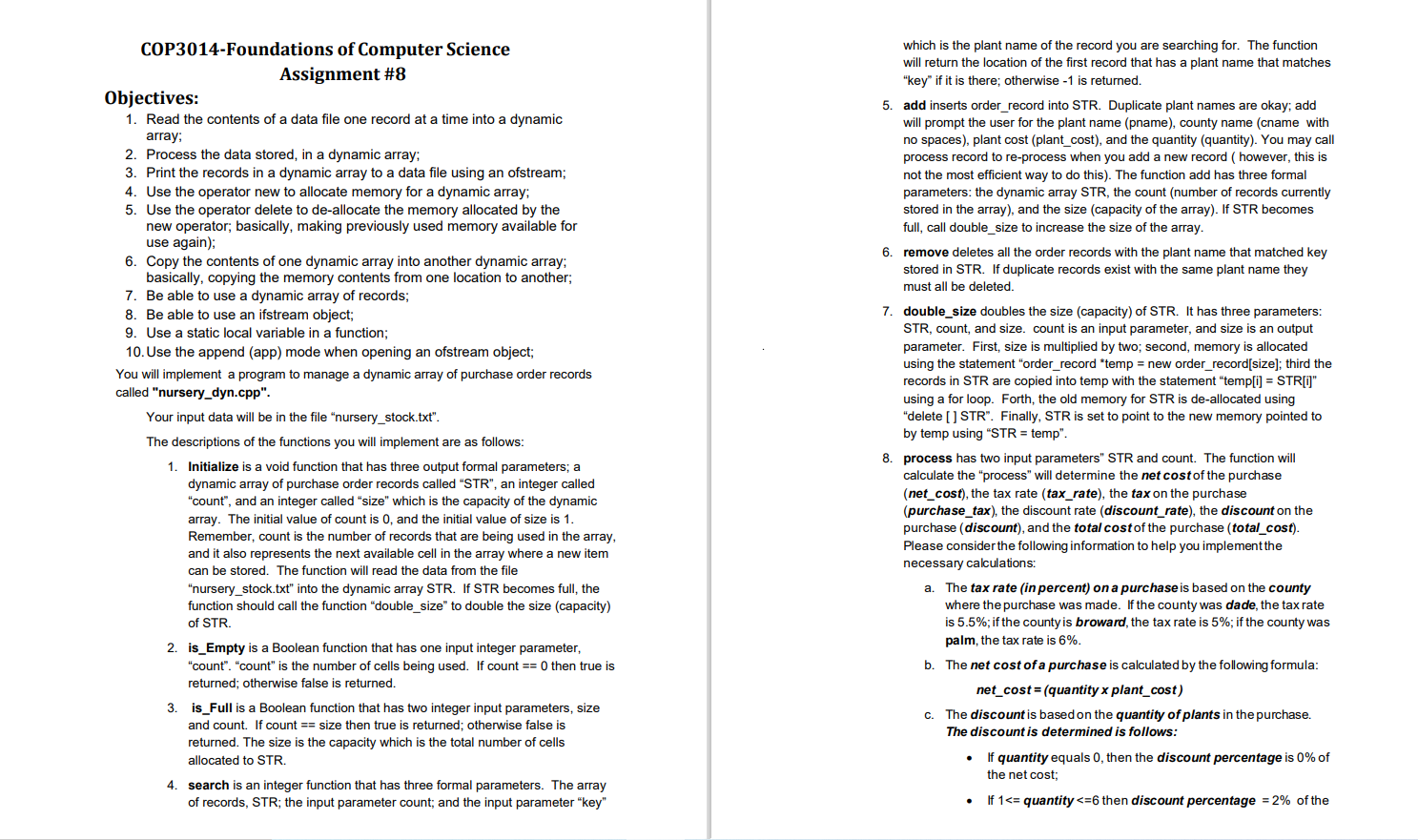
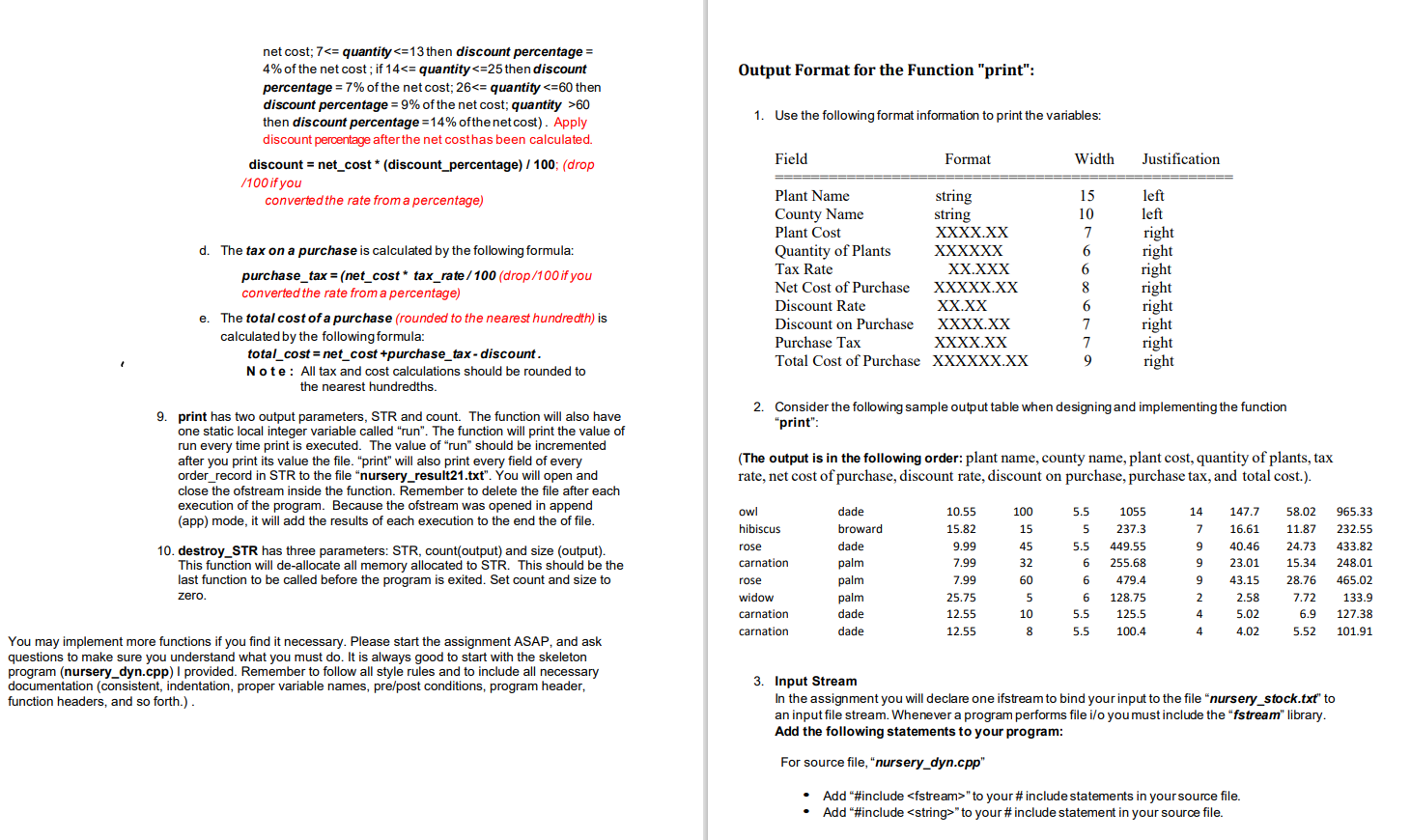
COP3014-Foundations of Computer Science Assignment #8 Objectives: 1. Read the contents of a data file one record at a time into a dynamic array; 2. Process the data stored, in a dynamic array: 3. Print the records in a dynamic array to a data file using an ofstream; 4. Use the operator new to allocate memory for a dynamic array; 5. Use the operator delete to de-allocate the memory allocated by the new operator; basically, making previously used memory available for use again); 6. Copy the contents of one dynamic array into another dynamic array; basically, copying the memory contents from one location to another; 7. Be able to use a dynamic array of records; 8. Be able to use an ifstream object; 9. Use a static local variable in a function; 10. Use the append (app) mode when opening an ofstream object; You will implement a program to manage a dynamic array of purchase order records called "nursery_dyn.cpp". Your input data will be in the file "nursery_stock.txt". The descriptions of the functions you will implement are as follows 1. Initialize is a void function that has three output formal parameters; a dynamic array of purchase order records called "STR, an integer called "count", and an integer called "size" which is the capacity of the dynamic array. The initial value of count is 0, and the initial value of size is 1. Remember, count is the number of records that are being used in the array, and it also represents the next available cell in the array where a new item can be stored. The function will read the data from the file "nursery_stock.txt" into the dynamic array STR. If STR becomes full, the function should call the function "double_size" to double the size (capacity) of STR. 2. is_Empty is a Boolean function that has one input integer parameter, "count". "count" is the number of cells being used. If count == 0 then true is returned; otherwise false is returned. 3. is_Full is a Boolean function that has two integer input parameters, size and count. If count == size then true is returned; otherwise false is returned. The size is the capacity which is the total number of cells allocated to STR. 4. search is an integer function that has three formal parameters. The array of records, STR; the input parameter count; and the input parameter "key" which is the plant name of the record you are searching for. The function will return the location of the first record that has a plant name that matches "key" if it is there; otherwise - 1 is returned. 5. add inserts order_record into STR. Duplicate plant names are okay; add will prompt the user for the plant name (pname), county name (cname with no spaces), plant cost (plant_cost), and the quantity (quantity). You may call process record to re-process when you add a new record ( however, this is not the most efficient way to do this). The function add has three formal parameters: the dynamic array STR, the count (number of records currently stored in the array), and the size (capacity of the array). If STR becomes full, call double_size to increase the size of the array. 6. remove deletes all the order records with the plant name that matched key stored in STR. If duplicate records exist with the same plant name they must all be deleted. 7. double_size doubles the size (capacity) of STR. It has three parameters: STR, count, and size. count is an input parameter, and size is an output parameter. First, size is multiplied by two, second, memory is allocated using the statement "order_record *temp = new order_record[size]; third the records in STR are copied into temp with the statement "temp[i] = STR[" using a for loop. Forth, the old memory for STR is de-allocated using "delete [ ] STR. Finally, STR is set to point to the new memory pointed to by temp using "STR = temp". 8. process has two input parameters" STR and count. The function will calculate the "process" will determine the net cost of the purchase (net_cost), the tax rate (tax_rate), the tax on the purchase (purchase_tax), the discount rate (discount_rate), the discount on the purchase (discount), and the total cost of the purchase (total_cost). Please consider the following information to help you implement the necessary calculations: a. The tax rate (in percent) on a purchase is based on the county where the purchase was made. If the county was dade, the tax rate is 5.5%; if the county is broward, the tax rate is 5%; if the county was palm, the tax rate is 6%. b. The net cost of a purchase is calculated by the following formula: net_cost=(quantity x plant_cost) c. The discount is based on the quantity of plants in the purchase. The discount is determined is follows: If quantity equals 0, then the discount percentage is 0% of the net cost; If 160 then discount percentage =14% ofthe netcost). Apply discount percentage after the net costhas been calculated. discount = net_cost * (discount_percentage) / 100; (drop /100 if you converted the rate from a percentage) Field Format Width Justification left left right right Plant Name string County Name string Plant Cost XXXX.XX Quantity of Plants XXXXXX Tax Rate XX.XXX Net Cost of Purchase XXXXX.XX Discount Rate XX.XX Discount on Purchase XXXX.XX Purchase Tax XXXX.XX Total Cost of Purchase XXXXXX.XX d. The tax on a purchase is calculated by the following formula: purchase_tax = (net_cost * tax_rate / 100 (drop/100 if you converted the rate from a percentage) e. The total cost of a purchase (rounded to the nearest hundredth) is calculated by the following formula: total_cost = net_cost +purchase_tax - discount. Note: All tax and cost calculations should be rounded to the nearest hundredths. 15 10 7 6 6 8 6 7 7 9 right right right right right right 2. Consider the following sample output table when designing and implementing the function "print": 9. print has two output parameters, STR and count. The function will also have one static local integer variable called "run". The function will print the value of run every time int is executed. The value of "run" should be incremented after you print its value the file. "print" will also print every field of every order_record in STR to the file nursery_result21.txt". You will open and close the ofstream inside the function. Remember to delete the file after each execution of the program. Because the ofstream was opened in append (app) mode, it will add the results of each execution to the end the of file. (The output is in the following order: plant name, county name, plant cost, quantity of plants, tax rate, net cost of purchase, discount rate, discount on purchase, purchase tax, and total cost.). 14 100 15 45 32 5.5 5 5.5 6 10. destroy_STR has three parameters: STR, count(output) and size (output). This function will de-allocate all memory allocated to STR. This should be the last function to be called before the program is exited. Set count and size to zero. owl hibiscus rose carnation rose widow carnation carnation dade broward dade palm palm palm dade dade 10.55 15.82 9.99 7.99 7.99 25.75 12.55 12.55 1055 237.3 449.55 255.68 479.4 128.75 125.5 100.4 7 9 9 9 2 147.7 16.61 40.46 23.01 43.15 2.58 5.02 4.02 58.02 11.87 24.73 15.34 28.76 7.72 6.9 5.52 965.33 232.55 433.82 248.01 465.02 133.9 127.38 101.91 60 5 10 8 6 6 5.5 5.5 4 4 You may implement more functions if you find it necessary. Please start the assignment ASAP, and ask questions to make sure you understand what you must do. It is always good to start with the skeleton program (nursery_dyn.cpp) provided. Remember to follow all style rules and to include all necessary documentation (consistent, indentation, proper variable names, pre/post conditions, program header, function headers, and so forth.). 3. Input Stream In the assignment you will declare one ifstream to bind your input to the file "nursery_stock.txt" to an input file stream. Whenever a program performs file i/o you must include the "fstream" library. Add the following statements to your program: For source file, "nursery_dyn.cpp" Add "#include
Step by Step Solution
There are 3 Steps involved in it

Get step-by-step solutions from verified subject matter experts
 Study Help