Question: Could you help me with this? This is C++. I really need your help please This looks quite long, but I just need a Time.cpp
Could you help me with this? This is C++.
I really need your help please
This looks quite long, but I just need a Time.cpp
Thank you
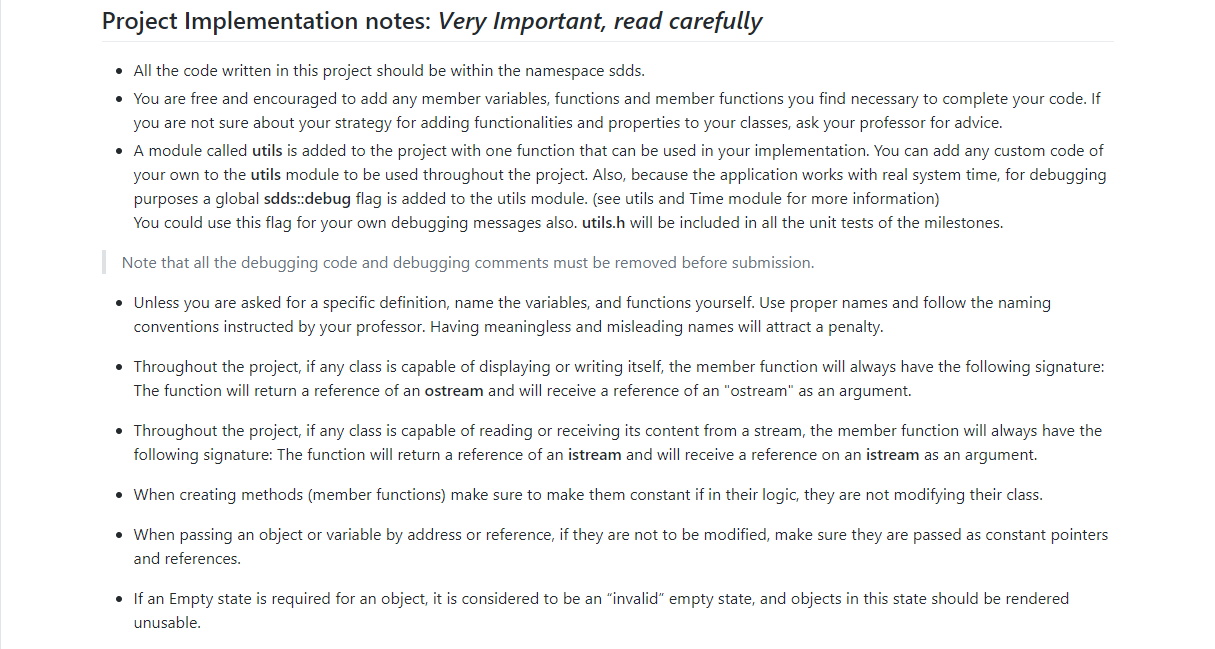
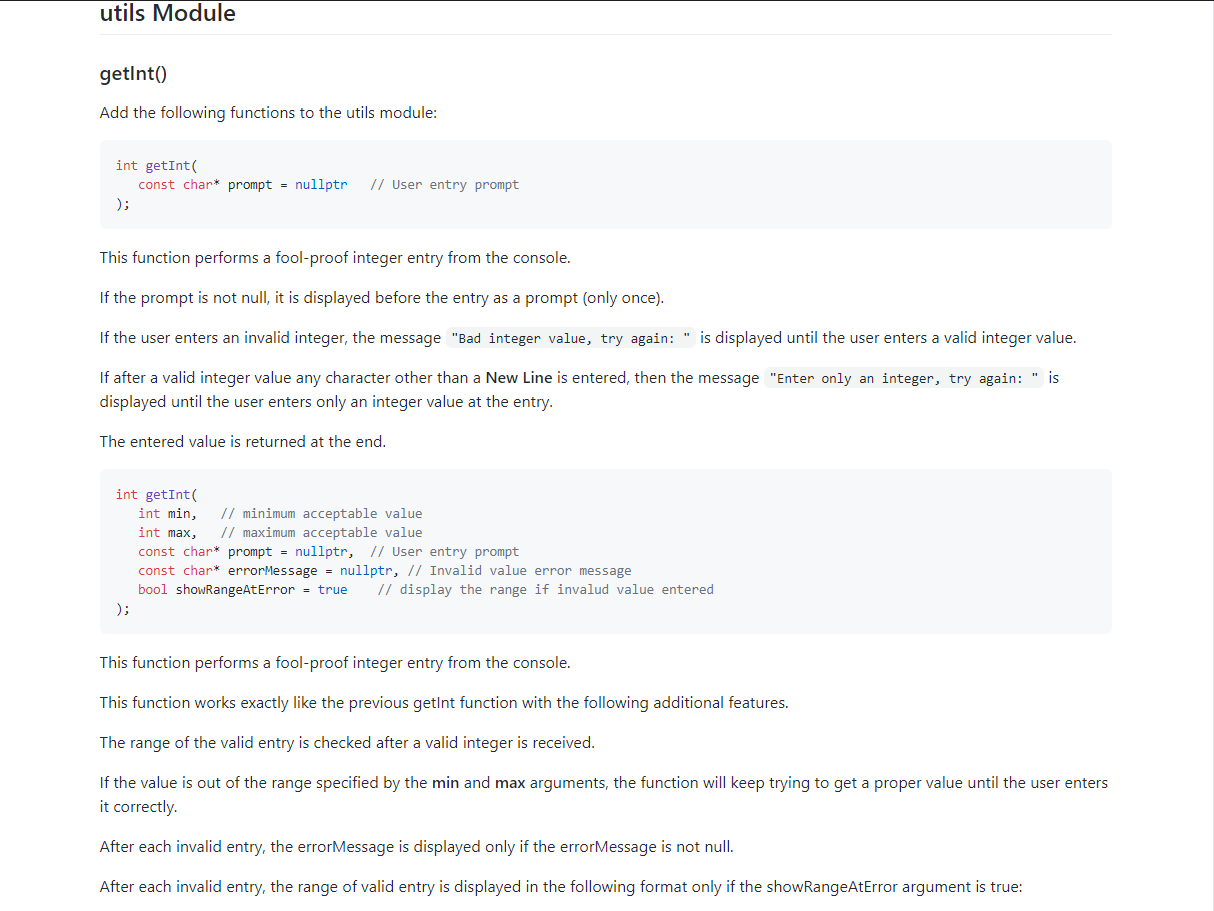
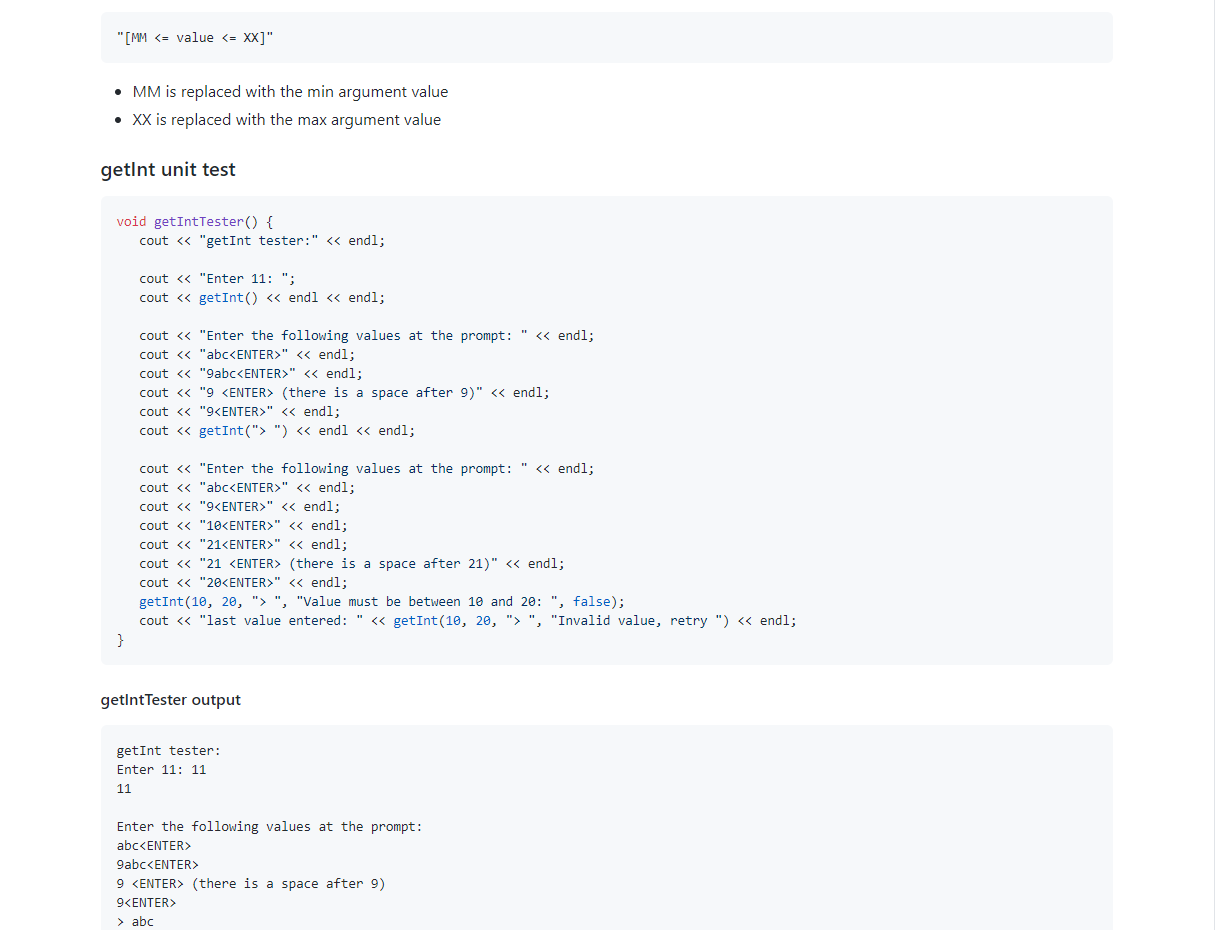
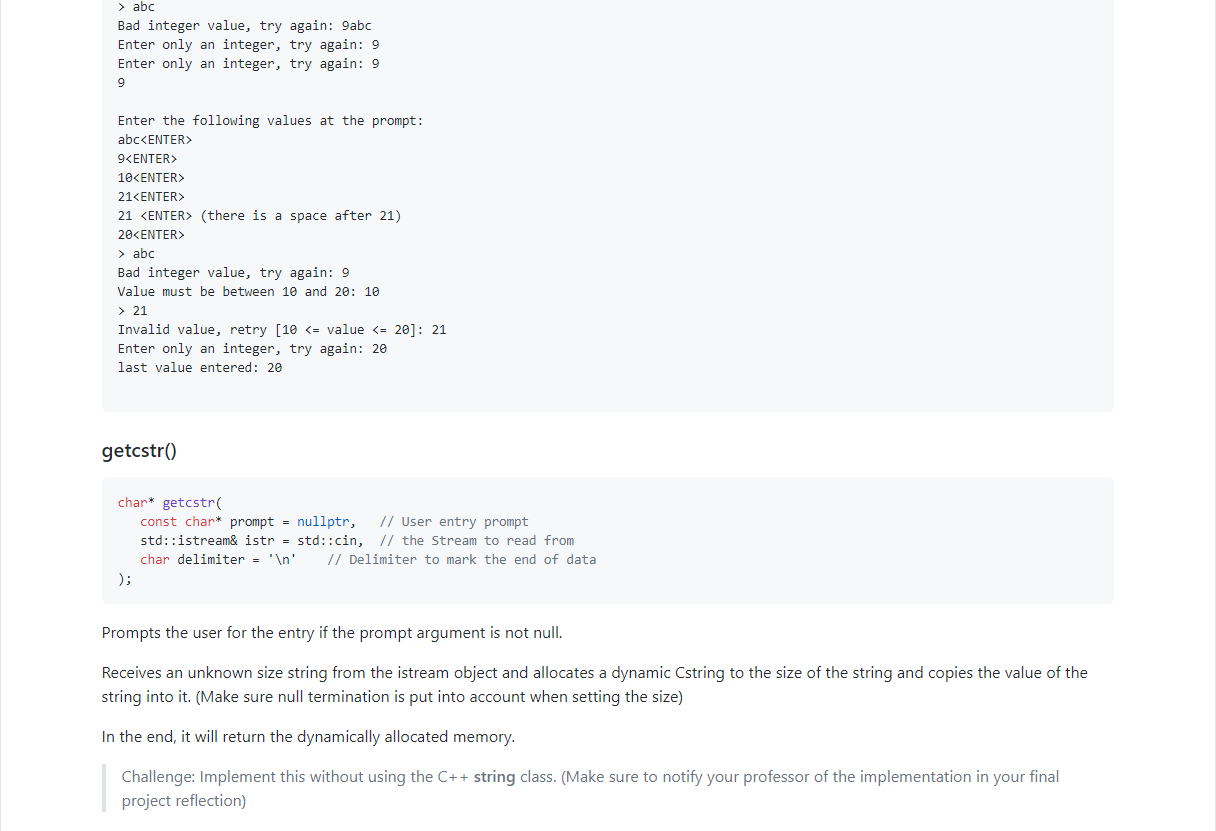
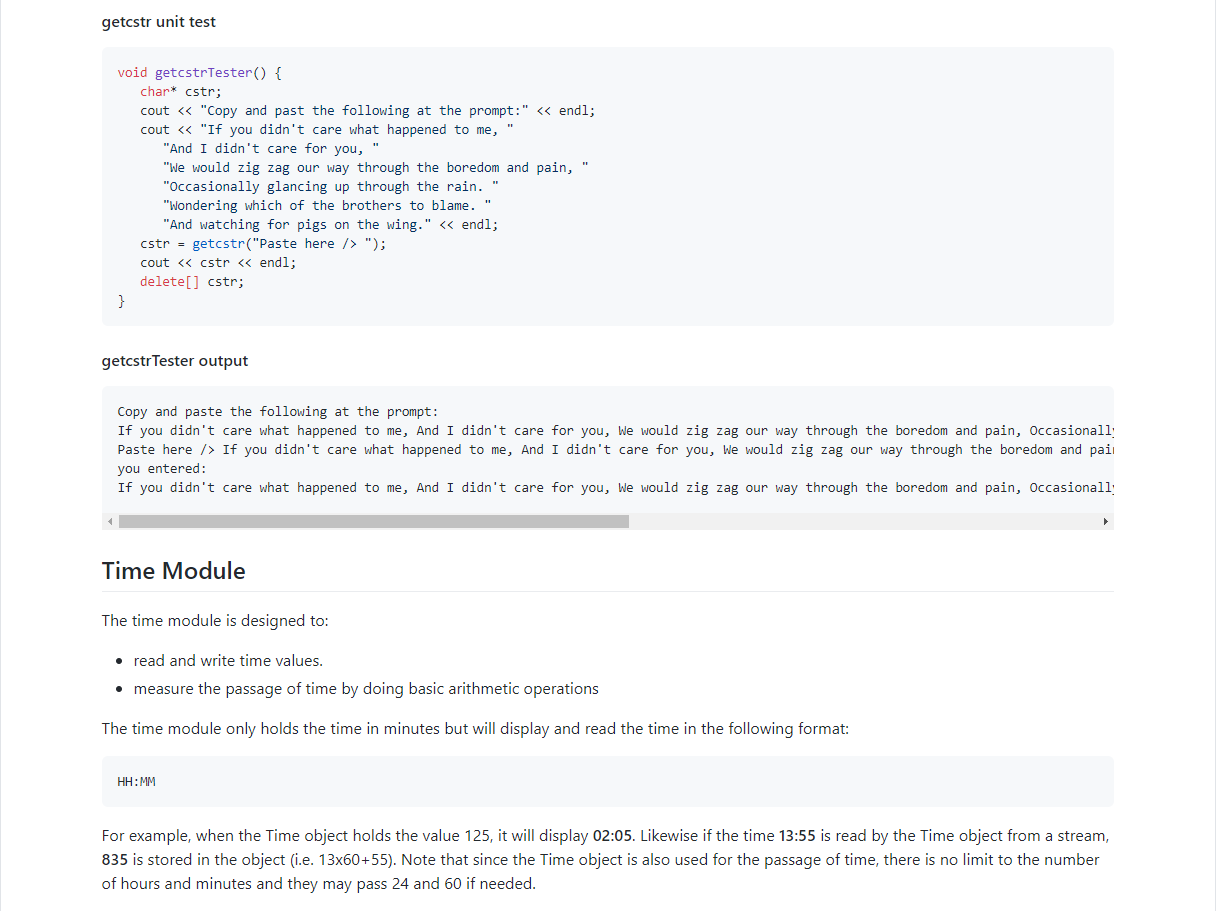
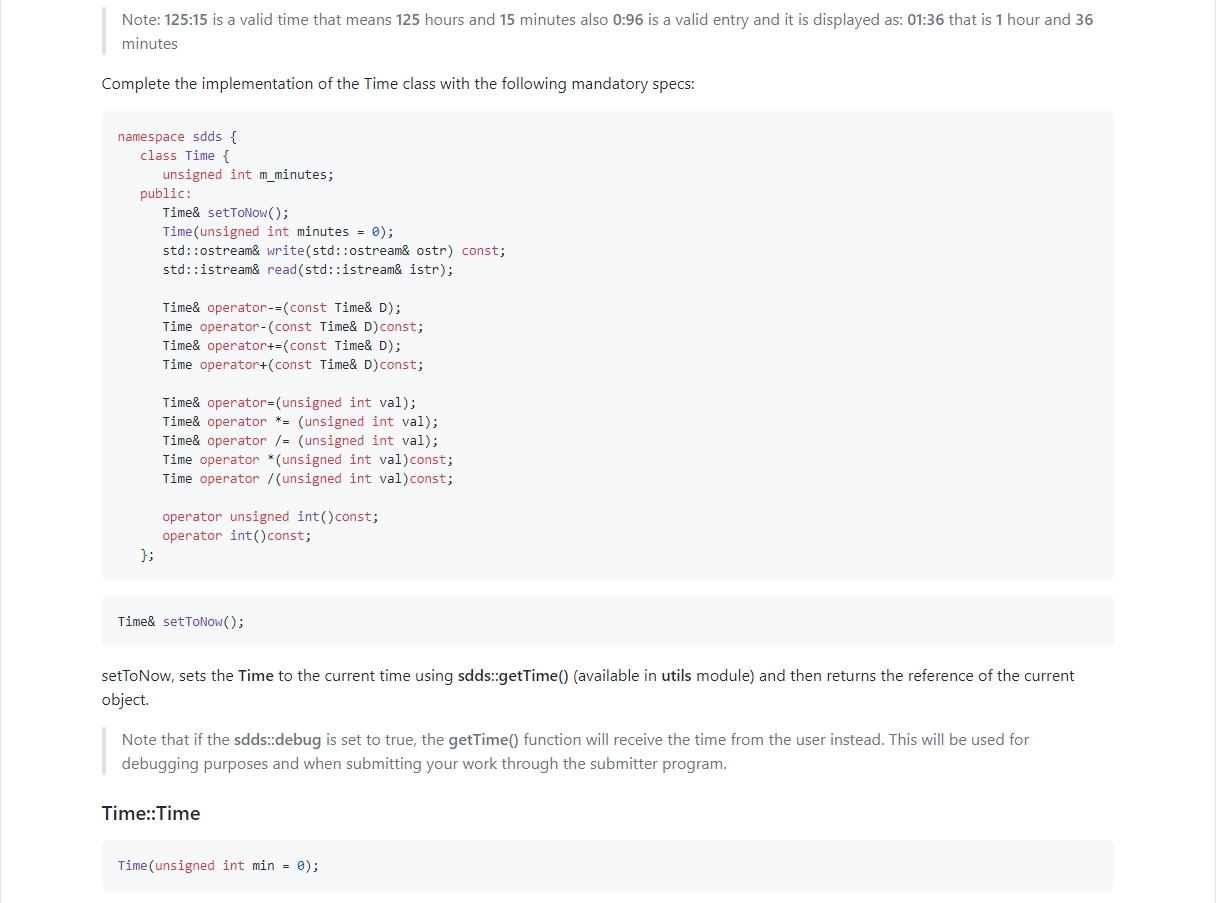
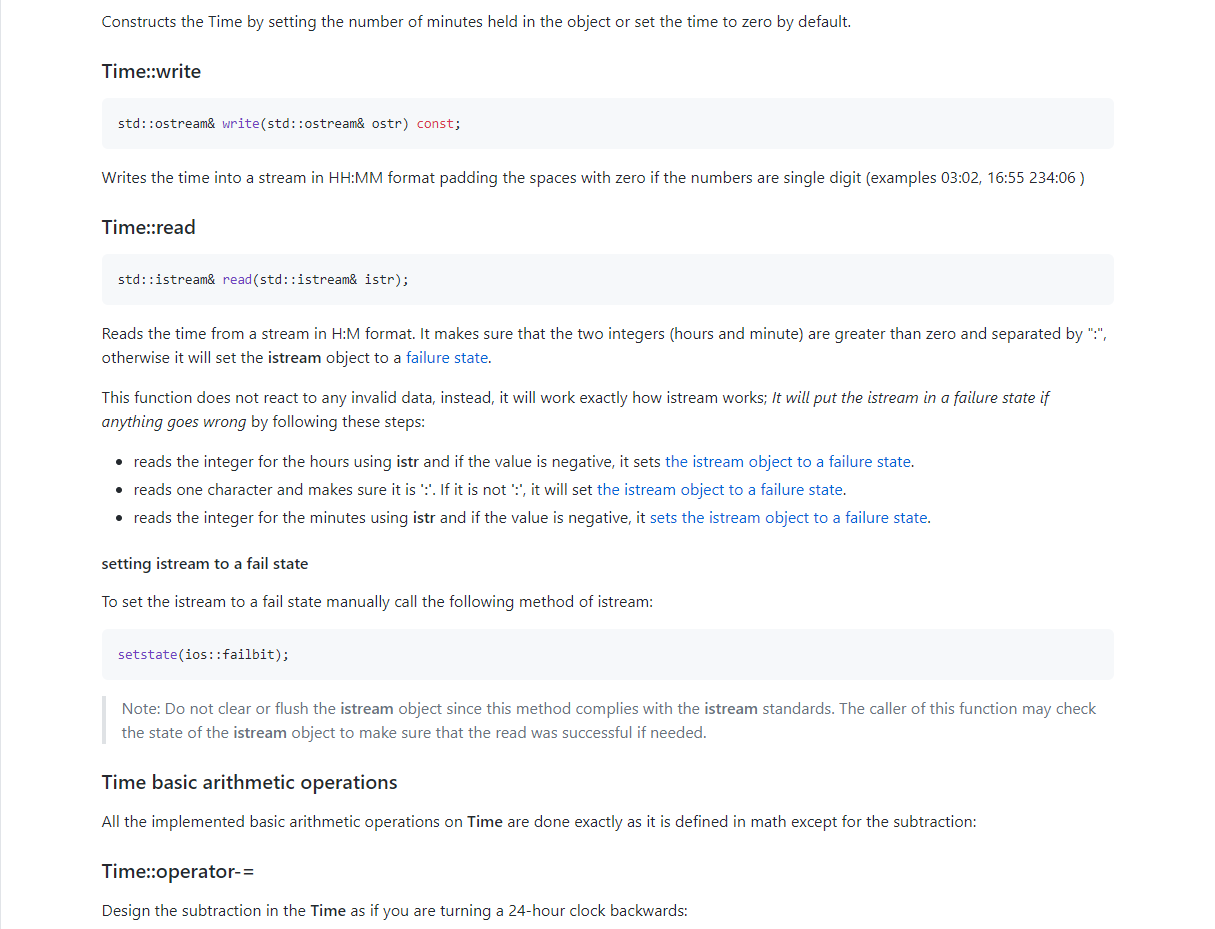
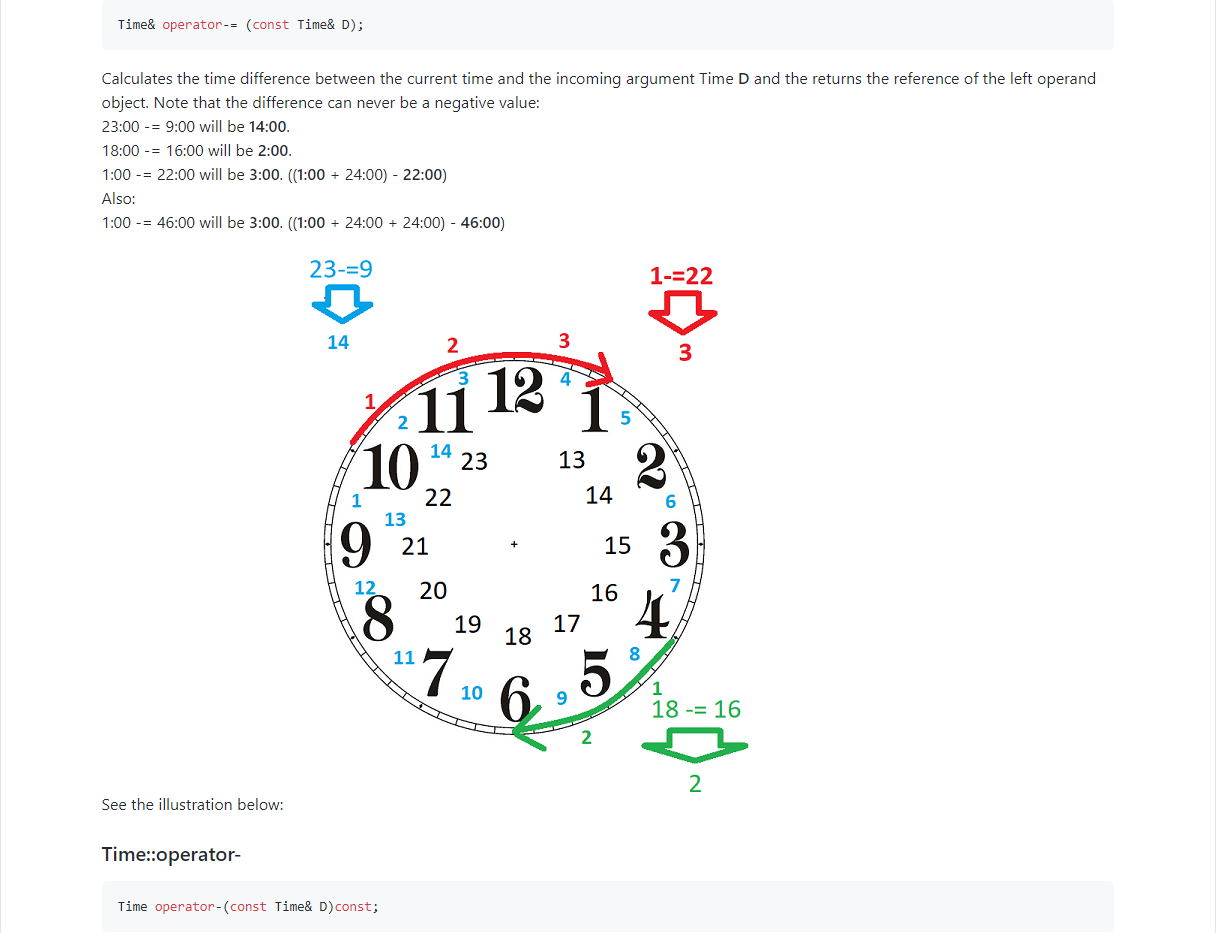
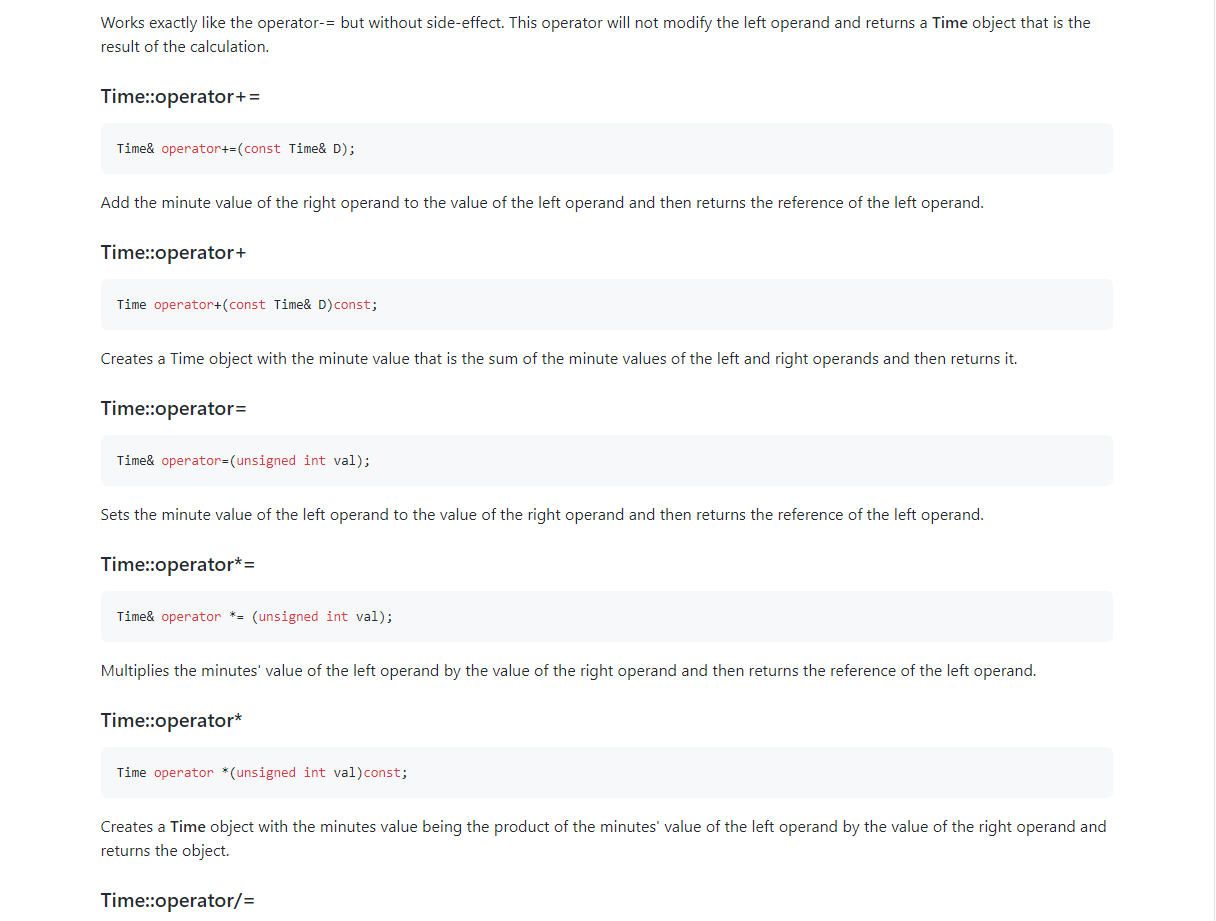
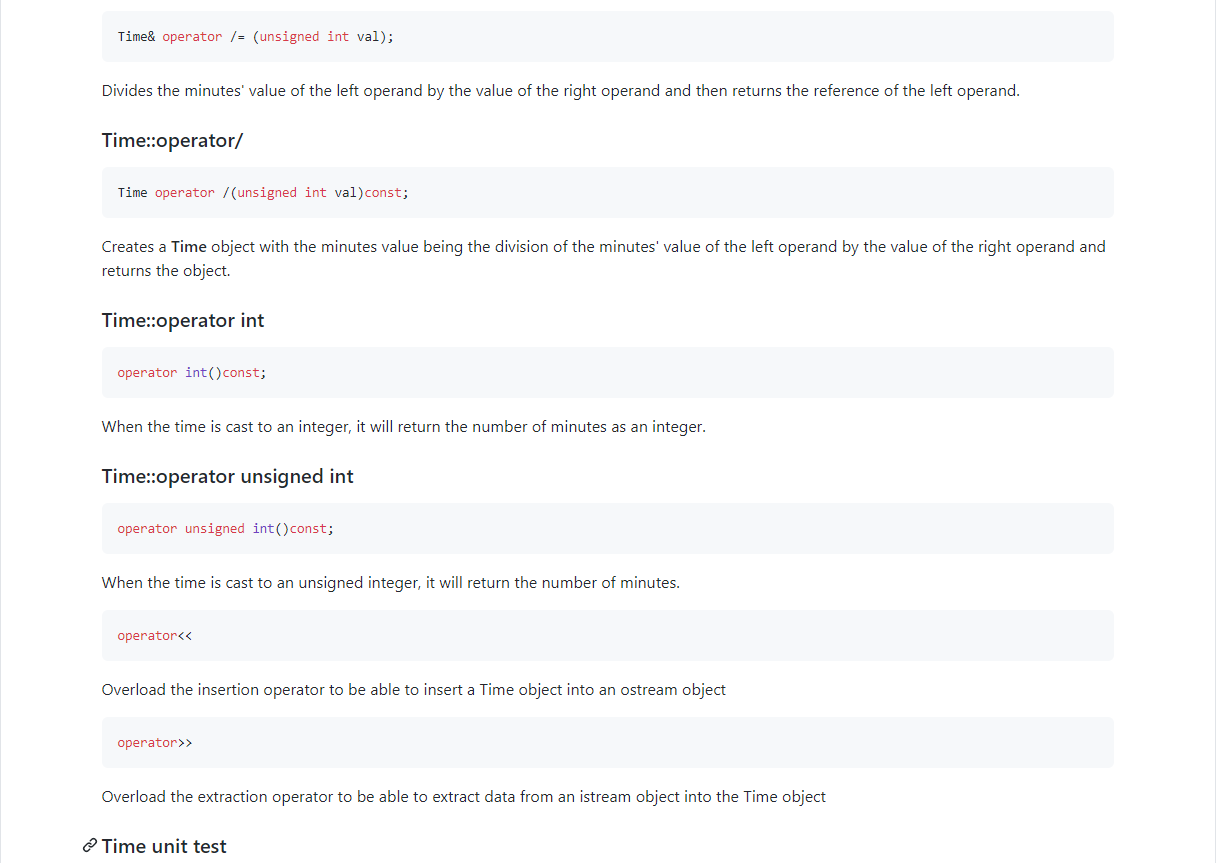
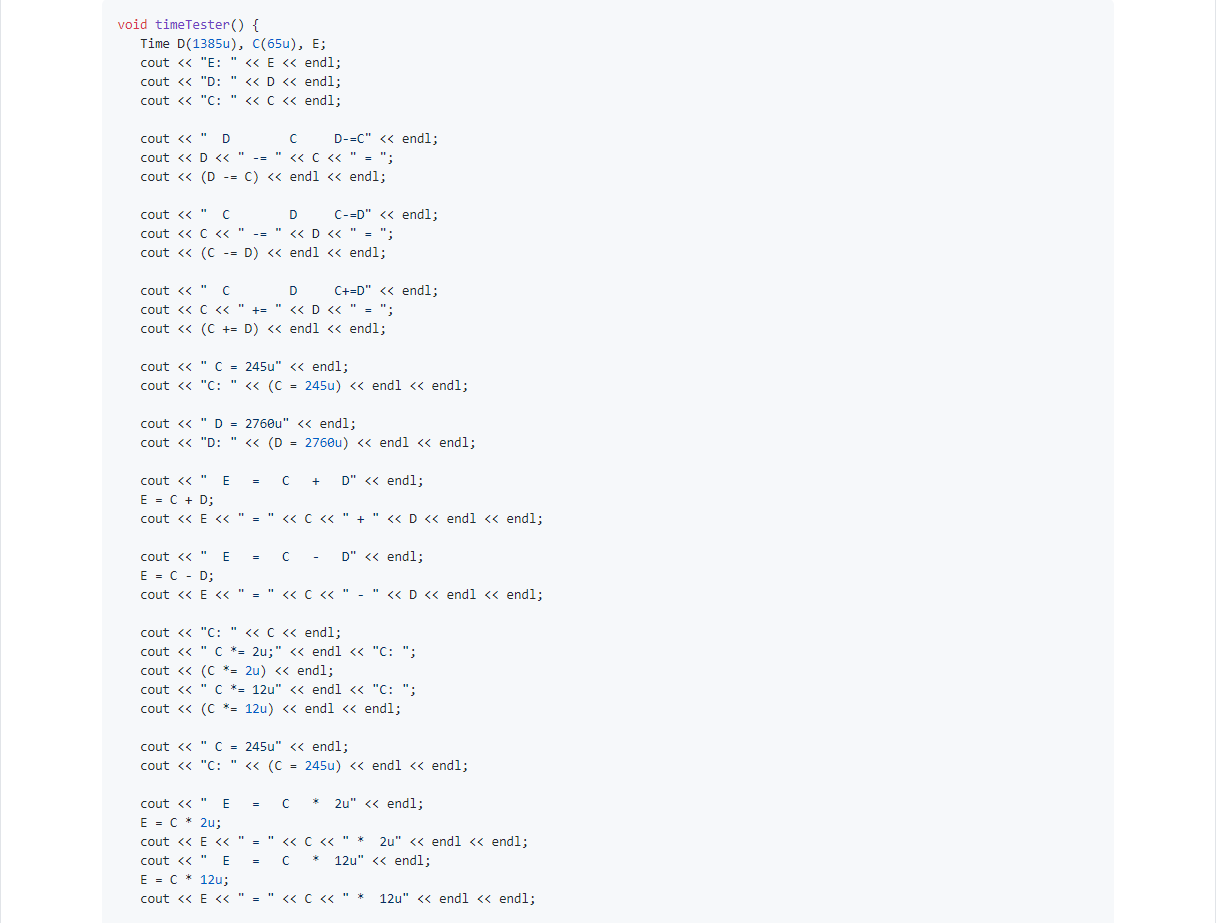
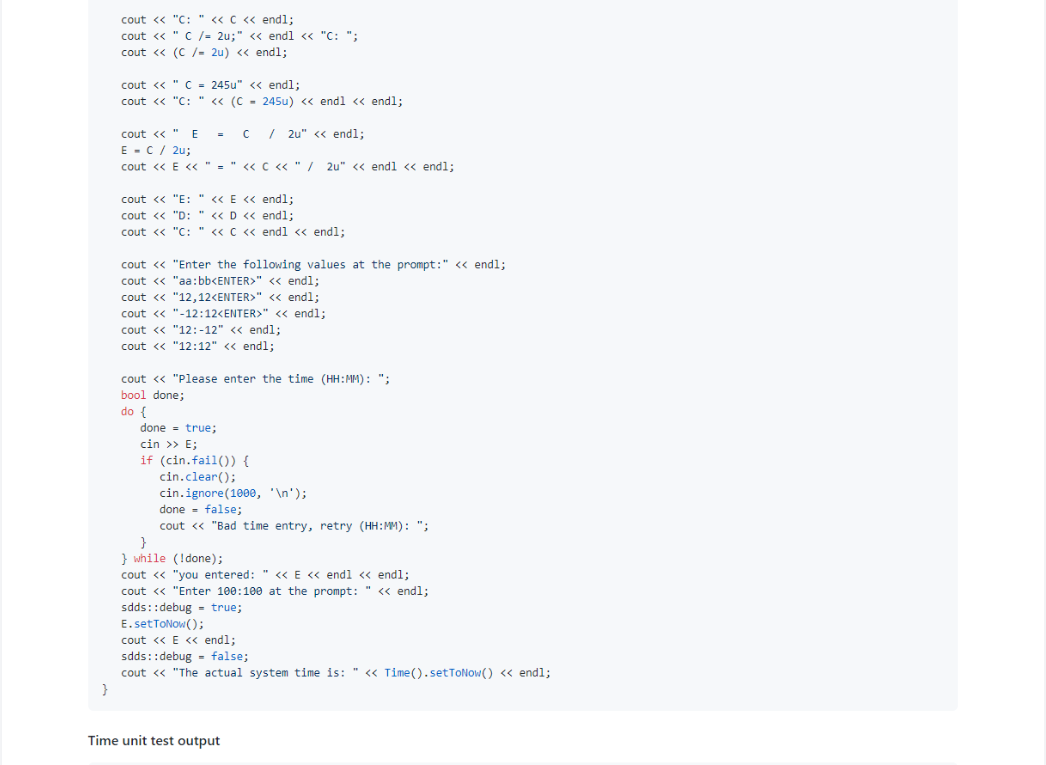
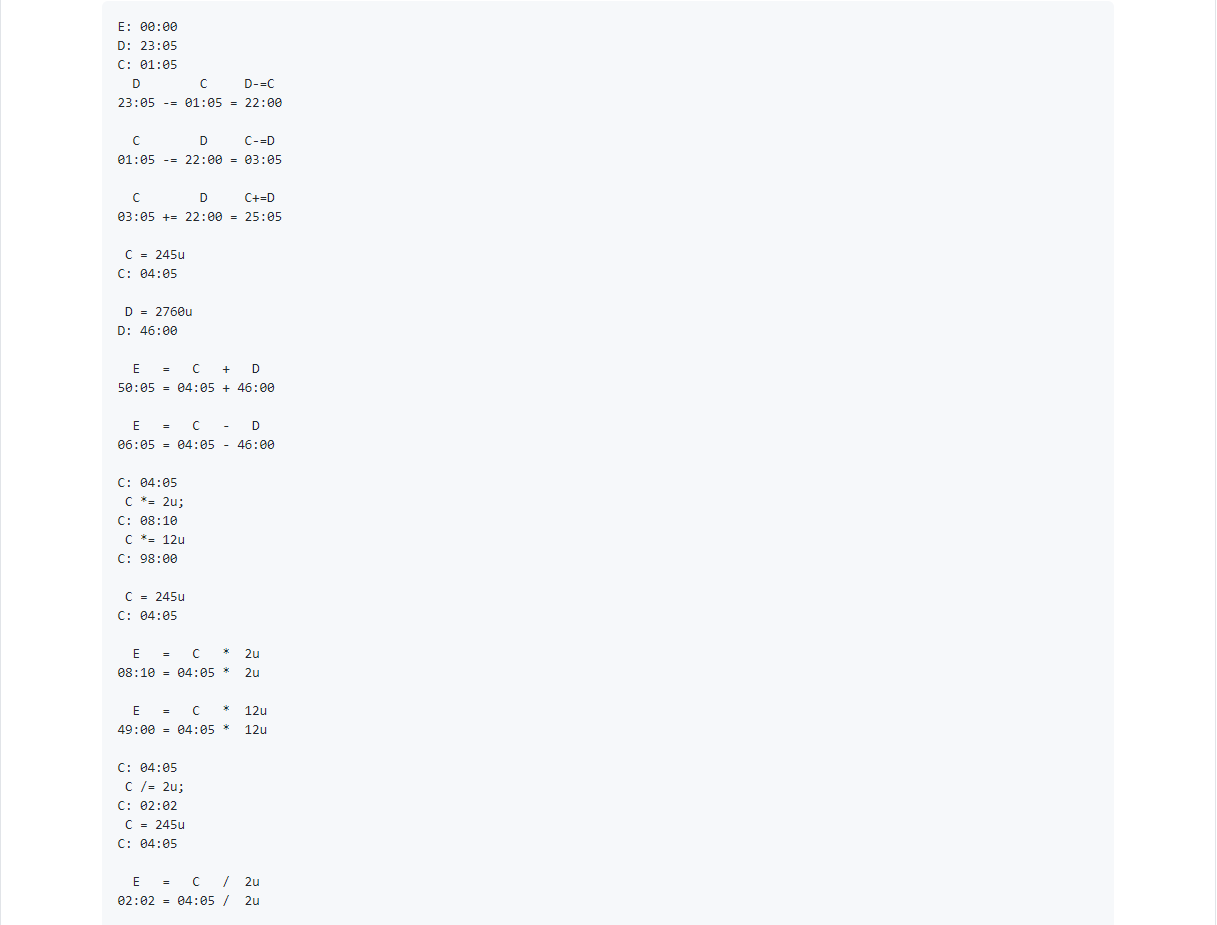
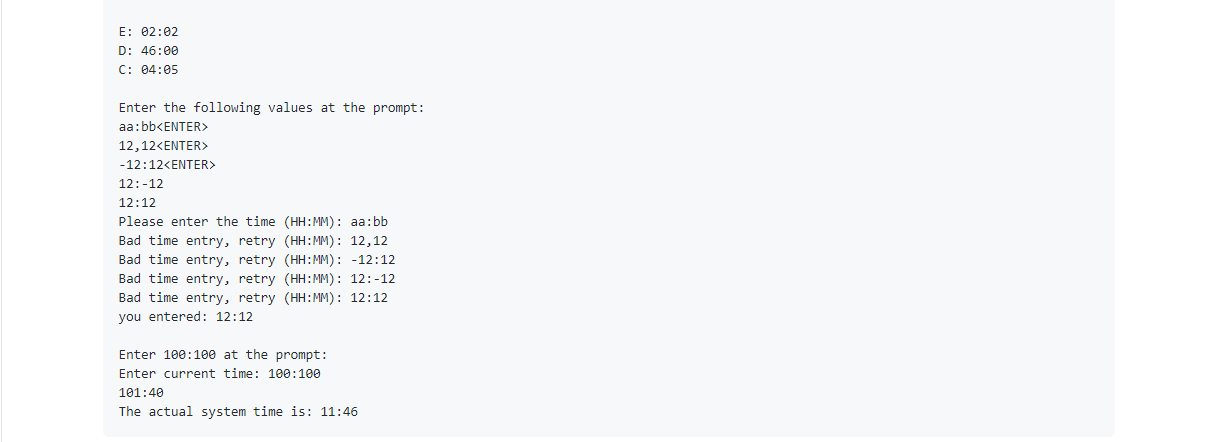
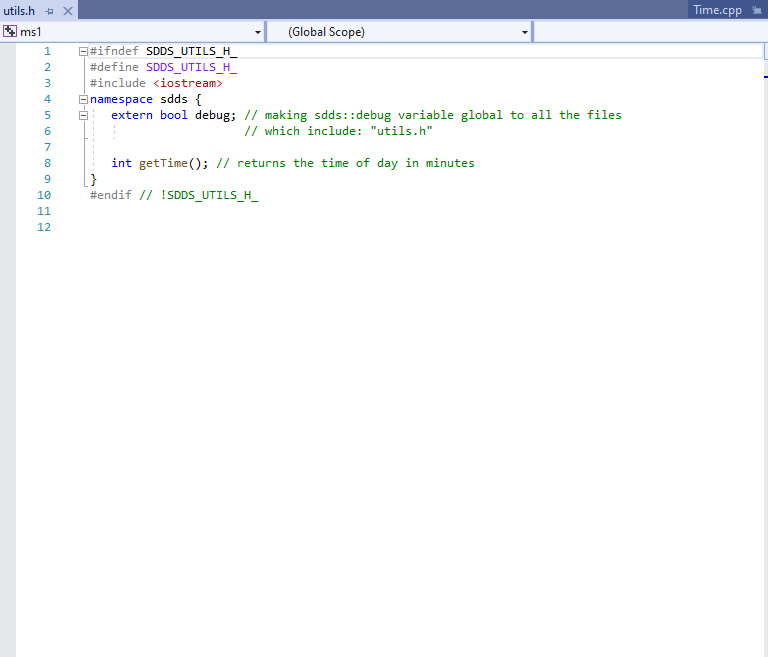
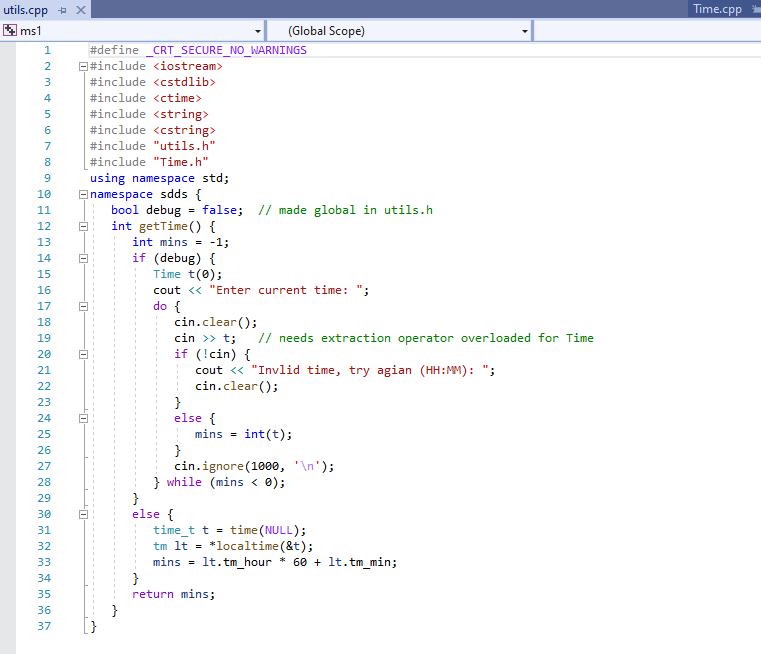
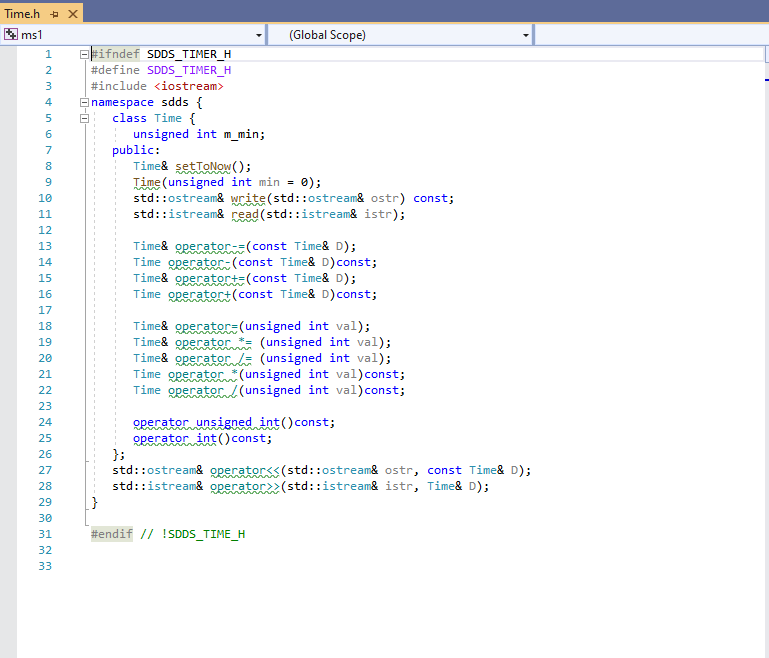
Project Implementation notes: Very Important, read carefully All the code written in this project should be within the namespace sdds. You are free and encouraged to add any member variables, functions and member functions you find necessary to complete your code. If you are not sure about your strategy for adding functionalities and properties to your classes, ask your professor for advice. A module called utils is added to the project with one function that can be used in your implementation. You can add any custom code of your own to the utils module to be used throughout the project. Also, because the application works with real system time, for debugging purposes a global sdds::debug flag is added to the utils module. (see utils and Time module for more information) You could use this flag for your own debugging messages also. utils.h will be included in all the unit tests of the milestones. Note that all the debugging code and debugging comments must be removed before submission. Unless you are asked for a specific definition, name the variables, and functions yourself. Use proper names and follow the naming conventions instructed by your professor. Having meaningless and misleading names will attract a penalty. Throughout the project, if any class is capable of displaying or writing itself, the member function will always have the following signature: The function will return a reference of an ostream and will receive a reference of an "ostream" as an argument. Throughout the project, if any class is capable of reading or receiving its content from a stream, the member function will always have the following signature: The function will return a reference of an istream and will receive a reference on an istream as an argument. When creating methods (member functions) make sure to make them constant if in their logic, they are not modifying their class. When passing an object or variable by address or reference, if they are not to be modified, make sure they are passed as constant pointers and references. If an Empty state is required for an object, it is considered to be an "invalid" empty state, and objects in this state should be rendered unusable. utils Module getInt() Add the following functions to the utils module: int getInt( const char* prompt = nullptr ); // User entry prompt This function performs a fool-proof integer entry from the console. If the prompt is not null, it is displayed before the entry as a prompt (only once). If the user enters an invalid integer, the message "Bad integer value, try again: " is displayed until the user enters a valid integer value. If after a valid integer value any character other than a New Line is entered, then the message "Enter only an integer, try again: " is displayed until the user enters only an integer value at the entry. The entered value is returned at the end. int getInt( int min, // minimum acceptable value int max, // maximum acceptable value const char* prompt = nullptr, // User entry prompt const char* errorMessage = nullptr, // Invalid value error message bool showRangeAtError = true // display the range if invalud value entered ); This function performs a fool-proof integer entry from the console. This function works exactly like the previous getint function with the following additional features. The range of the valid entry is checked after a valid integer is received. If the value is out of the range specified by the min and max arguments, the function will keep trying to get a proper value until the user enters it correctly. After each invalid entry, the errorMessage is displayed only if the errorMessage is not null. After each invalid entry, the range of valid entry is displayed in the following format only if the showRangeAtError argument is true: "[MM " " (there is a space after 9)" " " " " " (there is a space after 21)" " ", "Value must be between 10 and 20: ", false); cout ", "Invalid value, retry ") 9abc 9 (there is a space after 9) 9 > abc > abc Bad integer value, try again: 9abc Enter only an integer, try again: 9 Enter only an integer, try again: 9 9 Enter the following values at the prompt: abc 9 18XENTER> 21 21 (there is a space after 21) 20 > abc Bad integer value, try again: 9 Value must be between 10 and 20: 10 > 21 Invalid value, retry (10 "); cout If you didn't care what happened to me, And I didn't care for you, we would zig zag our way through the boredom and pair you entered: If you didn't care what happened to me, And I didn't care for you, we would zig zag our way through the boredom and pain, Occasionall Time Module The time module is designed to: read and write time values. measure the passage of time by doing basic arithmetic operations The time module only holds the time in minutes but will display and read the time in the following format: HH:MM For example, when the Time object holds the value 125, it will display 02:05. Likewise if the time 13:55 is read by the Time object from a stream, 835 is stored in the object (i.e. 13x60+55). Note that since the Time object is also used for the passage of time, there is no limit to the number of hours and minutes and they may pass 24 and 60 if needed. Note: 125:15 is a valid time that means 125 hours and 15 minutes also 0:96 is a valid entry and it is displayed as: 01:36 that is 1 hour and 36 minutes Complete the implementation of the Time class with the following mandatory specs: namespace sdds { class Time { unsigned int m_minutes; public: Time& setToNow(); Time(unsigned int minutes = ); std::ostream& write(std::ostream& ostr) const; std::istream& read(std::istream& istr); Time& operator-=(const Time& D); Time operator-(const Time& D) const; Time& operator+(const Time&D); Time operator+(const Time& D) const; Time& operator=(unsigned int val); Time& operator *= (unsigned int val); Time& operator /= (unsigned int val); Time operator *(unsigned int val)const; Time operator /(unsigned int val)const; operator unsigned int() const; operator int() const; }; Time& setToNow(); setToNow, sets the Time to the current time using sdds::getTime() (available in utils module) and then returns the reference of the current object. Note that if the sdds::debug is set to true, the getTime() function will receive the time from the user instead. This will be used for debugging purposes and when submitting your work through the submitter program. Time::Time Time (unsigned int min = 0); Constructs the Time by setting the number of minutes held in the object or set the time to zero by default. Time::write std::ostream& write(std::ostream& ostr) const; Writes the time into a stream in HH:MM format padding the spaces with zero if the numbers are single digit (examples 03:02, 16:55 234:06) Time::read std::istream& read(std::istream& istr); Reads the time from a stream in H:M format. It makes sure that the two integers (hours and minute) are greater than zero and separated by":", otherwise it will set the istream object to a failure state. This function does not react to any invalid data, instead, it will work exactly how istream works; It will put the istream in a failure state if anything goes wrong by following these steps: reads the integer for the hours using istr and if the value is negative, it sets the istream object a failure state. reads one character and makes sure it is ?. If it is not :', it will set the istream object to a failure state. reads the integer for the minutes using istr and if the value is negative, it sets the istream object to a failure state. setting istream to a fail state To set the istream to a fail state manually call the following method of istream: setstate(ios:: failbit); Note: Do not clear or flush the istream object since this method complies with the istream standards. The caller of this function may check the state of the istream object to make sure that the read was successful if needed. Time basic arithmetic operations All the implemented basic arithmetic operations on Time are done exactly as it is defined in math except for the subtraction: Time::operator-= Design the subtraction in the Time as if you are turning a 24-hour clock backwards: Time& operator-- (const Time& D); Calculates the time difference between the current time and the incoming argument Time D and the returns the reference of the left operand object. Note that the difference can never be a negative value: 23:00 -= 9:00 will be 14:00. 18:00 -= 16:00 will be 2:00. 1:00 -= 22:00 will be 3:00. ((1:00 + 24:00) - 22:00) Also: 1:00 -= 46:00 will be 3:00. ((1:00 - 24:00 + 24:00) - 46:00) 23-=9 1-=22 14 2 3 3 5 13 14 23 22 13 21 14 11 12 1 10 2 19 3 4. 17 6 6 15 12 7 8 20 19 16 17 18 8 5 10 1 9 18 -= 16 2. See the illustration below: Time::operator- Time operator-(const Time& D) const; Works exactly like the operator-= but without side-effect. This operator will not modify the left operand and returns a Time object that is the result of the calculation. Time::operator+= Time& operator+(const Time& D); Add the minute value of the right operand to the value of the left operand and then returns the reference of the left operand. Time::operator+ Time operator+(const Time& D) const; Creates a Time object with the minute value that is the sum of the minute values of the left and right operands and then returns it. Time::operator= Time& operator=(unsigned int val); Sets the minute value of the left operand to the value of the right operand and then returns the reference of the left operand. Time::operator* = Time& operator *- (unsigned int val); Multiplies the minutes' value of the left operand by the value of the right operand and then returns the reference of the left operand. Time::operator* Time operator *(unsigned int val) const; Creates a Time object with the minutes value being the product of the minutes' value of the left operand by the value of the right operand and returns the object. Time::operator/= Time& operator /= (unsigned int val); Divides the minutes' value of the left operand by the value of the right operand and then returns the reference of the left operand. Time::operator/ Time operator /(unsigned int val) const; Creates a Time object with the minutes value being the division of the minutes' value of the left operand by the value of the right operand and returns the object. Time::operator int operator int() const; When the time is cast to an integer, it will return the number of minutes as an integer. Time::operator unsigned int operator unsigned int() const; When the time is cast to an unsigned integer, it will return the number of minutes. operator> Overload the extraction operator to be able to extract data from an istream object into the Time object Time unit test void timeTester() { Time D (1385), C(65u), E; cout " " " > E; if (cin.fail() { cin.clear(); cin.ignore(1000, ' '); done - false; cout 12,12 - 12:12 ENTER> 12: -12 12:12 Please enter the time (HH:MM): aa: bb Bad time entry, retry (HH:MM): 12,12 Bad time entry, retry (HH:MM): -12:12 Bad time entry, retry (HH:MM): 12:-12 Bad time entry, retry (HH:MM): 12:12 you entered: 12:12 Enter 100:100 at the prompt: Enter current time: 100:100 101:40 The actual system time is: 11:46 utils.h X Time.cpp 1 #ms1 1 2 3 4 5 6 7 8 9 10 11 12 (Global Scope) #ifndef SDDS_UTILS_H_ #define SDDS_UTILS_H_ #include namespace sdds { extern bool debug; // making sdds::debug variable global to all the files // which include: "utils.h" int getTime(); // returns the time of day in minutes #endif // SDDS_UTILS_H_ Time.cpp 1 utils.cpp + x 1 ms1 (Global Scope) #define _CRT_SECURE_NO_WARNINGS 2 #include 3 #include 4 #include 5 #include 6 #include 7 #include "utils.h" 8 #include "Time.h" 9 using namespace std; 10 namespace sdds { 11 bool debug = false; // made global in utils.h 12 int getTime() { 13 int mins = -1; 14 if (debug) { 15 Time t(0); 16 cout > t; // needs extraction operator overloaded for Time 20 if (!cin) { 21 cout 4. namespace sdds { 5 class Time { 6 unsigned int m_min; 7 public: 8 Time& setToNow(); 9 Time (unsigned int min = *); 10 std::ostream& write(std::ostream& ostr) const; 11 std::istream& cead(std::istream& istr); 12 13 Time& operator =(const Time&D); 14 Time operator:(const Time& D) const; 15 Time& operator+=(const Time& D); 16 Time operator+(const Time& D) const; 17 18 Time& operator=(unsigned int val); 19 Time& operatoru (unsigned int val); 20 Time& operatora (unsigned int val); 21 Time operator (unsigned int val)const; 22 Time operator/(unsigned int val)const; 23 24 operator unsigned int() const; 25 operator int() const; 26 }; 27 std::ostream& operator>(std::istream& istr, Time& D); 29 } 30 31 #endif // SDDS_TIME_H 32 33 Project Implementation notes: Very Important, read carefully All the code written in this project should be within the namespace sdds. You are free and encouraged to add any member variables, functions and member functions you find necessary to complete your code. If you are not sure about your strategy for adding functionalities and properties to your classes, ask your professor for advice. A module called utils is added to the project with one function that can be used in your implementation. You can add any custom code of your own to the utils module to be used throughout the project. Also, because the application works with real system time, for debugging purposes a global sdds::debug flag is added to the utils module. (see utils and Time module for more information) You could use this flag for your own debugging messages also. utils.h will be included in all the unit tests of the milestones. Note that all the debugging code and debugging comments must be removed before submission. Unless you are asked for a specific definition, name the variables, and functions yourself. Use proper names and follow the naming conventions instructed by your professor. Having meaningless and misleading names will attract a penalty. Throughout the project, if any class is capable of displaying or writing itself, the member function will always have the following signature: The function will return a reference of an ostream and will receive a reference of an "ostream" as an argument. Throughout the project, if any class is capable of reading or receiving its content from a stream, the member function will always have the following signature: The function will return a reference of an istream and will receive a reference on an istream as an argument. When creating methods (member functions) make sure to make them constant if in their logic, they are not modifying their class. When passing an object or variable by address or reference, if they are not to be modified, make sure they are passed as constant pointers and references. If an Empty state is required for an object, it is considered to be an "invalid" empty state, and objects in this state should be rendered unusable. utils Module getInt() Add the following functions to the utils module: int getInt( const char* prompt = nullptr ); // User entry prompt This function performs a fool-proof integer entry from the console. If the prompt is not null, it is displayed before the entry as a prompt (only once). If the user enters an invalid integer, the message "Bad integer value, try again: " is displayed until the user enters a valid integer value. If after a valid integer value any character other than a New Line is entered, then the message "Enter only an integer, try again: " is displayed until the user enters only an integer value at the entry. The entered value is returned at the end. int getInt( int min, // minimum acceptable value int max, // maximum acceptable value const char* prompt = nullptr, // User entry prompt const char* errorMessage = nullptr, // Invalid value error message bool showRangeAtError = true // display the range if invalud value entered ); This function performs a fool-proof integer entry from the console. This function works exactly like the previous getint function with the following additional features. The range of the valid entry is checked after a valid integer is received. If the value is out of the range specified by the min and max arguments, the function will keep trying to get a proper value until the user enters it correctly. After each invalid entry, the errorMessage is displayed only if the errorMessage is not null. After each invalid entry, the range of valid entry is displayed in the following format only if the showRangeAtError argument is true: "[MM " " (there is a space after 9)" " " " " " (there is a space after 21)" " ", "Value must be between 10 and 20: ", false); cout ", "Invalid value, retry ") 9abc 9 (there is a space after 9) 9 > abc > abc Bad integer value, try again: 9abc Enter only an integer, try again: 9 Enter only an integer, try again: 9 9 Enter the following values at the prompt: abc 9 18XENTER> 21 21 (there is a space after 21) 20 > abc Bad integer value, try again: 9 Value must be between 10 and 20: 10 > 21 Invalid value, retry (10 "); cout If you didn't care what happened to me, And I didn't care for you, we would zig zag our way through the boredom and pair you entered: If you didn't care what happened to me, And I didn't care for you, we would zig zag our way through the boredom and pain, Occasionall Time Module The time module is designed to: read and write time values. measure the passage of time by doing basic arithmetic operations The time module only holds the time in minutes but will display and read the time in the following format: HH:MM For example, when the Time object holds the value 125, it will display 02:05. Likewise if the time 13:55 is read by the Time object from a stream, 835 is stored in the object (i.e. 13x60+55). Note that since the Time object is also used for the passage of time, there is no limit to the number of hours and minutes and they may pass 24 and 60 if needed. Note: 125:15 is a valid time that means 125 hours and 15 minutes also 0:96 is a valid entry and it is displayed as: 01:36 that is 1 hour and 36 minutes Complete the implementation of the Time class with the following mandatory specs: namespace sdds { class Time { unsigned int m_minutes; public: Time& setToNow(); Time(unsigned int minutes = ); std::ostream& write(std::ostream& ostr) const; std::istream& read(std::istream& istr); Time& operator-=(const Time& D); Time operator-(const Time& D) const; Time& operator+(const Time&D); Time operator+(const Time& D) const; Time& operator=(unsigned int val); Time& operator *= (unsigned int val); Time& operator /= (unsigned int val); Time operator *(unsigned int val)const; Time operator /(unsigned int val)const; operator unsigned int() const; operator int() const; }; Time& setToNow(); setToNow, sets the Time to the current time using sdds::getTime() (available in utils module) and then returns the reference of the current object. Note that if the sdds::debug is set to true, the getTime() function will receive the time from the user instead. This will be used for debugging purposes and when submitting your work through the submitter program. Time::Time Time (unsigned int min = 0); Constructs the Time by setting the number of minutes held in the object or set the time to zero by default. Time::write std::ostream& write(std::ostream& ostr) const; Writes the time into a stream in HH:MM format padding the spaces with zero if the numbers are single digit (examples 03:02, 16:55 234:06) Time::read std::istream& read(std::istream& istr); Reads the time from a stream in H:M format. It makes sure that the two integers (hours and minute) are greater than zero and separated by":", otherwise it will set the istream object to a failure state. This function does not react to any invalid data, instead, it will work exactly how istream works; It will put the istream in a failure state if anything goes wrong by following these steps: reads the integer for the hours using istr and if the value is negative, it sets the istream object a failure state. reads one character and makes sure it is ?. If it is not :', it will set the istream object to a failure state. reads the integer for the minutes using istr and if the value is negative, it sets the istream object to a failure state. setting istream to a fail state To set the istream to a fail state manually call the following method of istream: setstate(ios:: failbit); Note: Do not clear or flush the istream object since this method complies with the istream standards. The caller of this function may check the state of the istream object to make sure that the read was successful if needed. Time basic arithmetic operations All the implemented basic arithmetic operations on Time are done exactly as it is defined in math except for the subtraction: Time::operator-= Design the subtraction in the Time as if you are turning a 24-hour clock backwards: Time& operator-- (const Time& D); Calculates the time difference between the current time and the incoming argument Time D and the returns the reference of the left operand object. Note that the difference can never be a negative value: 23:00 -= 9:00 will be 14:00. 18:00 -= 16:00 will be 2:00. 1:00 -= 22:00 will be 3:00. ((1:00 + 24:00) - 22:00) Also: 1:00 -= 46:00 will be 3:00. ((1:00 - 24:00 + 24:00) - 46:00) 23-=9 1-=22 14 2 3 3 5 13 14 23 22 13 21 14 11 12 1 10 2 19 3 4. 17 6 6 15 12 7 8 20 19 16 17 18 8 5 10 1 9 18 -= 16 2. See the illustration below: Time::operator- Time operator-(const Time& D) const; Works exactly like the operator-= but without side-effect. This operator will not modify the left operand and returns a Time object that is the result of the calculation. Time::operator+= Time& operator+(const Time& D); Add the minute value of the right operand to the value of the left operand and then returns the reference of the left operand. Time::operator+ Time operator+(const Time& D) const; Creates a Time object with the minute value that is the sum of the minute values of the left and right operands and then returns it. Time::operator= Time& operator=(unsigned int val); Sets the minute value of the left operand to the value of the right operand and then returns the reference of the left operand. Time::operator* = Time& operator *- (unsigned int val); Multiplies the minutes' value of the left operand by the value of the right operand and then returns the reference of the left operand. Time::operator* Time operator *(unsigned int val) const; Creates a Time object with the minutes value being the product of the minutes' value of the left operand by the value of the right operand and returns the object. Time::operator/= Time& operator /= (unsigned int val); Divides the minutes' value of the left operand by the value of the right operand and then returns the reference of the left operand. Time::operator/ Time operator /(unsigned int val) const; Creates a Time object with the minutes value being the division of the minutes' value of the left operand by the value of the right operand and returns the object. Time::operator int operator int() const; When the time is cast to an integer, it will return the number of minutes as an integer. Time::operator unsigned int operator unsigned int() const; When the time is cast to an unsigned integer, it will return the number of minutes. operator> Overload the extraction operator to be able to extract data from an istream object into the Time object Time unit test void timeTester() { Time D (1385), C(65u), E; cout " " " > E; if (cin.fail() { cin.clear(); cin.ignore(1000, ' '); done - false; cout 12,12 - 12:12 ENTER> 12: -12 12:12 Please enter the time (HH:MM): aa: bb Bad time entry, retry (HH:MM): 12,12 Bad time entry, retry (HH:MM): -12:12 Bad time entry, retry (HH:MM): 12:-12 Bad time entry, retry (HH:MM): 12:12 you entered: 12:12 Enter 100:100 at the prompt: Enter current time: 100:100 101:40 The actual system time is: 11:46 utils.h X Time.cpp 1 #ms1 1 2 3 4 5 6 7 8 9 10 11 12 (Global Scope) #ifndef SDDS_UTILS_H_ #define SDDS_UTILS_H_ #include namespace sdds { extern bool debug; // making sdds::debug variable global to all the files // which include: "utils.h" int getTime(); // returns the time of day in minutes #endif // SDDS_UTILS_H_ Time.cpp 1 utils.cpp + x 1 ms1 (Global Scope) #define _CRT_SECURE_NO_WARNINGS 2 #include 3 #include 4 #include 5 #include 6 #include 7 #include "utils.h" 8 #include "Time.h" 9 using namespace std; 10 namespace sdds { 11 bool debug = false; // made global in utils.h 12 int getTime() { 13 int mins = -1; 14 if (debug) { 15 Time t(0); 16 cout > t; // needs extraction operator overloaded for Time 20 if (!cin) { 21 cout 4. namespace sdds { 5 class Time { 6 unsigned int m_min; 7 public: 8 Time& setToNow(); 9 Time (unsigned int min = *); 10 std::ostream& write(std::ostream& ostr) const; 11 std::istream& cead(std::istream& istr); 12 13 Time& operator =(const Time&D); 14 Time operator:(const Time& D) const; 15 Time& operator+=(const Time& D); 16 Time operator+(const Time& D) const; 17 18 Time& operator=(unsigned int val); 19 Time& operatoru (unsigned int val); 20 Time& operatora (unsigned int val); 21 Time operator (unsigned int val)const; 22 Time operator/(unsigned int val)const; 23 24 operator unsigned int() const; 25 operator int() const; 26 }; 27 std::ostream& operator>(std::istream& istr, Time& D); 29 } 30 31 #endif // SDDS_TIME_H 32 33









 Study Help