







Question: Create A table named RMA to store RMA information with a primary key of RMA ID and a foreign key of Order ID . Provide
Create A table named RMA to store RMA information with a primary key of RMA ID and a foreign key of Order ID Provide the SQL commands you ran against MySQL to complete this step.
Step Two: Load and Query the Data
Import the data from each file into tables.
a Use the QuantigrationUpdates database, the three tables you created, and the three CSV files preloaded into Codio.
b Use the import utility of your database program to load the data from each file into the table of the same name. Perform this step three times, once for each table.
c Provide the SQL commands you ran against MySQL to complete this step.
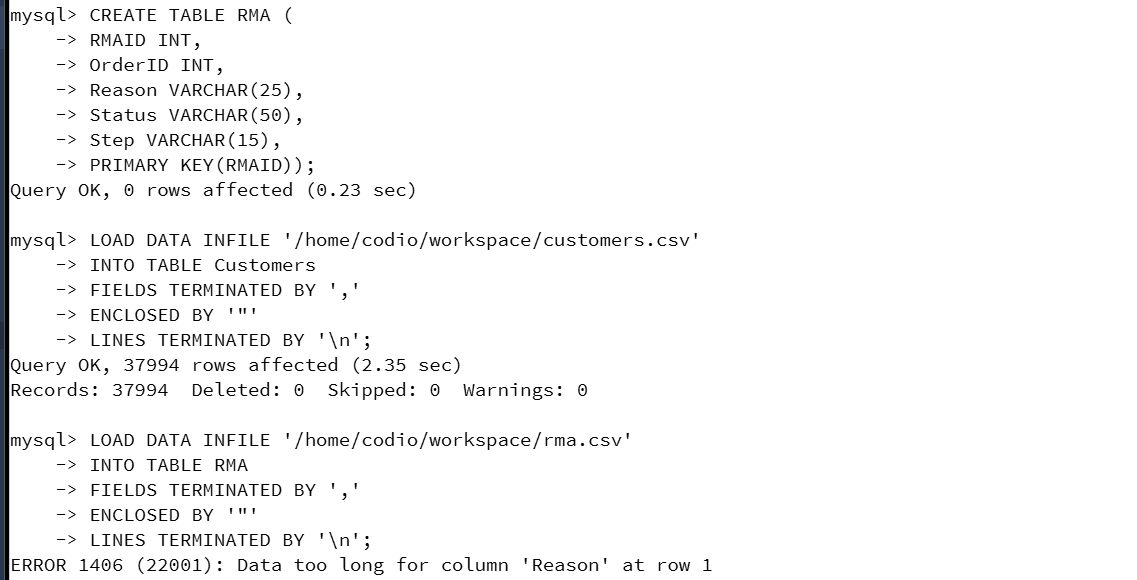
I have the steps but I am getting an error How do I fix this?
ERROR : Data too long for column 'Reason' at row
mysql CREATE TABLE RMA
RMAID INT,
OrderID INT,
Reason VARCHAR
Status VARCHAR
Step VARCHAR
PRIMARY KEYRMAID;
Query OK rows affected sec
mysql LOAD DATA INFILE homecodioworkspacecustomerscsv
INTO TABLE Customers
FIELDS TERMINATED BY
ENCLOSED BY
LINES TERMINATED BY
;
Query OK rows affected sec
Records: Deleted: Skipped: Warnings:
mysql LOAD DATA INFILE homecodioworkspacermacsv
INTO TABLE RMA
FIELDS TERMINATED BY
ENCLOSED BY
LINES TERMINATED BY
;
ERROR : Data too long for column 'Reason' at row
Step by Step Solution
There are 3 Steps involved in it
1 Expert Approved Answer
Step: 1 Unlock

Question Has Been Solved by an Expert!
Get step-by-step solutions from verified subject matter experts
Step: 2 Unlock
Step: 3 Unlock
 Study Help