







Question: Create Action Charts Action charts quickly describe the behaviour between a parent and child on how that behaviour enforces the relationships when instances of
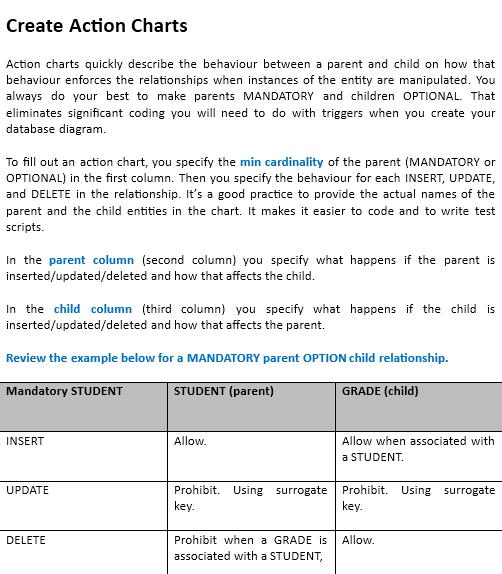
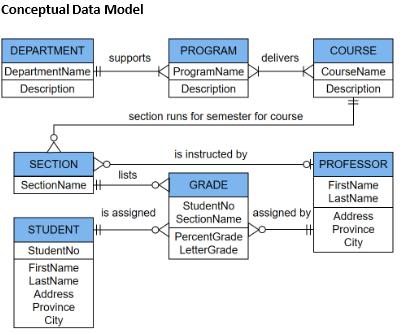
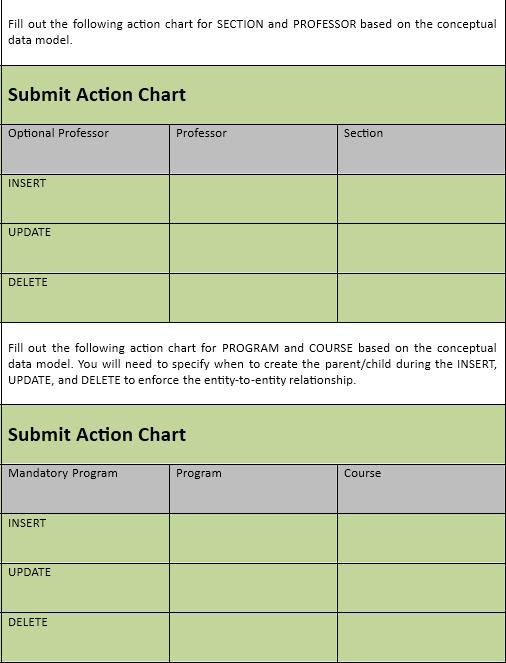
Create Action Charts Action charts quickly describe the behaviour between a parent and child on how that behaviour enforces the relationships when instances of the entity are manipulated. You always do your best to make parents MANDATORY and children OPTIONAL. That eliminates significant coding you will need to do with triggers when you create your database diagram. To fill out an action chart, you specify the min cardinality of the parent (MANDATORY or OPTIONAL) in the first column. Then you specify the behaviour for each INSERT, UPDATE, and DELETE in the relationship. It's a good practice to provide the actual names of the parent and the child entities in the chart. It makes it easier to code and to write test scripts. In the parent column (second column) you specify what happens if the parent is inserted/updated/deleted and how that affects the child. In the child column (third column) you specify what happens if the child is inserted/updated/deleted and how that affects the parent. Review the example below for a MANDATORY parent OPTION child relationship. Mandatory STUDENT STUDENT (parent) GRADE (child) INSERT UPDATE DELETE Allow. Allow when associated with a STUDENT. Prohibit. Using surrogate Prohibit. Using surrogate key. key. Prohibit when a GRADE is associated with a STUDENT, Allow. Conceptual Data Model DEPARTMENT DepartmentName H Description SECTION SectionName is STUDENT H StudentNo FirstName LastName Address Province City PROGRAM ProgramName Description section runs for semester for course supports lists assigned delivers is instructed by GRADE StudentNo SectionName assigned by PercentGrade LetterGrade COURSE CourseName Description -O PROFESSOR FirstName LastName H Address Province City Fill out the following action chart for SECTION and PROFESSOR based on the conceptual data model. Submit Action Chart Optional Professor INSERT UPDATE DELETE Fill out the following action chart for PROGRAM and COURSE based on the conceptual data model. You will need to specify when to create the parent/child during the INSERT, UPDATE, and DELETE to enforce the entity-to-entity relationship. Submit Action Chart Mandatory Program INSERT Professor UPDATE DELETE Section Program Course
Step by Step Solution
3.27 Rating (150 Votes )
There are 3 Steps involved in it
The images provided show guidelines for creating action charts for database r... View full answer

Get step-by-step solutions from verified subject matter experts
 Study Help