







Question: For this assignment (joins), link the tables in either the WHERE clause or in the FROM clause - depending on the requirements of the question.
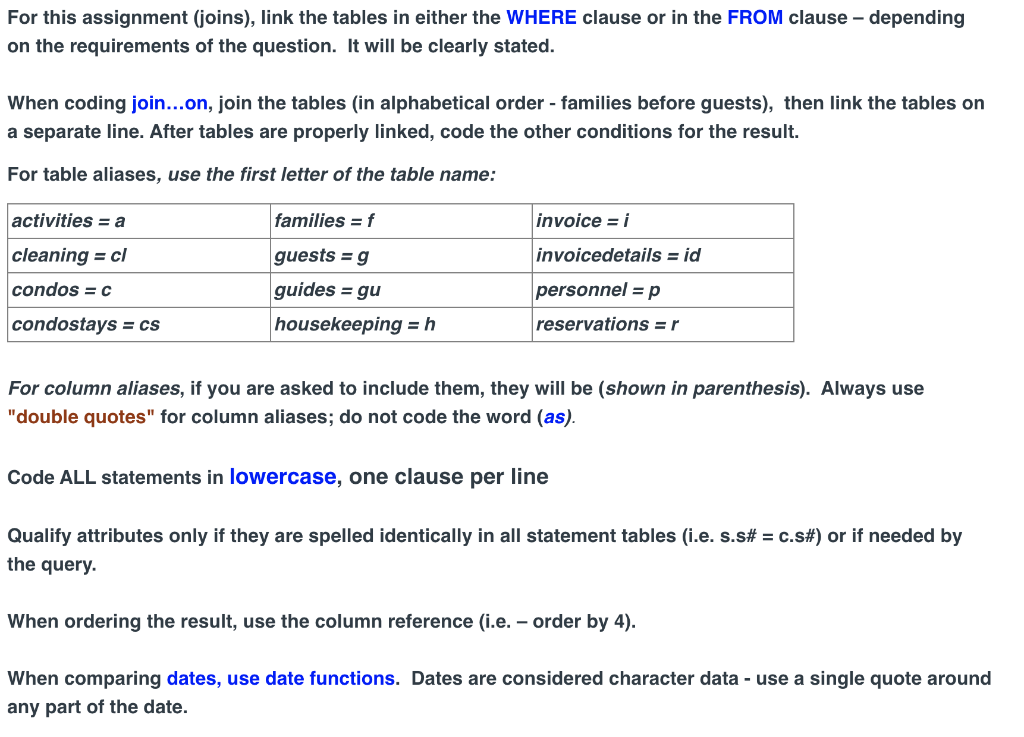

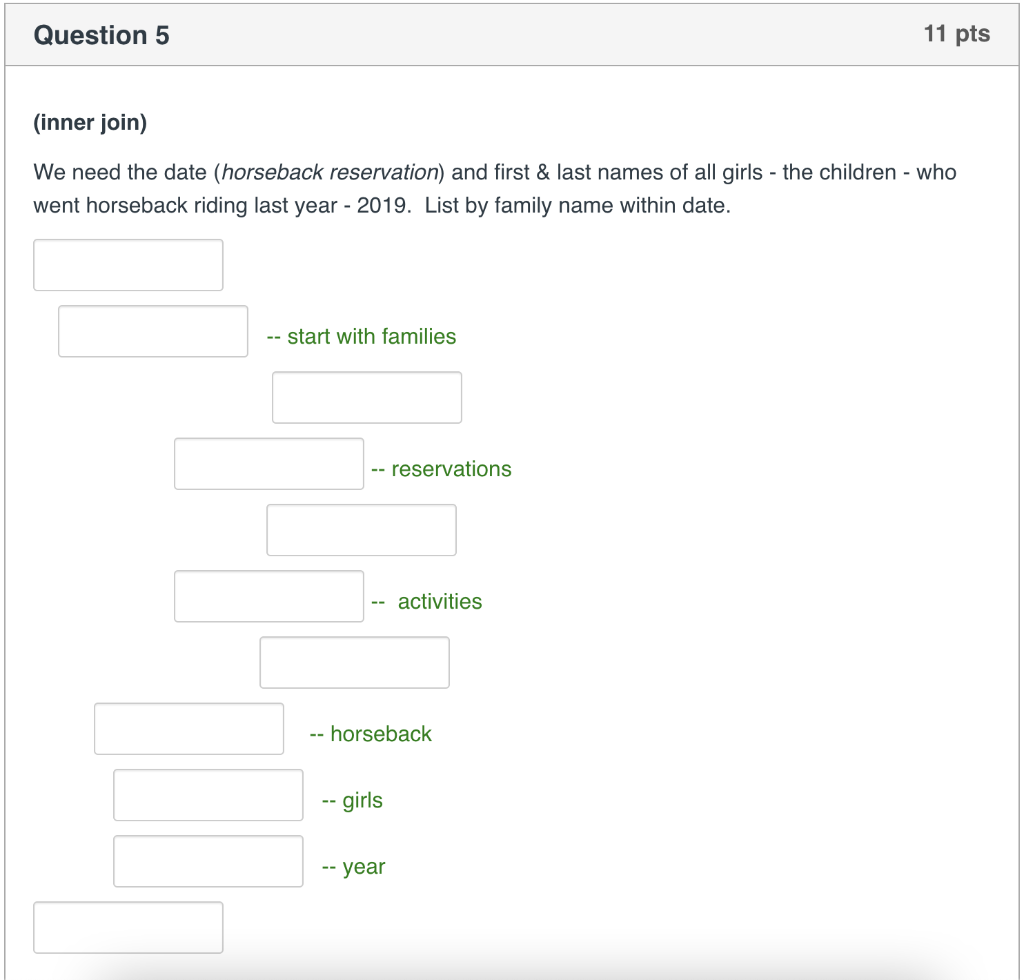
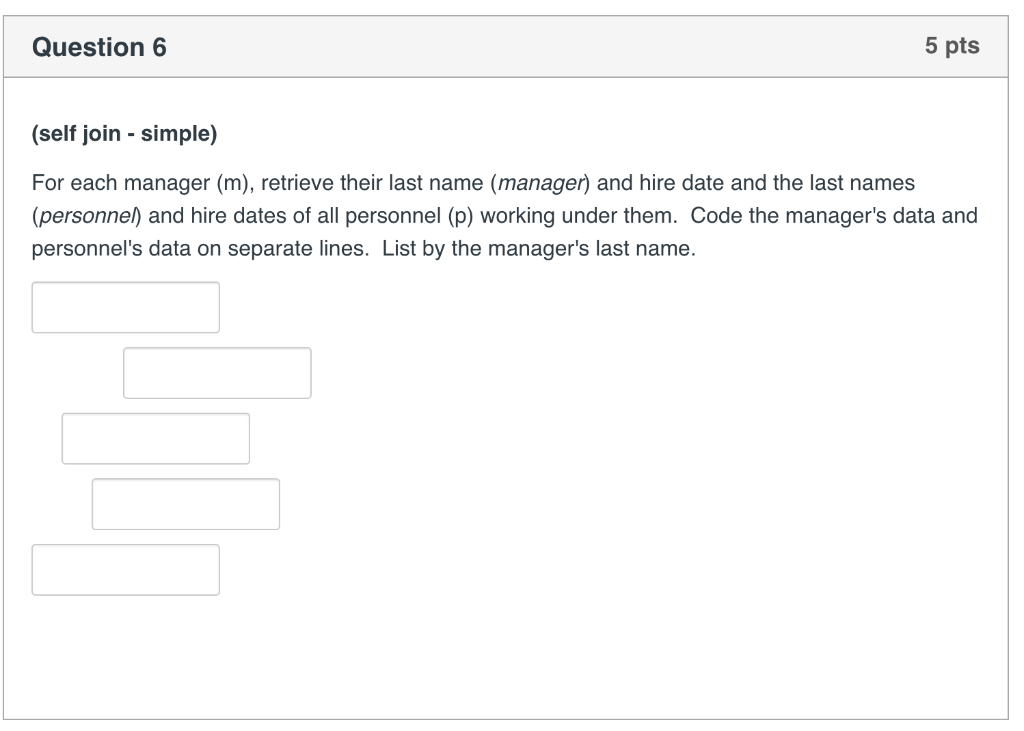
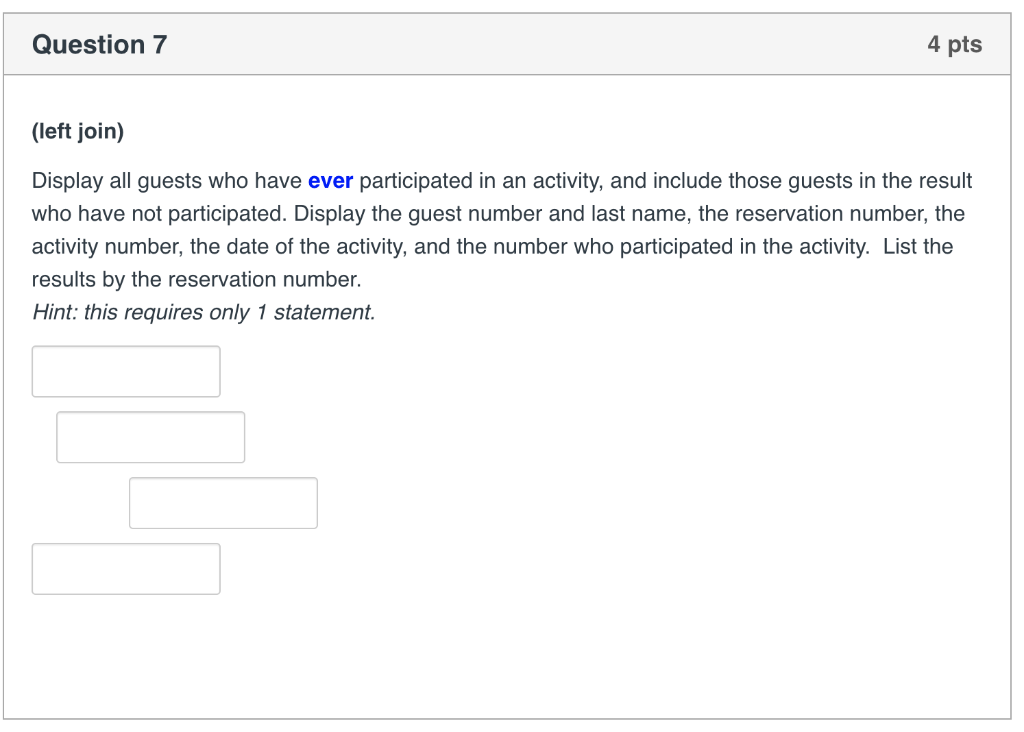
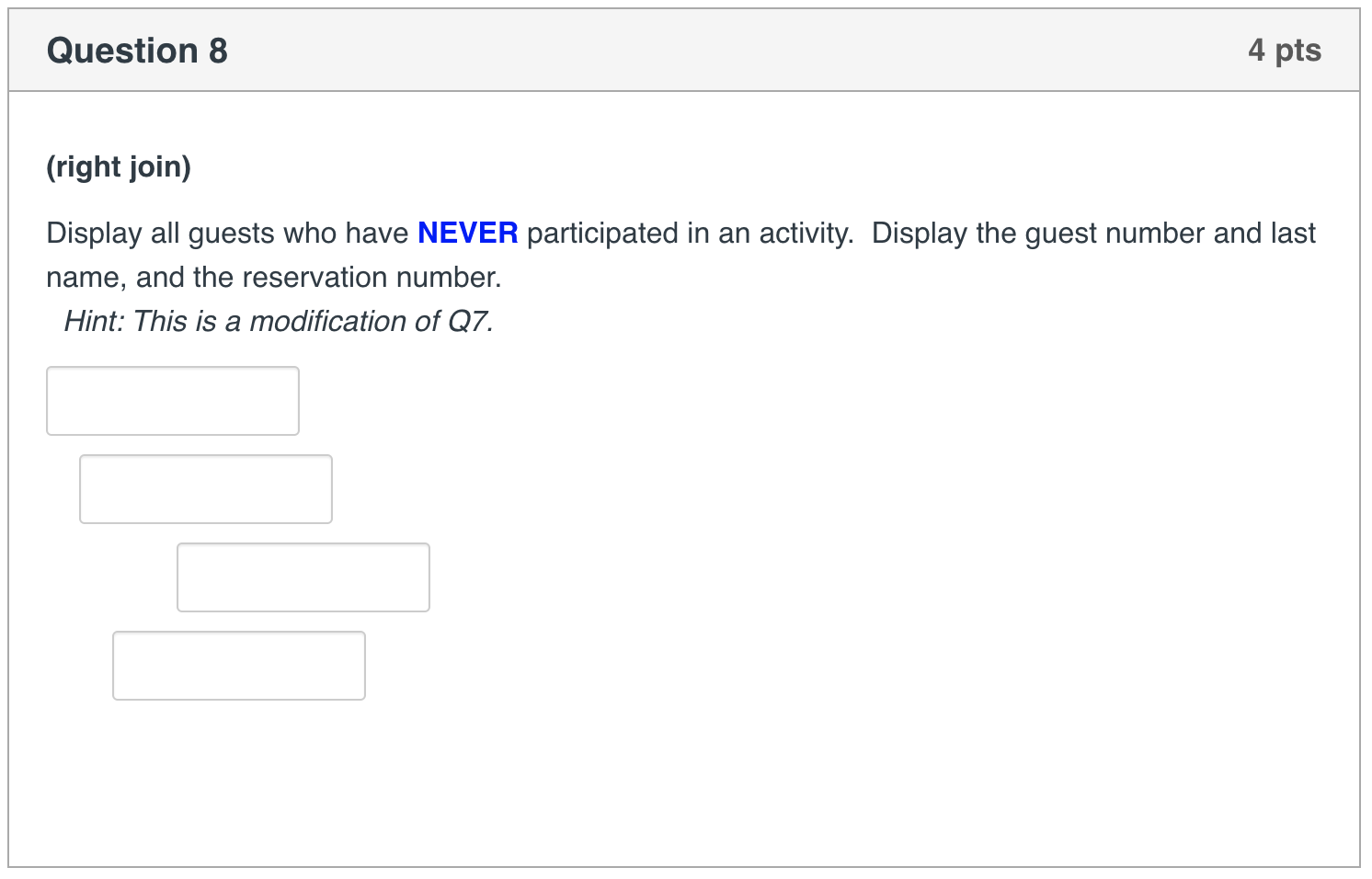
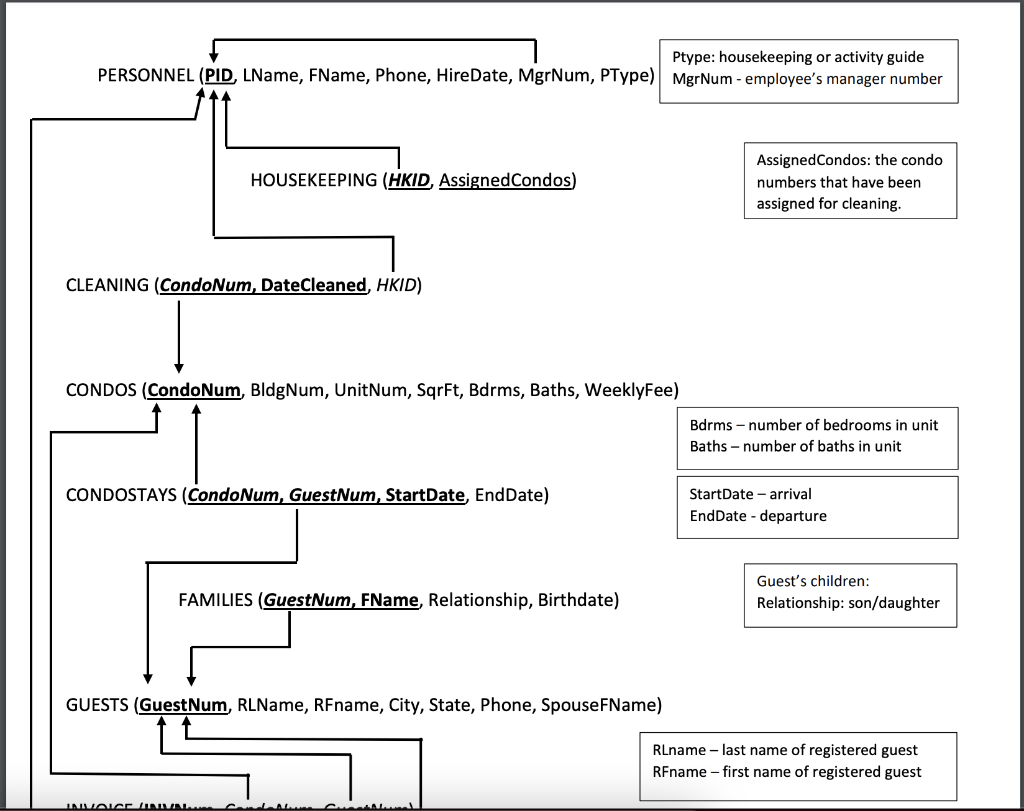
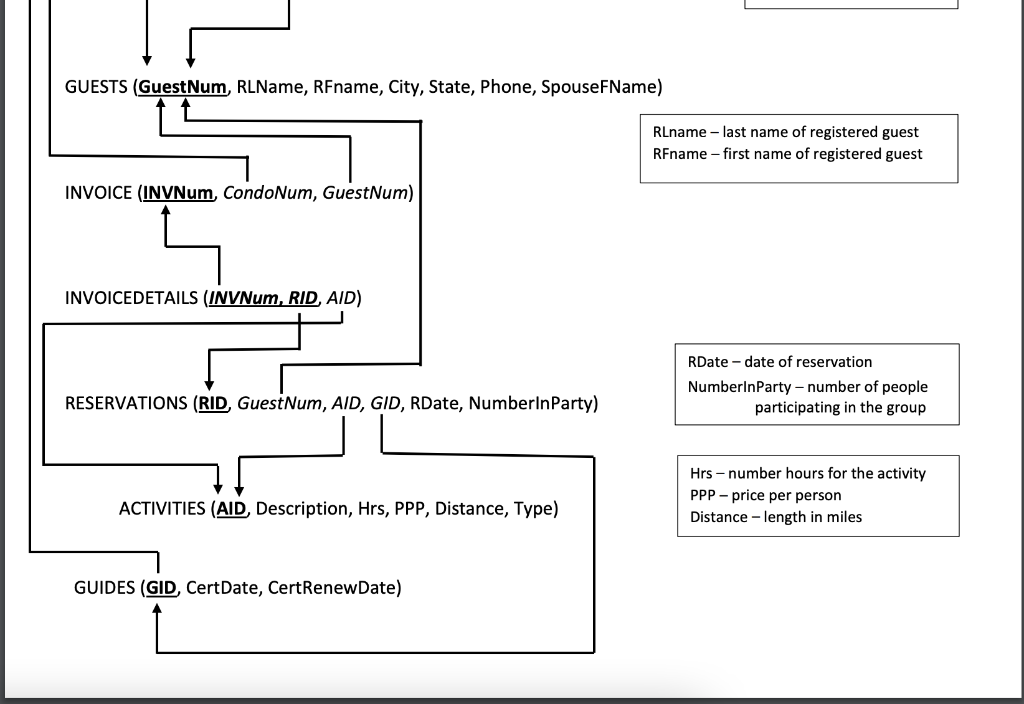
For this assignment (joins), link the tables in either the WHERE clause or in the FROM clause - depending on the requirements of the question. It will be clearly stated. When coding join...on, join the tables in alphabetical order - families before guests), then link the tables on a separate line. After tables are properly linked, code the other conditions for the result. For table aliases, use the first letter of the table name: activities = a families = f invoice = i invoicedetails = id cleaning = cl condos = c guests = 9 guides = gu housekeeping = h personnel = p condostays = cs reservations ar For column aliases, if you are asked to include them, they will be (shown in parenthesis). Always use "double quotes" for column aliases; do not code the word (as). Code ALL statements in lowercase, one clause per line Qualify attributes only if they are spelled identically in all statement tables (i.e. s.s# = c.s#) or if needed by the query. When ordering the result, use the column reference (i.e. - order by 4). When comparing dates, use date functions. Dates are considered character data - use a single quote around any part of the date. When joining, code the join specified in the parenthesis before the question: - for simple joins; the linking info is in the WHERE clause - for inner or outer joins, omit the word (inner/outer) and use Join... On, or left/right Join... On (follow the formats given in the lecture videos) Question 5 11 pts (inner join) We need the date (horseback reservation) and first & last names of all girls - the children - who went horseback riding last year - 2019. List by family name within date. start with families -- reservations -- activities -- horseback -- girls -- year Question 6 5 pts (self join - simple) For each manager (m), retrieve their last name (manager) and hire date and the last names (personnel) and hire dates of all personnel (p) working under them. Code the manager's data and personnel's data on separate lines. List by the manager's last name. Question 7 4 pts (left join) Display all guests who have ever participated in an activity, and include those guests in the result who have not participated. Display the guest number and last name, the reservation number, the activity number, the date of the activity, and the number who participated in the activity. List the results by the reservation number. Hint: this requires only 1 statement. Question 8 4 pts (right join) Display all guests who have NEVER participated in an activity. Display the guest number and last name, and the reservation number. Hint: This is a modification of Q7. Ptype: housekeeping or activity guide PERSONNEL (PID, LName, FName, Phone, HireDate, MgrNum, PType) MgrNum - employee's manager number HOUSEKEEPING (HKID, Assigned Condos) Assigned Condos: the condo numbers that have been assigned for cleaning. CLEANING (CondoNum, DateCleaned, HKID) CONDOS (CondoNum, BldgNum, UnitNum, SqrFt, Bdrms, Baths, WeeklyFee) Bdrms - number of bedrooms in unit Baths - number of baths in unit CONDOSTAYS (CondoNum, GuestNum, StartDate, EndDate) StartDate - arrival EndDate - departure FAMILIES (GuestNum, FName, Relationship, Birthdate) Guest's children: Relationship: son/daughter GUESTS (GuestNum, RLName, RFname, City, State, Phone, SpouseFName) Rename - last name of registered guest RFname - first name of registered guest INIVALEN GUESTS (GuestNum, RLName, RFname, City, State, Phone, SpouseFName) Rlname - last name of registered guest RFname - first name of registered guest INVOICE (INVNum, CondoNum, GuestNum) 4 INVOICEDETAILS (INVNum, RID, AID) RDate - date of reservation NumberinParty -number of people participating in the group RESERVATIONS (RID, Guest Num, AID, GID, RDate, NumberinParty) Hrs - number hours for the activity PPP - price per person Distance -length in miles ACTIVITIES (AID Description, Hrs, PPP, Distance, Type) GUIDES (GID, CertDate, CertRenewDate) For this assignment (joins), link the tables in either the WHERE clause or in the FROM clause - depending on the requirements of the question. It will be clearly stated. When coding join...on, join the tables in alphabetical order - families before guests), then link the tables on a separate line. After tables are properly linked, code the other conditions for the result. For table aliases, use the first letter of the table name: activities = a families = f invoice = i invoicedetails = id cleaning = cl condos = c guests = 9 guides = gu housekeeping = h personnel = p condostays = cs reservations ar For column aliases, if you are asked to include them, they will be (shown in parenthesis). Always use "double quotes" for column aliases; do not code the word (as). Code ALL statements in lowercase, one clause per line Qualify attributes only if they are spelled identically in all statement tables (i.e. s.s# = c.s#) or if needed by the query. When ordering the result, use the column reference (i.e. - order by 4). When comparing dates, use date functions. Dates are considered character data - use a single quote around any part of the date. When joining, code the join specified in the parenthesis before the question: - for simple joins; the linking info is in the WHERE clause - for inner or outer joins, omit the word (inner/outer) and use Join... On, or left/right Join... On (follow the formats given in the lecture videos) Question 5 11 pts (inner join) We need the date (horseback reservation) and first & last names of all girls - the children - who went horseback riding last year - 2019. List by family name within date. start with families -- reservations -- activities -- horseback -- girls -- year Question 6 5 pts (self join - simple) For each manager (m), retrieve their last name (manager) and hire date and the last names (personnel) and hire dates of all personnel (p) working under them. Code the manager's data and personnel's data on separate lines. List by the manager's last name. Question 7 4 pts (left join) Display all guests who have ever participated in an activity, and include those guests in the result who have not participated. Display the guest number and last name, the reservation number, the activity number, the date of the activity, and the number who participated in the activity. List the results by the reservation number. Hint: this requires only 1 statement. Question 8 4 pts (right join) Display all guests who have NEVER participated in an activity. Display the guest number and last name, and the reservation number. Hint: This is a modification of Q7. Ptype: housekeeping or activity guide PERSONNEL (PID, LName, FName, Phone, HireDate, MgrNum, PType) MgrNum - employee's manager number HOUSEKEEPING (HKID, Assigned Condos) Assigned Condos: the condo numbers that have been assigned for cleaning. CLEANING (CondoNum, DateCleaned, HKID) CONDOS (CondoNum, BldgNum, UnitNum, SqrFt, Bdrms, Baths, WeeklyFee) Bdrms - number of bedrooms in unit Baths - number of baths in unit CONDOSTAYS (CondoNum, GuestNum, StartDate, EndDate) StartDate - arrival EndDate - departure FAMILIES (GuestNum, FName, Relationship, Birthdate) Guest's children: Relationship: son/daughter GUESTS (GuestNum, RLName, RFname, City, State, Phone, SpouseFName) Rename - last name of registered guest RFname - first name of registered guest INIVALEN GUESTS (GuestNum, RLName, RFname, City, State, Phone, SpouseFName) Rlname - last name of registered guest RFname - first name of registered guest INVOICE (INVNum, CondoNum, GuestNum) 4 INVOICEDETAILS (INVNum, RID, AID) RDate - date of reservation NumberinParty -number of people participating in the group RESERVATIONS (RID, Guest Num, AID, GID, RDate, NumberinParty) Hrs - number hours for the activity PPP - price per person Distance -length in miles ACTIVITIES (AID Description, Hrs, PPP, Distance, Type) GUIDES (GID, CertDate, CertRenewDate)
Step by Step Solution
There are 3 Steps involved in it

Get step-by-step solutions from verified subject matter experts
 Study Help