







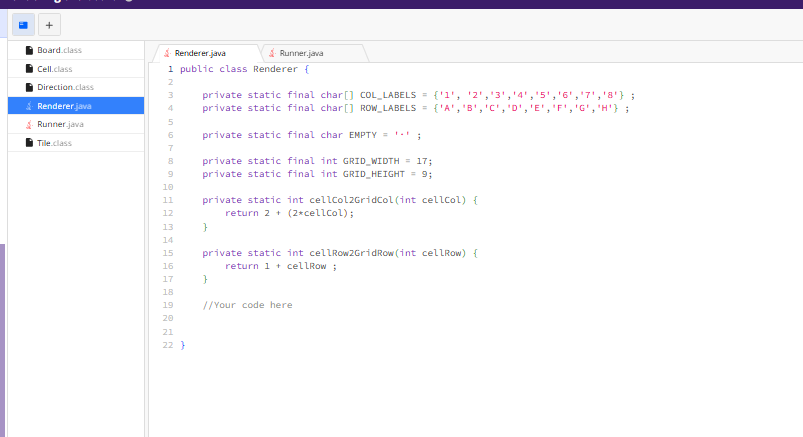
Question: For this task you will need to implement a Renderer class that is able to render and display the game board. As usual, the included
For this task you will need to implement a Renderer class that is able to render and display the game board.
As usual, the included Runner class is provided purely so you can manually debug your code by hitting the Run button and observing the results. It is not included in any tests, so feel free to make any changes you like to it
Your workspace for this task includes compiled Cell Direction Tile, and Board classes, all of which have been implemented according to the specifications described in Parts &
Background
A physical game of Domineering is often played with dominoes on a chessboard. Players take turns placing dominoes one player placing them horizontally, the other player placing them vertically until one player can no longer place a tile.
In our game we will draw the chessboard as a simple grid of dots, and use the coordinate system from Part to identify each location on the grid.
Specification
You need to complete the Renderer class so that it has the following methods:
A static render method that accepts no parameters, and returns a D char array representing an empty grid ie one with no tiles on it The first dimension of this char array should correspond to the rows of the rendered grid, and the second dimension should correspond to the columns of the rendered grid. You will need to fill the char array with characters like A B and so that it resembles the empty grid shown in the background section above.
A static render method that accepts a Board as input, and returns a D char array representing the a grid on which the tiles in the given board have been placed. Horizontally placed tiles should be indicated with H symbols, and vertically placed tiles should be indicated with V symbols. The expected contents of this grid were described in the background section.
A static toString method that accepts a D char array representing a grid ie the output of the render methods and returns a String containing the given characters in the same D arrangement, with newline characters ie
added to break up the rows.
All of these methods should be public and static. There should not be any other public methods or properties, but you are welcome to add any private properties and methods that you feel are necessaryhelpful
Both render methods should return D arrays of characters.
Here we have a D char array with rows and columns. The leftmost column and the topmost row are used for displaying the grid coordinates AH and Valid locations for tiles eg A F etc. are indicated with a character. Every second column is filled with spaces, to help make the grid appear roughly square and be easier to read.
Available methods
To assist you in this task, your Renderer class includes the following helper methods that you can call:
A static cellColGridCol method, which accepts a valid column index ie an int from as input, and returns the corresponding column index in the D array ie an int from
A static cellRowGridRow method, which accepts a valid cell row index ie an int from as input, and returns the corresponding row index in the D array ie an int from
We recommend focusing the logic of your solution on the original cell coordinate system from Part and then using these helper methods to convert cell coordinates into the corresponding indexes into the d array.
Step by Step Solution
There are 3 Steps involved in it
1 Expert Approved Answer
Step: 1 Unlock

Question Has Been Solved by an Expert!
Get step-by-step solutions from verified subject matter experts
Step: 2 Unlock
Step: 3 Unlock
 Study Help