







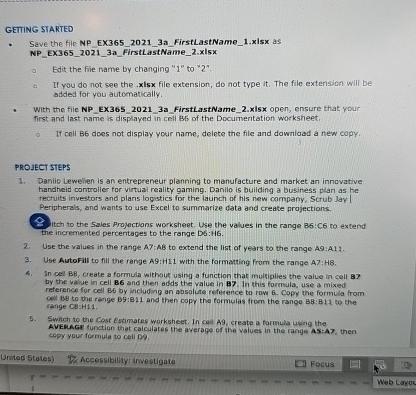
Question: GEITING STARTED Save the file NP EX 3 6 5 2 0 2 1 3 a FirstLastName _ 1 . xisx as NP _ EX
GEITING STARTED
Save the file NP EXa FirstLastNamexisx as
NPEXaFirstlastNamexisx
a Edit the fie name by changing to
a If you do not see the xisx file extension, do not type it The file extension will be added for you automatically.
With the file NPEXaFirstLastNamexisx open, ensure that your first and last name is displayed in crell of the Documentation worksheet.
If cell B does not display your name; delete the file and download a new copy.
PROJECT STEPS
Daniio Lewelien is an entrepreneur planning to manufacture and market an innovative hanaheid controlier for virtuai reality gaming. Danilo is building a business plan as he rectuits investors and plans logstics for the launch of his new company, Scrub day Peripherals, and wants to use Excel to summarize data and create projections
itch to the Sales Projectians workshept. Use the values in the range :C no extend The incremented percentages to the range Db:HG
Use the values in the range : to extend the list of years to the range :
Use Autofall to fill the range A:H with the formating from the range A:
In cel Greate a formula without using a function that multiplies the value in cell by the vaiue in cell and then adds the value in In this formula, use a mixed reference for cell B by including an absalisa reference to raw Copy the formula from range Cl:H
b Swhin to the Cost Estamares worksheet. In can A create a formula uting the AVEMAGe funtion that calculates the averape of ithe yolues in the range ASA then copy your formula to cell D
Ebcus
Wes canvo
Step by Step Solution
There are 3 Steps involved in it
1 Expert Approved Answer
Step: 1 Unlock

Question Has Been Solved by an Expert!
Get step-by-step solutions from verified subject matter experts
Step: 2 Unlock
Step: 3 Unlock
 Study Help