







Question: Hello, I need urgent help with a payment form that I am trying to create using HTML & internal CSS. Everything was going well, physically
Hello, I need urgent help with a payment form that I am trying to create using HTML & internal CSS.
Everything was going well, physically the form looked great until I tried to validate it and the validator said
"Warning: A table row was 1 columns wide, which is less than the column count established by the first row (2)." Now, I need my form to look like the mock up below.
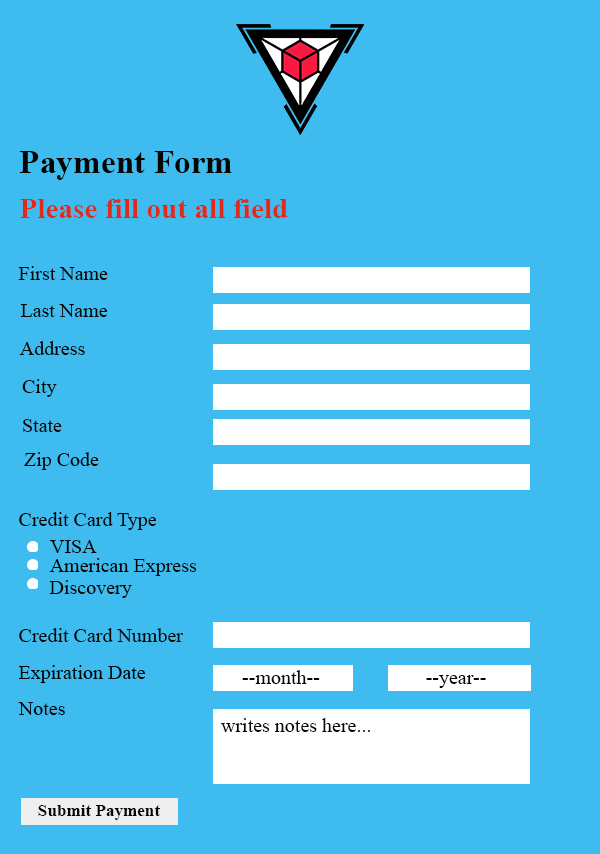
(Please note, this image is ONLY a mock-up of what it should look like in HTML/CSS.)
However, if I tried to fix it, the 'Notes' section will not sit in alignment with the beginning of its textbox on the right and the words 'Credit Card Number' and 'Expiration Date' will be written like this:
"Credit Card
Number"
"Expiration
Date"
Above & below each other, instead of what is shown in the mock up above.
I used this code below:
Form Payment Form
Please fill out all the fields
The css
* { box-sizing: border-box; font-family: 'Times New Roman', Times, serif; } body { background: #f6f5f7; /*centerring all the elemnents*/ flex-direction: column; } .Container { width: 500px; height:700px; background-color: #E9C6B6; margin: 0 auto; margin-top: 10px; } .image {/*keeping the image in the center*/ display: flex; justify-content: center; } h2 { font-weight: bold; padding-left: 20px; } h3 { color:red; padding-left: 20px; } table { border-collapse: collapse; } td { padding: 4px; } .formbox { padding-left: 20px; padding-right: 20px; } .formbox input, textarea, .month, .year/*so that the no border effect can be applied on all the fields mentioned*/ {/*removing all the borders of the input fields*/ border: none; } .month { width: 120px; } .year { width: 120px; margin-left: 45px; } button { font-weight: bold; border: none; width: 160px; height: 30px; background-color:grey; } Really need your help. Thanks!
Payment Form Please fill out all field First Name Last Name Address City State Zip Code Credit Card Type VISA American Express Discovery Credit Card Number Expiration Date --month-- --year-- Notes writes notes here... Submit PaymentStep by Step Solution
There are 3 Steps involved in it

Get step-by-step solutions from verified subject matter experts
 Study Help