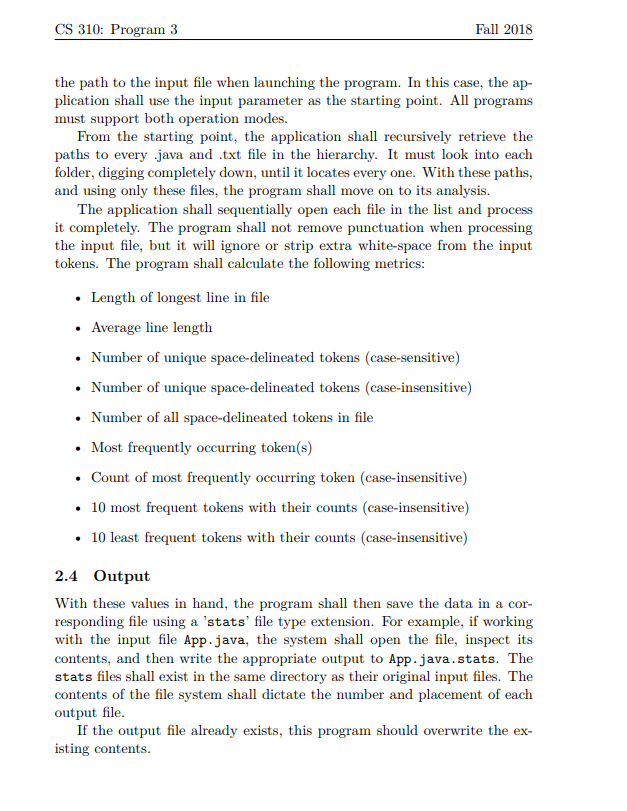
Question: Hello, I'm writing an application which can recursively retrieve the paths to every .java and .txt file in the hierarchy. Then the application shall sequentially
Hello, I'm writing an application which can recursively retrieve the paths to every .java and .txt file in the hierarchy. Then the application shall sequentially open each file in the list and process it completely, and calculate the following metrics as the instructions below (i.e Length of longest line in file, Average line length, etc)
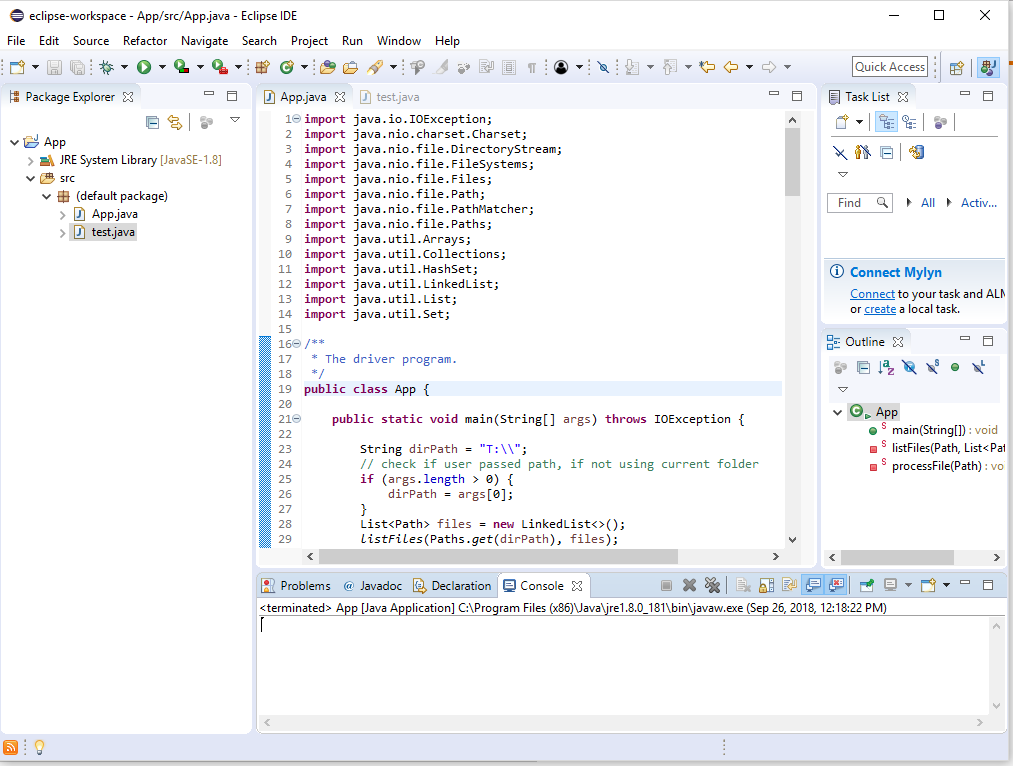
Here is my App.java code so far. My codes seem to fulfill all the requirements above as well as showing no errors at all. But when i tried to run, it cannot read any .txt or .java files in a directory and show no output at all in the Console, even though the directory contains .txt and .java files. Can you help me figure out the error and fix my codes to make it be able to read the files?
//App.java
package edu.sdsu.cs;
import java.io.IOException; import java.nio.charset.Charset; import java.nio.file.DirectoryStream; import java.nio.file.FileSystems; import java.nio.file.Files; import java.nio.file.Path; import java.nio.file.PathMatcher; import java.nio.file.Paths; import java.util.Arrays; import java.util.Collections; import java.util.HashSet; import java.util.LinkedList; import java.util.List; import java.util.Set;
/** * The driver program. */ public class App { public static void main(String[] args) throws IOException { String dirPath = "T:\\"; // check if user passed path, if not using current folder if (args.length > 0) { dirPath = args[0]; } List files = new LinkedList(); listFiles(Paths.get(dirPath), files); for (Path file: files) { processFile(file); } } /** * * Searches for .txt or .java files and add them to the list * */ private static void listFiles(Path path, List files) throws IOException { PathMatcher extensionMatcher = FileSystems.getDefault().getPathMatcher("glob:**{.java,txt}"); try (DirectoryStream stream = Files.newDirectoryStream(path)) { for (Path entry : stream) { if (Files.isDirectory(entry)) { listFiles(entry, files); } else if (extensionMatcher.matches(entry)){ files.add(entry); } } } } /** * * Analyzes file content and writes report * */ private static void processFile(Path file) throws IOException{ // read file content into list List lines = Files.readAllLines(file, Charset.defaultCharset()); // list to store all tokens List tokens = new LinkedList(); int longestLineLength = 0; double avgLineLength = 0; for (String line : lines) { // check if line is the longest if (line.length() > longestLineLength) { longestLineLength = line.length(); } // sum up line length avgLineLength += line.length(); // split line by space and it parts to tokens list tokens.addAll(Arrays.asList(line.split(" "))); } // remove all empty string while( tokens.remove("")){ } // sets to store unique case sensetive/insensetive tokens Set uniqueCaseSens = new HashSet(); Set uniqueCaseInsens = new HashSet(); String mostFreqOccured = ""; for (int i = 0; i Collections.frequency(tokens, mostFreqOccured)) { mostFreqOccured = tokens.get(i); } } // sorting tokens by frequency in descending order Collections.sort(tokens, (tkn1, tkn2) -> { return Collections.frequency(tokens, tkn2) - Collections.frequency(tokens, tkn1); }); // add 10 first unique token to most occured tokens List mostOccuredTokens = new LinkedList(); for (String token: tokens) { if (mostOccuredTokens.size() == 10) { break; } if (!mostOccuredTokens.contains(token)) { mostOccuredTokens.add(token); } }
// add 10 last unique token to least occured tokens List leastOccuredTokens = new LinkedList(); for (int i = tokens.size() - 1; i >= 0; i--) { if (leastOccuredTokens.size() == 10) { break; } if (!leastOccuredTokens.contains(tokens.get(i))) { leastOccuredTokens.add(tokens.get(i)); } } // calculate average line length avgLineLength /= (double)lines.size(); // add report lines to list List report = new LinkedList(); report.add(String.format("%-60s: %-5d", "Longest line length", longestLineLength)); report.add(String.format("%-60s: %-5.2f", "Average line length", avgLineLength)); report.add(String.format("%-60s: %-5d", "Number of unique space-delineated tokens (case-sensitive)", uniqueCaseSens.size())); report.add(String.format("%-60s: %-5d", "Number of unique space-delineated tokens (case-insensitive)", uniqueCaseInsens.size())); report.add(String.format("%-60s: %-5d", "Number of all space-delineated tokens in file", tokens.size())); report.add(String.format("%-60s: %s", "Most frequently occurring token", mostFreqOccured)); report.add(String.format("%-60s: %-5d", "Count of most frequently occurring token", Collections.frequency(tokens, mostFreqOccured))); report.add(""); report.add("10 most frequent tokens with their counts:"); for (int i = 0; i }
//The code shows no output
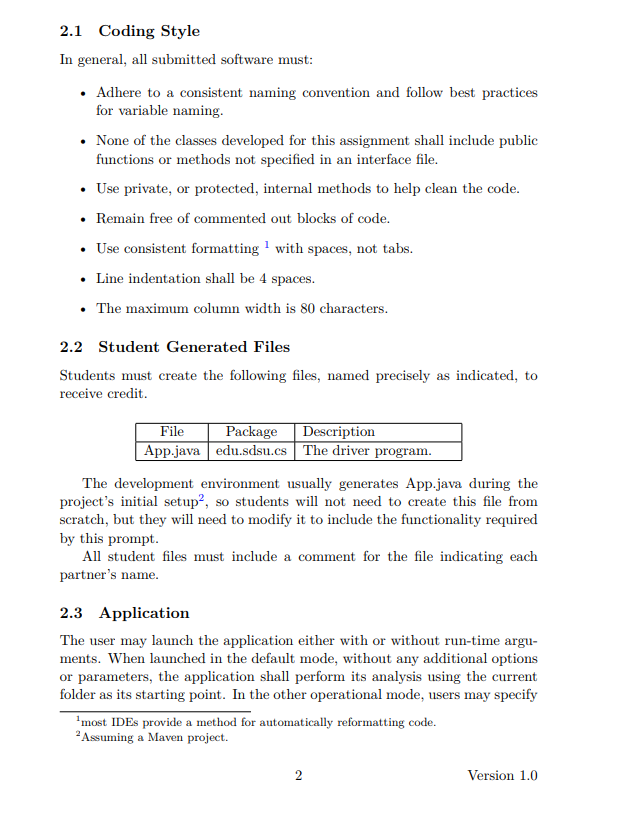
2.1 Coding Style In general, all submitted software must: Adhere to a consistent naming convention and follow best practices for variable naming. None of the classes developed for this assignment shall include public functions or methods not specified in an interface file Use private, or protected, internal methods to help clean the code . Remain free of commented out blocks of code . Use consistent formatting 1 with spaces, not tabs Line indentation shall be 4 spaces . The maximum column width is 80 characters 2.2 Student Generated Files precisely as indicated, to Students must create the following files, named receive credit File App.java edu.sdsu.cs | The driver program Package Description The development environment usually generates App.java during the project's initial setup2, so students will not need to create this file from scratch, but they will need to modify it to include the functionality required this prompt All student files must include a comment for the file indicating each partner's name 2.3 Application The user may launch the application either with or without run-time argu ments. When launched in the default mode, without any additional options or parameters, the application shall perform its analysis using the current folder as its starting point. In the other operational mode, users may specify most IDEs provide a method for automatically reformatting code. Assuming a Maven project. Version 1.0









 Study Help