







Question: Here is what I have so far. import javafx.application.Application; import javafx.event.ActionEvent; import javafx.event.EventHandler; import javafx.scene.Group; import javafx.scene.Scene; import javafx.scene.control.Button; import javafx.scene.layout.StackPane; import javafx.scene.layout.Pane; import javafx.scene.paint.Color;
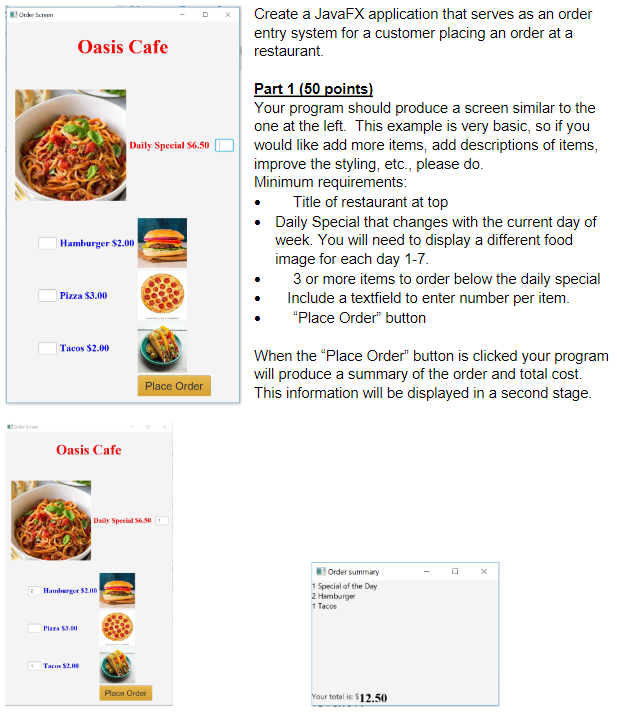
Here is what I have so far.
import javafx.application.Application; import javafx.event.ActionEvent; import javafx.event.EventHandler; import javafx.scene.Group; import javafx.scene.Scene; import javafx.scene.control.Button; import javafx.scene.layout.StackPane; import javafx.scene.layout.Pane; import javafx.scene.paint.Color; import javafx.scene.text.Font; import javafx.scene.text.FontPosture; import javafx.scene.text.FontWeight; import javafx.scene.text.Text; import javafx.stage.Stage; import javax.swing.*; import javax.swing.text.html.ImageView; import java.awt.*; import java.io.FileInputStream; import java.io.InputStream; import java.util.Stack; public class Main extends Application { double price = 0.0; Button button; Text text; public static void main(String[] args){ launch(args); } @Override public void start(Stage primaryStage) throws Exception{ primaryStage.setTitle("Order Screen"); //buttons button = new Button(); button.setText("Place Order"); button.setTranslateX(150); button.setTranslateY(350); button.setScaleX(1.5); button.setScaleY(1.5); button.setStyle("-fx-background-color: #93ddff; "); //text Text title = new Text(); title.setText("Restaurant"); title.setTranslateY(-350); // title.setScaleX(3); // title.setScaleY(3); title.setFont(Font.font("Segoe", FontWeight.BOLD, FontPosture.REGULAR, 35)); title.setFill(Color.RED); Text dailySpecial = new Text(); dailySpecial.setText("Daily Special $12.50"); dailySpecial.setTranslateX(100); dailySpecial.setTranslateY(-200); dailySpecial.setScaleX(1.25); dailySpecial.setScaleY(1.25); //images StackPane layout = new StackPane(); //calling text and buttons layout.getChildren().add(button); layout.getChildren().add(title); layout.getChildren().add(dailySpecial); Scene scene = new Scene(layout, 500, 800); primaryStage.setScene(scene); primaryStage.show(); } } ber Create a JavaFX application that serves as an order entry system for a customer placing an order at a restaurant Oasis Cafe Daily Special 56.50 Hamburger $2.00 Part 1 (50 points) Your program should produce a screen similar to the one at the left. This example is very basic, so if you would like add more items, add descriptions of items, improve the styling, etc., please do. Minimum requirements: Title of restaurant at top Daily Special that changes with the current day of week. You will need to display a different food image for each day 1-7. 3 or more items to order below the daily special Include a textfield to enter number per item. "Place Order" button When the "Place Order" button is clicked your program will produce a summary of the order and total cost. This information will be displayed in a second stage. Pizza $3.00 Tacos $2.00 Place Order Order Oasis Cafe Daily Special 56.50 3 Hamburger $2.00 Order summary 1 Special of the Day 2 Hamburger 1 Tacos Pizza $3,00 Tacn $2.00 Placa Order Your totalis: $12.50
Step by Step Solution
There are 3 Steps involved in it
To create a JavaFX application that meets the requirements you need to update and expand your current implementation as follows Steps to Implement the JavaFX Application 1 Prepare Images and Layout El... View full answer

Get step-by-step solutions from verified subject matter experts
 Study Help