







Question: hi i need help with this warm up in visual studio visual basics Create a new Windows Form application named Country Currency Solution and Country
hi i need help with this warm up in visual studio visual basics
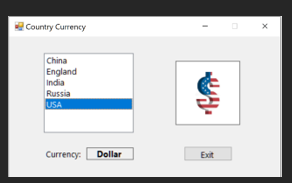
Create a new Windows Form application named Country Currency Solution and Country Currency Project. This application will display in a label, the currency of a country selected in a listbox Upon program startup, the four countries listed in the table will be displayed in a listbox. China will be selected and its currency, the Yuan, will be displayed the label.
China
Yuan
India
Rupee
Russia
Ruble
England
Pound
United State
Dollar
To create this application, pleases do the following.
Change form name and form file attributes as you have in all other programs.
Create a GUI with a listbox and a label. If you are doing the extra credit add four picture boxes Use visual basic naming conventions to label all these controls. See examples
Using the form Load event, add the four countries from the table to the listbox in order. Make sure when the program starts, the first country in the listbox China is selected and its the currency Yuan is displayed in the label.
When the user clicks a country name in the list box, the list boxs SelectedIndexChanged procedure should display the name of the countrys currency in a label control. Use the SelectedIndex property to determine the country label.
Chinaaa
China
China
India
China
China
England
China
China
Russia
China
China
USA
China
China
For extra credit, when the country changes, along with changing the name of the currency, you can display the symbol for the currency in a picture box. I have included the png files containing the symbol for each currency in the assignment. Simply download these symbols into a known location. Create picture boxes for each symbol and load the symbol into the picture box. Hint: overlay each of the picture boxes on the GUI, then make the picture box with the selected countrys currency symbol visible on the GUI while hiding the other three. Investigate the visible property of picture boxes to do this.
Currency:
Step by Step Solution
There are 3 Steps involved in it
1 Expert Approved Answer
Step: 1 Unlock

Question Has Been Solved by an Expert!
Get step-by-step solutions from verified subject matter experts
Step: 2 Unlock
Step: 3 Unlock
 Study Help