







Question: Homework 6: Chapter 6 Personal Trainer, Inc. Personal Trainer, Inc. owns and operates fitness centers in a dozen Midwestern cities. The centers have done well,
Homework 6: Chapter 6 Personal Trainer, Inc.
Personal Trainer, Inc. owns and operates fitness centers in a dozen Midwestern cities. The centers have done well, and the company is planning an international expansion by opening a new supercenter in the Toronto area. Personal Trainers president, Cassia Umi, hired an IT consultant, Susan Park, to help develop an information system for the new facility. During the project, Susan will work closely with Gray Lewis, who will manage the new operation.
Background
Working as an IT consultant for Personal Trainer, Susan Park used data and process modeling tools to create a logical model of the proposed information system. Now she wants to build an object-oriented view of the system using O-O tools and techniques. Before you perform the following tasks, you should review the information and background in Chapters 1 and 2, and the fact-finding summary of the case provided in Chapter 4.
Tasks
1. Identify possible actors and use cases involved in Personal Trainers operations.
2. Create an object relationship diagram for the Personal Trainer information system.
3. Create a use case diagram for the system.
4. Select one of the use cases and create a sequence diagram and a state transition diagram.
/////////////////////////////////////////////////////////////////////////////////////////////////////////////////////////////////////////////////////////////////////////////////////////////////////////////////////////////////////////////////////////////////////////////////////////////////////////////////////////////////////////////////////////////////////////////////////////////////////////////////////////////////////
Here an example of how you should solve it for a similar problem.
Description:
New Century Wellness Group offers a holistic approach to healthcare with an emphasis on preventive
medicine as well as traditional medical care. In your role as an IT consultant, you will help
New Century develop a new information system.
Background
You began the systems analysis phase at New Century by completing a series of interviews, reviewing existing reports, and observing office operations. Then, in Chapter 5, you acquired more information and developed a set of DFDs, process descriptions, and a data dictionary. The next step in the SDLC is to perform an object-oriented analysis of the new system. Before you begin, go back and review the organization chart and processes list from Chapter 1, and the diagrams data store list from Chapter 5. Then complete the following tasks.
Tasks
1. Identify possible use cases and actors, and create a use case diagram for the New Century
Wellness Group system.
2. Select one of the use cases and create a class diagram.
3. Create a sequence diagram for the use case that you selected.
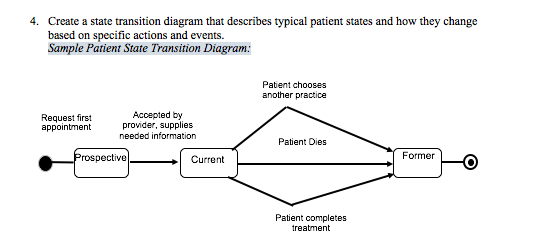
4. Create a state transition diagram that describes typical patient states and how they change
based on specific actions and events.
Solution :
Tasks
Identify possible use cases and actors, and create a use case diagram for the New Century Wellness Group system.
Use cases might include Establish New Patient, Make or Change Appointment, Remind Patient, Provide Service, Bill Patient, Handle Insurance Claim, and Update Records.
Actors might include Patient, Provider, Medical Staff, and Office Staff.
A sample diagram for the Make or Change Appointment use case follows:
| Name: | Make or Change Appointment |
| Actor: | Patient/Office Staff |
| Description: | Describes the process used to make or change an appointment |
| Successful Completion: | Patient requests new appointment or change Office staff offers available appointments Patient chooses an appointment Office staff adds appointment and cancels changed appointment if needed |
| Alternative: | Patient requests new appointment or change Office staff offers available appointments Patient chooses not to schedule or change appointment |
| Pre-Condition: | Patient needs to schedule or change an appointment |
| Post-Condition: | Appointment is scheduled or changed. |
| Assumptions: | None |
Sample documentation for the Make or Change Appointment use case follows:
| Name: | Update records |
| Actor: | Office Staff/Medical Staff/Patient |
| Description: | Describes the process of updating patient personal and medical information |
| Successful Completion: | Office staff receives updated information from patient or medical staff Office staff locates patient records Office staff adds or corrects records Office staff adds appointment and cancels changed appointment if needed |
| Alternative: | None |
| Pre-Condition: | Change occurs in patients information |
| Post-Condition: | Patient records updated to reflect change |
| Assumptions: | Established patient |
Sample documentation for the Remind Patient use case follows:
| Name: | Remind Patient |
| Actor: | Patient/Office Staff |
| Description: | Describes the process used to remind a patient of an appointment |
| Successful Completion: | Office staff identifies following weeks appointments Office staff prints reminder postcards Office staff mails postcards and calls patients two days before appointment |
| Alternative: | None |
| Pre-Condition: | Patient has scheduled appointment during the following week |
| Post-Condition: | Patient receives reminder postcard and reminder calls |
| Assumptions: | Patient has valid mailing address and phone number |
Sample documentation for the Establish New Patient use case follows:
| Name: | Establish New Patient |
| Actor: | Patient/Office Staff |
| Description: | Describes the process used to set up new patient records |
| Successful Completion: | Office staff provides patient with medical history and insurance billing forms Patient returns completed forms Office staff creates a patient file Office staff adds patient to current list |
| Alternative: | Office staff provides patient with medical history and insurance billing forms Patient does not complete forms No file is created |
| Pre-Condition: | Patient requests medical services |
| Post-Condition: | Patient file is created |
| Assumptions: | Providers are taking new patients |
Sample documentation for the Submit Insurance Claim follows:
| Name: | Submit Insurance Claim |
| Actor: | Office Staff/Insurance Carrier |
| Description: | Describes the process to submit an insurance claim for covered services |
| Successful Completion: | Office staff verifies patient insurance carrier and policy number information Office staff prepares claim based on medical codes for services provided Office staff submits claim to insurance carrier |
| Alternative: | None |
| Pre-Condition: | Patient has provided evidence of coverage and policy number |
| Post-Condition: | Claim submitted with identification number |
| Assumptions: | Patient has insurance |
Sample documentation for the Bill Patient use case follows:
| Name: | Bill Patient |
| Actor: | Office Staff |
| Description: | Describes the process to bill a patient for services |
| Successful Completion: | Office staff deducts insurance payments and calculates balance due Office staff updates patient records Office staff produces and prints bill and mails to patient |
| Alternative: | None |
| Pre-Condition: | Patient has balance due |
| Post-Condition: | Bill is prepared and sent |
| Assumptions: | None |
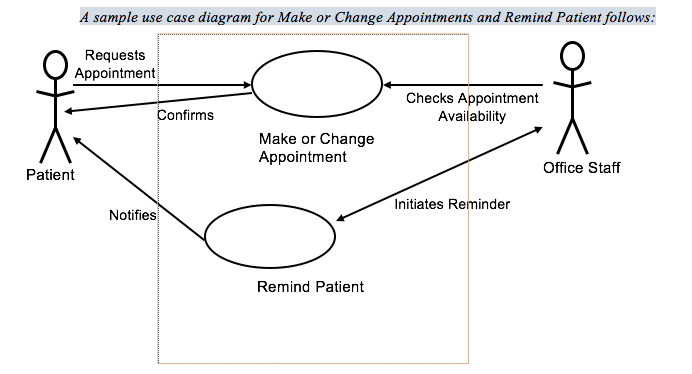
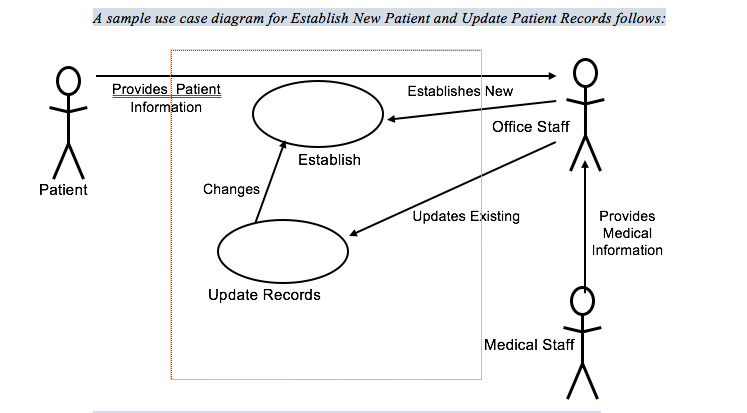
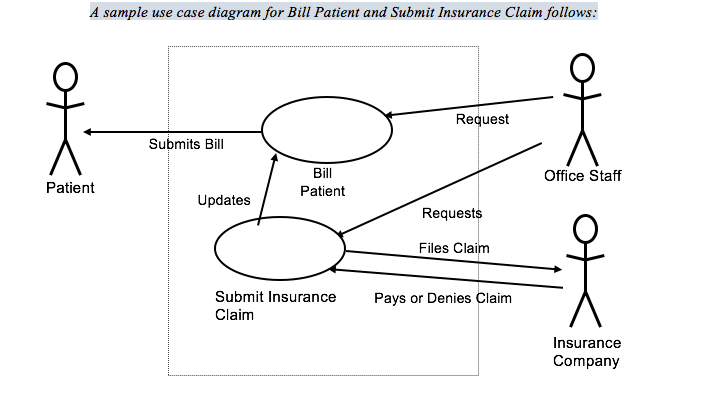
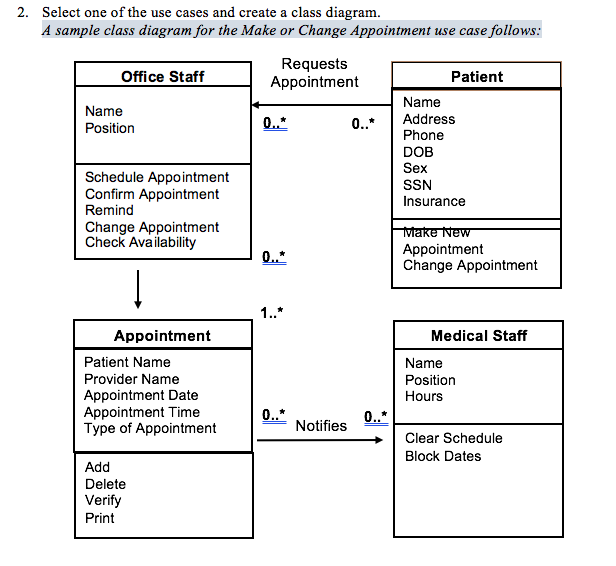
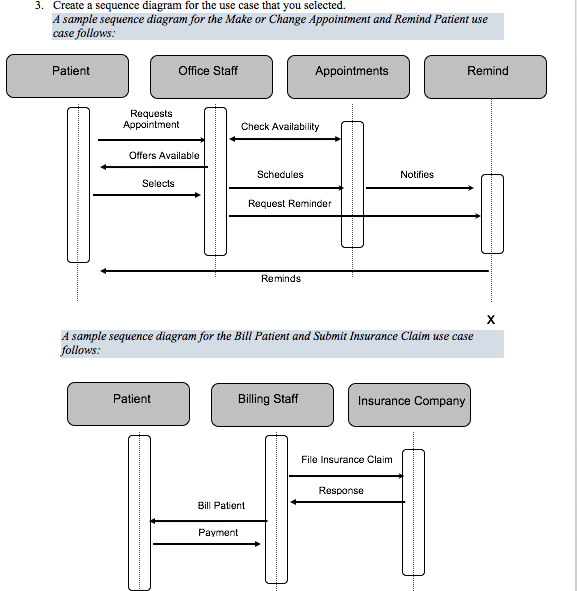
A sample use case diagram for Make or Change Appointments and Remind Patient follows Requests Appointment Checks Appointment Availability Confirms Make or Change Appointment Office Staff Patient Initiates Reminder Notifies Remind Patient
Step by Step Solution
There are 3 Steps involved in it

Get step-by-step solutions from verified subject matter experts
 Study Help