







Question: I'm having trouble trying to figure out the correct commands to use for each of these questions. I keep getting errors. I'm using Oracle Apex
I'm having trouble trying to figure out the correct commands to use for each of these questions. I keep getting errors. I'm using Oracle Apex to put in the SQL commands. Please help and I appreciate any feedback.
4. Create a list of students that displays the student number, last name followed by the first name for each student and email. The last name and first name should be separated by a comma and a blank space. Use a column alias for the email to show the heading EMAIL ADDRESS in the output.
5. Part A. Display a list of the states in the STUDENTS table. Part B. Display a list of the states in the STUDENTS table. List each state only once.
6. Create a new table containing these four columns: Anumber#, Lastname, Firstname, and Age. The table name should be AGETABLE. The Anumber# column should be able to store character strings up to a maximum number of 9. The Age column contains a numeric age and should allow a 3-digit number. Use column sizes you consider to suitable for the Firstname and Lastname columns
7. Add two columns to the AGETABLE table that contains the each person date of birth, and its default value should be the system date. The second column, named date of death, contains the date of the persons death.
8. Modify the Anumber# column of the AGETABLE so that it allows storing a maximum width of five characters.
9. Delete the date of death column from the AGETABLE. Rename the AGETABLE as EXAM1_AGETABLE
10. Write the command that will list all the tables in your user account
Here is the table I'm working with.
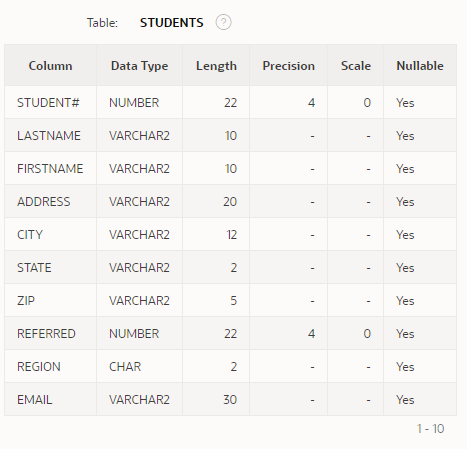
Table: STUDENTS ? Column Data Type Length Precision Scale Nullable STUDENT# NUMBER 22 4 0 Yes LASTNAME VARCHAR2 10 Yes FIRSTNAME VARCHAR2 10 Yes ADDRESS VARCHAR2 20 Yes CITY VARCHAR2 12 Yes STATE VARCHAR2 2 Yes ZIP VARCHARZ 5 Yes REFERRED NUMBER 22 4 0 Yes REGION CHAR 2 - Yes EMAIL VARCHAR2 30 Yes 1 - 10 Table: STUDENTS ? Column Data Type Length Precision Scale Nullable STUDENT# NUMBER 22 4 0 Yes LASTNAME VARCHAR2 10 Yes FIRSTNAME VARCHAR2 10 Yes ADDRESS VARCHAR2 20 Yes CITY VARCHAR2 12 Yes STATE VARCHAR2 2 Yes ZIP VARCHARZ 5 Yes REFERRED NUMBER 22 4 0 Yes REGION CHAR 2 - Yes EMAIL VARCHAR2 30 Yes 1 - 10
Step by Step Solution
There are 3 Steps involved in it

Get step-by-step solutions from verified subject matter experts
 Study Help