







Question: In cells G6, add a VLOOKUP function that returns the starting raise percentage based on the named range Raise and the number of years employed

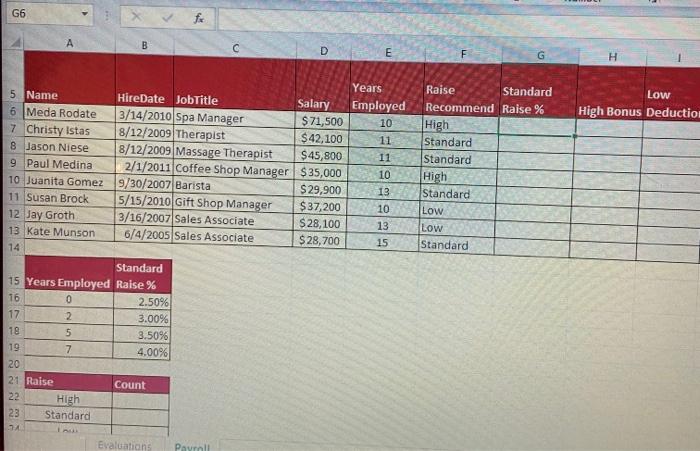
In cells G6, add a VLOOKUP function that returns the starting raise percentage based on the named range Raise and the number of years employed in column E (E6 for first row) Column 2 Copy the formula through G13. G6 fx A B DE F G H Low High Bonus Deduction Raise Standard Recommend Raise % High Standard Standard High Standard Low Low Standard Years 5 Name HireDate JobTitle Salary Employed 6 Meda Rodate 3/14/2010 Spa Manager $ 71,500 10 7 Christy istas 8/12/2009 Therapist $ 42,100 11 8 Jason Niese 8/12/2009 Massage Therapist $45,800 11 9 Paul Medina 2/1/2011 Coffee Shop Manager $35,000 10 10 Juanita Gomez 9/30/2007 Barista $ 29,900 13 11 Susan Brock 5/15/2010 Gift Shop Manager $37,200 10 12 Jay Groth 3/16/2007 Sales Associate $28,100 13 13 Kate Munson 6/4/2005 Sales Associate $ 28,700 15 14 Standard 15 Years Employed Raise % 16 0 2.50% 17 2 3.00% 18 5 3.50% 19 7 4.00% 20 21 Raise Count 22 High 23 Standard 34 Evaluation Paurell
Step by Step Solution
There are 3 Steps involved in it

Get step-by-step solutions from verified subject matter experts
 Study Help