







Question: Instruction: This document is for teacher use only. Teachers can recreate the checkpoint activities in Swift Assess, Teams or even LMS if it is working
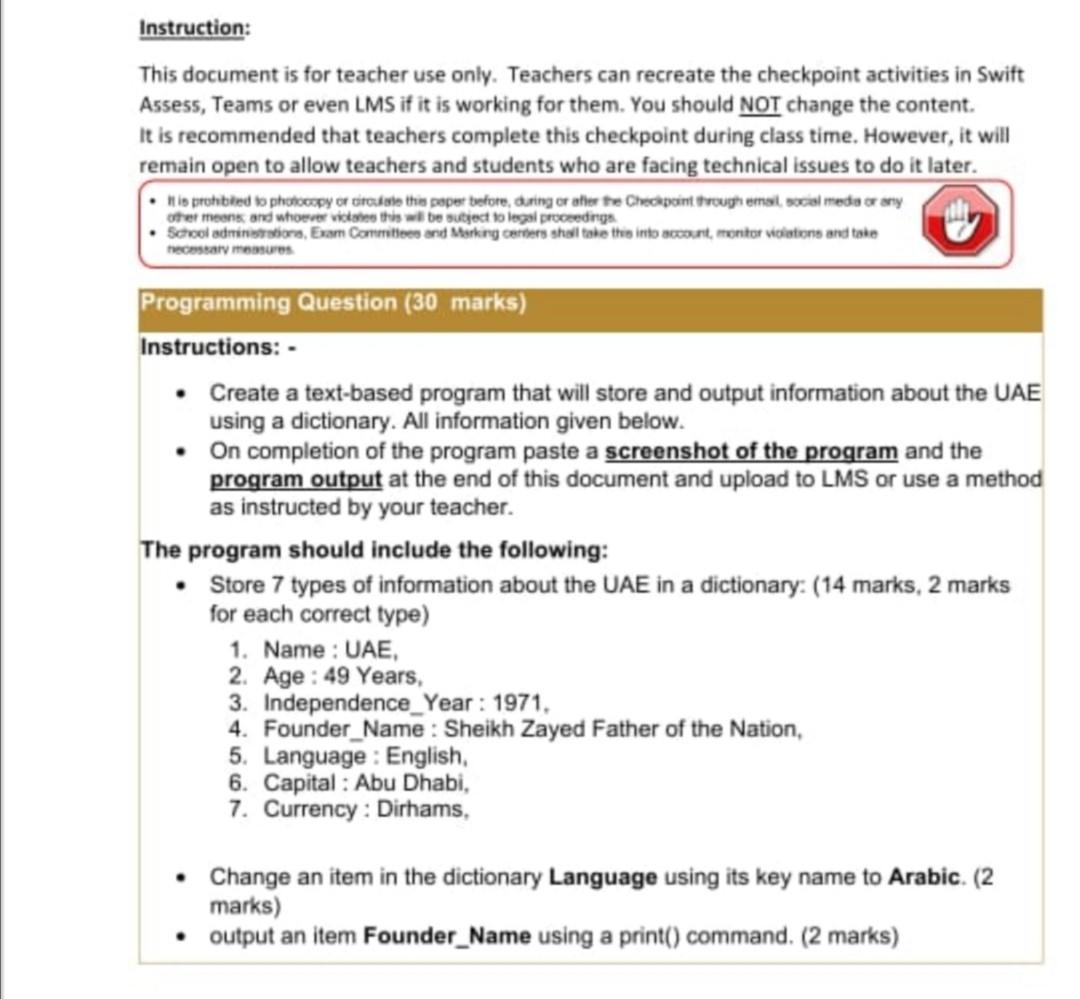
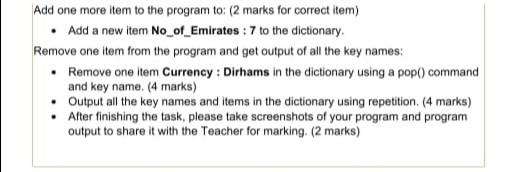
Instruction: This document is for teacher use only. Teachers can recreate the checkpoint activities in Swift Assess, Teams or even LMS if it is working for them. You should NOT change the content It is recommended that teachers complete this checkpoint during class time. However, it will remain open to allow teachers and students who are facing technical issues to do it later. . io probled to photocopy or to this paper before, during rather the Checkpoint through email wil media or any Ofer moons and whoever vil this will be subject to legal proceedings School adore Exam Commons and Marking centers shall take this into account, mentor violations and take omar memes Programming Question (30 marks) Instructions: Create a text-based program that will store and output information about the UAE using a dictionary. All information given below. On completion of the program paste a screenshot of the program and the program output at the end of this document and upload to LMS or use a method as instructed by your teacher. The program should include the following: Store 7 types of information about the UAE in a dictionary: (14 marks, 2 marks for each correct type) 1. Name : UAE, 2. Age: 49 Years. 3. Independence_Year: 1971. 4. Founder_Name : Sheikh Zayed Father of the Nation, 5. Language: English, 6. Capital : Abu Dhabi, 7. Currency: Dirhams, Change an item in the dictionary Language using its key name to Arabic. (2 marks) output an item Founder_Name using a print() command. (2 marks) Add one more item to the program to: (2 marks for correct item) Add a new item No_of_Emirates : 7 to the dictionary Remove one item from the program and get output of all the key names: Remove one item Currency : Dirhams in the dictionary using a pop() command and key name. (4 marks) Output all the key names and items in the dictionary using repetition. (4 marks) . After finishing the task, please take screenshots of your program and program output to share it with the Teacher for marking. (2 marks) 1. Screenshot of Program Read the instructions carefully for sharing your work with the Teacher. If you are sharing screenshots, please use this space to paste clear and easy to read screenshots of your program. 2. Screenshot of Program Output Read the instructions carefully for sharing your work with the Teacher. If you are sharing screenshots, please use this space to paste clear and easy to read screenshots of your program output
Step by Step Solution
There are 3 Steps involved in it

Get step-by-step solutions from verified subject matter experts
 Study Help