







Question: Introduction to Webpage Design and Development Case-Based Critical Thinking Questions Alex's woodworking shop is trying to design a web page with Cascading Style Sheets (CSS).
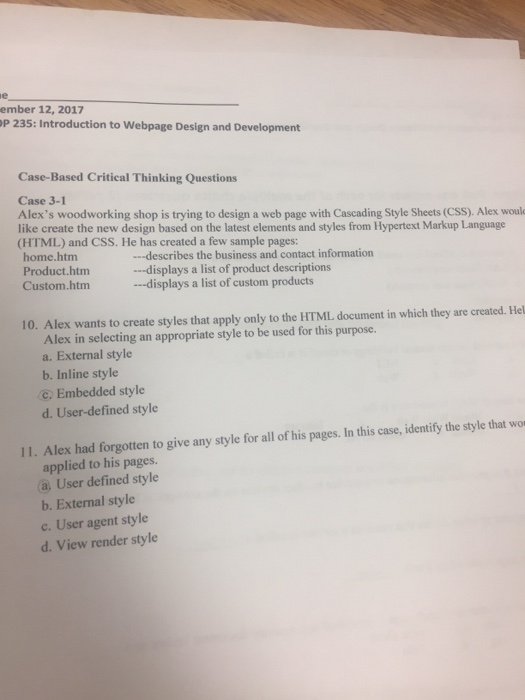
Introduction to Webpage Design and Development Case-Based Critical Thinking Questions Alex's woodworking shop is trying to design a web page with Cascading Style Sheets (CSS). Alex would like create the new design based on the latest elements and styles from Hypertext Markup language (HTML) and CSS. He has created a few sample pages: Alex wants to create styles that apply only to the HTML document in which they are created. Hel Alex in selecting an appropriate style to be used for this purpose. a. External style b. Inline style c. Embedded style d. User-defined style Alex had forgotten to give any style for all of his pages. In this case, identify the style that applied to his pages. a. User defined style b. External style c. User agent style d. View render style Introduction to Webpage Design and Development Case-Based Critical Thinking Questions Alex's woodworking shop is trying to design a web page with Cascading Style Sheets (CSS). Alex would like create the new design based on the latest elements and styles from Hypertext Markup language (HTML) and CSS. He has created a few sample pages: Alex wants to create styles that apply only to the HTML document in which they are created. Hel Alex in selecting an appropriate style to be used for this purpose. a. External style b. Inline style c. Embedded style d. User-defined style Alex had forgotten to give any style for all of his pages. In this case, identify the style that applied to his pages. a. User defined style b. External style c. User agent style d. View render style
Step by Step Solution
There are 3 Steps involved in it

Get step-by-step solutions from verified subject matter experts
 Study Help