







Question: INTRODUCTION: Your lab will assign integers to two arrays and then perform a number of tasks on those arrays. The numbers for the first array
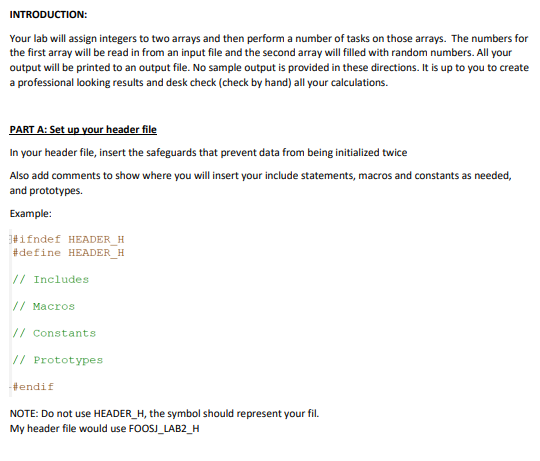
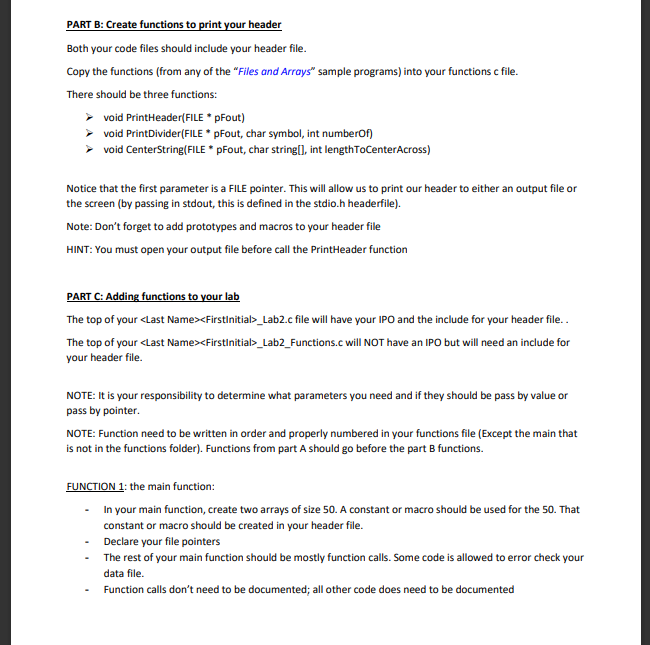
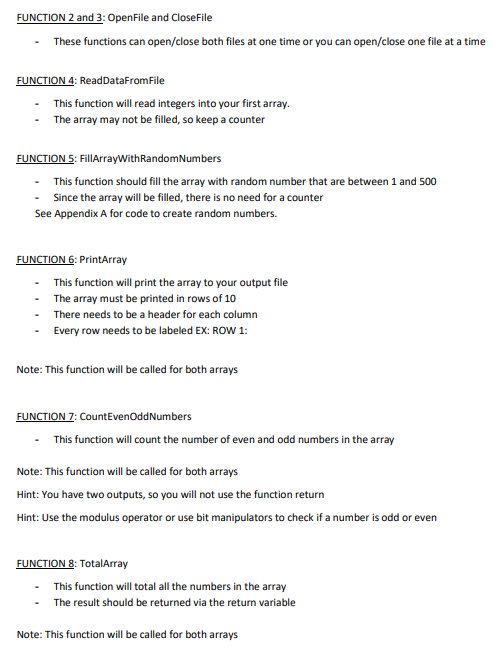
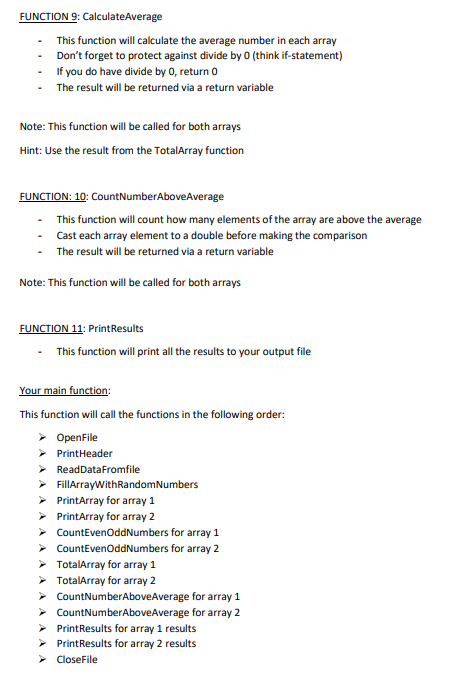
INTRODUCTION: Your lab will assign integers to two arrays and then perform a number of tasks on those arrays. The numbers for the first array will be read in from an input file and the second array will filled with random numbers. All your output will be printed to an output file. No sample output is provided in these directions. It is up to you to create a professional looking results and desk check (check by hand) all your calculations. PART A: Set up your header file In your header file, insert the safeguards that prevent data from being initialized twice Also add comments to show where you will insert your include statements, macros and constants as needed, and prototypes. Example: \#ifndef HEADER_H \#define HEADER_H // Includes // Macros // Constants // Prototypes -\#endif NOTE: Do not use HEADER_H, the symbol should represent your fil. My header file would use FOOSJ_LAB2_H PART B: Create functions to print your header Both your code files should include your header file. Copy the functions (from any of the "Files and Arrays" sample programs) into your functions c file. There should be three functions: void PrintHeader(FILE * pFout) void PrintDivider(FILE * pFout, char symbol, int numberOf) void CenterString(FILE * pFout, char string[], int lengthToCenterAcross) Notice that the first parameter is a FILE pointer. This will allow us to print our header to either an output file or the screen (by passing in stdout, this is defined in the stdio.h headerfile). Note: Don't forget to add prototypes and macros to your header file HINT: You must open your output file before call the Printheader function PART C: Adding functions to your lab The top of your _Lab2.c file will have your IPO and the include for your header file.. The top of your > Firstinitial>_Lab2_Functions.c will NOT have an IPO but will need an include for your header file. NOTE: It is your responsibility to determine what parameters you need and if they should be pass by value or pass by pointer. NOTE: Function need to be written in order and properly numbered in your functions file (Except the main that is not in the functions folder). Functions from part A should go before the part B functions. FUNCTION 1: the main function: - In your main function, create two arrays of size 50. A constant or macro should be used for the 50. That constant or macro should be created in your header file. - Declare your file pointers - The rest of your main function should be mostly function calls. Some code is allowed to error check your data file. - Function calls don't need to be documented; all other code does need to be documented FUNCTION 2 and 3: OpenFile and CloseFile - These functions can open/close both files at one time or you can open/close one file at a time FUNCTION 4: ReadDataFromFile - This function will read integers into your first array. - The array may not be filled, so keep a counter FUNCTION 5: FillArrayWithRandomNumbers - This function should fill the array with random number that are between 1 and 500 - Since the array will be filled, there is no need for a counter See Appendix A for code to create random numbers. FUNCTION 6: PrintArray - This function will print the array to your output file - The array must be printed in rows of 10 - There needs to be a header for each column - Every row needs to be labeled EX: ROW 1: Note: This function will be called for both arrays FUNCTION 7: CountEvenOddNumbers - This function will count the number of even and odd numbers in the array Note: This function will be called for both arrays Hint: You have two outputs, so you will not use the function return Hint: Use the modulus operator or use bit manipulators to check if a number is odd or even FUNCTION 8: TotalArray - This function will total all the numbers in the array - The result should be returned via the return variable Note: This function will be called for both arrays FUNCTION 9: CalculateAverage - This function will calculate the average number in each array - Don't forget to protect against divide by 0 (think if-statement) - If you do have divide by 0 , return 0 - The result will be returned via a return variable Note: This function will be called for both arrays Hint: Use the result from the TotalArray function FUNCTION: 10: CountNumberAboveAverage - This function will count how many elements of the array are above the average - Cast each array element to a double before making the comparison - The result will be returned via a return variable Note: This function will be called for both arrays FUNCTION 11: PrintResults - This function will print all the results to your output file Your main function: This function will call the functions in the following order: OpenFile PrintHeader ReadDataFromfile FillArrayWithRandomNumbers PrintArray for array 1 PrintArray for array 2 CountEvenOddNumbers for array 1 CountEvenOddNumbers for array 2 TotalArray for array 1 TotalArray for array 2 CountNumberAboveAverage for array 1 CountNumberAboveAverage for array 2 PrintResults for array 1 results PrintResults for array 2 results CloseFile INTRODUCTION: Your lab will assign integers to two arrays and then perform a number of tasks on those arrays. The numbers for the first array will be read in from an input file and the second array will filled with random numbers. All your output will be printed to an output file. No sample output is provided in these directions. It is up to you to create a professional looking results and desk check (check by hand) all your calculations. PART A: Set up your header file In your header file, insert the safeguards that prevent data from being initialized twice Also add comments to show where you will insert your include statements, macros and constants as needed, and prototypes. Example: \#ifndef HEADER_H \#define HEADER_H // Includes // Macros // Constants // Prototypes -\#endif NOTE: Do not use HEADER_H, the symbol should represent your fil. My header file would use FOOSJ_LAB2_H PART B: Create functions to print your header Both your code files should include your header file. Copy the functions (from any of the "Files and Arrays" sample programs) into your functions c file. There should be three functions: void PrintHeader(FILE * pFout) void PrintDivider(FILE * pFout, char symbol, int numberOf) void CenterString(FILE * pFout, char string[], int lengthToCenterAcross) Notice that the first parameter is a FILE pointer. This will allow us to print our header to either an output file or the screen (by passing in stdout, this is defined in the stdio.h headerfile). Note: Don't forget to add prototypes and macros to your header file HINT: You must open your output file before call the Printheader function PART C: Adding functions to your lab The top of your _Lab2.c file will have your IPO and the include for your header file.. The top of your > Firstinitial>_Lab2_Functions.c will NOT have an IPO but will need an include for your header file. NOTE: It is your responsibility to determine what parameters you need and if they should be pass by value or pass by pointer. NOTE: Function need to be written in order and properly numbered in your functions file (Except the main that is not in the functions folder). Functions from part A should go before the part B functions. FUNCTION 1: the main function: - In your main function, create two arrays of size 50. A constant or macro should be used for the 50. That constant or macro should be created in your header file. - Declare your file pointers - The rest of your main function should be mostly function calls. Some code is allowed to error check your data file. - Function calls don't need to be documented; all other code does need to be documented FUNCTION 2 and 3: OpenFile and CloseFile - These functions can open/close both files at one time or you can open/close one file at a time FUNCTION 4: ReadDataFromFile - This function will read integers into your first array. - The array may not be filled, so keep a counter FUNCTION 5: FillArrayWithRandomNumbers - This function should fill the array with random number that are between 1 and 500 - Since the array will be filled, there is no need for a counter See Appendix A for code to create random numbers. FUNCTION 6: PrintArray - This function will print the array to your output file - The array must be printed in rows of 10 - There needs to be a header for each column - Every row needs to be labeled EX: ROW 1: Note: This function will be called for both arrays FUNCTION 7: CountEvenOddNumbers - This function will count the number of even and odd numbers in the array Note: This function will be called for both arrays Hint: You have two outputs, so you will not use the function return Hint: Use the modulus operator or use bit manipulators to check if a number is odd or even FUNCTION 8: TotalArray - This function will total all the numbers in the array - The result should be returned via the return variable Note: This function will be called for both arrays FUNCTION 9: CalculateAverage - This function will calculate the average number in each array - Don't forget to protect against divide by 0 (think if-statement) - If you do have divide by 0 , return 0 - The result will be returned via a return variable Note: This function will be called for both arrays Hint: Use the result from the TotalArray function FUNCTION: 10: CountNumberAboveAverage - This function will count how many elements of the array are above the average - Cast each array element to a double before making the comparison - The result will be returned via a return variable Note: This function will be called for both arrays FUNCTION 11: PrintResults - This function will print all the results to your output file Your main function: This function will call the functions in the following order: OpenFile PrintHeader ReadDataFromfile FillArrayWithRandomNumbers PrintArray for array 1 PrintArray for array 2 CountEvenOddNumbers for array 1 CountEvenOddNumbers for array 2 TotalArray for array 1 TotalArray for array 2 CountNumberAboveAverage for array 1 CountNumberAboveAverage for array 2 PrintResults for array 1 results PrintResults for array 2 results CloseFile
Step by Step Solution
There are 3 Steps involved in it

Get step-by-step solutions from verified subject matter experts
 Study Help