







Question: La b Assignments for Chapter 2 We have created six lab assignments for this chapter: Lab2-1 to Lab2-6. We have also included six lab-report sheets,
Lab Assignments for Chapter 2
We have created six lab assignments for this chapter: Lab2-1 to Lab2-6. We have also included six lab-report sheets, which means that each lab assignment needs to be reported in a separate sheet. The six lab assignments are related to six application-layer protocols we discussed in this chapter. The lab assignment for SSH protocol has been moved to Chapter 10 because it involves security issues. It is strongly recommended that the student carefully study and digest the corresponding protocols before working on the related lab assignment. It is necessary that the student carefully study the instructions in the lab assignment for Chapter 1 before starting this assignment.
Lab2-2: FTP
File Transfer Protocol (FTP) is a standard client-server protocol for copying files from one host to another over the Internet. You can run the FTP program using command- line.
ftp [options] [hostname] // You may want to use the -v option.
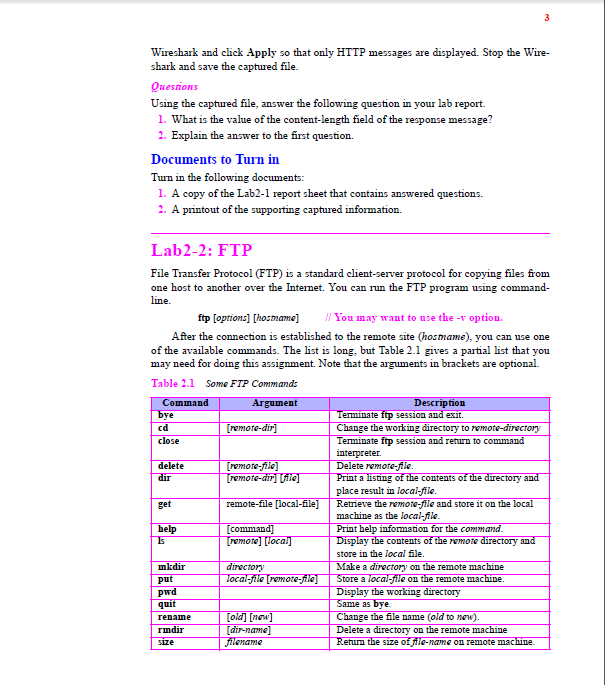
After the connection is established to the remote site (hostname), you can use one of the available commands. The list is long, but Table 2.1 gives a partial list that you may need for doing this assignment. Note that the arguments in brackets are optional.
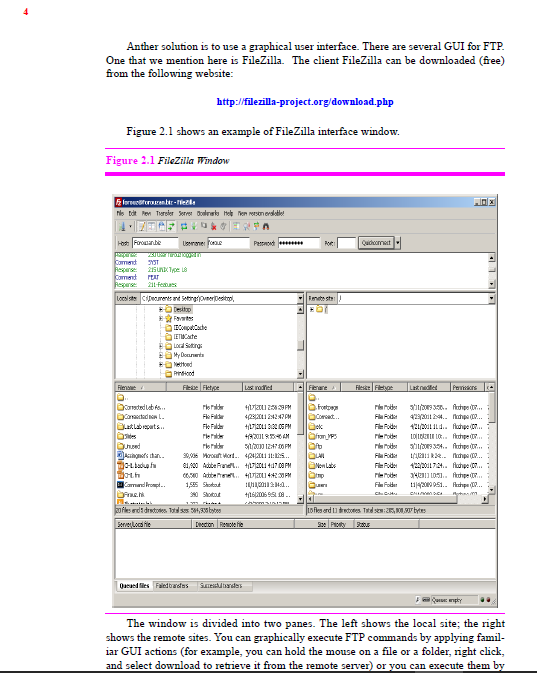
Anther solution is to use a graphical user interface. There are several GUI for FTP. One that we mention here is FileZilla. The client FileZilla can be downloaded (free) from the following website:
http://filezilla-project.org/download.php
The window is divided into two panes. The left shows the local site; the right shows the remote sites. You can graphically execute FTP commands by applying famil- iar GUI actions (for example, you can hold the mouse on a file or a folder, right click, and select download to retrieve it from the remote server) or you can execute them by
entering custom command which you can find under the Server or Transfer dropdown menu.
Assignment
Open Wireshark and start capturing.
Open the FTP client from the command-line utility, or open FileZilla. Connect to the remote site and execute several FTP commands.
After quitting the FTP program, go back to the Wireshark, select the Capture from the pull down menu and click Stop. Select the File menu and save the captured file. You will notice several FTP packets and FTP/DAT packets as well as many TCP packets that are used to establish and terminate FTP connection and acknowl- edge the transfer of FTP data.
Questions
Examining the above-mentioned packets and consulting Tables 2.4 and 2.5 in the text- book, answer the following questions in your lab-report sheet.
1. Identify the three TCP packets used for connection establishment.
2. What is the first FTP packet? Is it a request or response packet?
3. How many packets are exchanged for login? What is the exchanged information?
4. Is the user name and password encrypted? What can you say about security of
FTP?
5. What request command is used in any of the following activities? What response code is used in any of them?
a. storing a file,
b. retrieving a file,
c. getting the list of files and folders in a folder,
d. deleting a file,
e. renaming a file, and
f. quitting
6. What well-known port number does the server used for control connection?
7. In active mode, the FTP data connection is opened by the server from its well- known port 20 to a negotiated (ephemeral) client port. In passive mode, the data connection is opened by the client from an arbitrary (ephemeral) port to a negoti- ated (ephemeral) server port. What is the server port number for the data-transfer phase (FTP-DAT)? Is the data connection opened by the server or by the client?
8. Identify the TCP packets used to terminate the connection.
Wireshark and click Apply so that only HTTP messages are displayed. Stop the ir shark and save the captured file. Quesions Using the captured file, answer the following question in your lab report. 1. What is the value of the content-length field of the response message 2. Explain the answer to the first question. Documents to Turn in Turn in the following documents: 1. A copy of the Lab2-1 report sheet that contains answered questions. 2. A printout of the supporting captured information. Lab2-2: FTP File Transfer Protocol (FTP) is a standard client-server protocol for copying files from one host to another over the line. Internet. You can run the FTP program using c ftp loptiona] [hosmame] You may want to use the -v option. After the connection is established to the remote site (hosmame), you can use one of the available commands. The list is long, but Table 2.1 gives a partial list that you may need for doing this assignment. Note that the arguments in brackets are optional. Table 2.1 Some FIP Commands tion Tenminate ftp session and exit e the working directory to close te ftp session and return to c delete remote-fie] lete remote-fle place result in local-fie machine as the local-file contents get l-file] Retrieve the remote-file and store it on the help t help information for the co amor contents emote store in the local file mkdir directory e a directory on the remote machine tore a on the remote pwd y the working directory e the file name (old to new). rmdir lete a directory on the remote machine e-nane on remote Wireshark and click Apply so that only HTTP messages are displayed. Stop the ir shark and save the captured file. Quesions Using the captured file, answer the following question in your lab report. 1. What is the value of the content-length field of the response message 2. Explain the answer to the first question. Documents to Turn in Turn in the following documents: 1. A copy of the Lab2-1 report sheet that contains answered questions. 2. A printout of the supporting captured information. Lab2-2: FTP File Transfer Protocol (FTP) is a standard client-server protocol for copying files from one host to another over the line. Internet. You can run the FTP program using c ftp loptiona] [hosmame] You may want to use the -v option. After the connection is established to the remote site (hosmame), you can use one of the available commands. The list is long, but Table 2.1 gives a partial list that you may need for doing this assignment. Note that the arguments in brackets are optional. Table 2.1 Some FIP Commands tion Tenminate ftp session and exit e the working directory to close te ftp session and return to c delete remote-fie] lete remote-fle place result in local-fie machine as the local-file contents get l-file] Retrieve the remote-file and store it on the help t help information for the co amor contents emote store in the local file mkdir directory e a directory on the remote machine tore a on the remote pwd y the working directory e the file name (old to new). rmdir lete a directory on the remote machine e-nane on remote
Step by Step Solution
There are 3 Steps involved in it

Get step-by-step solutions from verified subject matter experts
 Study Help