







Question: please help I need this by tonight ASAP. if you solve this i will give you the BEST RATING. ALL I NEED IS THE FULL
please help I need this by tonight ASAP. if you solve this i will give you the BEST RATING. ALL I NEED IS THE FULL DETAILED CODE FOR THE MULTITASKING COMMANDER. other commanders are finished. I REPEAT, only MULTI COMMANDER. Please provide comments and details on how you did this as well as all files such as multi.c and multi-helper1.c, multi.txt, ETC.
Here is the instructions:
PLEASE HELP I NEED THIS ASAP BY TONIGHT
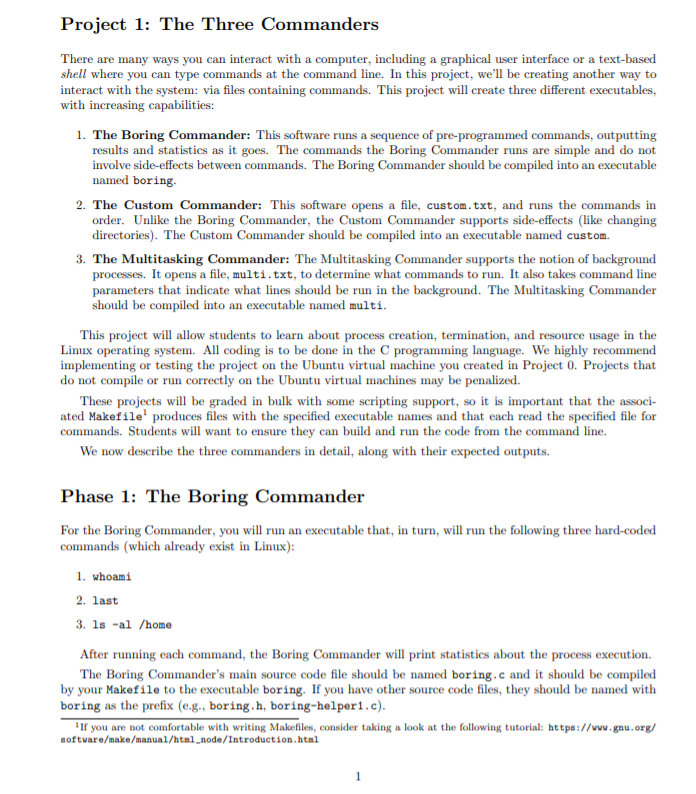
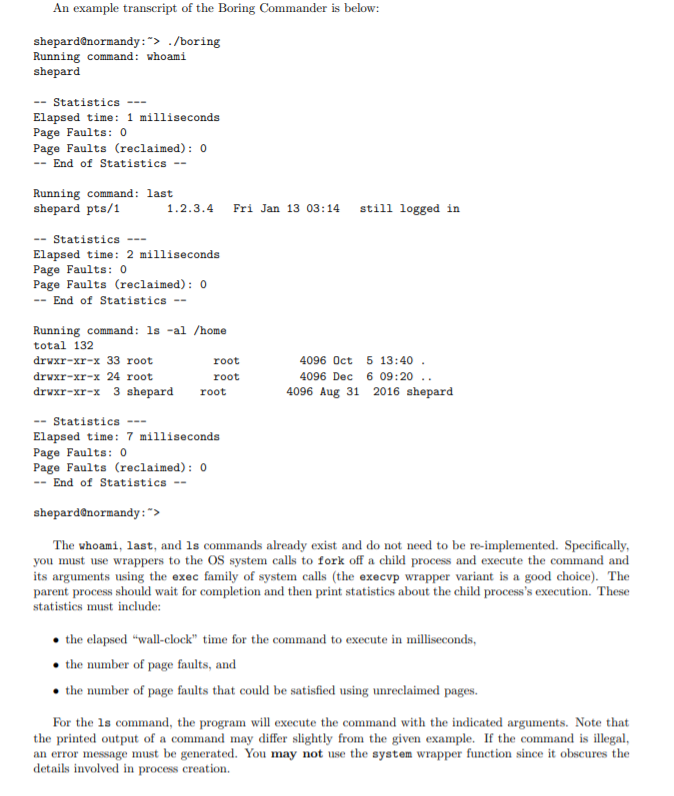
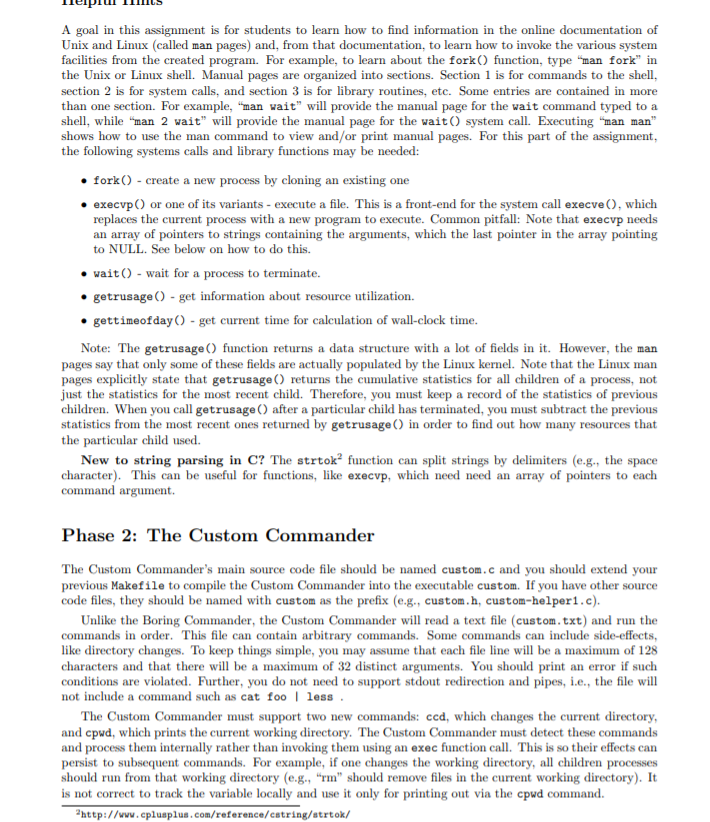
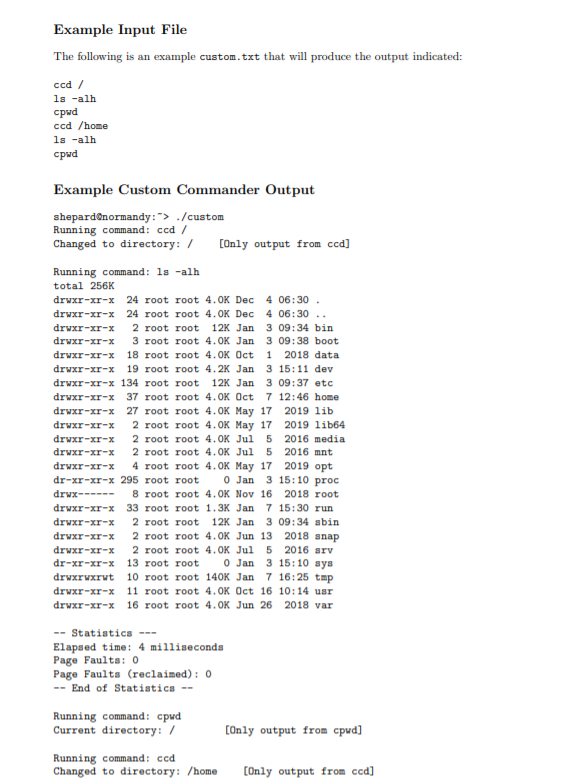
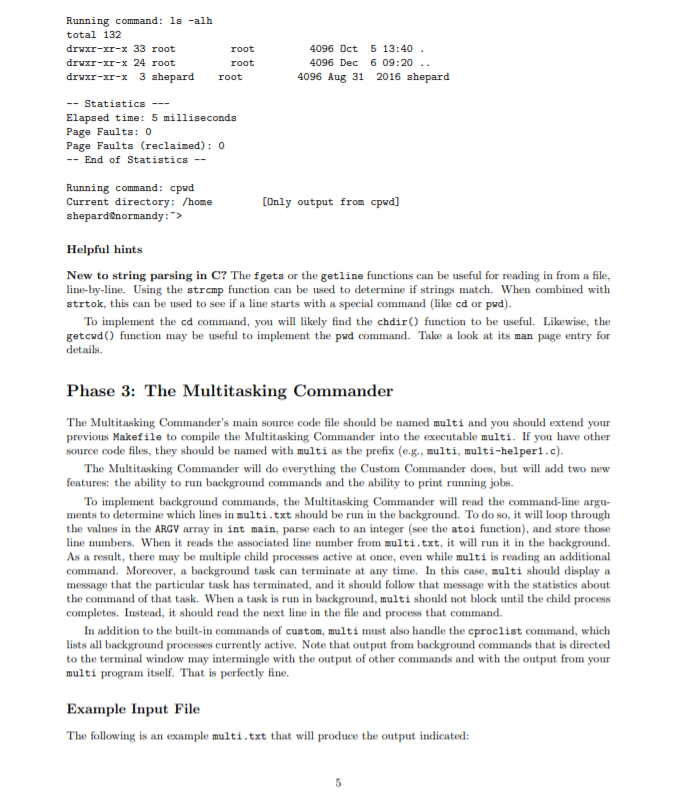
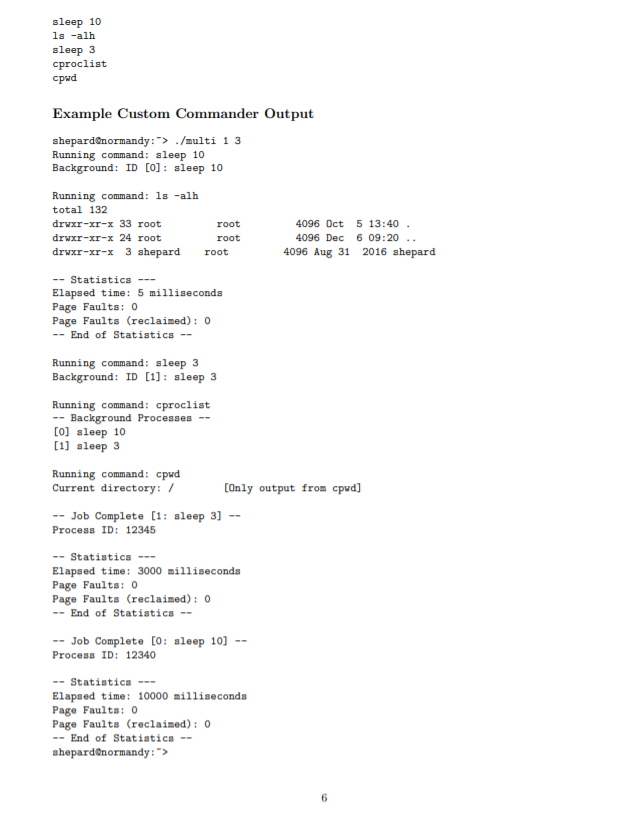
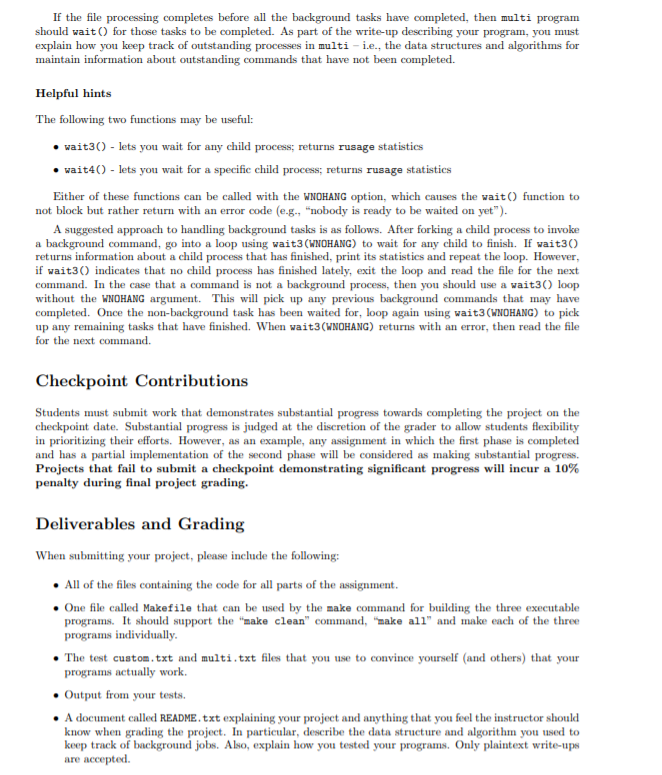
Project 1: The Three Commanders There are many ways you can interact with a computer, including a graphical user interface or a text-based shell where you can type commands at the command line. In this project, we'll be creating another way to interact with the system: via files containing commands. This project will create three different executables, with increasing capabilities: 1. The Boring Commander: This software runs a sequence of pre-programmed commands, outputting results and statistics as it goes. The commands the Boring Commander runs are simple and do not involve side-effects between commands. The Boring Commander should be compiled into an executable named boring 2. The Custom Commander: This software opens a file, custom.txt, and runs the commands in order. Unlike the Boring Commander, the Custom Commander supports side-effects (like changing directories). The Custom Commander should be compiled into an executable 3. The Multitasking Commander: The Multitasking Commander supports the notion of background processes. It opens a file, multi.txt, to determine what commands to run. It also takes command line parameters that indicate what lines should be run in the background. The Multitasking Commander should be compiled into an executable named multi. This project will allow students to learn about process creation, termination, and resource usage in the Linux operating system. All coding is to be done in the programming language. We highly recommend implementing or testing the project on the Ubuntu virtual machine you created in Project 0. Projects that do not compile or run correctly on the Ubuntu virtual machines may be penalized. These projects will be graded in bulk with some scripting support, so it is important that the associ- ated Makefile produces files with the specified executable names and that each read the specified file for commands. Students will want to ensure they can build and run the code from the command line. We now describe the three commanders in detail, along with their expected outputs. Phase 1: The Boring Commander For the Boring Commander, you will run an executable that, in turn, will run the following three hard-coded commands (which already exist in Linux): 1. whoami 2. last 3. ls -al /home After running each command, the Boring Commander will print statistics about the process execution. The Boring Commander's main source code file should be named boring.c and it should be compiled by your Makefile to the executable boring. If you have other source code files, they should be named with boring as the prefix (e.g., boring.h, boring-helper1.c). If you are not comfortable with writing Makefiles, consider taking a look at the following tutorial: https://www.gnu.org/ software/make/manual/html_node/Introduction.html An example transcript of the Boring Commander is below: shepard@normandy:"> ./boring Running command: whoami shepard -- Statistics --- Elapsed time: 1 milliseconds Page Faults: 0 Page Faults (reclaimed): 0 -- End of Statistics -- Running command: last shepard pts/ 1 1 .2.3.4 Fri Jan 13 03:14 still logged in -- Statistics --- Elapsed time: 2 milliseconds Page Faults: 0 Page Faults (reclaimed): 0 -- End of Statistics -- Running command: ls -al /home total 132 drwxr-xr-x 33 root root drwxr-xr-x 24 root root drwxr-xr-x 3 shepard root 4096 Oct 5 13:40. 4096 Dec 6 09:20 .. 4096 Aug 31 2016 shepard -- Statistics --- Elapsed time: 7 milliseconds Page Faults: 0 Page Faults (reclaimed): 0 -- End of Statistics -- shepard@normandy :"> The whoami, last, and ls commands already exist and do not need to be re-implemented. Specifically, you must use wrappers to the OS system calls to fork off a child process and execute the command and its arguments using the exec family of system calls (the execup wrapper variant is a good choice). The parent process should wait for completion and then print statistics about the child process's execution. These statistics must include: the elapsed "wall-clock" time for the command to execute in milliseconds, the number of page faults, and the number of page faults that could be satisfied using unreclaimed pages. For the ls command, the program will execute the command with the indicated arguments. Note that the printed output of a command may differ slightly from the given example. If the command is illegal, an error message must be generated. You may not use the system wrapper function since it obscures the details involved in process creation. IIILS A goal in this assignment is for students to learn how to find information in the online documentation of Unix and Linux (called man pages) and, from that documentation, to learn how to invoke the various system facilities from the created program. For example, to learn about the fork() function, type "man fork" in the Unix or Linux shell. Manual pages are organized into sections. Section 1 is for commands to the shell. section 2 is for system calls, and section 3 is for library routines, etc. Some entries are contained in more than one section. For example, "man wait" will provide the manual page for the wait command typed to a shell, while "man 2 wait" will provide the manual page for the wait system call. Executing "man man" shows how to use the man command to view and/or print manual pages. For this part of the assignment, the following systems calls and library functions may be needed: fork) - create a new process by cloning an existing one execvp) or one of its variants - execute a file. This is a front-end for the system call execve(), which replaces the current process with a new program to execute. Common pitfall: Note that execvp needs an array of pointers to strings containing the arguments, which the last pointer in the array pointing to NULL. See below on how to do this. wait() - wait for a process to terminate. getrusage() - get information about resource utilization. gettimeofday) - get current time for calculation of wall-clock time. Note: The getrusage() function returns a data structure with a lot of fields in it. However, the man pages say that only some of these fields are actually populated by the Linux kernel. Note that the Linux man pages explicitly state that getrusage() returns the cumulative statistics for all children of a process, not just the statistics for the most recent child. Therefore, you must keep a record of the statistics of previous children. When you call getrusage after a particular child has terminated, you must subtract the previous statistics from the most recent ones returned by getrusage in order to find out how many resources that the particular child used. New to string parsing in C? The strtok function can split strings by delimiters (e.g., the space character). This can be useful for functions, like execvp, which need need an array of pointers to each command argument. Phase 2: The Custom Commander The Custom Commander's main source code file should be named custom.c and you should extend your previous Makefile to compile the Custom Commander into the executable custom. If you have other source code files, they should be named with custom as the prefix (e.g., custom.h, custom-helper1.c). Unlike the Boring Commander, the Custom Commander will read a text file (custom.txt) and run the commands in order. This file can contain arbitrary commands. Some commands can include side-effects, like directory changes. To keep things simple, you may assume that each file line will be a maximum of 128 characters and that there will be a maximum of 32 distinct arguments. You should print an error if such conditions are violated. Further, you do not need to support stdout redirection and pipes, i.e., the file will not include a command such as cat fool less. The Custom Commander must support two new commands: ccd, which changes the current directory, and cpwd, which prints the current working directory. The Custom Commander must detect these commands and process them internally rather than invoking them using an exec function call. This is so their effects can persist to subsequent commands. For example, if one changes the working directory, all children processes should run from that working directory (e.g., "m" should remove files in the current working directory). It is not correct to track the variable locally and use it only for printing out via the cpwd command. http://www.cplusplus.com/reference/catring/strtok/ Example Input File The following is an example custom.txt that will produce the output indicated: ccd/ ls -alh cpud ccd /home ls -alh cpwd Example Custom Commander Output shepard normandy:"> ./custom Running command: ccd/ Changed to directory: / (Only output from ccd] Running command: ls -alh total 256K drwxr-xr-x 24 root root 4.OK Dec 4 06:30 drwxr-xr-x 24 root root 4.OK Dec 4 06:30 .. drwxr-xr-x 2 root root 12K Jan 3 09:34 bin drwxr-xr-x 3 root root 4.OK Jan 3 09:38 boot drwxr-xr-x 18 root root 4.OK Oct 1 2018 data drwxr-xr-x 19 root root 4.2K Jan 3 15:11 dev drwxr-xr-x 134 root root 12K Jan 3 09:37 etc drwxr-xr-x 37 root root 4.OK Oct 7 12:46 home drwxr-xr-x 27 root root 4.OK May 17 2019 lib drwxr-xr-x 2 root root 4. OK May 17 2019 lib64 drwxr-xr-x 2 root root 4.OK Jul 5 2016 media drwxr-xr-x 2 root root 4.OK Jul 5 2016 mnt drwxr-xr-x 4 root root 4. OK May 17 2019 opt dr-xr-xr-x 295 root root 0 Jan 3 15:10 proc drwx------ 8 root root 4.OK Nov 16 2018 root drwxr-xr-x 33 root root 1.3K Jan 7 15:30 run drwxr-xr-x 2 root root 12K Jan 3 09:34 sbin drwxr-xr-x 2 root root 4. OK Jun 13 2018 snap drwxr-xr-x 2 root root 4.OK Jul 5 2016 srv dr-xr-xr-x 13 root root 0 Jan 3 15:10 sys drwxrwxrwt 10 root root 140K Jan 7 16:25 tmp drwxr-xr-x 11 root root 4.OK Oct 16 10:14 usr drwxr-xr-x 16 root root 4. OK Jun 26 2018 var -- Statistics --- Elapsed time: 4 milliseconds Page Faults: 0 Page Faults (reclaimed): 0 -- End of Statistics -- Running command: cpwd Current directory: / [Only output from cpwd] Running command: ccd Changed to directory: /home (Only output from ccd] Running command: ls -alh total 132 drwxr-xr-x 33 root drwxr-xr-x 24 root drwxr-xr-x 3 shepard root root root 4096 Oct 5 13:40. 4096 Dec 6 09:20 .. 4096 Aug 31 2016 shepard -- Statistics --- Elapsed time: 5 milliseconds Page Faults: 0 Page Faults (reclaimed): 0 -- End of Statistics -- Running command: cpwd Current directory: /home shepard@normandy:"> [Only output from cpwd] Helpful hints New to string parsing in C? The fgets or the getline functions can be useful for reading in from a file, line-by-line. Using the strcmp function can be used to determine if strings match. When combined with strtok, this can be used to see if a line starts with a special command (like cd or pwd). To implement the cd command, you will likely find the chdir() function to be useful. Likewise, the getowd() function may be useful to implement the pwd command. Take a look at its man page entry for details. Phase 3: The Multitasking Commander The Multitasking Commander's main source code file should be named multi and you should extend your previous Makefile to compile the Multitasking Commander into the executable multi. If you have other source code files, they should be named with multi as the prefix (e.g., multi, multi-helper1.c). The Multitasking Commander will do everything the Custom Commander does, but will add two new features: the ability to run background commands and the ability to print running jobs. To implement background commands, the Multitasking Commander will read the command-line argu- ments to determine which lines in multi.txt should be run in the background. To do so, it will loop through the values in the ARGV array in int main, parse each to an integer (see the atoi function), and store those line numbers. When it reads the associated line number from multi.txt, it will run it in the background. As a result, there may be multiple child processes active at once, even while multi is reading an additional command. Moreover, a background task can terminate at any time. In this case, multi should display a message that the particular task has terminated, and it should follow that message with the statistics about the command of that task. When a task is run in background, multi should not block until the child process completes. Instead, it should read the next line in the file and process that command. In addition to the built-in commands of custom, multi must also handle the cproclist command, which lists all background processes currently active. Note that output from background commands that is directed to the terminal window may intermingle with the output of other commands and with the output from your multi program itself. That is perfectly fine. Example Input File The following is an example multi.txt that will produce the output indicated: sleep 10 ls -alh sleep 3 cproclist cpwd Example Custom Commander Output shepard@normandy: > ./multi 1 3 Running command: sleep 10 Background: ID [O]: sleep 10 Running command: ls -alh total 132 drwxr-xr-x 33 root drwxr-xr-x 24 root drwxr-xr-x 3 shepard root root root 4096 Oct 5 13:40. 4096 Dec 6 09:20 .. 4096 Aug 31 2016 shepard -- Statistics --- Elapsed time: 5 milliseconds Page Faults: 0 Page Faults (reclaimed): 0 -- End of Statistics -- Running command: sleep 3 Background: ID [1]: sleep 3 Running command: cproclist -- Background Processes [0] sleep 10 [1] sleep 3 Running command: cpwd Current directory: / [Only output from cpwd] -- Job Complete [1: sleep 3] -- Process ID: 12345 -- Statistics --- Elapsed time: 3000 milliseconds Page Faults: 0 Page Faults (reclaimed) : 0 -- End of Statistics -- -- Job Complete [0: sleep 10] -- Process ID: 12340 -- Statistics --- Elapsed time: 10000 milliseconds Page Faults: 0 Page Faults (reclaimed): 0 -- End of Statistics -- shepard normandy :"> If the file processing completes before all the background tasks have completed, then multi program should wait for those tasks to be completed. As part of the write-up describing your program, you must explain how you keep track of outstanding processes in multi-i.e., the data structures and algorithms for maintain information about outstanding commands that have not been completed. Helpful hints The following two functions may be useful: wait3) - lets you wait for any child process returns rusage statistics wait4() - lets you wait for a specific child process; returns rusage statistics Either of these functions can be called with the WNOHANG option, which causes the wait() function to not block but rather return with an error code (e.g., "nobody is ready to be waited on yet"). A suggested approach to handling background tasks is as follows. After forking a child process to invoke a background command, go into a loop using wait3(WNOHANG) to wait for any child to finish. If wait30) returns information about a child process that has finished, print its statistics and repeat the loop. However, if wait 3) indicates that no child process has finished lately, exit the loop and read the file for the next command. In the case that a command is not a background process, then you should use a wait3 loop without the WNOHANG argument. This will pick up any previous background commands that may have completed. Once the non-background task has been waited for, loop again using wait3(WNOHANG) to pick up any remaining tasks that have finished. When wait3(WNOHANG) returns with an error, then read the file for the next command. Checkpoint Contributions Students must submit work that demonstrates substantial progress towards completing the project on the checkpoint date. Substantial progress is judged at the discretion of the grader to allow students flexibility in prioritizing their efforts. However, as an example, any assignment in which the first phase is completed and has a partial implementation of the second phase will be considered as making substantial progress. Projects that fail to submit a checkpoint demonstrating significant progress will incur a 10% penalty during final project grading. Deliverables and Grading When submitting your project, please include the following: . All of the files containing the code for all parts of the assignment. One file called Makefile that can be used by the make command for building the three executable programs. It should support the "make clean" command, "make all" and make each of the three programs individually. The test custom.txt and multi.txt files that you use to convince yourself and others) that your programs actually work. Output from your tests. A document called README.txt explaining your project and anything that you feel the instructor should know when grading the project. In particular, describe the data structure and algorithm you used to keep track of background jobs. Also, explain how you tested your programs. Only plaintext write-ups are accepted. Project 1: The Three Commanders There are many ways you can interact with a computer, including a graphical user interface or a text-based shell where you can type commands at the command line. In this project, we'll be creating another way to interact with the system: via files containing commands. This project will create three different executables, with increasing capabilities: 1. The Boring Commander: This software runs a sequence of pre-programmed commands, outputting results and statistics as it goes. The commands the Boring Commander runs are simple and do not involve side-effects between commands. The Boring Commander should be compiled into an executable named boring 2. The Custom Commander: This software opens a file, custom.txt, and runs the commands in order. Unlike the Boring Commander, the Custom Commander supports side-effects (like changing directories). The Custom Commander should be compiled into an executable 3. The Multitasking Commander: The Multitasking Commander supports the notion of background processes. It opens a file, multi.txt, to determine what commands to run. It also takes command line parameters that indicate what lines should be run in the background. The Multitasking Commander should be compiled into an executable named multi. This project will allow students to learn about process creation, termination, and resource usage in the Linux operating system. All coding is to be done in the programming language. We highly recommend implementing or testing the project on the Ubuntu virtual machine you created in Project 0. Projects that do not compile or run correctly on the Ubuntu virtual machines may be penalized. These projects will be graded in bulk with some scripting support, so it is important that the associ- ated Makefile produces files with the specified executable names and that each read the specified file for commands. Students will want to ensure they can build and run the code from the command line. We now describe the three commanders in detail, along with their expected outputs. Phase 1: The Boring Commander For the Boring Commander, you will run an executable that, in turn, will run the following three hard-coded commands (which already exist in Linux): 1. whoami 2. last 3. ls -al /home After running each command, the Boring Commander will print statistics about the process execution. The Boring Commander's main source code file should be named boring.c and it should be compiled by your Makefile to the executable boring. If you have other source code files, they should be named with boring as the prefix (e.g., boring.h, boring-helper1.c). If you are not comfortable with writing Makefiles, consider taking a look at the following tutorial: https://www.gnu.org/ software/make/manual/html_node/Introduction.html An example transcript of the Boring Commander is below: shepard@normandy:"> ./boring Running command: whoami shepard -- Statistics --- Elapsed time: 1 milliseconds Page Faults: 0 Page Faults (reclaimed): 0 -- End of Statistics -- Running command: last shepard pts/ 1 1 .2.3.4 Fri Jan 13 03:14 still logged in -- Statistics --- Elapsed time: 2 milliseconds Page Faults: 0 Page Faults (reclaimed): 0 -- End of Statistics -- Running command: ls -al /home total 132 drwxr-xr-x 33 root root drwxr-xr-x 24 root root drwxr-xr-x 3 shepard root 4096 Oct 5 13:40. 4096 Dec 6 09:20 .. 4096 Aug 31 2016 shepard -- Statistics --- Elapsed time: 7 milliseconds Page Faults: 0 Page Faults (reclaimed): 0 -- End of Statistics -- shepard@normandy :"> The whoami, last, and ls commands already exist and do not need to be re-implemented. Specifically, you must use wrappers to the OS system calls to fork off a child process and execute the command and its arguments using the exec family of system calls (the execup wrapper variant is a good choice). The parent process should wait for completion and then print statistics about the child process's execution. These statistics must include: the elapsed "wall-clock" time for the command to execute in milliseconds, the number of page faults, and the number of page faults that could be satisfied using unreclaimed pages. For the ls command, the program will execute the command with the indicated arguments. Note that the printed output of a command may differ slightly from the given example. If the command is illegal, an error message must be generated. You may not use the system wrapper function since it obscures the details involved in process creation. IIILS A goal in this assignment is for students to learn how to find information in the online documentation of Unix and Linux (called man pages) and, from that documentation, to learn how to invoke the various system facilities from the created program. For example, to learn about the fork() function, type "man fork" in the Unix or Linux shell. Manual pages are organized into sections. Section 1 is for commands to the shell. section 2 is for system calls, and section 3 is for library routines, etc. Some entries are contained in more than one section. For example, "man wait" will provide the manual page for the wait command typed to a shell, while "man 2 wait" will provide the manual page for the wait system call. Executing "man man" shows how to use the man command to view and/or print manual pages. For this part of the assignment, the following systems calls and library functions may be needed: fork) - create a new process by cloning an existing one execvp) or one of its variants - execute a file. This is a front-end for the system call execve(), which replaces the current process with a new program to execute. Common pitfall: Note that execvp needs an array of pointers to strings containing the arguments, which the last pointer in the array pointing to NULL. See below on how to do this. wait() - wait for a process to terminate. getrusage() - get information about resource utilization. gettimeofday) - get current time for calculation of wall-clock time. Note: The getrusage() function returns a data structure with a lot of fields in it. However, the man pages say that only some of these fields are actually populated by the Linux kernel. Note that the Linux man pages explicitly state that getrusage() returns the cumulative statistics for all children of a process, not just the statistics for the most recent child. Therefore, you must keep a record of the statistics of previous children. When you call getrusage after a particular child has terminated, you must subtract the previous statistics from the most recent ones returned by getrusage in order to find out how many resources that the particular child used. New to string parsing in C? The strtok function can split strings by delimiters (e.g., the space character). This can be useful for functions, like execvp, which need need an array of pointers to each command argument. Phase 2: The Custom Commander The Custom Commander's main source code file should be named custom.c and you should extend your previous Makefile to compile the Custom Commander into the executable custom. If you have other source code files, they should be named with custom as the prefix (e.g., custom.h, custom-helper1.c). Unlike the Boring Commander, the Custom Commander will read a text file (custom.txt) and run the commands in order. This file can contain arbitrary commands. Some commands can include side-effects, like directory changes. To keep things simple, you may assume that each file line will be a maximum of 128 characters and that there will be a maximum of 32 distinct arguments. You should print an error if such conditions are violated. Further, you do not need to support stdout redirection and pipes, i.e., the file will not include a command such as cat fool less. The Custom Commander must support two new commands: ccd, which changes the current directory, and cpwd, which prints the current working directory. The Custom Commander must detect these commands and process them internally rather than invoking them using an exec function call. This is so their effects can persist to subsequent commands. For example, if one changes the working directory, all children processes should run from that working directory (e.g., "m" should remove files in the current working directory). It is not correct to track the variable locally and use it only for printing out via the cpwd command. http://www.cplusplus.com/reference/catring/strtok/ Example Input File The following is an example custom.txt that will produce the output indicated: ccd/ ls -alh cpud ccd /home ls -alh cpwd Example Custom Commander Output shepard normandy:"> ./custom Running command: ccd/ Changed to directory: / (Only output from ccd] Running command: ls -alh total 256K drwxr-xr-x 24 root root 4.OK Dec 4 06:30 drwxr-xr-x 24 root root 4.OK Dec 4 06:30 .. drwxr-xr-x 2 root root 12K Jan 3 09:34 bin drwxr-xr-x 3 root root 4.OK Jan 3 09:38 boot drwxr-xr-x 18 root root 4.OK Oct 1 2018 data drwxr-xr-x 19 root root 4.2K Jan 3 15:11 dev drwxr-xr-x 134 root root 12K Jan 3 09:37 etc drwxr-xr-x 37 root root 4.OK Oct 7 12:46 home drwxr-xr-x 27 root root 4.OK May 17 2019 lib drwxr-xr-x 2 root root 4. OK May 17 2019 lib64 drwxr-xr-x 2 root root 4.OK Jul 5 2016 media drwxr-xr-x 2 root root 4.OK Jul 5 2016 mnt drwxr-xr-x 4 root root 4. OK May 17 2019 opt dr-xr-xr-x 295 root root 0 Jan 3 15:10 proc drwx------ 8 root root 4.OK Nov 16 2018 root drwxr-xr-x 33 root root 1.3K Jan 7 15:30 run drwxr-xr-x 2 root root 12K Jan 3 09:34 sbin drwxr-xr-x 2 root root 4. OK Jun 13 2018 snap drwxr-xr-x 2 root root 4.OK Jul 5 2016 srv dr-xr-xr-x 13 root root 0 Jan 3 15:10 sys drwxrwxrwt 10 root root 140K Jan 7 16:25 tmp drwxr-xr-x 11 root root 4.OK Oct 16 10:14 usr drwxr-xr-x 16 root root 4. OK Jun 26 2018 var -- Statistics --- Elapsed time: 4 milliseconds Page Faults: 0 Page Faults (reclaimed): 0 -- End of Statistics -- Running command: cpwd Current directory: / [Only output from cpwd] Running command: ccd Changed to directory: /home (Only output from ccd] Running command: ls -alh total 132 drwxr-xr-x 33 root drwxr-xr-x 24 root drwxr-xr-x 3 shepard root root root 4096 Oct 5 13:40. 4096 Dec 6 09:20 .. 4096 Aug 31 2016 shepard -- Statistics --- Elapsed time: 5 milliseconds Page Faults: 0 Page Faults (reclaimed): 0 -- End of Statistics -- Running command: cpwd Current directory: /home shepard@normandy:"> [Only output from cpwd] Helpful hints New to string parsing in C? The fgets or the getline functions can be useful for reading in from a file, line-by-line. Using the strcmp function can be used to determine if strings match. When combined with strtok, this can be used to see if a line starts with a special command (like cd or pwd). To implement the cd command, you will likely find the chdir() function to be useful. Likewise, the getowd() function may be useful to implement the pwd command. Take a look at its man page entry for details. Phase 3: The Multitasking Commander The Multitasking Commander's main source code file should be named multi and you should extend your previous Makefile to compile the Multitasking Commander into the executable multi. If you have other source code files, they should be named with multi as the prefix (e.g., multi, multi-helper1.c). The Multitasking Commander will do everything the Custom Commander does, but will add two new features: the ability to run background commands and the ability to print running jobs. To implement background commands, the Multitasking Commander will read the command-line argu- ments to determine which lines in multi.txt should be run in the background. To do so, it will loop through the values in the ARGV array in int main, parse each to an integer (see the atoi function), and store those line numbers. When it reads the associated line number from multi.txt, it will run it in the background. As a result, there may be multiple child processes active at once, even while multi is reading an additional command. Moreover, a background task can terminate at any time. In this case, multi should display a message that the particular task has terminated, and it should follow that message with the statistics about the command of that task. When a task is run in background, multi should not block until the child process completes. Instead, it should read the next line in the file and process that command. In addition to the built-in commands of custom, multi must also handle the cproclist command, which lists all background processes currently active. Note that output from background commands that is directed to the terminal window may intermingle with the output of other commands and with the output from your multi program itself. That is perfectly fine. Example Input File The following is an example multi.txt that will produce the output indicated: sleep 10 ls -alh sleep 3 cproclist cpwd Example Custom Commander Output shepard@normandy: > ./multi 1 3 Running command: sleep 10 Background: ID [O]: sleep 10 Running command: ls -alh total 132 drwxr-xr-x 33 root drwxr-xr-x 24 root drwxr-xr-x 3 shepard root root root 4096 Oct 5 13:40. 4096 Dec 6 09:20 .. 4096 Aug 31 2016 shepard -- Statistics --- Elapsed time: 5 milliseconds Page Faults: 0 Page Faults (reclaimed): 0 -- End of Statistics -- Running command: sleep 3 Background: ID [1]: sleep 3 Running command: cproclist -- Background Processes [0] sleep 10 [1] sleep 3 Running command: cpwd Current directory: / [Only output from cpwd] -- Job Complete [1: sleep 3] -- Process ID: 12345 -- Statistics --- Elapsed time: 3000 milliseconds Page Faults: 0 Page Faults (reclaimed) : 0 -- End of Statistics -- -- Job Complete [0: sleep 10] -- Process ID: 12340 -- Statistics --- Elapsed time: 10000 milliseconds Page Faults: 0 Page Faults (reclaimed): 0 -- End of Statistics -- shepard normandy :"> If the file processing completes before all the background tasks have completed, then multi program should wait for those tasks to be completed. As part of the write-up describing your program, you must explain how you keep track of outstanding processes in multi-i.e., the data structures and algorithms for maintain information about outstanding commands that have not been completed. Helpful hints The following two functions may be useful: wait3) - lets you wait for any child process returns rusage statistics wait4() - lets you wait for a specific child process; returns rusage statistics Either of these functions can be called with the WNOHANG option, which causes the wait() function to not block but rather return with an error code (e.g., "nobody is ready to be waited on yet"). A suggested approach to handling background tasks is as follows. After forking a child process to invoke a background command, go into a loop using wait3(WNOHANG) to wait for any child to finish. If wait30) returns information about a child process that has finished, print its statistics and repeat the loop. However, if wait 3) indicates that no child process has finished lately, exit the loop and read the file for the next command. In the case that a command is not a background process, then you should use a wait3 loop without the WNOHANG argument. This will pick up any previous background commands that may have completed. Once the non-background task has been waited for, loop again using wait3(WNOHANG) to pick up any remaining tasks that have finished. When wait3(WNOHANG) returns with an error, then read the file for the next command. Checkpoint Contributions Students must submit work that demonstrates substantial progress towards completing the project on the checkpoint date. Substantial progress is judged at the discretion of the grader to allow students flexibility in prioritizing their efforts. However, as an example, any assignment in which the first phase is completed and has a partial implementation of the second phase will be considered as making substantial progress. Projects that fail to submit a checkpoint demonstrating significant progress will incur a 10% penalty during final project grading. Deliverables and Grading When submitting your project, please include the following: . All of the files containing the code for all parts of the assignment. One file called Makefile that can be used by the make command for building the three executable programs. It should support the "make clean" command, "make all" and make each of the three programs individually. The test custom.txt and multi.txt files that you use to convince yourself and others) that your programs actually work. Output from your tests. A document called README.txt explaining your project and anything that you feel the instructor should know when grading the project. In particular, describe the data structure and algorithm you used to keep track of background jobs. Also, explain how you tested your programs. Only plaintext write-ups are accepted
Step by Step Solution
There are 3 Steps involved in it

Get step-by-step solutions from verified subject matter experts
 Study Help