







Question: Please specifically tell me what you do to create these reports / queries. Also the Table name for queries is the top table Invoices with
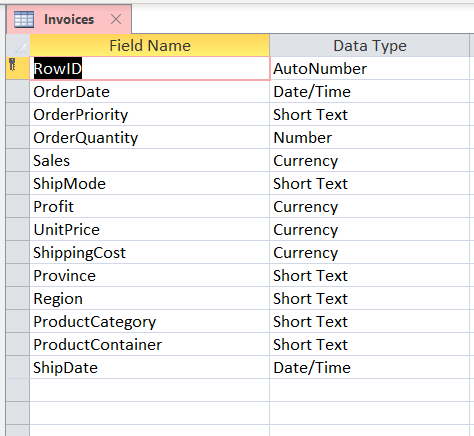
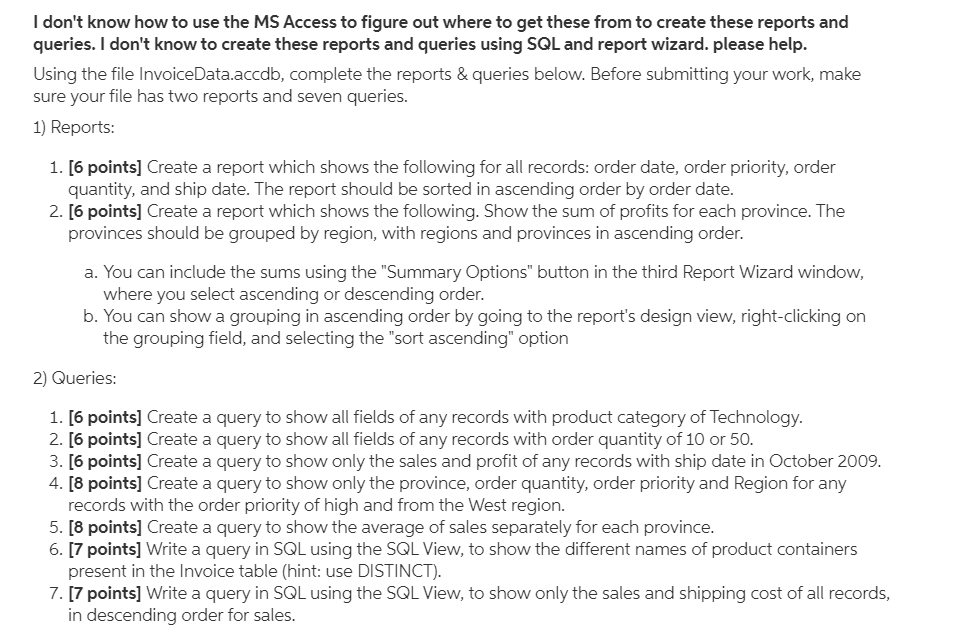
Please specifically tell me what you do to create these reports / queries. Also the Table name for queries is the top table "Invoices" with all the fields. Thank you.
Invoices X Field Name 1 RowID Order Date Order Priority OrderQuantity Sales Ship Mode Profit Unit Price Shipping Cost Province Region ProductCategory ProductContainer ShipDate Data Type AutoNumber Date/Time Short Text Number Currency Short Text Currency Currenc Currency Short Text Short Text Short Text Short Text Date/Time I don't know how to use the MS Access to figure out where to get these from to create these reports and queries. I don't know to create these reports and queries using SQL and report wizard. please help. Using the file InvoiceData.accdb, complete the reports & queries below. Before submitting your work, make sure your file has two reports and seven queries. 1) Reports: 1. [6 points] Create a report which shows the following for all records: order date, order priority, order quantity, and ship date. The report should be sorted in ascending order by order date. 2. [6 points] Create a report which shows the following. Show the sum of profits for each province. The provinces should be grouped by region, with regions and provinces in ascending order. a. You can include the sums using the "Summary Options" button in the third Report Wizard window, where you select ascending or descending order. b. You can show a grouping in ascending order by going to the report's design view, right-clicking on the grouping field, and selecting the "sort ascending" option 2) Queries: 1. [6 points] Create a query to show all fields of any records with product category of Technology. 2. [6 points] Create a query to show all fields of any records with order quantity of 10 or 50. 3. [6 points] Create a query to show only the sales and profit of any records with ship date in October 2009. 4. [8 points] Create a query to show only the province, order quantity, order priority and Region for any records with the order priority of high and from the West region. 5. [8 points] Create a query to show the average of sales separately for each province. 6. [7 points] Write a query in SQL using the SQL View, to show the different names of product containers present in the Invoice table (hint: use DISTINCT). 7. [7 points] Write a query in SQL using the SQL View, to show only the sales and shipping cost of all records, in descending order for sales. Invoices X Field Name 1 RowID Order Date Order Priority OrderQuantity Sales Ship Mode Profit Unit Price Shipping Cost Province Region ProductCategory ProductContainer ShipDate Data Type AutoNumber Date/Time Short Text Number Currency Short Text Currency Currenc Currency Short Text Short Text Short Text Short Text Date/Time I don't know how to use the MS Access to figure out where to get these from to create these reports and queries. I don't know to create these reports and queries using SQL and report wizard. please help. Using the file InvoiceData.accdb, complete the reports & queries below. Before submitting your work, make sure your file has two reports and seven queries. 1) Reports: 1. [6 points] Create a report which shows the following for all records: order date, order priority, order quantity, and ship date. The report should be sorted in ascending order by order date. 2. [6 points] Create a report which shows the following. Show the sum of profits for each province. The provinces should be grouped by region, with regions and provinces in ascending order. a. You can include the sums using the "Summary Options" button in the third Report Wizard window, where you select ascending or descending order. b. You can show a grouping in ascending order by going to the report's design view, right-clicking on the grouping field, and selecting the "sort ascending" option 2) Queries: 1. [6 points] Create a query to show all fields of any records with product category of Technology. 2. [6 points] Create a query to show all fields of any records with order quantity of 10 or 50. 3. [6 points] Create a query to show only the sales and profit of any records with ship date in October 2009. 4. [8 points] Create a query to show only the province, order quantity, order priority and Region for any records with the order priority of high and from the West region. 5. [8 points] Create a query to show the average of sales separately for each province. 6. [7 points] Write a query in SQL using the SQL View, to show the different names of product containers present in the Invoice table (hint: use DISTINCT). 7. [7 points] Write a query in SQL using the SQL View, to show only the sales and shipping cost of all records, in descending order for salesStep by Step Solution
There are 3 Steps involved in it
1 Expert Approved Answer
Step: 1 Unlock

Question Has Been Solved by an Expert!
Get step-by-step solutions from verified subject matter experts
Step: 2 Unlock
Step: 3 Unlock
 Study Help