







Question: Project 2 was a logical model of the Mom & Pop database. Step One: CREATE THE SQL DDL FOR YOUR DATABASE For your logical database
Project was a logical model of the Mom & Pop database.
Step One: CREATE THE SQL DDL FOR YOUR DATABASE
For your logical database model created in Project create the SQL DDL commands that will be
submitted to Oracle. Oracle will create the data structures to hold your data.
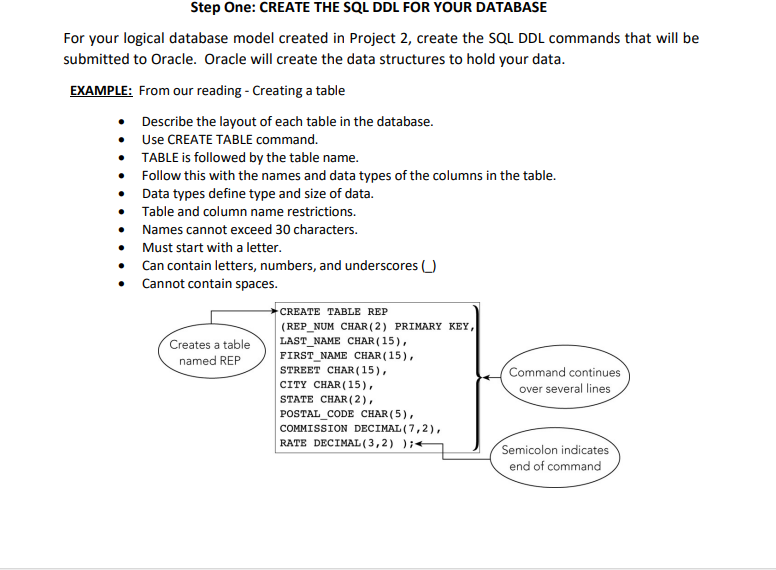
EXAMPLE: From our reading Creating a table
Describe the layout of each table in the database.
Use CREATE TABLE command.
TABLE is followed by the table name.
Follow this with the names and data types of the columns in the table.
Data types define type and size of data.
Table and column name restrictions.
Names cannot exceed characters.
Must start with a letter.
Can contain letters, numbers, and underscores
Cannot contain snaces.
Be sure to SAVE your work. Saving your work with a sql extension will:
Allow you to use commands again without retyping.
Save commands in a script file or script Text file with sql extension.
Step Two: LOAD DATA INTO YOUR DATABASE
Following the creation of the database structure the tables and fields using DDL we'll need to
load data into the structures eg populate data into the tables Populating the Mom and Pop
Video Store database is done by Data Manipulation Language DML SQL commands.
As an example, let's create a table not related to our project. We will use INSERT to add the first
few records to it The example code below will create a table named users that has columns.
We'll have an id column that will be the PRIMARY KEY the column that will always have unique
values and allow us to uniquely identify a row and then the name, age, state, and email columns.
The SQL DDL is:
CREATE TABLE users id INTEGER PRIMARY KEY AUTOINCREMENT, name TEXT,
age INTEGER, state TEXT, email TEXT;
Load data into the 'users' table by using the SQL DML INSERT command. We will add the user Paul
with an id of an age of from the state of Michigan, and with an email address of
paul@example.com using the query below:
INSERT INTO users
VALUES "Paul", "Michigan", "paul@example.com";
The result will look like the following:
Add a few more records using the INSERT command:
INSERT INTO users name state
VALUES Molly "New Jersey";
INSERT INTO users name state,
age VALUES Robert "New York",
;
In this case the first value is assigned to the first mentioned column, so "Molly" is assigned to the
name column, and "New Jersey" to the state column. Then for the other record, the column name
is given the value of "Robert", the column state gets "New York", the column age is assigned
As noted above, the process of creating the database structure by using DDL followed by using the
DML Insert command will be similar to creating the database structure and loading data from
Project
Assignment Requirements:
Step One: Create Oracle database tables using SQL Data Definition Language DDL for
each table listed in the metadata of Project
a You may need to use a combination of DROP TABLE, CREATE TABLE, and ALTER
TABLE SQL statements.
b Make sure that entity and referential integrity are enforced by declaring a
primary key for each table these may be composite keys and declaring all
appropriate foreign keys.
c Your CREATE TABLE and ALTER TABLE statements if desired must show integrity
constraints, as appropriate, for NOT NULL, UNIQUE, PRIMARY KEY, FOREIGN KEY,
REFERENCES, and CHECK constraints.
d Be sure to save your SQL script file used to create these tables with a sql
extension.
e You should rerun and test your SQL script file until it runs without any errors this
is why you'll want to include DROP TABLE statements in another script
Step Two: Populate each of your tables with at least five valid rows of data each and
show the SQL INSERT statements as you executed them. Populate other tables in your
database, as necessary, to satisfy referential integrity. Save your SQL script file. You
should test and rerun your SQL script file until it runs without any errors.
Step Three: Develop an SQL script file to perform the following FIVE queries and updates.
a Use Oracles SQL Developer to create and test the SQL file.
b You will find an Oracle database and Oracle's SQL Developer in the virtual Lab
Broker.
c You should test your SQL script file until it runs without any errors.
d Queries to include the following FIVE queries:
Retrieve all of your customers' names, account numbers, and
addresses street and zip code only sorted by account number.
Retrieve all of the videos rented in the last days and sort in
chronological rental date order.
Produce a list of your distributors and all their information sorted in order by
company name.
Update a customer name to change their maiden name to a married
name. You can choose which row to update. Make sure that you use the
primary key column in your WHERE clause to affect only a specific row.
You may want to include a ROLLBACK statement to undo your data
update.
Delete a customer from the database. You can choose which row to
delete. Make sure that you use the primary key column in you
Step by Step Solution
There are 3 Steps involved in it
1 Expert Approved Answer
Step: 1 Unlock

Question Has Been Solved by an Expert!
Get step-by-step solutions from verified subject matter experts
Step: 2 Unlock
Step: 3 Unlock
 Study Help