







Question: Question 23 (1 point) Select the answer that contains the command that will correctly check and repair a Linux filesystem on the second partition of
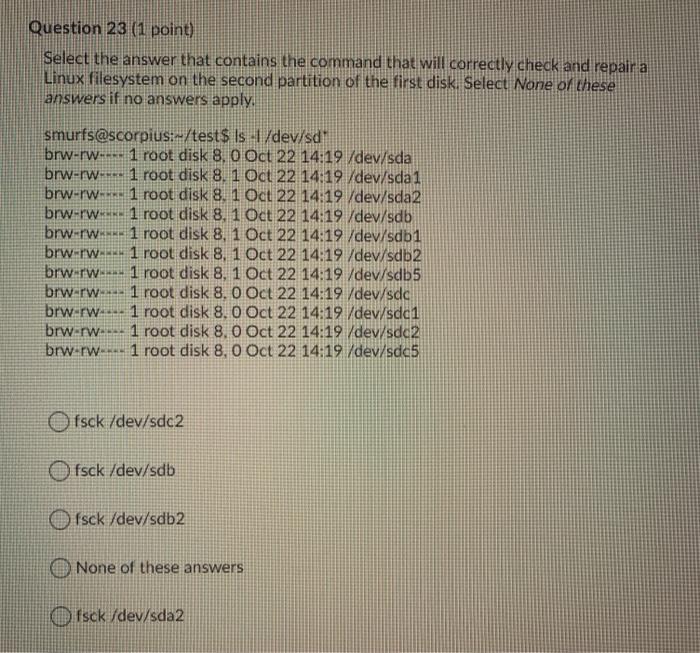
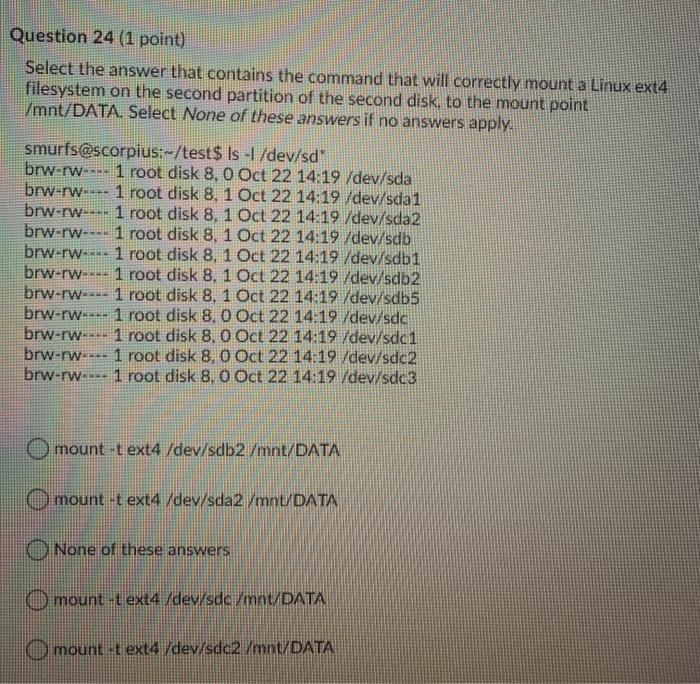
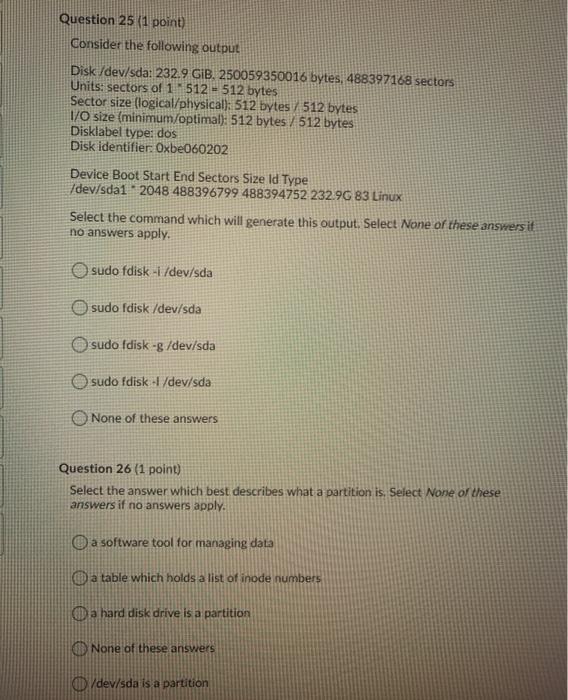
Question 23 (1 point) Select the answer that contains the command that will correctly check and repair a Linux filesystem on the second partition of the first disk. Select None of these answers if no answers apply. smurfs@scorpius:-/test$ ls -1 /dev/sd" brw-rw-...1 root disk 8.0 Oct 22 14:19 /dev/sda brw-rw- 1 root disk 8. 1 Oct 22 14:19 /dev/sda1 brw-rw-.1 root disk 8. 1 Oct 22 14:19 /dev/sda2 brw-rw 1 root disk 8. 1 Oct 22 14:19 /dev/sdb brw-rw 1 root disk 8,1 Oct 22 14:19 /dev/sdb1 brw-rw 1 root disk 8, 1 Oct 22 14:19 /dev/sdb2 brw-rw... 1 root disk 8, 1 Oct 22 14:19 /dev/sdb5 brw-rw 1 root disk 8.0 Oct 22 14:19 /dev/sdc brw-rw- 1 root disk 8.0 Oct 22 14:19 /dev/sda1 brw-rw 1 root disk 8.0 Oct 22 14:19 /dev/sdc2 brw-rw- 1 root disk 8,0 Oct 22 14:19 /dev/sdc5 Ofsck /dev/sdc2 Ofsck /dev/sdb Isck /dev/sdb2 None of these answers Ofsck /dev/sda2 Question 24 (1 point) Select the answer that contains the command that will correctly mount a Linux ext4 filesystem on the second partition of the second disk, to the mount point /mnt/DATA. Select None of these answers if no answers apply. smurfs@scorpius:--/test$ ls -1 /dev/sd" brw-rw--. 1 root disk 8.0 Oct 22 14:19 /dev/sda brw-rw 1 root disk 8,1 Oct 22 14:19 /dev/sda1 brw-rw--- 1 root disk 8. 1 Oct 22 14:19 /dev/sda2 brw-rw--- 1 root disk 8, 1 Oct 22 14:19 /dev/sdb brw-rw- 1 root disk 8. 1 Oct 22 14:19 /dev/sdbi brw-rw 1 root disk 8, 1 Oct 22 14:19 /dev/sdb2 brw-rw 1 root disk 8, 1 Oct 22 14:19 /dev/sdb5 brw-rw---- 1 root disk 8.0 Oct 22 14:19 /dev/sda brw-rw- 1 root disk 8.0 Oct 22 14:19 /dev/sdci brw-rw- 1 root disk 8,0 Oct 22 14:19 /dev/sdc2 brw-rw-u-- 1 root disk 8.0 Oct 22 14:19 /dev/sdc3 mount -t ext4 /dev/sdb 2 /mnt/DATA mount -t ext4 /dev/sda2 /mnt/DATA None of these answers mount -t ext4 /dev/sda/mntDATA mount -t ext4 /dev/sdc2 /mnt/DATA Question 25 (1 point) Consider the following output Disk/dev/sda: 232.9 GiB, 250059350016 bytes, 488397168 sectors Units: sectors of 1 512 512 bytes Sector size (logical/physical): 512 bytes 512 bytes I/O size (minimum/optimal): 512 bytes / 512 bytes Disklabel type: dos Disk identifier: Oxbe060202 Device Boot Start End Sectors Size Id Type /dev/sda1 2048 488396799 488394752 232.96 83 Linux Select the command which will generate this output. Select None of these answers it no answers apply. sudo fdisk -1 /dev/sda sudo fdisk /dev/sda sudo fdisk -g /dev/sda sudo fdisk -l /dev/sda None of these answers Question 26 (1 point) Select the answer which best describes what a partition is. Select None of these answers if no answers apply. a software tool for managing data a table which holds a list of inode numbers a hard disk drive is a partition None of these answers /dev/sda is a partition
Step by Step Solution
There are 3 Steps involved in it

Get step-by-step solutions from verified subject matter experts
 Study Help