







Question: Requirements: a) Your class should be named NumberGuessingGame, and your source code file should be NumberGuessingGame.java. named b) Although you don't need to submit
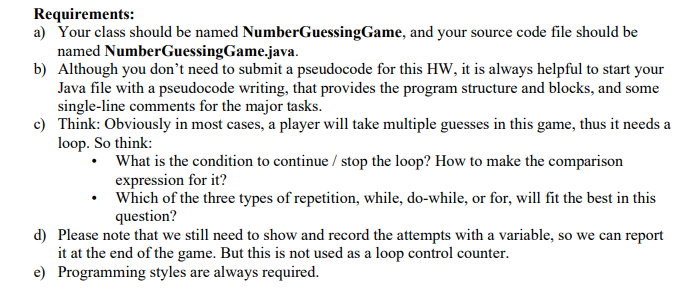
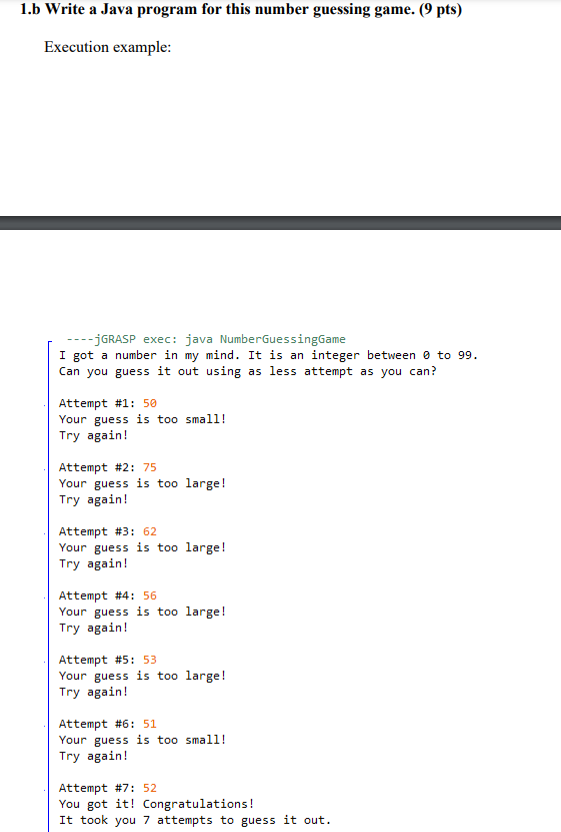
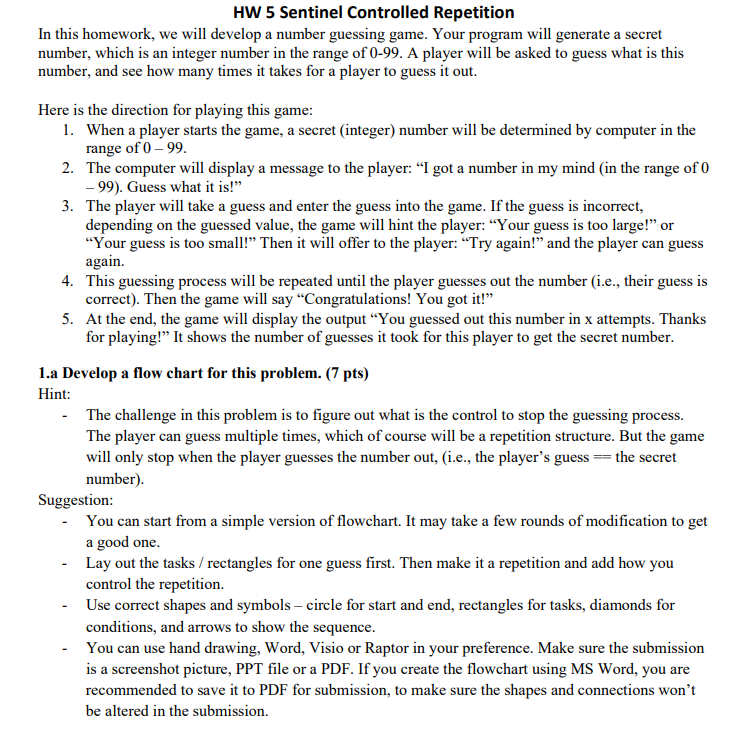
Requirements: a) Your class should be named NumberGuessingGame, and your source code file should be NumberGuessingGame.java. named b) Although you don't need to submit a pseudocode for this HW, it is always helpful to start your Java file with a pseudocode writing, that provides the program structure and blocks, and some single-line comments for the major tasks. c) Think: Obviously in most cases, a player will take multiple guesses in this game, thus it needs a loop. So think: What is the condition to continue/ stop the loop? How to make the comparison expression for it? Which of the three types of repetition, while, do-while, or for, will fit the best in this question? d) Please note that we still need to show and record the attempts with a variable, so we can report it at the end of the game. But this is not used as a loop control counter. Programming styles are always required. e) 1.b Write a Java program for this number guessing game. (9 pts) Execution example: --jGRASP exec: java NumberGuessingGame I got a number in my mind. It is an integer between 0 to 99. Can you guess it out using as less attempt as you can? Attempt # 1: 50 Your guess is too small! Try again! Attempt #2: 75 Your guess is too large! Try again! Attempt # 3: 62 Your guess is too large! Try again! Attempt #4: 56 Your guess is too large! Try again! Attempt # 5: 53 Your guess is too large! Try again! Attempt #6: 51 Your guess is too small! Try again! Attempt # 7: 52 You got it! Congratulations! It took you 7 attempts to guess it out. HW 5 Sentinel Controlled Repetition In this homework, we will develop a number guessing game. Your program will generate a secret number, which is an integer number in the range of 0-99. A player will be asked to guess what is this number, and see how many times it takes for a player to guess it out. Here is the direction for playing this game: 1. When a player starts the game, a secret (integer) number will be determined by computer in the range of 0 - 99. 2. The computer will display a message to the player: "I got a number in my mind (in the range of 0 -99). Guess what it is!" 3. The player will take a guess and enter the guess into the game. If the guess is incorrect, depending on the guessed value, the game will hint the player: "Your guess is too large!" or "Your guess is too small!" Then it will offer to the player: "Try again!" and the player can guess again. 4. This guessing process will be repeated until the player guesses out the number (i.e., their guess is correct). Then the game will say "Congratulations! You got it!" 5. At the end, the game will display the output "You guessed out this number in x attempts. Thanks for playing!" It shows the number of guesses it took for this player to get the secret number. 1.a Develop a flow chart for this problem. (7 pts) Hint: The challenge in this problem is to figure out what is the control to stop the guessing process. The player can guess multiple times, which of course will be a repetition structure. But the game will only stop when the player guesses the number out, (i.e., the player's guess - the secret number). Suggestion: You can start from a simple version of flowchart. It may take a few rounds of modification to get a good one. Lay out the tasks/ rectangles for one guess first. Then make it a repetition and add how you control the repetition. Use correct shapes and symbols - circle for start and end, rectangles for tasks, diamonds for conditions, and arrows to show the sequence. You can use hand drawing, Word, Visio or Raptor in your preference. Make sure the submission is a screenshot picture, PPT file or a PDF. If you create the flowchart using MS Word, you are recommended to save it to PDF for submission, to make sure the shapes and connections won't be altered in the submission.
Step by Step Solution
3.39 Rating (149 Votes )
There are 3 Steps involved in it
The Java program for the Number Guessing Game along with a simple pseudocode and a description of th... View full answer

Get step-by-step solutions from verified subject matter experts
 Study Help