







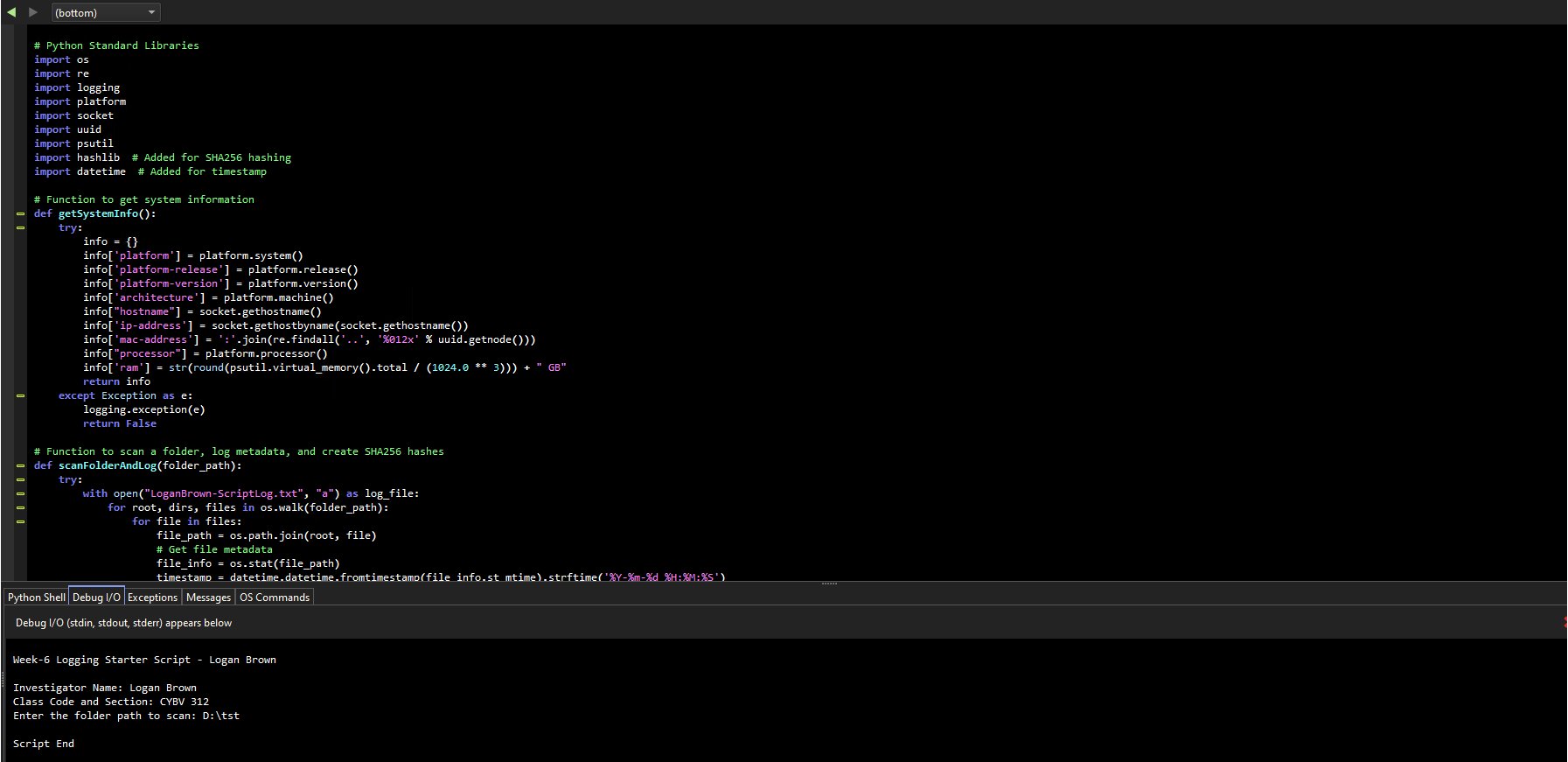
Question: So here is my file path D: tst why is this the output and not logging Week - 6 Logging Starter Script - Me
So here is my file path D:tst why is this the output and not logging Week Logging Starter Script Me
Investigator Name: My name
Class Code and Section: My Class Code
Enter the folder path to scan: D:CYBV test
Script End
bottom
# Python Standard Libraries
import os
import re
import logging
import platform
import socket
import uuid
import psutil
import hashlib # Added for SHA hashing
import datetime # Added for timestamp
# Function to get system information
def getSystemInfo:
try:
info
infoplatform platform.system
infoplatformrelease' platform.release
infoplatformversion' platform.version
infoarchitecture platform.machine
infohostname socket.gethostname
infoipaddress' socket.gethostbynamesocketgethostname
infomacaddress':joinrefindallx uuid.getnode
infoprocessor platform.processor
inforam strroundpsutilvirtualmemorytotal GB
return info
except Exception as e:
loggingexceptione
return False
# Function to scan a folder, log metadata, and create SHA hashes
def scanFolderAndLogfolderpath:
try:
with openLoganBrownScriptLog.txta as logfile:
for root, dirs, files in oswalkfolderpath:
for file in files:
filepath ospath.joinroot file
# Get file metadata
fileinfo osstatfilepath
timestamp datetime.datetime.fromtimestampfile info.st mtimestrftimeYmd H:M:s
begintabularlllll
hline Python Shell & Debug IO & Exceptions & Messages & OS Commands
hline
endtabular
Debug IO stdin stdout, stderr appears below
Week Logging Starter Script Logan Brown
Investigator Name: Logan Brown
Class Code and Section: CYBV
Enter the folder path to scan: D:tst
Script End
Step by Step Solution
There are 3 Steps involved in it
1 Expert Approved Answer
Step: 1 Unlock

Question Has Been Solved by an Expert!
Get step-by-step solutions from verified subject matter experts
Step: 2 Unlock
Step: 3 Unlock
 Study Help