Question: string-input.txt Craig Dern Ford Goodman Macy int-input.txt 3 9 10 19 37 45 63 84 100 int-input2.txt 2 5 7 7 19 21 21 21

string-input.txt
Craig Dern Ford Goodman Macy
int-input.txt
3 9 10 19 37 45 63 84 100
int-input2.txt
2 5 7 7 19 21 21 21 25 32 41
float-input.txt
3.1 9.6 10.3 19.3 37.3 45.9 63.5 84.5 100.7
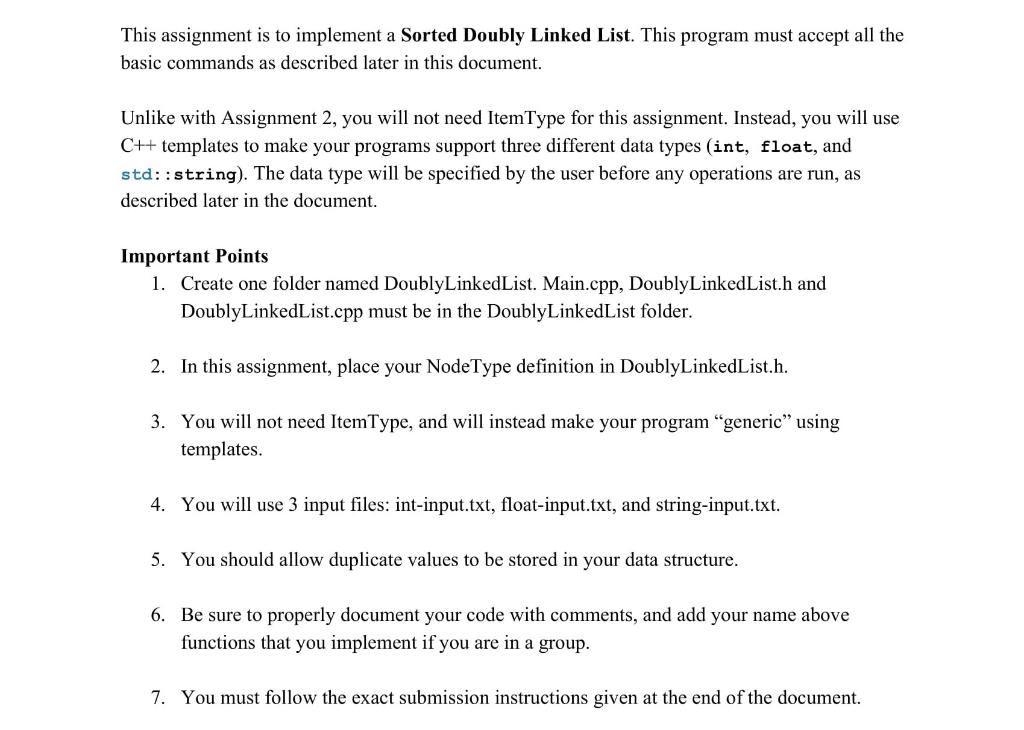
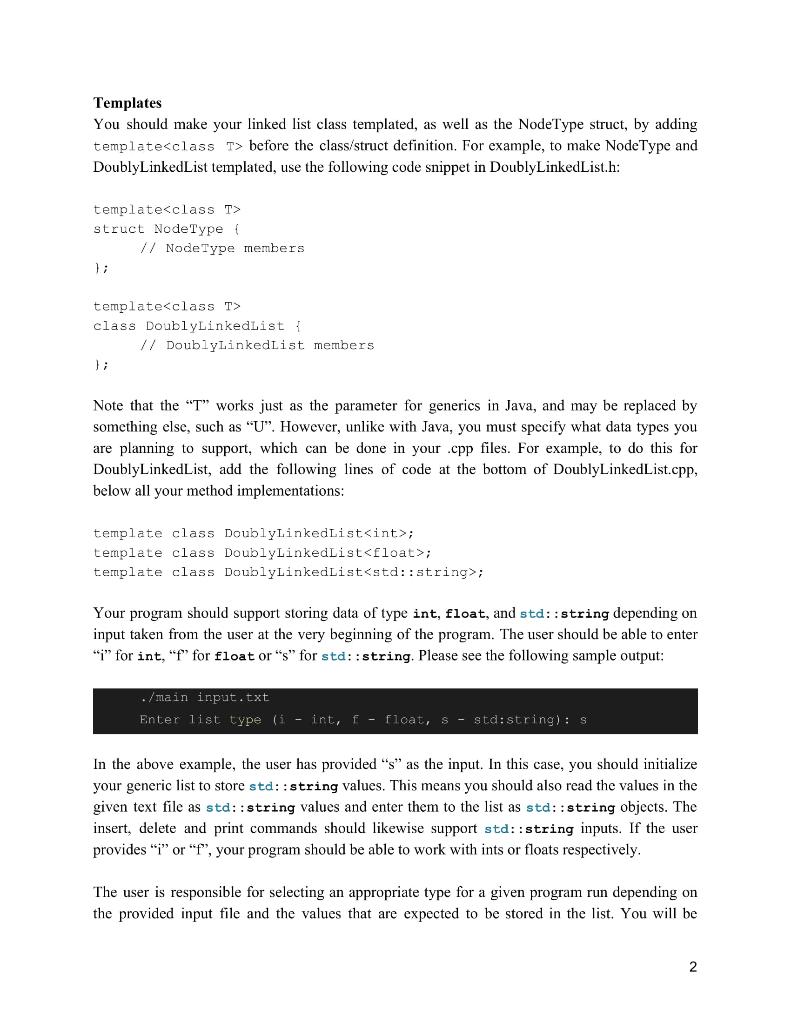
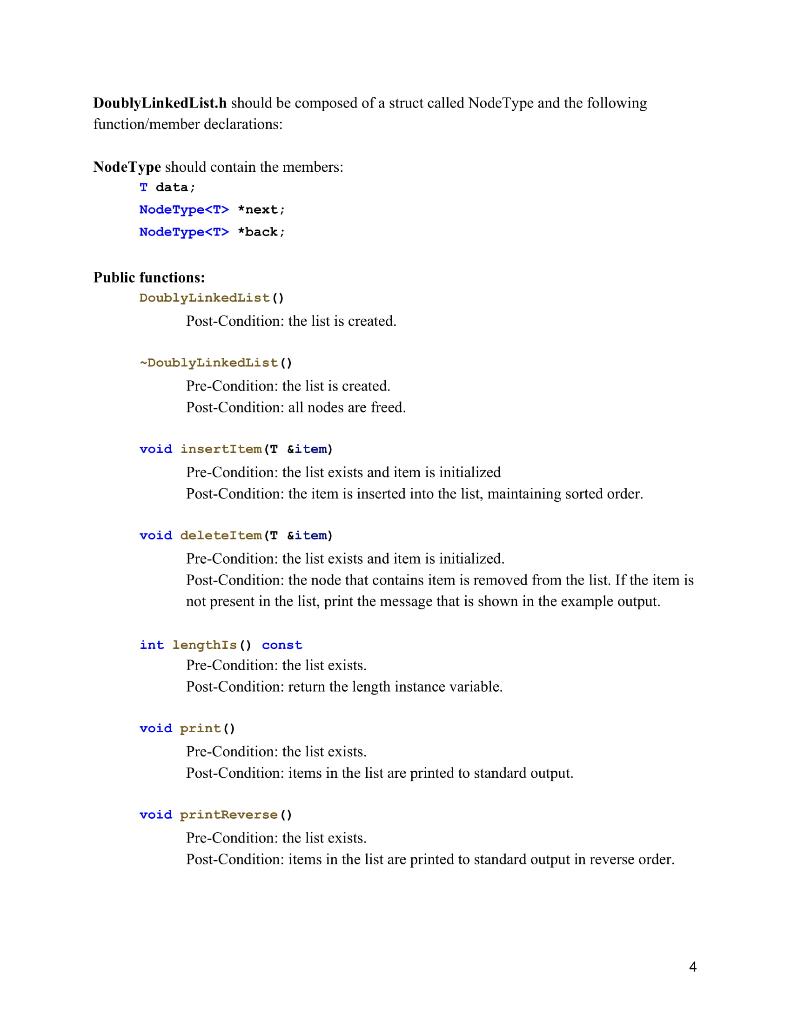
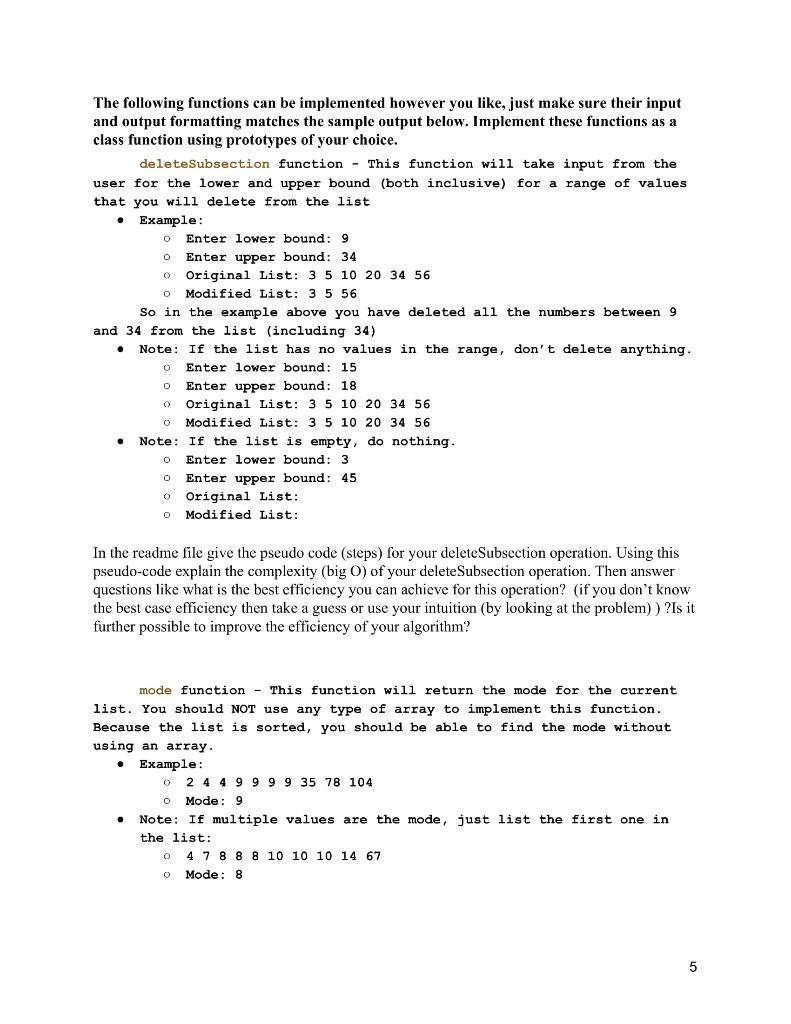
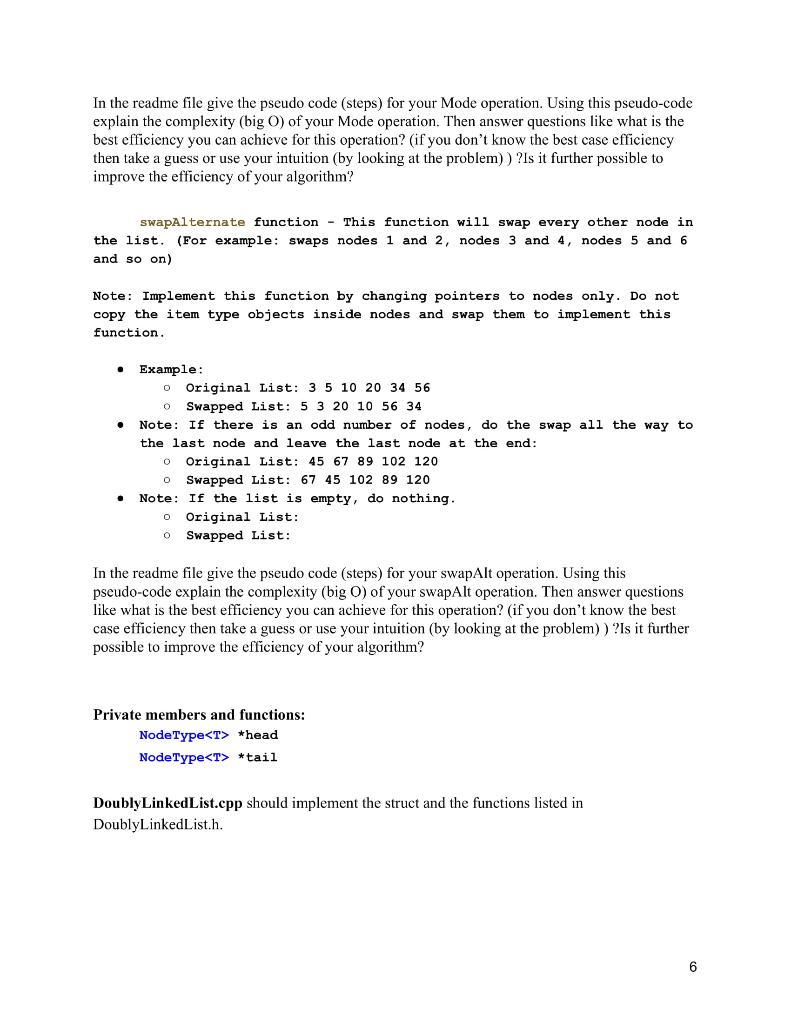
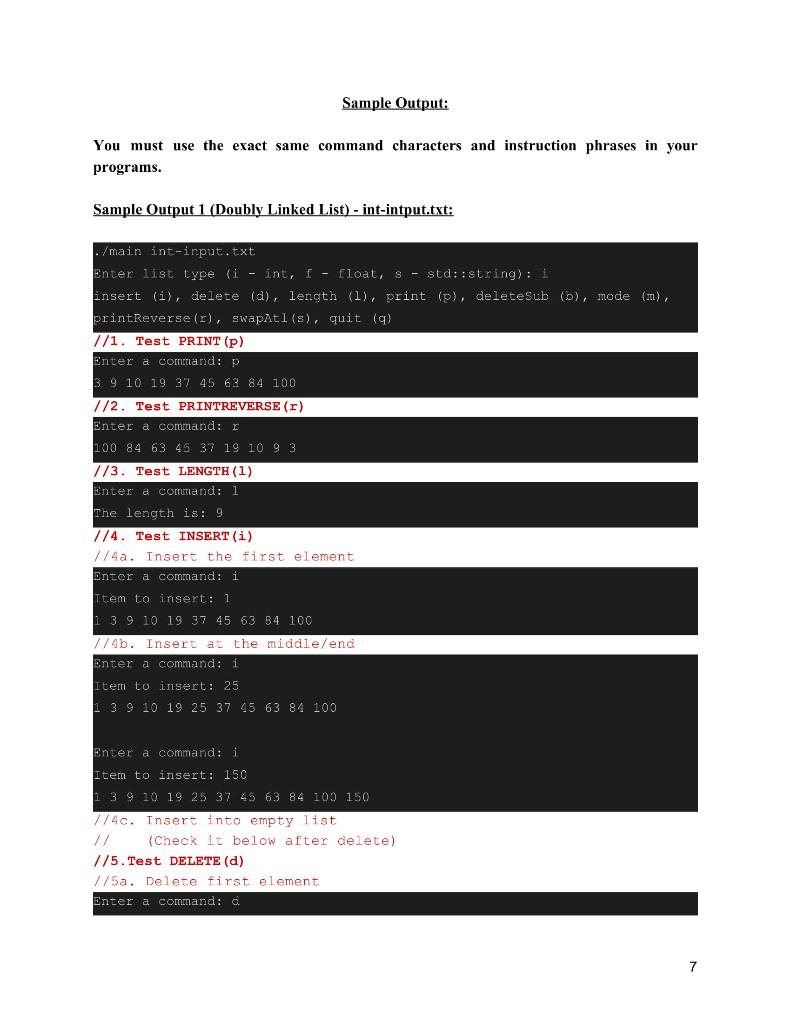
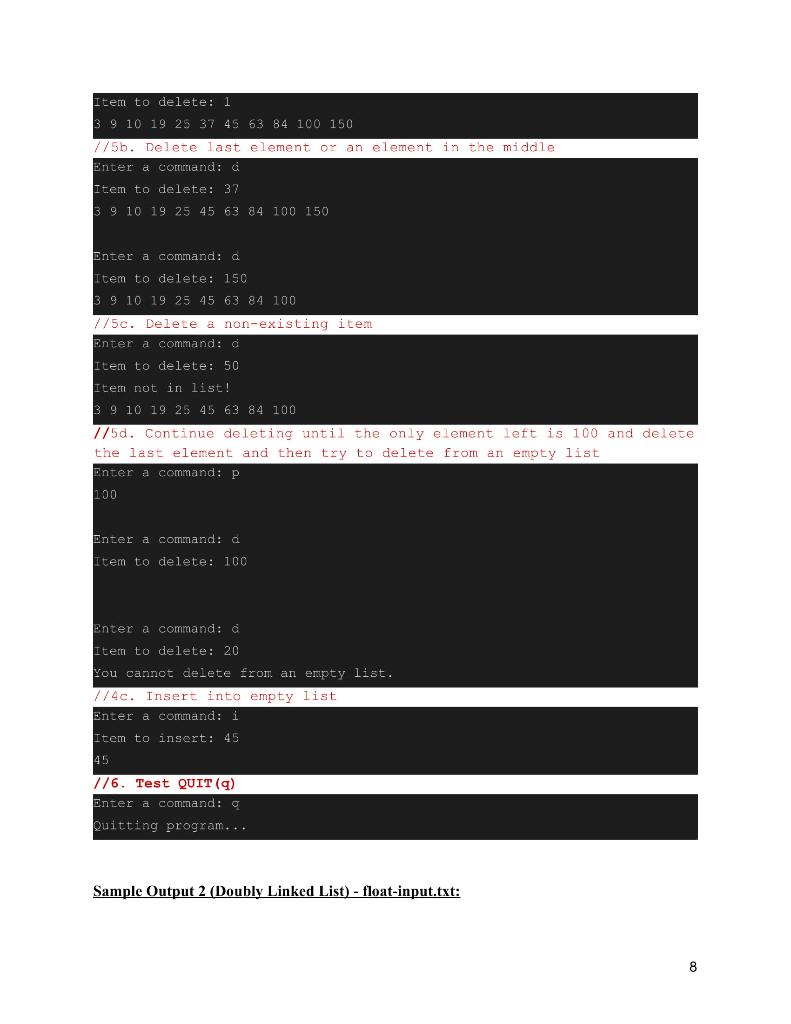
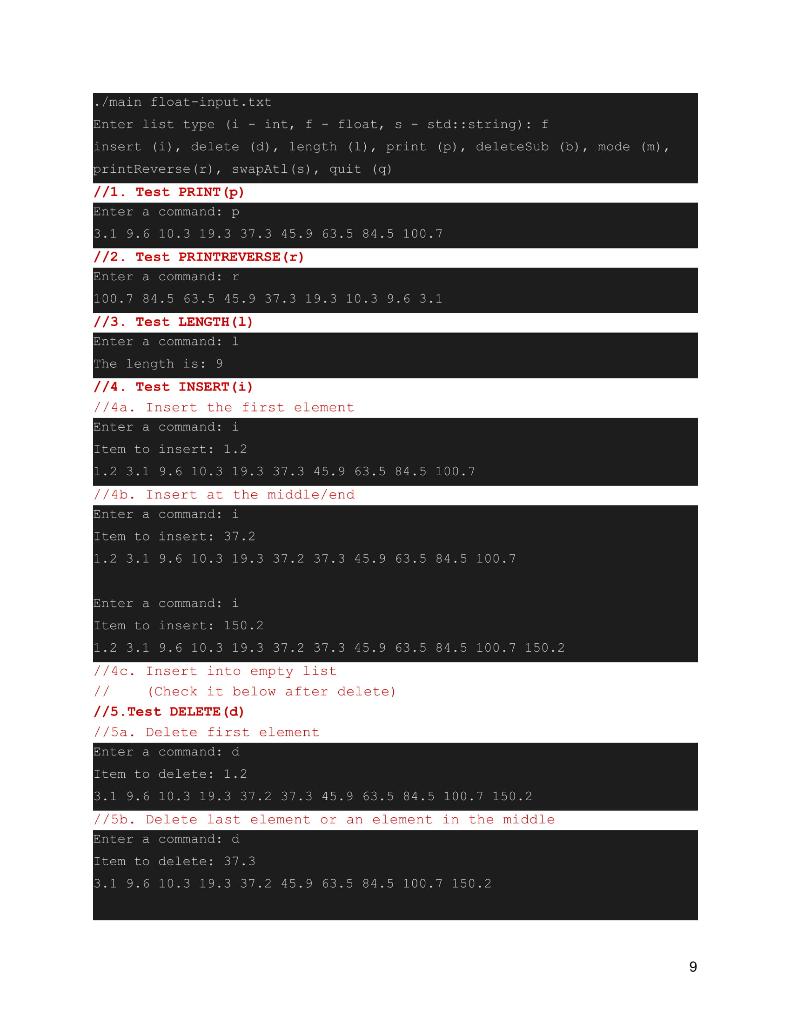
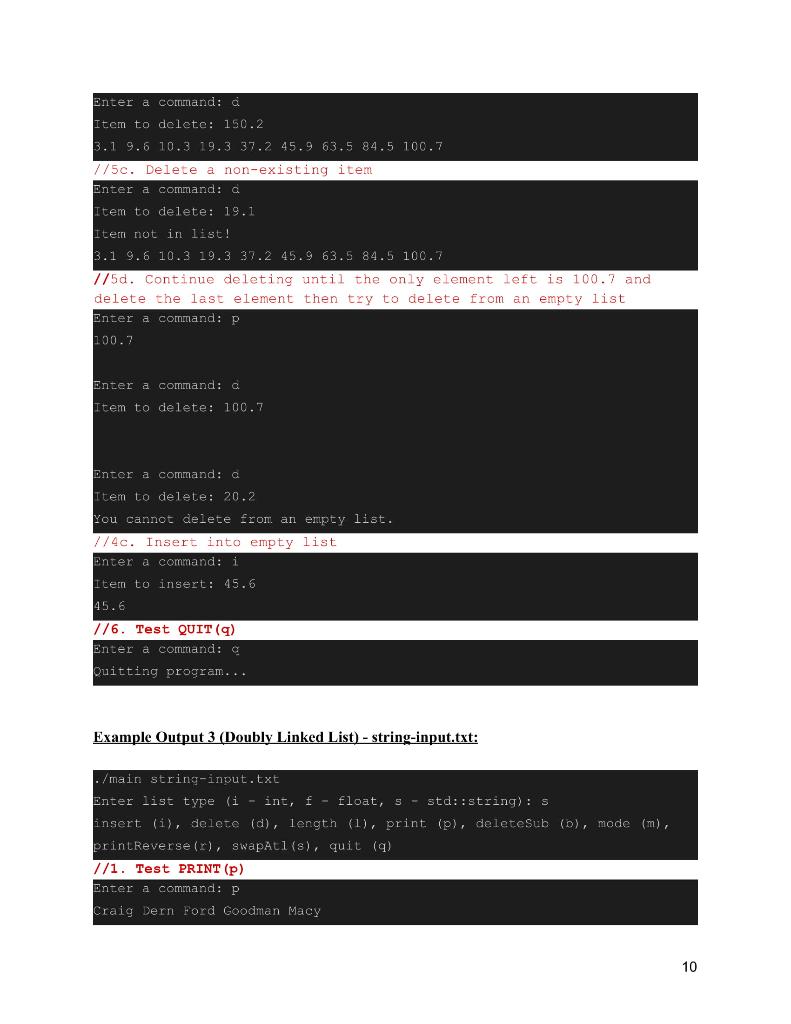
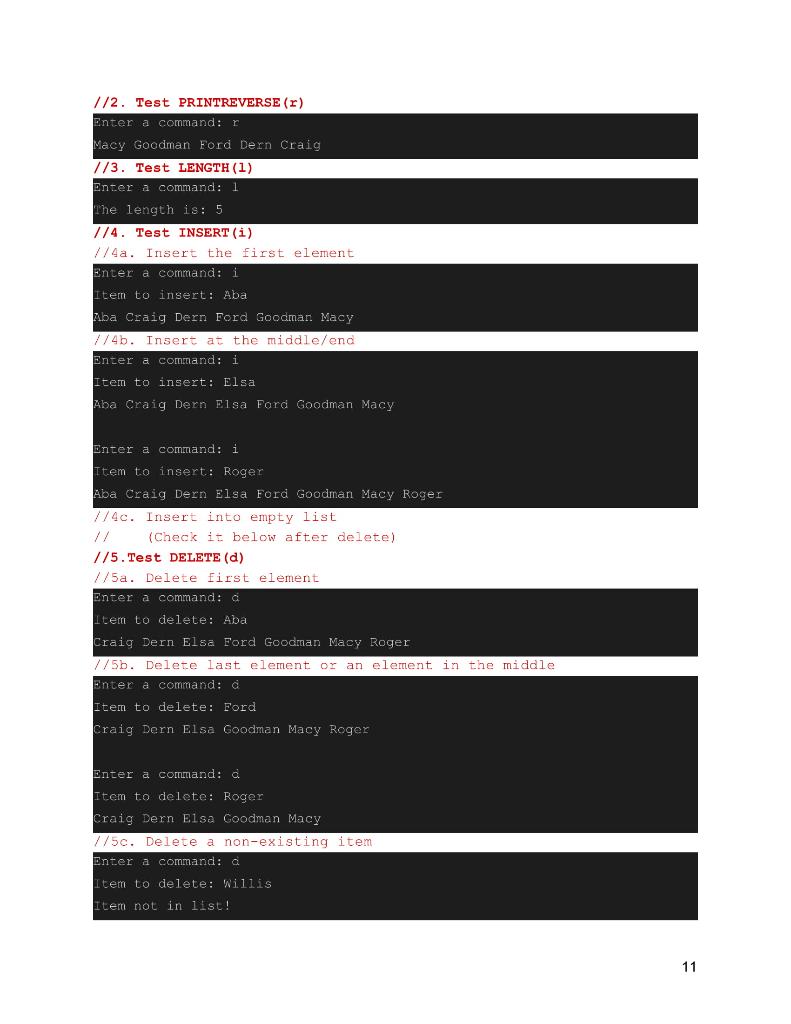
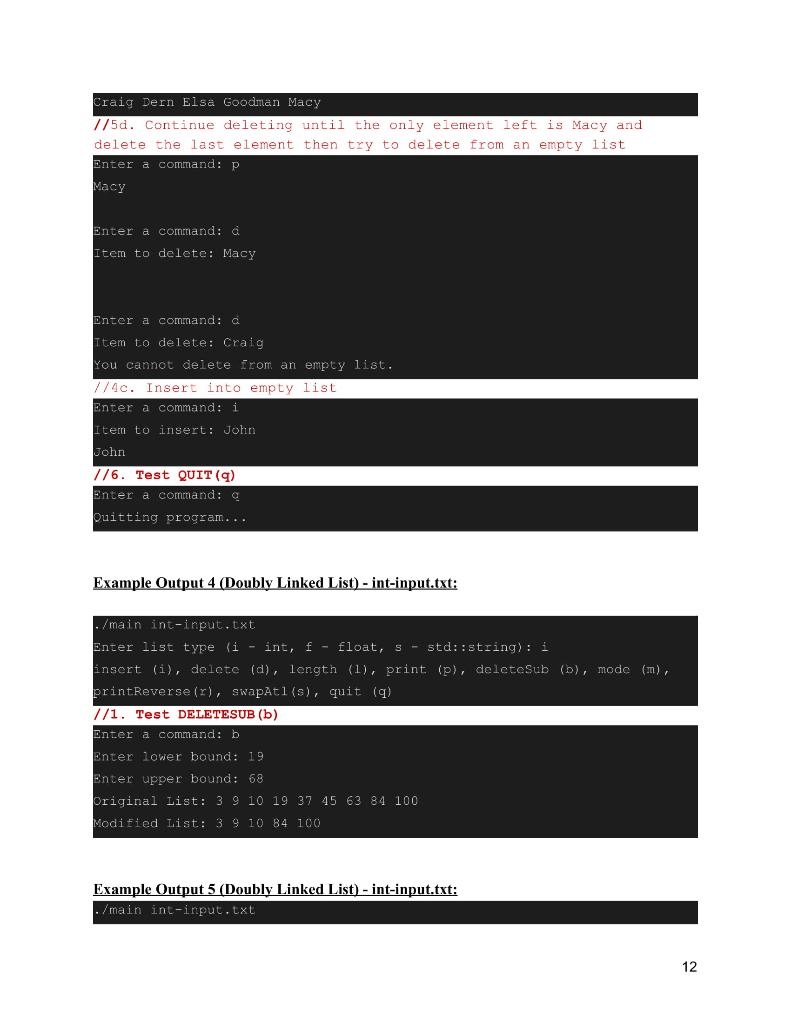
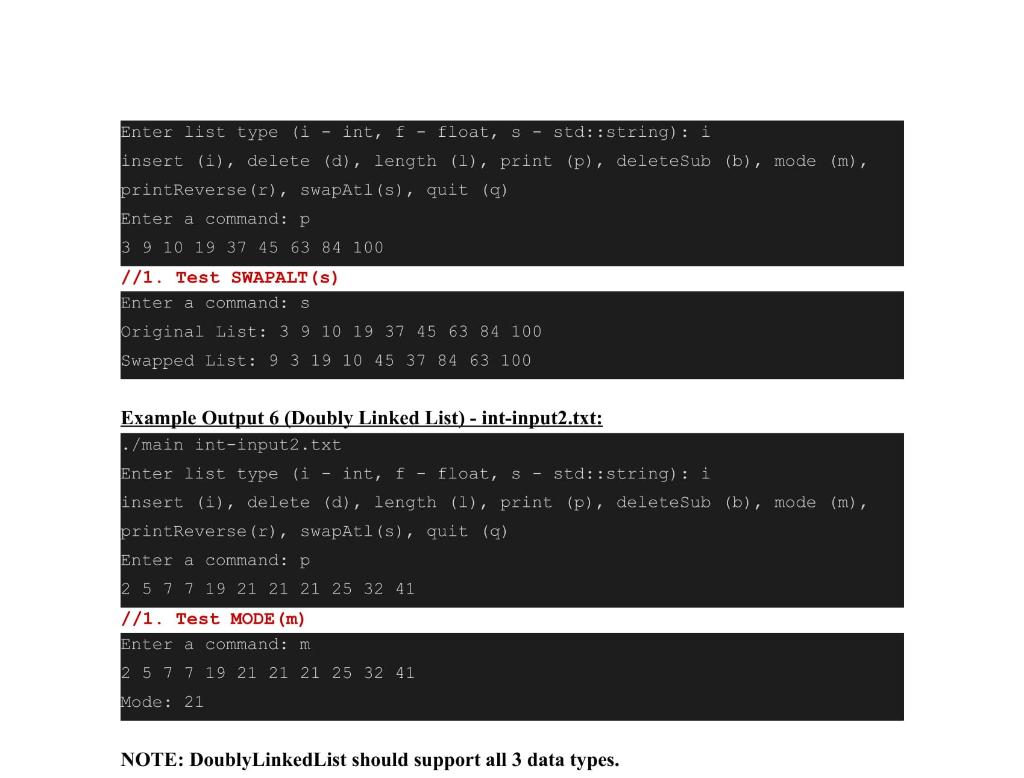
This assignment is to implement a Sorted Doubly Linked List. This program must accept all the basic commands as described later in this document. Unlike with Assignment 2, you will not need ItemType for this assignment. Instead, you will use C++ templates to make your programs support three different data types (int, float, and std::string). The data type will be specified by the user before any operations are run, as described later in the document. Important Points 1. Create one folder named DoublyLinkedList. Main.cpp, DoublyLinkedList.h and DoublyLinkedList.cpp must be in the DoublyLinkedList folder. 2. In this assignment, place your NodeType definition in DoublyLinkedList.h. 3. You will not need ItemType, and will instead make your program "generic" using templates. 4. You will use 3 input files: int-input.txt, float-input.txt, and string-input.txt. 5. You should allow duplicate values to be stored in your data structure. 6. Be sure to properly document your code with comments, and add your name above functions that you implement if you are in a group. 7. You must follow the exact submission instructions given at the end of the document. Templates You should make your linked list class templated, as well as the NodeType struct, by adding template before the class/struct definition. For example, to make Node Type and DoublyLinkedList templated, use the following code snippet in DoublyLinkedList.h: templatesclass T> struct Node Type { // Node Type members 1; template class DoublyLinkedlist // DoublyLinkedList members }; Note that the "T" works just as the parameter for generics in Java, and may be replaced by something else, such as "U". However, unlike with Java, you must specify what data types you are planning to support, which can be done in your .cpp files. For example, to do this for DoublyLinkedList, add the following lines of code at the bottom of DoublyLinkedList.cpp, below all your method implementations: template class DoublyLinkedList; template class DoublyLinkedList; template class DoublyLinkedList<:string>; Your program should support storing data of type int, float, and std::string depending on input taken from the user at the very beginning of the program. The user should be able to enter "i" for int, "t" for float or "s" for std::string, Please see the following sample output: ./main input.txt Enter list type ( int, f - float, S - std:string): s In the above example, the user has provided "s" as the input. In this case, you should initialize your generic list to store std::string values. This means you should also read the values in the given text file as std::string values and enter them to the list as std::string objects. The insert, delete and print commands should likewise support std::string inputs. If the user provides "i" or "f", your program should be able to work with ints or floats respectively. The user is responsible for selecting an appropriate type for a given program run depending on the provided input file and the values that are expected to be stored in the list. You will be 2 provided sample text files for each appropriate data type: one for int, one for float, and one for std::string. Doubly LinkedList.h should be composed of a struct called NodeType and the following function/member declarations: Node Type should contain the members: T data; Node Type *next; Node Type *back; Public functions: DoublyLinkedList() Post-Condition: the list is created. --DoublyLinkedlist() Pre-Condition: the list is created. Post-Condition: all nodes are freed. void insertItem(T &item) Pre-Condition: the list exists and item is initialized Post-Condition: the item is inserted into the list, maintaining sorted order. void deleteItem (T &item) Pre-Condition: the list exists and item is initialized. Post-Condition: the node that contains item is removed from the list. If the item is not present in the list, print the message that is shown in the example output. int lengthIs() const Pre-Condition: the list exists. Post-Condition: return the length instance variable. void print() Pre-Condition: the list exists. Post-Condition: items in the list are printed to standard Output. void printReverse() Pre-Condition: the list exists. Post-Condition: items in the list are printed to standard output in reverse order. 4 0 o The following functions can be implemented however you like, just make sure their input and output formatting matches the sample output below. Implement these functions as a class function using prototypes of your choice. deleteSubsection function - This function will take input from the user for the lower and upper bound (both inclusive) for a range of values that you will delete from the list Example: Enter lower bound: 9 Enter upper bound: 34 o Original List: 3 5 10 20 34 56 Modified List: 3 5 56 So in the example above you have deleted all the numbers between 9 and 34 from the list (including 34) Note: If the list has no values in the range, don't delete anything. Enter lower bound: 15 Enter upper bound: 18 Original List: 3 5 10 20 34 56 Modified List: 3 5 10 20 34 56 Note: If the list is empty, do nothing. Enter lower bound: 3 Enter upper bound: 45 o Original List: o Modified List: : 0 O 0 0 0 In the readme file give the pseudo code (steps) for your delete Subsection operation. Using this pseudo-code explain the complexity (big O) of your deleteSubsection operation. Then answer questions like what is the best efficiency you can achieve for this operation? (if you don't know the best case efficiency then take a guess or use your intuition (by looking at the problem)) ?Is it further possible to improve the efficiency of your algorithm? mode function - This function will return the mode for the current list. You should not use any type of array to implement this function. Because the list is sorted, you should be able to find the mode without using an array. Example: 2 4 4 9 9 9 9 35 78 104 Mode: 9 Note: If multiple values are the mode, just list the first one in the list: 4 7 8 8 8 10 10 10 14 67 4 7 8 8 Mode: 8 0 0 5 In the readme file give the pseudo code (steps) for your Mode operation. Using this pseudo-code explain the complexity (big) of your Mode operation. Then answer questions like what is the best efficiency you can achieve for this operation? (if you don't know the best case efficiency then take a guess or use your intuition (by looking at the problem)) ?Is it further possible to improve the efficiency of your algorithm? swapAlternate function - This function will swap every other node in the list. (For example: swaps nodes 1 and 2, nodes 3 and 4, nodes 5 and 6 and so on) Note: Implement this function by changing pointers to nodes only. Do not copy the item type objects inside nodes and swap them to implement this function. 0 Example: o Original List: 3 5 10 20 34 56 Swapped List: 53 20 10 56 34 Note: If there is an odd number of nodes, do the swap all the way to the last node and leave the last node at the end: o Original List: 45 67 89 102 120 Swapped List: 67 45 102 89 120 Note: If the list is empty, do nothing. o Original List: Swapped List: o O In the readme file give the pseudo code (steps) for your swapAlt operation. Using this pseudo-code explain the complexity (big O) of your swapAlt operation. Then answer questions like what is the best efficiency you can achieve for this operation? (if you don't know the best case efficiency then take a guess or use your intuition (by looking at the problem)) ?Is it further possible to improve the efficiency of your algorithm? Private members and functions: Node Type *head Node Type *tail Doubly LinkedList.cpp should implement the struct and the functions listed in DoublyLinkedList.h. 6 Sample Output: You must use the exact same command characters and instruction phrases in your programs. Sample Output 1 (Doubly Linked List) - int-intput.txt: ./mainint-input.txt Enter list type (i - int, I - float, 9 - std::string): 1 insert (i), delete (d), length (1), print (p), delete sub b), mode (1), printReverse (1), swapAtl(s), quit (q) //1. Test PRINT (p) Enter a comand: P 3 9 10 19 37 45 63 84 100 //2. Test PRINTREVERSE (r) Enter a command: r 100 84 63 45 37 19 10 9 3 //3. Test LENGTH (1) Enter a comand: 1 The length is: 9 //4. Test INSERT (i) //4a. Insert the first element Enter a command: i Ttem to insert: 1 13 9 10 19 37 45 63 84 100 //4b. Insert at the middle/end Enter a command: i Item to insert: 25 13 9 10 19 25 37 45 63 84 100 Enter a command: i Item to insert: 150 1 3 9 10 19 25 37 45 63 84 100 150 //4c. Insert into empty list (Check it below after delete) 1/5. Test DELETE (d) //5a. Delete first element Enter a command: a 7 Item to delete: 1 3 9 10 19 25 37 45 63 84 100 150 //5b. Delete last element or an element in the middle Enter a command: 0 Item to delete: 37 3910 19 25 45 63 84 100 150 Enter a command: a Item to delete: 150 39. 10 19 25 45 63 84 100 //5c. Delete a non-existing item Enter a command: d Item to delete: 50 Item not in list! 3 9 10 19 25 45 63 84 100 7/5d. Continue deleting until the only element left is 100 and delete the last element and then try to delete from an empty list Enter a command: P 100 Enter a command: a Item to delete: 100 Enter a command: a Item to delete: 20 You cannot delete from an empty list. //4c. Insert into empty list Enter a command: i Item to insert: 45 45 1/6. Test QUIT (9) Enter a command: 0 Quitting program... Sample Output 2 (Doubly Linked List) - float-input.txt: 8 - /main float-input.txt Enter list type (i - int, f - float, s - std::string): f insert (i), delete (d), length (1), print (p), deleteSub (D), mode (m), printReverse (r), swapAtl(s), quit (g) //1. Test PRINT (p) Enter a command: P 3.1 9.6 10.3 19.3 37.3 45.9 63.5 84.5 100.7 1/2. Test PRINTREVERSE (r) Enter a command: r 100.7 84.5 63.5 45.9 37.3 19.3 10.3 9.6 3.1 //3. Test LENGTH (1) Enter a command: 1 The length is: 9 7/4. Test INSERT (i) //4a. Insert the first element Enter a command: i Item to insert: 1.2 1.2 3.1 9.6 10.3 19.3 37.3 45.9 63.5 84.5 100.7 //4b. Insert at the middle/end Enter a command: i Item to insert: 37.2 1.2 3.1 9.6 10.3 19.3 37.2 37.3 45.9 63.5 84.5 100.7 Enter a command: i Item to insert: 150.2 1.2 3.1 9.6 10.3 19.3 37.2 37.3 45.9 63.5 81.5 100.7 150.2 7/4c. Insert into empty list (Check it below after delete) //5. Test DELETE (d) //5a. Delete first element Enter a command: a Item to delete: 1.2 3.1 9.6 10.3 19.3 37.2 37.3 45.9 63.5 84.5 100.7 150.2. //5b. Delete last element or an element in the middle Enter a command: a Item to delete: 37.3 3.1 9.6 10.3 19.3 37.2 45.9 63.5 84.5 100.7 150.2 9 Enter a comand: Item to delete: 150.2 3.1 9.6 10.3 19.3 37.2 45.9 63.5 84.5 100.7 //5c. Delete a non-existing item Enter a command: a Item to delete: 19.1 Iter not in list! 3.1 9.6 10.3 19.3 37.2 45.9 63.5 84.5 100.7 7/5d. Continue deleting until the only element left is 100.7 and delete the last element then try to delete from an empty list Enter a command: P 100.7 Enter a command: a Item to delete: 100.7 Enter a command: a Ttem to delete: 20.2 You cannot delete from an empty list. //4c. Insert into empty list Enter a command: i Item to insert: 45.6 45.6 1/6. Test QUIT (9) Enter a command: a Quitting program... Example Output 3 (Doubly Linked List) - string-input.txt: ./main string-input.txt Enter list type (i - int, f - float, 5 - std::string): s insert (i), delete (d), length (1), print (p), deleteSub (D), mode (m), printReverse(r), swapAtl(s), quit (9) //1. Test PRINT (p) Enter a command: P Craig Dern Ford Goodman Macy 10 //2. Test PRINTREVERSE (r) Enter a command: Macy Goodman Ford Dern Craig //3. Test LENGTH (1) Enter a command: 1 The length is: 5 //4. Test INSERT (i) //4a. Insert the first element Enter a command: i Item to insert: Aba Aba Craig Dern Ford Goodman Macy //4b. Insert at the middle/end Enter a command: i Item to insert: Elsa Aba Craig Dern Elsa Ford Goodman Macy Enter a command: i Ttem to insert: Roger Aba Craig Dern Elsa Ford Goodman Macy Roger 7/4c. Insert into empty list (Check it below after delete) 1/5. Test DELETE (d) //5a. Delete first element Enter a command: a Item to delete: Aba Craig Dern Elsa Ford Goodman Macy Roger //5b. Delete last element or an element in the middle Enter a command: a Item to delete: Ford Craig Dern Elsa Goodman Macy Roger Enter a command: a Item to delete: Roger Craig Dern Elsa Goodman Macy //5e. Delete a non-existing item Enter a command: a Item to delete: Willis Item not in list! 11 Craig Dern Elsa Goodman Macy 1/5d. Continue deleting until the only element left is Macy and delete the last element then try to delete from an empty list Enter a command: P Macy Enter a command: a Item to delete: Macy Enter a command: a Item to delete: Craig You cannot delete from an empty list. //4c. Insert into empty list Enter a command: i Item to insert: John John 1/6. Test QUIT (9) Enter a command: a Quitting program... Example Output 4 (Doubly Linked List) - int-input.txt: ./main int-input.txt Enter list type (i - int, f - float, s - std::string): 1 insert (i), delete (d), length (1), print (p), deleteSub (b), mode (m), printReverse(r), swapati(s), quit (9) //1. Test DELETESUB (b) Enter a command: b Enter lower bound: 19 Enter upper bound: 68 Original List: 3 9 10 19 37 45 63 84 100 Modified List: 3 9 10 84 100 Example Output 5 (Doubly Linked List) - int-input.txt: ./main int-input.txt 12 Enter list type (i - int, f - float, s - std::string): i insert (i), delete (d), length (1), print (p), deleteSub (b), mode (m), printReverse (r), swapAtl(s), quit (q) Enter a command: p 3 9 10 19 37 45 63 84 100 //1. Test SWAPALT (S) Enter a command: s Original List: 3 9 10 19 37 45 63 84 100 Swapped List: 9 3 19 10 45 37 84 63 100 Example Output 6 (Doubly Linked List) - int-input2.txt: ./main int-input2.txt Enter list type (i - int, f - float, s - std::string): i insert (i), delete (d), length (1), print (p), delete sub (b), mode (m), printReverse (r), swapAtl(s), quit (q) Enter a command: p 2 5 7 7 19 21 21 21 25 32 41 //1. Test MODE (m) Enter a command: m 2 5 7 7 19 21 21 21 25 32 41 Mode: 21 NOTE: DoublyLinkedList should support all 3 data types









 Study Help