







Question: Task build.gradle AndroidManifest.xml layout/activity_main.xml layout/activity_game_options.xml layout/fragment_game_options.xml layout/activity_board.xml layout/fragment_board.xml menu/bottom_nav_menu.xml navigation/nav_graph.xml Connect FourGame.java 1. Add the following to the dependencies a. implementation 'androidx.navigation:navigation-fragment:2.3.5' b. implementation
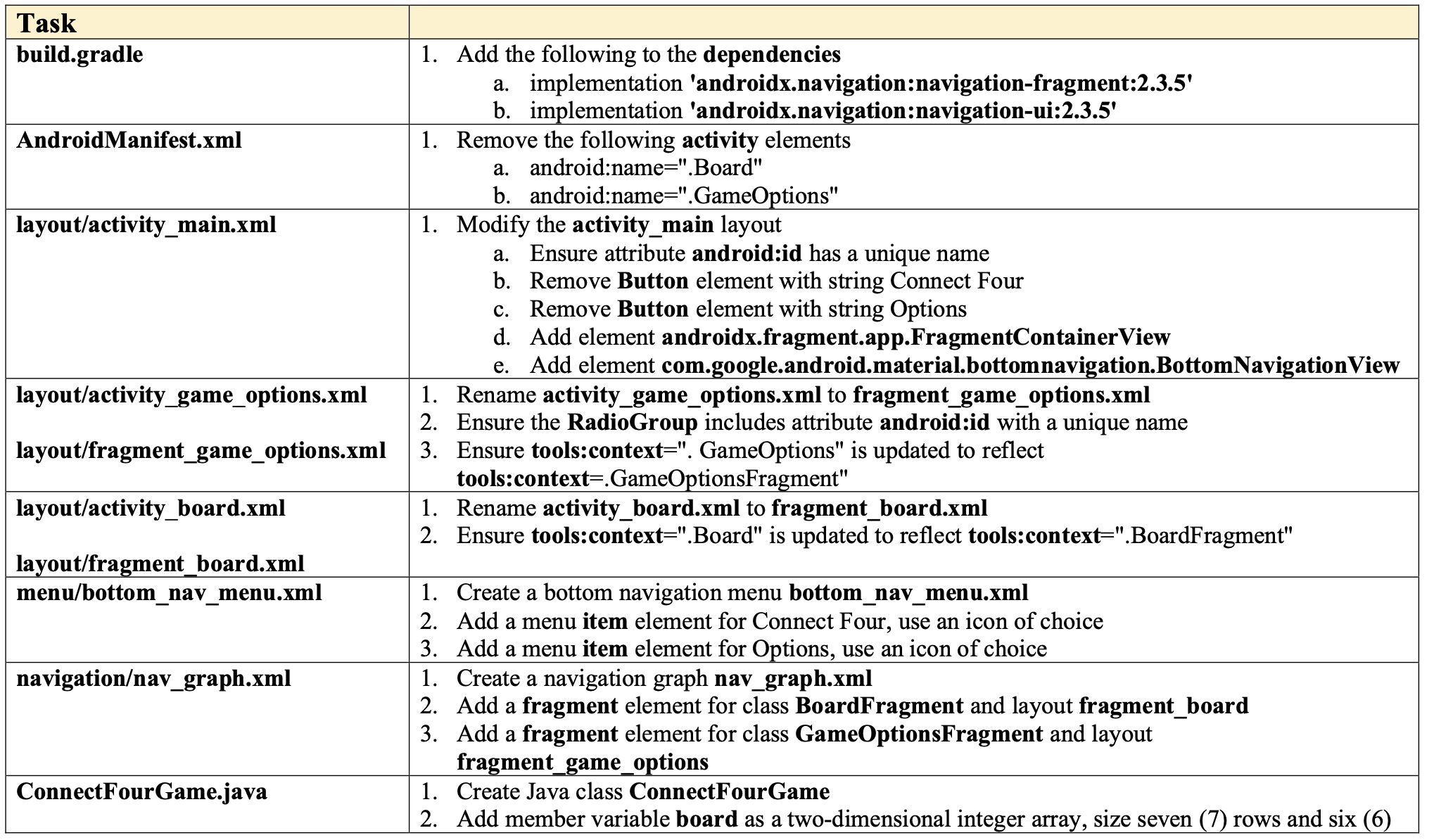
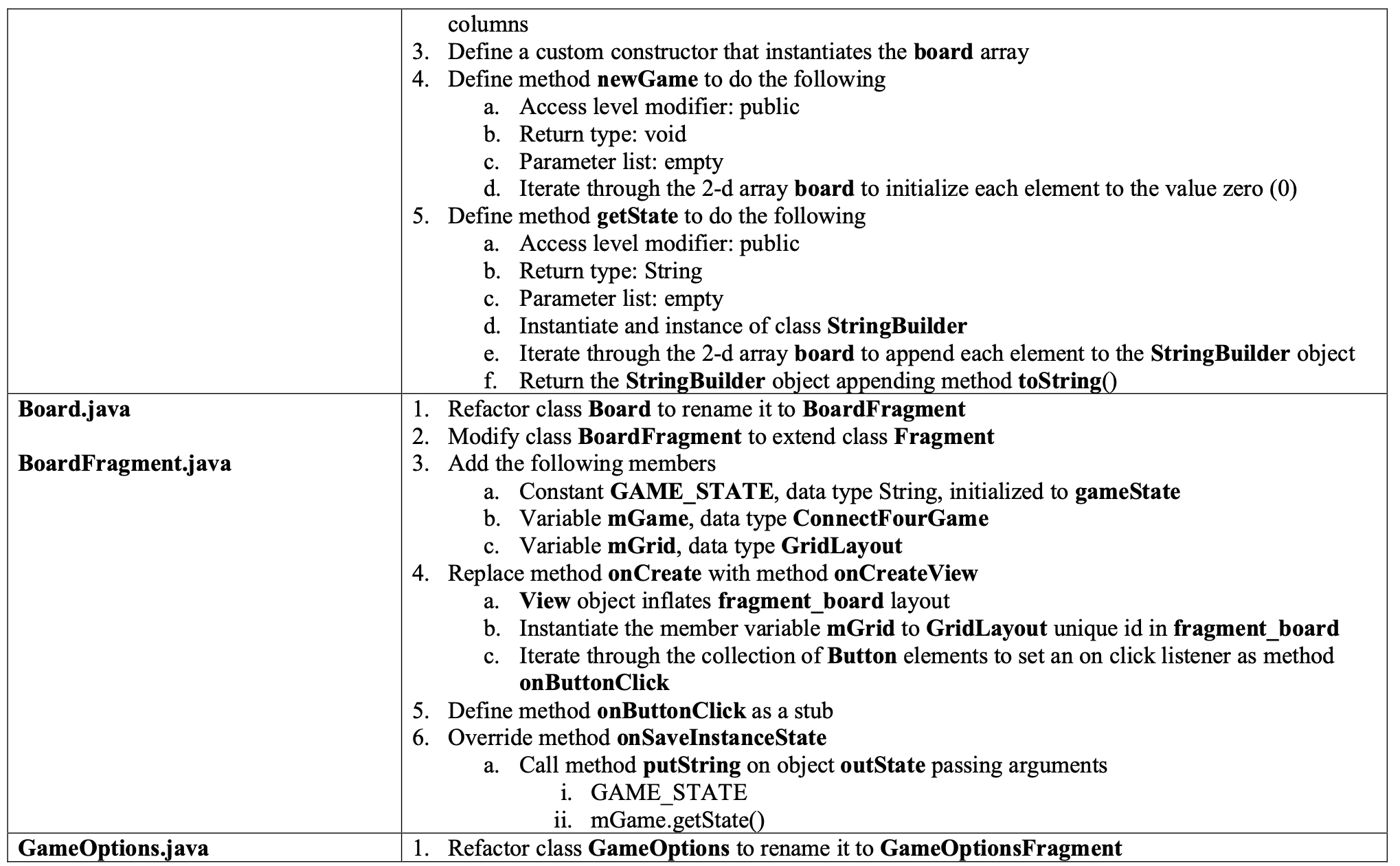
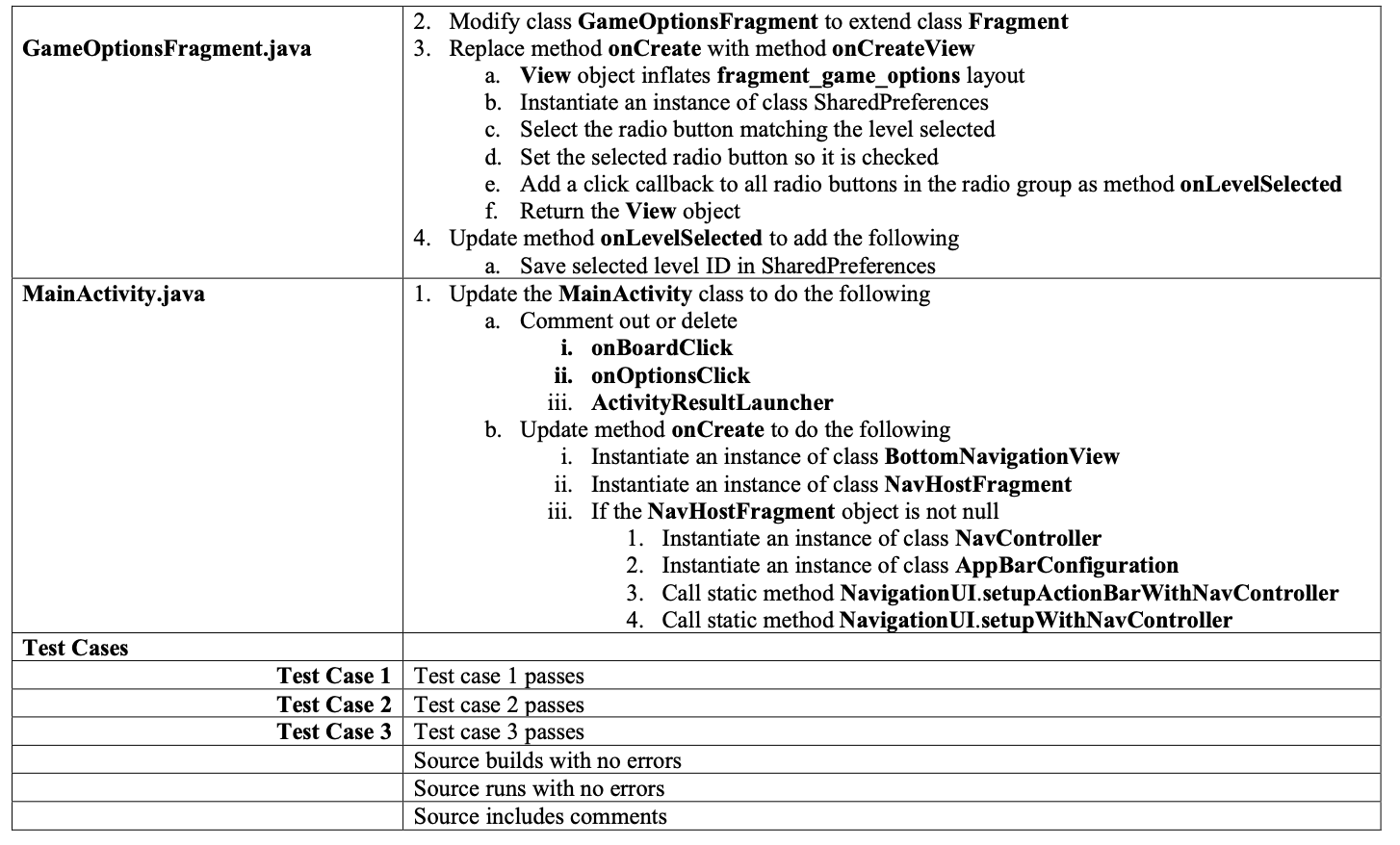

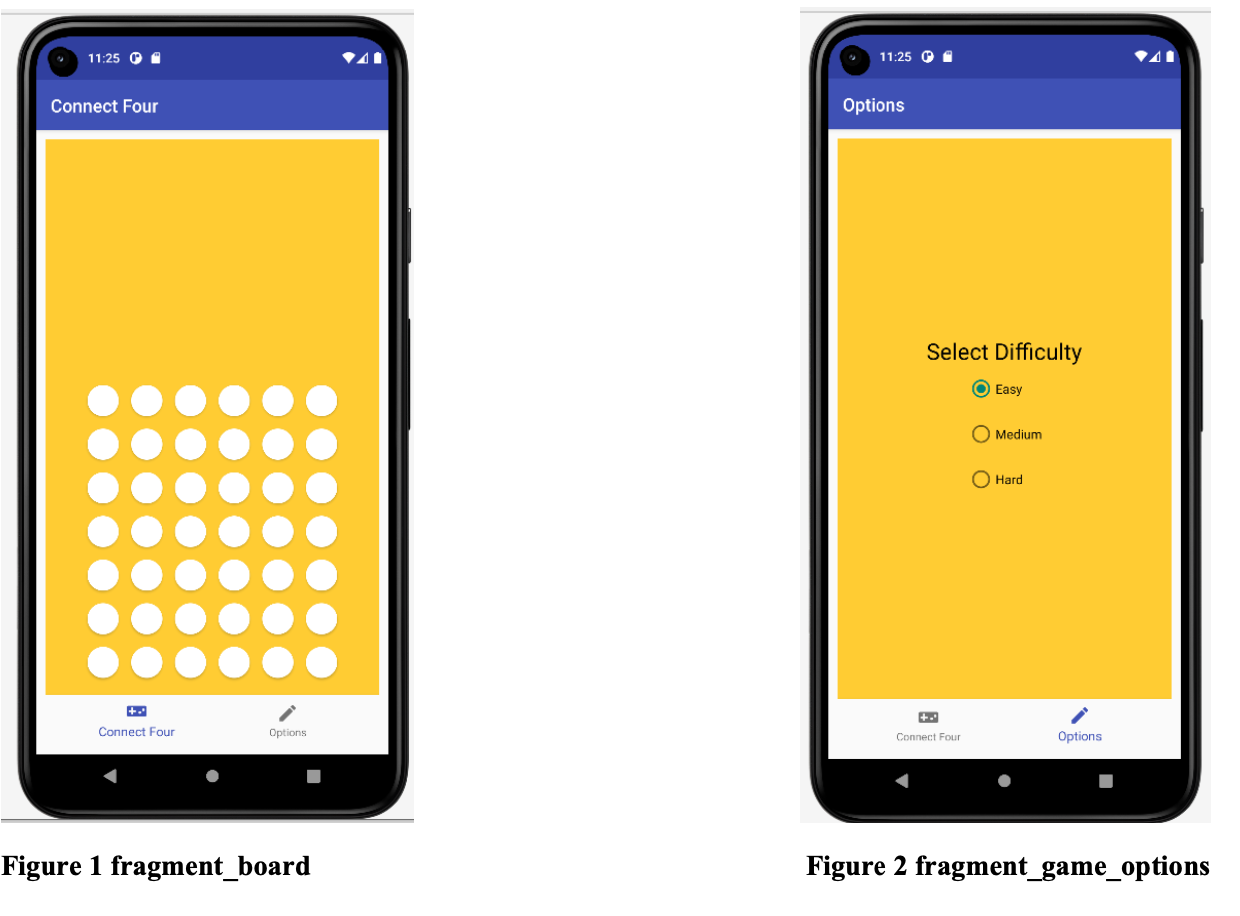
Task build.gradle AndroidManifest.xml layout/activity_main.xml layout/activity_game_options.xml layout/fragment_game_options.xml layout/activity_board.xml layout/fragment_board.xml menu/bottom_nav_menu.xml navigation/nav_graph.xml Connect FourGame.java 1. Add the following to the dependencies a. implementation 'androidx.navigation:navigation-fragment:2.3.5' b. implementation 'androidx.navigation:navigation-ui:2.3.5' 1. Remove the following activity elements a. android:name=".Board" b. android:name=".GameOptions" 1. Modify the activity_main layout a. Ensure attribute android:id has a unique name b. Remove Button element with string Connect Four c. Remove Button element with string Options d. Add element androidx.fragment.app.FragmentContainerView e. Add element com.google.android.material.bottomnavigation.BottomNavigation View 1. Rename activity_game_options.xml to fragment_game_options.xml 2. Ensure the RadioGroup includes attribute android:id with a unique name 3. Ensure tools:context=". GameOptions" is updated to reflect tools:context=.GameOptionsFragment" 1. Rename activity_board.xml to fragment_board.xml 2. Ensure tools:context=".Board" is updated to reflect tools:context=".BoardFragment" 1. Create a bottom navigation menu bottom_nav_menu.xml 2. Add a menu item element for Connect Four, use an icon of choice 3. Add a menu item element for Options, use an icon of choice 1. Create a navigation graph nav_graph.xml 2. Add a fragment element for class BoardFragment and layout fragment_board 3. Add a fragment element for class GameOptionsFragment and layout fragment_game_options 1. Create Java class ConnectFourGame 2. Add member variable board as a two-dimensional integer array, size seven (7) rows and six (6) Board.java BoardFragment.java GameOptions.java columns 3. Define a custom constructor that instantiates the board array 4. Define method newGame to do the following a. Access level modifier: public b. Return type: void c. Parameter list: empty d. Iterate through the 2-d array board to initialize each element to the value zero (0) 5. Define method getState to do the following a. Access level modifier: public b. Return type: String c. Parameter list: empty d. Instantiate and instance of class StringBuilder e. Iterate through the 2-d array board to append each element to the StringBuilder object f. Return the StringBuilder object appending method toString() 1. Refactor class Board to rename it to BoardFragment 2. Modify class BoardFragment to extend class Fragment 3. Add the following members a. Constant GAME_STATE, data type String, initialized to gameState b. Variable mGame, data type ConnectFourGame c. Variable mGrid, data type GridLayout 4. Replace method onCreate with method onCreate View a. View object inflates fragment_board layout b. Instantiate the member variable mGrid to GridLayout unique id in fragment_board c. Iterate through the collection of Button elements to set an on click listener as method on ButtonClick 5. Define method onButtonClick as a stub 6. Override method onSaveInstanceState a. Call method putString on object outState passing arguments i. GAME STATE ii. mGame.getState() 1. Refactor class GameOptions to rename it to GameOptionsFragment GameOptions Fragment.java MainActivity.java Test Cases Test Case 1 Test Case 2 Test Case 3 2. Modify class GameOptions Fragment to extend class Fragment 3. Replace method onCreate with method onCreate View a. View object inflates fragment_game_options layout b. Instantiate an instance of class SharedPreferences c. Select the radio button matching the level selected d. Set the selected radio button so it is checked e. Add a click callback to all radio buttons in the radio group as method onLevelSelected f. Return the View object 4. Update method on LevelSelected to add the following a. Save selected level ID in SharedPreferences 1. Update the MainActivity class to do the following a. Comment out or delete i. on BoardClick ii. on OptionsClick iii. ActivityResultLauncher b. Update method onCreate to do the following i. Instantiate an instance of class BottomNavigation View ii. iii. Instantiate an instance of class NavHostFragment If the NavHostFragment object is not null 1. Instantiate an instance of class NavController 2. Instantiate an instance of class AppBarConfiguration 3. Call static method Navigation UI.setupAction BarWithNavController 4. Call static method Navigation UI.setup WithNavController Test case 1 passes Test case 2 passes Test case 3 passes Source builds with no errors Source runs with no errors Source includes comments Test Cases Test Case 1 Test Case 2 Test Case 3 Action Run application in emulator Click the Options menu item Click the Connect Four menu item Expected outcome The output in the emulator should look similar to Figure 1 The output in the emulator should look similar to Figure 2 The output in the emulator should look similar to Figure 1 11:25 Connect Four ++ Connect Four Options Figure 1 fragment_board 11:25 Options Select Difficulty ++ Connect Four O Easy Medium O Hard Options Figure 2 fragment_game_options
Step by Step Solution
3.38 Rating (139 Votes )
There are 3 Steps involved in it
Heres how you can approach the given tasks using Kotlin import androidxnavigationfragmentNavHostFragment import comgoogleandroidmaterialbottomnavigationBottomNavigationView import androidxnavigationfi... View full answer

Get step-by-step solutions from verified subject matter experts
 Study Help