







Question: Testcase file with output 1 Overview Wordle is an online word game, where you guess words and the computer tells you how close the word
Testcase file with output
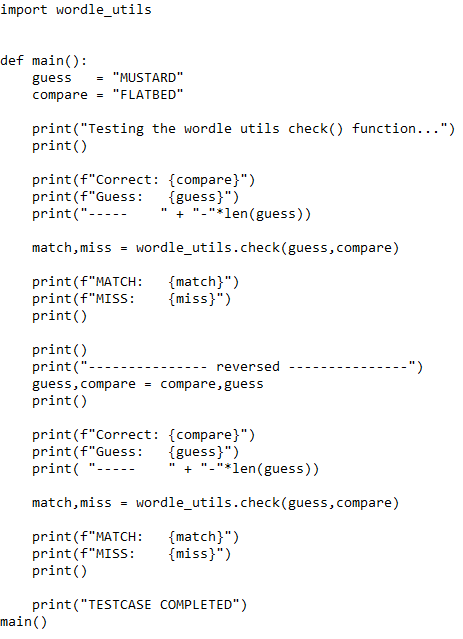
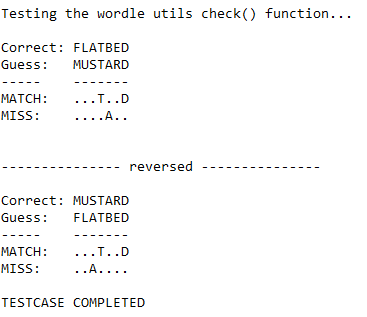
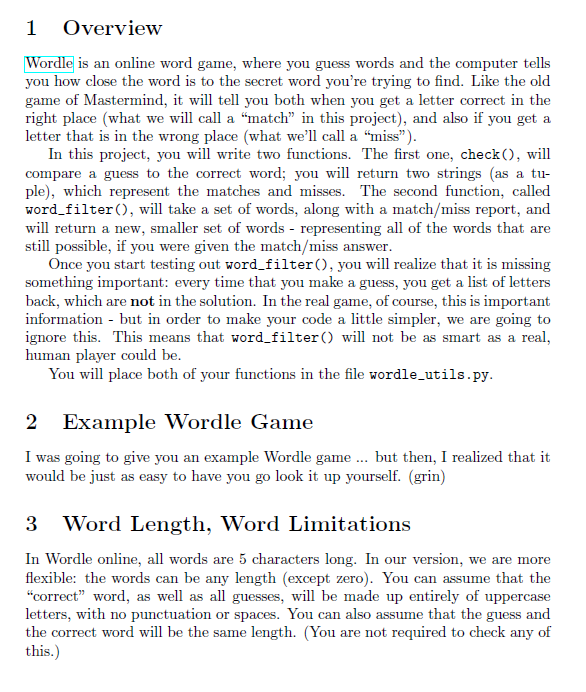
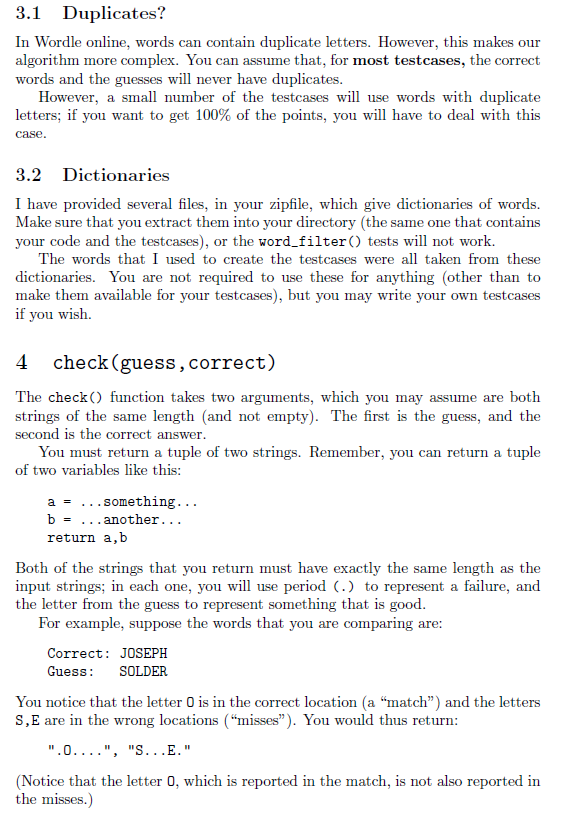
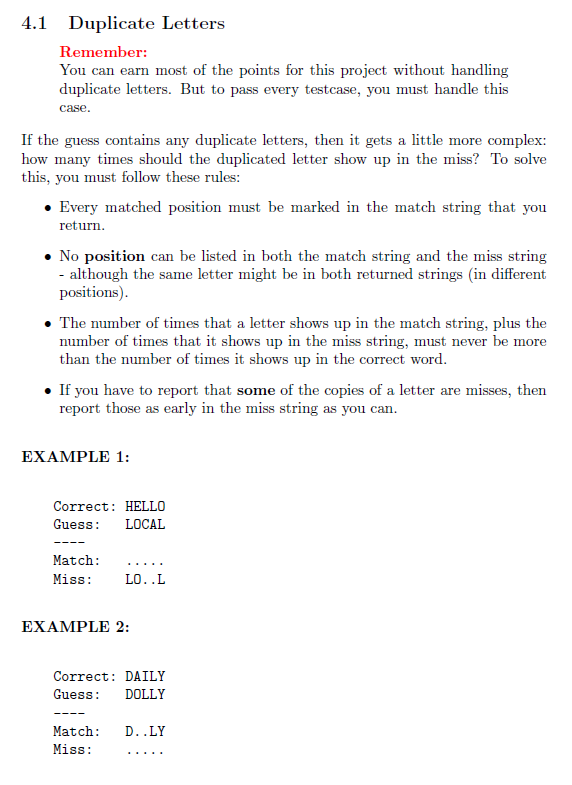
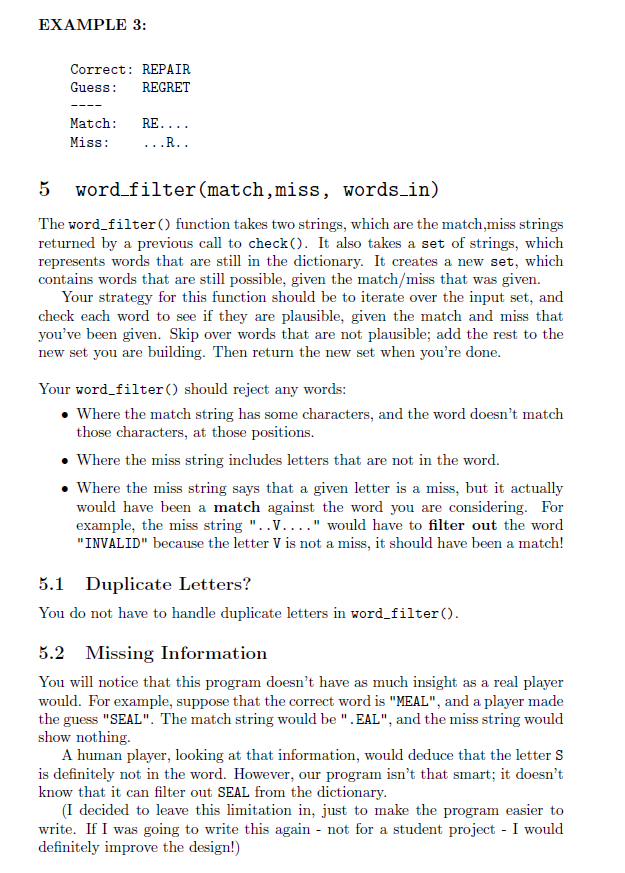
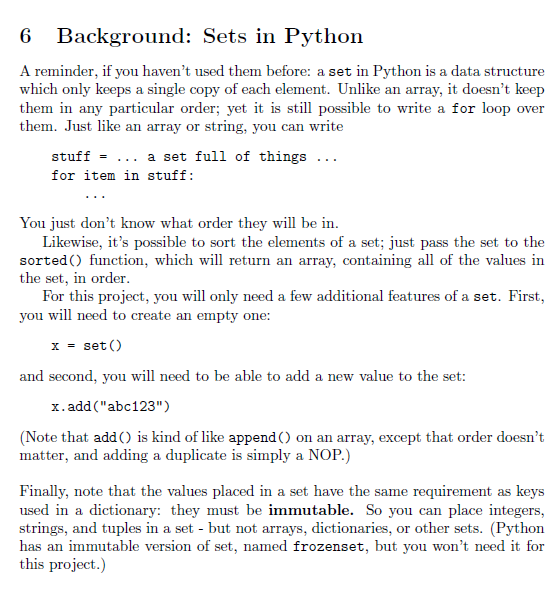
1 Overview Wordle is an online word game, where you guess words and the computer tells you how close the word is to the secret word you're trying to find. Like the old game of Mastermind, it will tell you both when you get a letter correct in the right place (what we will call a "match in this project), and also if you get a letter that is in the wrong place (what we'll call a "miss). In this project, you will write two functions. The first one, check(), will compare a guess to the correct word; you will return two strings (as a tu- ple), which represent the matches and misses. The second function, called word_filter(), will take a set of words, along with a match/miss report, and will return a new, smaller set of words - representing all of the words that are still possible, if you were given the match/miss ans answer. Once you start testing out word_filter(), you will realize that it is missing something important: every time that you make a guess, you get a list of letters back, which are not in the solution. In the real game, of course, this is important information - but in order to make your code a little simpler, we are going to ignore this. This means that word_filter() will not be as smart as a real, human player could be. You will place both of your functions in the file wordle_utils.py. 2 Example Wordle Game I was going to give you an example Wordle game ... but then, I realized that it would be just as easy to have you go look it up yourself. (grin) Word Length, Word Limitations In Wordle online, all words are 5 characters long. In our version, we are more flexible: the words can be any length (except zero). You can assume that the "correct word, as well as all guesses, will be made up entirely of uppercase letters, with no punctuation or spaces. You can also assume that the guess and the correct word will be the same length. (You are not required to check any of this.) 3.1 Duplicates? In Wordle online, words can contain duplicate letters. However, this makes our algorithm more complex. You can assume that, for most testcases, the correct words and the guesses will never have duplicates. However, a small number of the testcases will use words with duplicate letters; if you want to get 100% of the points, you will have to deal with this case. 3.2 Dictionaries I have provided several files, in your zipfile, which give dictionaries of words. Make sure that you extract them into your directory (the same one that contains your code and the testcases), or the word_filter() tests will not work. The words that I used to create the testcases were all taken from these dictionaries. You are not required to use these for anything other than to make them available for your testcases), but you may write your own testcases if you wish. 4 check (guess, correct) The check() function takes two arguments, which you may assume are both strings of the same length (and not empty). The first is the guess, and the second is the correct answer. You must return a tuple of two strings. Remember, you can return a tuple of two variables like this: a = ...something... b = ...another... return a,b Both of the strings that you return must have exactly the same length as the input strings; in each one, you will use period (.) to represent a failure, and the letter from the guess to represent something that is good. For example, suppose the words that you are comparing are: Correct: JOSEPH Guess: SOLDER You notice that the letter 0 is in the correct location (a "match) and the letters S,E are in the wrong locations ("misses). You would thus return: ".0....", "S...E." (Notice that the letter 0, which is reported in the match, is not also reported in the misses.) 4.1 Duplicate Letters Remember: You can earn most of the points for this project without handling duplicate letters. But to pass every testcase, you must handle this case. If the guess contains any duplicate letters, then it gets a little more complex: how many times should the duplicated letter show up in the miss? To solve this, you must follow these rules: Every matched position must be marked in the match string that you return. No position can be listed in both the match string and the miss string - although the same letter might be in both returned strings in different positions). The number of times that a letter shows up in the match string, plus the number of times that it shows up in the miss string, must never be more than the number of times it shows up in the correct word. . If you have to report that some of the copies of a letter are misses, then report those as early in the miss string as you can. EXAMPLE 1: Correct: HELLO Guess : LOCAL Match: Miss: LO..L EXAMPLE 2: Correct: DAILY Guess: DOLLY D.LY Match: Miss: EXAMPLE 3: Correct: REPAIR Guess: REGRET Match: Miss: RE.... ...R.. word_filter(match,miss, words_in) The word_filter() function takes two strings, which are the match,miss strings returned by a previous call to check(). It also takes a set of strings, which represents words that are still in the dictionary. It creates a new set, which contains words that are still possible, given the match/miss that was given. Your strategy for this function should be to iterate over the input set, and check each word to see if they are plausible, given the match and miss that you've been given. Skip over words that are not plausible; add the rest to the new set you are building. Then return the new set when you're done. Your word_filter() should reject any words: Where the match string has some characters, and the word doesn't match those characters, at those positions. Where the miss string includes letters that are not in the word. Where the miss string says that a given letter is a miss, but it actually would have been a match against the word you are considering. For example, the miss string "..V...." would have to filter out the word "INVALID" because the letter V is not a miss, it should have been a match! 5.1 Duplicate Letters? You do not have to handle duplicate letters in word_filter(). 5.2 Missing Information You will notice that this program doesn't have as much insight as a real player would. For example, suppose that the correct word is "MEAL", and a player made the guess "SEAL". The match string would be ".EAL", and the miss string would show nothing A human player, looking at that information, would deduce that the letters is definitely not in the word. However, our program isn't that smart; it doesn't know that it can filter out SEAL from the dictionary. (I decided to leave this limitation in, just to make the program easier to write. If I was going to write this again - not for a student project - I would definitely improve the design!) 6 6 Background: Sets in Python A reminder, if you haven't used them before: a set in Python is a data structure which only keeps a single copy of each element. Unlike an array, it doesn't keep them in any particular order; yet it is still possible to write a for loop over them. Just like an array or string, you can write stuff = ... a set full of things ... for item in stuff: You just don't know what order they will be in. Likewise, it's possible to sort the elements of a set; just pass the set to the sorted() function, which will return an array, containing all of the values in the set, in order. For this project, you will only need a few additional features of a set. First, you will need to create an empty one: x = set() and second, you will need to be able to add a new value to the set: x.add("abc123") (Note that add() is kind of like append() on an array, except that order doesn't matter, and adding a duplicate is simply a NOP.) Finally, note that the values placed in a set have the same requirement as keys used in a dictionary: they must be immutable. So you can place integers, strings, and tuples in a set - but not arrays, dictionaries, or other sets. (Python has an immutable version of set, named frozenset, but you won't need it for this project.) import wordle_utils def main(): guess = "MUSTARD" compare = "FLATBED" print("Testing the wordle utils check() function...") print() print(f"Correct: {compare}") print(f"Guess: {guess}") print("----- " + "."*len (guess)) match, miss = wordle_utils.check(guess, compare) print("MATCH: print("MISS: print() {match}") {miss}") ") print() print("- reversed guess, compare = compare,guess print() print(f"Correct: {compare}") print(f"Guess: {guess}") print("--- "-"*len(guess)) match, miss = wordle_utils.check(guess, compare) print(f"MATCH: {match}") print("MISS: {miss}") print() print("TESTCASE COMPLETED") main() Testing the wordle utils check() function... Correct: FLATBED Guess: MUSTARD MATCH: MISS: ...1..D ...A.. reversed Correct: MUSTARD Guess: FLATBED MATCH: MISS: ...T..D ..A.... TESTCASE COMPLETED 1 Overview Wordle is an online word game, where you guess words and the computer tells you how close the word is to the secret word you're trying to find. Like the old game of Mastermind, it will tell you both when you get a letter correct in the right place (what we will call a "match in this project), and also if you get a letter that is in the wrong place (what we'll call a "miss). In this project, you will write two functions. The first one, check(), will compare a guess to the correct word; you will return two strings (as a tu- ple), which represent the matches and misses. The second function, called word_filter(), will take a set of words, along with a match/miss report, and will return a new, smaller set of words - representing all of the words that are still possible, if you were given the match/miss ans answer. Once you start testing out word_filter(), you will realize that it is missing something important: every time that you make a guess, you get a list of letters back, which are not in the solution. In the real game, of course, this is important information - but in order to make your code a little simpler, we are going to ignore this. This means that word_filter() will not be as smart as a real, human player could be. You will place both of your functions in the file wordle_utils.py. 2 Example Wordle Game I was going to give you an example Wordle game ... but then, I realized that it would be just as easy to have you go look it up yourself. (grin) Word Length, Word Limitations In Wordle online, all words are 5 characters long. In our version, we are more flexible: the words can be any length (except zero). You can assume that the "correct word, as well as all guesses, will be made up entirely of uppercase letters, with no punctuation or spaces. You can also assume that the guess and the correct word will be the same length. (You are not required to check any of this.) 3.1 Duplicates? In Wordle online, words can contain duplicate letters. However, this makes our algorithm more complex. You can assume that, for most testcases, the correct words and the guesses will never have duplicates. However, a small number of the testcases will use words with duplicate letters; if you want to get 100% of the points, you will have to deal with this case. 3.2 Dictionaries I have provided several files, in your zipfile, which give dictionaries of words. Make sure that you extract them into your directory (the same one that contains your code and the testcases), or the word_filter() tests will not work. The words that I used to create the testcases were all taken from these dictionaries. You are not required to use these for anything other than to make them available for your testcases), but you may write your own testcases if you wish. 4 check (guess, correct) The check() function takes two arguments, which you may assume are both strings of the same length (and not empty). The first is the guess, and the second is the correct answer. You must return a tuple of two strings. Remember, you can return a tuple of two variables like this: a = ...something... b = ...another... return a,b Both of the strings that you return must have exactly the same length as the input strings; in each one, you will use period (.) to represent a failure, and the letter from the guess to represent something that is good. For example, suppose the words that you are comparing are: Correct: JOSEPH Guess: SOLDER You notice that the letter 0 is in the correct location (a "match) and the letters S,E are in the wrong locations ("misses). You would thus return: ".0....", "S...E." (Notice that the letter 0, which is reported in the match, is not also reported in the misses.) 4.1 Duplicate Letters Remember: You can earn most of the points for this project without handling duplicate letters. But to pass every testcase, you must handle this case. If the guess contains any duplicate letters, then it gets a little more complex: how many times should the duplicated letter show up in the miss? To solve this, you must follow these rules: Every matched position must be marked in the match string that you return. No position can be listed in both the match string and the miss string - although the same letter might be in both returned strings in different positions). The number of times that a letter shows up in the match string, plus the number of times that it shows up in the miss string, must never be more than the number of times it shows up in the correct word. . If you have to report that some of the copies of a letter are misses, then report those as early in the miss string as you can. EXAMPLE 1: Correct: HELLO Guess : LOCAL Match: Miss: LO..L EXAMPLE 2: Correct: DAILY Guess: DOLLY D.LY Match: Miss: EXAMPLE 3: Correct: REPAIR Guess: REGRET Match: Miss: RE.... ...R.. word_filter(match,miss, words_in) The word_filter() function takes two strings, which are the match,miss strings returned by a previous call to check(). It also takes a set of strings, which represents words that are still in the dictionary. It creates a new set, which contains words that are still possible, given the match/miss that was given. Your strategy for this function should be to iterate over the input set, and check each word to see if they are plausible, given the match and miss that you've been given. Skip over words that are not plausible; add the rest to the new set you are building. Then return the new set when you're done. Your word_filter() should reject any words: Where the match string has some characters, and the word doesn't match those characters, at those positions. Where the miss string includes letters that are not in the word. Where the miss string says that a given letter is a miss, but it actually would have been a match against the word you are considering. For example, the miss string "..V...." would have to filter out the word "INVALID" because the letter V is not a miss, it should have been a match! 5.1 Duplicate Letters? You do not have to handle duplicate letters in word_filter(). 5.2 Missing Information You will notice that this program doesn't have as much insight as a real player would. For example, suppose that the correct word is "MEAL", and a player made the guess "SEAL". The match string would be ".EAL", and the miss string would show nothing A human player, looking at that information, would deduce that the letters is definitely not in the word. However, our program isn't that smart; it doesn't know that it can filter out SEAL from the dictionary. (I decided to leave this limitation in, just to make the program easier to write. If I was going to write this again - not for a student project - I would definitely improve the design!) 6 6 Background: Sets in Python A reminder, if you haven't used them before: a set in Python is a data structure which only keeps a single copy of each element. Unlike an array, it doesn't keep them in any particular order; yet it is still possible to write a for loop over them. Just like an array or string, you can write stuff = ... a set full of things ... for item in stuff: You just don't know what order they will be in. Likewise, it's possible to sort the elements of a set; just pass the set to the sorted() function, which will return an array, containing all of the values in the set, in order. For this project, you will only need a few additional features of a set. First, you will need to create an empty one: x = set() and second, you will need to be able to add a new value to the set: x.add("abc123") (Note that add() is kind of like append() on an array, except that order doesn't matter, and adding a duplicate is simply a NOP.) Finally, note that the values placed in a set have the same requirement as keys used in a dictionary: they must be immutable. So you can place integers, strings, and tuples in a set - but not arrays, dictionaries, or other sets. (Python has an immutable version of set, named frozenset, but you won't need it for this project.) import wordle_utils def main(): guess = "MUSTARD" compare = "FLATBED" print("Testing the wordle utils check() function...") print() print(f"Correct: {compare}") print(f"Guess: {guess}") print("----- " + "."*len (guess)) match, miss = wordle_utils.check(guess, compare) print("MATCH: print("MISS: print() {match}") {miss}") ") print() print("- reversed guess, compare = compare,guess print() print(f"Correct: {compare}") print(f"Guess: {guess}") print("--- "-"*len(guess)) match, miss = wordle_utils.check(guess, compare) print(f"MATCH: {match}") print("MISS: {miss}") print() print("TESTCASE COMPLETED") main() Testing the wordle utils check() function... Correct: FLATBED Guess: MUSTARD MATCH: MISS: ...1..D ...A.. reversed Correct: MUSTARD Guess: FLATBED MATCH: MISS: ...T..D ..A.... TESTCASE COMPLETED
Step by Step Solution
There are 3 Steps involved in it

Get step-by-step solutions from verified subject matter experts
 Study Help