







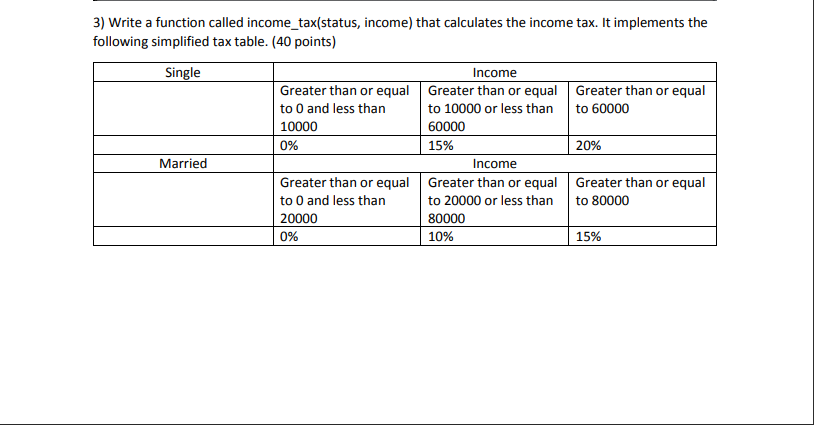
Question: undefined 3) Write a function called income_tax(status, income) that calculates the income tax. It implements the following simplified tax table. (40 points) Single Income Greater
 undefined
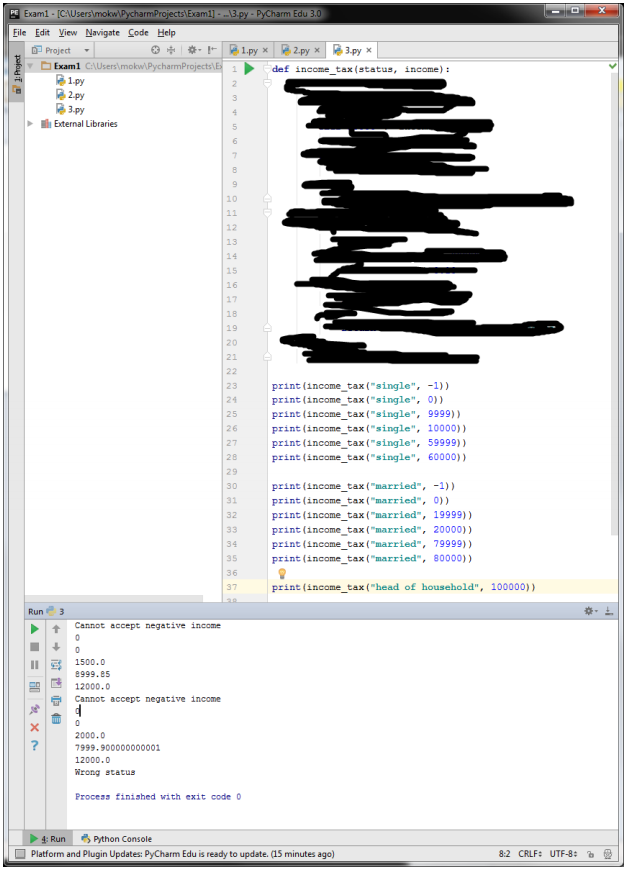
3) Write a function called income_tax(status, income) that calculates the income tax. It implements the following simplified tax table. (40 points) Single Income Greater than or equal Greater than or equal Greater than or equal to 0 and less than to 10000 or less than to 60000 10000 60000 0% 15% 20% Income Greater than or equal Greater than or equal Greater than or equal to 0 and less than to 20000 or less than to 80000 20000 80000 0% 10% 15% Married Project PE Exam - [CAUsers\mokw Pycharm Projects\Examl] ... 13.py - PyCharm Edu 3.0 File Edit View Navigate Code Help Project 1.py * B2.py * 3.py Examl CAUsers\mokwPycharm Projects def income_tax(status, income): 1.py 2 2.py 3.py External Libraries 5 ON 7 9 10 11 12 13 14 15 16 17 18 19 20 21 22 23 24 25 26 27 28 29 30 31 32 33 34 35 36 37 print (income_tax("single", -1)) print (income_tax("single", 0)) print (income_tax("single", 9999) print (income_tax("single", 10000)) print (income_tax("single", 59999) print(income_tax("single", 60000)) print (income_tax (married", -1)) print (income_tax("married", 0)) print (income_tax"married", 19999)) print(income_tax"married", 20000)) print (income_tax("married", 79999)) print (income_tax("married", 80000)) print (income_tax("head of household", 100000)) Run 3 t Cannot accept negative income 0 0 1500.0 1999.es 12000.0 Cannot accept negative income ? 0 2000.0 7999.900000000001 12000.0 Wrong status Process finished with exit code o 4: Run Python Console Platform and Plugin Updates: PyCharm Edu is ready to update. (15 minutes ago) 8:2 CRLF: UTF-8
Step by Step Solution
There are 3 Steps involved in it

Get step-by-step solutions from verified subject matter experts
 Study Help