





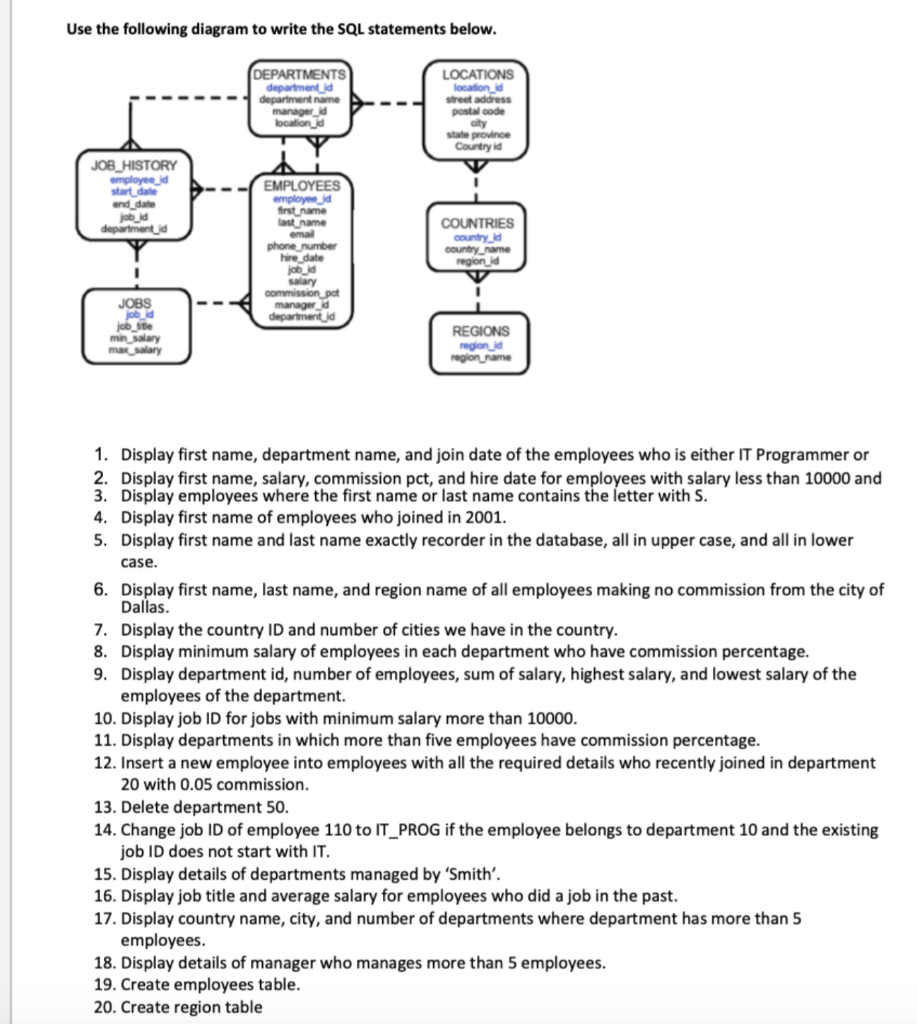
Question: Use the following diagram to write the SQL statements below. DEPARTMENTS department_id department name manager_id location LOCATIONS location_id street address postal code city state province
Use the following diagram to write the SQL

Use the following diagram to write the SQL statements below. DEPARTMENTS department_id department name manager_id location LOCATIONS location_id street address postal code city state province Country id JOB HISTORY employee_id start date and date job_id department id EMPLOYEES employee id first name last name emad phone number hire date job id salary commission pot managed department_id COUNTRIES countryd country_name region_id JOBS job_d job site min salary max_salary REGIONS region_id region name 1. Display first name, department name, and join date of the employees who is either IT Programmer or 2. Display first name, salary, commission pct, and hire date for employees with salary less than 10000 and 3. Display employees where the first name or last name contains the letter with S. 4. Display first name of employees who joined in 2001. 5. Display first name and last name exactly recorder in the database, all in upper case, and all in lower case. 6. Display first name, last name, and region name of all employees making no commission from the city of Dallas. 7. Display the country ID and number of cities we have in the country. 8. Display minimum salary of employees in each department who have commission percentage. 9. Display department id, number of employees, sum of salary, highest salary, and lowest salary of the employees of the department. 10. Display job ID for jobs with minimum salary more than 10000. 11. Display departments in which more than five employees have commission percentage. 12. Insert a new employee into employees with all the required details who recently joined in department 20 with 0.05 commission. 13. Delete department 50. 14. Change job ID of employee 110 to IT_PROG if the employee belongs to department 10 and the existing job ID does not start with IT. 15. Display details of departments managed by 'Smith'. 16. Display job title and average salary for employees who did a job in the past. 17. Display country name, city, and number of departments where department has more than 5 employees 18. Display details of manager who manages more than 5 employees. 19. Create employees table. 20. Create region table

Step by Step Solution

There are 3 Steps involved in it

1 Expert Approved Answer
Step: 1 Unlock blur-text-image

Question Has Been Solved by an Expert!

Get step-by-step solutions from verified subject matter experts

Step: 2 Unlock
Step: 3 Unlock

Students Have Also Explored These Related General Management Questions!