







Question: When I did mine, It only shows the bottom half of the calendar package com.mycompany.excercise_13_4; import java.util.Arrays; import java.util.Calendar; import java.util.GregorianCalendar; import java.util.Locale; import java.util.Scanner;
When I did mine, It only shows the bottom half of the calendar
package com.mycompany.excercise_13_4;
import java.util.Arrays; import java.util.Calendar; import java.util.GregorianCalendar; import java.util.Locale; import java.util.Scanner;
/** * * @author banue */ public class Excercise_13_4 {
//Main Method public static void main(String[] args) { Scanner input = new Scanner(System.in);
//Creating a Calendar abstract class //Including the GregorianCalendar Class
Calendar gregCal = new GregorianCalendar();
// Prompt the user to enter year System.out.print("Enter full year (e.g., 2001): "); int year = input.nextInt(); gregCal.set(GregorianCalendar.YEAR, year); System.out.println(gregCal.get(GregorianCalendar.YEAR));
// Prompt the user to enter month System.out.print("Enter month in number between 1 and 12: "); int month = input.nextInt(); gregCal.set(GregorianCalendar.MONTH, month); System.out.println(gregCal.get(GregorianCalendar.MONTH));
// Print calendar for the month of the year printMonth(gregCal.get(GregorianCalendar.YEAR), gregCal.get(GregorianCalendar.MONTH));
printCalendarBody(gregCal);
// Pad space before the first day of the month for (int i = 1; i
// Print days in month while (gregCal.get(Calendar.DATE)
if (gregCal.get(Calendar.DAY_OF_WEEK) == 7) System.out.printf("%4d ", gregCal.get(Calendar.DATE)); else System.out.printf("%4d", gregCal.get(Calendar.DATE));
// Add a day gregCal.add(Calendar.DATE, 1); } System.out.printf("%4d ", gregCal.get(Calendar.DATE));
}
static void printMonth(int year, int month) { printMonthTitle(year, month); } /** Print the month title, e.g., May, 1999 * @param year * @param month */ public static void printMonthTitle(int year, int month) { System.out.println(" " + month + " " + year);
}
public static String[] getMonthName() { String[] months = { "January", "February", "March", "April", "May", "June", "July", "August", "September", "October", "November", "December" }; return months; }
public static void printCalendarBody(Calendar gregCal) {
String[] months = getMonthName();
System.out.println(months[gregCal.get(Calendar.MONTH)] + ", " + gregCal.get(Calendar.YEAR));
System.out.println("-----------------------------"); System.out.println(" Sun Mon Tue Wed Thu Fri Sat"); } }
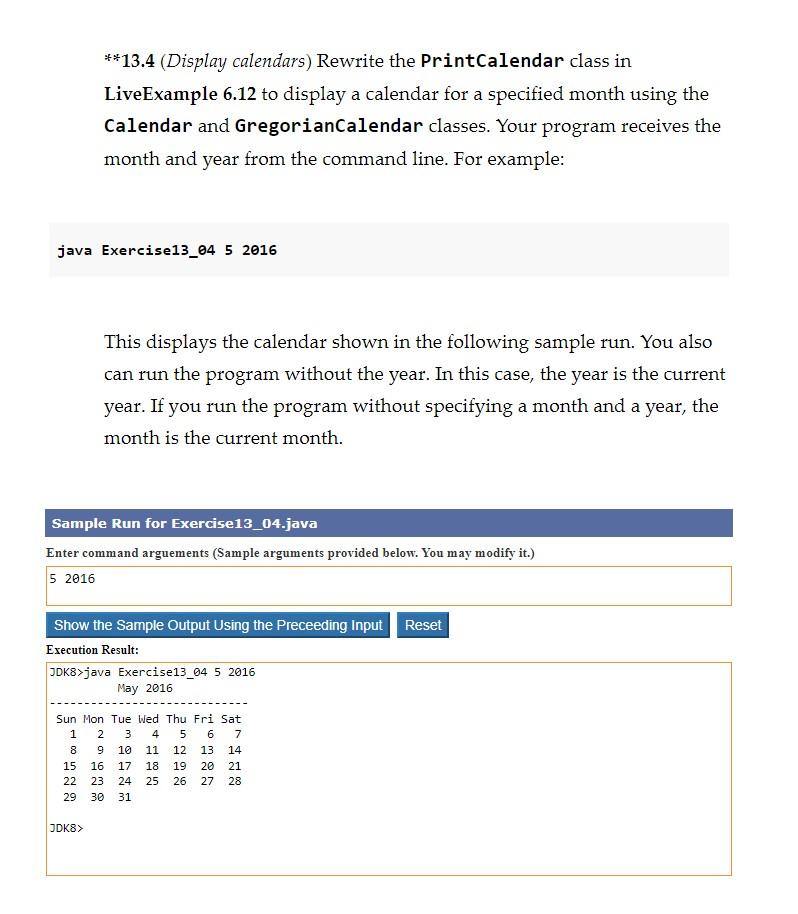
13.4 (Display calendars) Rewrite the PrintCalendar class in LiveExample 6.12 to display a calendar for a specified month using the Calendar and GregorianCalendar classes. Your program receives the month and year from the command line. For example: java Exercise13_04 52016 This displays the calendar shown in the following sample run. You also can run the program without the year. In this case, the year is the current year. If you run the program without specifying a month and a year, the month is the current month. Sample Run for Exercise13_04.java Enter command arguements (Sample arguments provided below. You may modify it.) 52016 Execution Result
Step by Step Solution
There are 3 Steps involved in it

Get step-by-step solutions from verified subject matter experts
 Study Help