







Question: In the following exercises, you will use the data in the TAL Distributors database shown in Figure 2-1 in Chapter 2. (If you use a
In the following exercises, you will use the data in the TAL Distributors database shown in Figure 2-1 in Chapter 2. (If you use a computer to complete these exercises, use a copy of the original TAL Distributors database so your data will not reflect the changes you made in Chapter 3.) If you have access to a DBMS, use the DBMS to perform the tasks and explain the steps you used in the process. If not, explain how you would use SQL to obtain the desired results. Check with your instructor if you are uncertain about which approach to take.
1. Create the TopLevelCust view described in Review Question 2. Display the data in the view.
2. Create the ItemOrder view described in Review Question 3. Display the data in the view.
3. Create a view named OrdTot. It consists of the order number and order total for each order currently on file. (The order total is the sum of the number ordered multiplied by the quoted price on each order line for each order.) Display the data in the view.
4. Create the following indexes. If it is necessary to name the index in your DBMS, use the indicated name.
a. Create an index named ItemIndex1 on the ItemNum field in the OrderLine table.
b. Create an index named ItemIndex2 on the Storehouse field in the Item table.
c. Create an index named ItemIndex3 on the Storehouse and Category fields in the Item table.
d. Create an index named ItemIndex4 on the Storehouse and OnHand fields in the Item table and list units on hand in descending order.
5. Drop the ItemIndex3 index from the Item table.
6. Assume the Item table has been created, but there are no integrity constraints. Create the necessary integrity constraint to ensure that the only allowable values for the Category field are PZL, GME, and TOY. Ensure that the ItemNum field is the primary key and that the ItemNum field in the OrderLine table is a foreign key that must match the primary key of the Item table.
7. Add a field named Allocation to the Item table. The allocation is a number representing the number of units of each item that have been allocated to each customer. Set all Allocation values to zero. Calculate the number of units of item number KD34 currently on order. Change the Allocation value for item number KD34 to this number. Display all the data in the Item table.
8. Increase the length of the Storehouse field in the Item table to two characters. Change the Storehouse number for Storehouse 1 to 1a. Display all the data in the Item table.
9. Delete the Allocation field from the Item table. Display all the data in the Item table.
10. What command would you use to delete the Item table from the TAL Distributors database? (Do not delete the Item table.)
11. If you are using Access 2013, create the following data macros.
a. Create a data macro associated with the After Insert event for the Customer table to add the customer€™s balance multiplied by the rep€™s commission rate to the commission for the corresponding rep when adding a customer. Test the data macro by adding a customer and ensuring that the corresponding rep€™s commission is updated correctly.
b. Create a data macro associated with the After Update event for the Customer table to add the difference between the new balance and the old balance multiplied by the rep€™s commission rate to the commission for the corresponding rep when updating a customer. Test the data macro by changing a customer€™s balance and ensuring that the corresponding rep€™s commission is updated correctly.
c. Create a data macro associated with the After Delete event for the Customer table to subtract the balance multiplied by the rep€™s commission rate from the commission for the corresponding rep when deleting a customer. Test the data macro by deleting a customer and ensuring that the corresponding rep€™s commission is updated correctly.
12. Using Access 2013, an employee at TAL Distributors tried to delete item number MT03 from the Item table and received the following error message: €œThe record cannot be deleted or changed because table €˜OrderLine€™ includes related records.€ Why did the employee receive this error message? What change is needed in the database to allow the deletion of records from the Item table?
13. TAL Distributors has decided to include wood carvings in its product line and has assigned these items to the category CRV. What change is needed in the database to add items in category CRV to the Item table? Would you add any integrity constraints to the Storehouse and Price fields in the Item table? Why or why not?
Figure 2-1
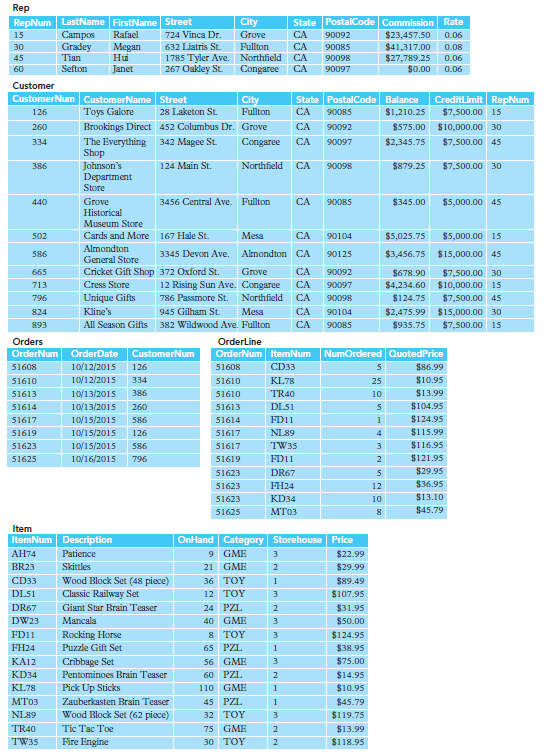
Rep RepNum LastName FirstName Street Campos Gradey Tian State PostalCode Commission Rate City Rafael 724 Vinca Dr. Grove CA $23,457.50 $41,317.00 $27,789.25 $0.00 15 90092 0.06 Megan Hui Janet 632 Liatris St. Fullton CA 30 90085 0.08 1785 Tyler Ave. Northfield CA Congaree 45 90098 0.06 Sefton 267 Oakley St. CA 60 90097 0.06 Customer CreditLimit RepNum $7,500.00 15 CustomerNum CustomerName Street State PostalCode Balance $1,210.25 City Toys Galore 28 Laketon St. Fullton CA 90085 126 452 Columbus Dr. Grove Brookings Direct CA 90092 $575.00 $10,000.00 30 260 The Everything Shop Johnson's Department Store 342 Magee St. Congaree CA 90097 $2,345.75 $7,500.00 45 334 124 Main St. Northfield CA $879.25 $7,500.00 30 386 90098 Grove 3456 Central Ave. Fullton CA $345.00 $5,000.00 45 440 90085 Historical Museum Store Mesa Cards and More 167 Hale St. CA 90104 $5,025.75 $5,000.00 15 502 Almondton 3345 Devon Ave. Almondton CA $3,456.75 $15,000.00 45 586 90125 General Store Cricket Gift Shop 372 Oxford St. Grove CA 665 90092 $678.90 $4,234.60 $10,000.00 15 $7,500.00 30 12 Rising Sun Ave. Congaree 786 Passmore St. Northfield Cress Store CA 90097 713 Unique Gifts CA 90098 $124.75 $7,500.00 45 796 Kline's 945 Gilham St. Mesa CA $2,475.99 $15,000.00 30 824 90104 All Season Gifts 382 Wildwood Ave. Fullton CA $935.75 $7,500.00 15 893 90085 Orders Orderline OrderNum OrderNum ItemNum NumOrdered QuotedPrice OrderDate CustomerNum 10/12/2015 CD33 $86.99 51608 126 51608 10/12/2015 $10.95 334 KL78 51610 51610 25 TR40 $13.99 10/13/2015 386 51613 51610 10 $104.95 10/13/2015 DL51 51614 260 51613 $124.95 10/15/2015 FD11 51617 586 51614 $115.99 10/15/2015 NL89 51619 126 51617 $116.95 10/15/2015 51617 TW35 51623 586 $121.95 10/16/2015 FD11 51625 796 51619 $29.95 51623 DR67 $36.95 51623 FH24 12 $13.10 51623 KD34 10 $45.79 51625 Item ItemNum Description OnHand Category Storehouse Price 9 GME 74 Patience $22.99 3. BR23 Skittles 21 GME $29.99 Wood Block Set (48 piece) CD33 36 TOY $89.49 DL51 Classic Railway Set Giant Star Brain Teaser 12 TOY $107.95 DR67 24 PZL $31.95 Mancala 40 GME DW23 $50.00 8 TOY FD11 Rocking Horse $124.95 $38.95 FH24 Puzzle Gift Set 65 PZL 56 GME $75.00 KA12 Cribbage Set Pentominoes Brain Teaser 3. KD34 60 PZL $14.95 KL78 110 GME Pick Up Sticks Zauberkasten Brain Teaser Wood Block Set (62 piece) $10.95 45 PZL $45.79 NL89 32 TOY $119.75 Tic Tac Toe Fire Engine TR40 75 GME $13.99 TW35 30 TOY $118.95
Step by Step Solution
3.42 Rating (165 Votes )
There are 3 Steps involved in it
The following answers indicate how to perform the specified task in SQL and in Microsoft Access The process for other database management systems may be different although it should be similar Data an... View full answer

Get step-by-step solutions from verified subject matter experts
Document Format (2 attachments)

1807_60b8c12143ff1_716264.pdf
180 KBs PDF File

1807_60b8c12143ff1_716264.docx
120 KBs Word File
 Study Help