







Question: 1. Please use c++ only to answer the following questions. 2. Please share your code. 3. Please show all output. 4. Please comment on your
1. Please use c++ only to answer the following questions.
2. Please share your code.
3. Please show all output.
4. Please comment on your program and add the real file name so when I save the file names in the same directory the program will run.
once I download them in the same folder.
Directions: (PLEASE COMMENT On Code)
4. Please comment on your program and add real name of files so when I save the command file and the data file I can run the program
once I download them in the same folder.
Directions: (PLEASE COMMENT LIBERLY)
FILE # 1
files_list.txt
Date Time Zn Size Name
11/18/2002 4:44:00 AM 232758 ARIALUNI.TTF
7/18/2008 3:15:00 AM 133424 zelan.ttf
7/18/2008 3:13:00 AM 148188 hiwua.ttf
7/18/2008 3:14:00 AM 162396 fantuwua.ttf
7/18/2008 3:12:00 AM 162504 tint.ttf
7/18/2008 3:10:00 AM 181652 yebse.ttf
7/18/2008 3:12:00 AM 183280 washrasb.ttf
7/18/2008 3:09:00 AM 205588 yigezubisratgothic.ttf
7/18/2008 3:10:00 AM 212112 wookianos.ttf
7/18/2008 3:11:00 AM 224260 washrab.ttf
7/18/2008 3:13:00 AM 417488 goffer.ttf
8/11/2009 4:59:00 AM 93432 MyriadWebPro.ttf
8/11/2009 4:59:00 AM 93552 MyriadWebPro-Italic.ttf
8/11/2009 4:59:00 AM 99356 MyriadWebPro-Bold.ttf
2/4/2010 3:26:00 AM 29124 OCRAStd.otf
2/4/2010 3:26:00 AM 29864 StencilStd.otf
2/4/2010 3:25:00 AM 31040 HoboStd.otf
2/4/2010 4:00:00 AM 33244 LetterGothicStd-Bold.otf
2/4/2010 4:00:00 AM 33444 LetterGothicStd.otf
2/4/2010 3:26:00 AM 34024 OratorStd.otf
2/4/2010 4:00:00 AM 34852 LetterGothicStd-BoldSlanted.otf
2/4/2010 3:25:00 AM 34960 CooperBlackStd.otf
2/4/2010 4:00:00 AM 34972 LetterGothicStd-Slanted.otf
2/4/2010 3:26:00 AM 35240 PrestigeEliteStd-Bd.otf
2/4/2010 3:26:00 AM 35372 OratorStd-Slanted.otf
2/4/2010 3:25:00 AM 35456 BrushScriptStd.otf
2/4/2010 3:26:00 AM 36012 PoplarStd.otf
2/4/2010 3:25:00 AM 36452 BirchStd.otf
2/4/2010 3:25:00 AM 36536 CooperBlackStd-Italic.otf
2/4/2010 3:25:00 AM 36888 CharlemagneStd-Bold.otf
2/4/2010 3:25:00 AM 44468 BlackoakStd.otf
2/4/2010 3:25:00 AM 47760 GiddyupStd.otf
2/4/2010 3:26:00 AM 50920 MesquiteStd.otf
2/4/2010 3:26:00 AM 55492 NuevaStd-BoldCondItalic.otf
2/4/2010 3:26:00 AM 55592 NuevaStd-BoldCond.otf
2/4/2010 3:26:00 AM 56196 NuevaStd-CondItalic.otf
2/4/2010 3:26:00 AM 56384 NuevaStd-Cond.otf
2/4/2010 3:26:00 AM 68564 TrajanPro-Regular.otf
2/4/2010 3:26:00 AM 68620 RosewoodStd-Regular.otf
2/4/2010 3:26:00 AM 68676 TrajanPro-Bold.otf
2/4/2010 3:25:00 AM 74952 AGaramondPro-Bold.otf
2/4/2010 3:25:00 AM 76452 AGaramondPro-BoldItalic.otf
2/4/2010 3:26:00 AM 78428 LithosPro-Regular.otf
2/4/2010 3:26:00 AM 79396 LithosPro-Black.otf
2/4/2010 4:00:00 AM 81204 AdobeHebrew-Bold.otf
2/4/2010 4:00:00 AM 82080 AdobeHebrew-Regular.otf
2/4/2010 4:00:00 AM 85252 AdobeHebrew-BoldItalic.otf
2/4/2010 4:00:00 AM 85608 AdobeHebrew-Italic.otf
2/4/2010 3:25:00 AM 91916 AGaramondPro-Italic.otf
2/4/2010 4:00:00 AM 91964 MyriadPro-Cond.otf
2/4/2010 4:00:00 AM 94360 MyriadPro-Regular.otf
2/4/2010 4:00:00 AM 94628 MyriadPro-BoldCond.otf
2/4/2010 4:00:00 AM 95616 MyriadPro-Semibold.otf
2/4/2010 4:00:00 AM 95684 MyriadPro-Bold.otf
2/4/2010 3:26:00 AM 97232 TektonPro-BoldCond.otf
2/4/2010 4:00:00 AM 97888 MyriadPro-CondIt.otf
2/4/2010 4:00:00 AM 98064 MyriadPro-It.otf
2/4/2010 3:26:00 AM 98336 TektonPro-Bold.otf
2/4/2010 3:26:00 AM 99580 TektonPro-BoldExt.otf
2/4/2010 4:00:00 AM 100184 MyriadPro-SemiboldIt.otf
2/4/2010 4:00:00 AM 100252 MyriadPro-BoldIt.otf
2/4/2010 4:00:00 AM 100312 MyriadPro-BoldCondIt.otf
2/4/2010 3:26:00 AM 111360 TektonPro-BoldObl.otf
2/4/2010 3:25:00 AM 127592 AGaramondPro-Regular.otf
2/4/2010 3:25:00 AM 132236 ChaparralPro-Regular.otf
2/4/2010 3:25:00 AM 132408 ChaparralPro-Bold.otf
2/4/2010 3:25:00 AM 133256 ChaparralPro-Italic.otf
2/4/2010 3:25:00 AM 133864 ChaparralPro-BoldIt.otf
2/4/2010 3:25:00 AM 143932 ACaslonPro-Bold.otf
2/4/2010 3:25:00 AM 168372 ACaslonPro-Italic.otf
2/4/2010 3:25:00 AM 168852 ACaslonPro-Regular.otf
2/4/2010 3:25:00 AM 169784 ACaslonPro-BoldItalic.otf
2/4/2010 3:25:00 AM 171092 ACaslonPro-SemiboldItalic.otf
2/4/2010 3:25:00 AM 172256 ACaslonPro-Semibold.otf
2/4/2010 4:00:00 AM 230912 MinionPro-Bold.otf
2/4/2010 4:00:00 AM 231312 MinionPro-Regular.otf
2/4/2010 3:26:00 AM 232680 MinionPro-BoldCn.otf
2/4/2010 3:26:00 AM 233088 MinionPro-Medium.otf
2/4/2010 3:26:00 AM 234260 MinionPro-Semibold.otf
2/4/2010 3:26:00 AM 275004 MinionPro-MediumIt.otf
2/4/2010 3:26:00 AM 275572 MinionPro-BoldCnIt.otf
2/4/2010 4:00:00 AM 276140 MinionPro-It.otf
2/4/2010 4:00:00 AM 276632 MinionPro-BoldIt.otf
2/4/2010 3:26:00 AM 277068 MinionPro-SemiboldIt.otf
2/4/2010 4:00:00 AM 358032 AdobeArabic-BoldItalic.otf
2/4/2010 4:00:00 AM 360784 AdobeArabic-Bold.otf
2/4/2010 4:00:00 AM 369512 AdobeArabic-Italic.otf
2/4/2010 4:00:00 AM 376016 AdobeArabic-Regular.otf
2/4/2010 3:25:00 AM 2832152 AdobeGothicStd-Bold.otf
2/4/2010 4:00:00 AM 3252652 KozGoPro-ExtraLight.otf
2/4/2010 4:00:00 AM 3456772 KozGoPro-Light.otf
2/4/2010 4:00:00 AM 3460376 KozGoPro-Regular.otf
2/4/2010 4:00:00 AM 3496008 KozGoPro-Medium.otf
2/4/2010 4:00:00 AM 3586872 KozGoPro-Bold.otf
2/4/2010 4:00:00 AM 3670080 KozGoPro-Heavy.otf
2/4/2010 4:00:00 AM 3825720 KozMinPro-ExtraLight.otf
2/4/2010 4:00:00 AM 4059096 AdobeMyungjoStd-Medium.otf
2/4/2010 4:00:00 AM 4233784 KozMinPro-Light.otf
2/4/2010 4:00:00 AM 4247988 KozMinPro-Regular.otf
2/4/2010 4:00:00 AM 4268536 KozMinPro-Heavy.otf
2/4/2010 4:00:00 AM 4313040 KozMinPro-Medium.otf
2/4/2010 4:00:00 AM 4383792 KozMinPro-Bold.otf
2/4/2010 3:25:00 AM 5050524 KozGoPr6N-ExtraLight.otf
2/4/2010 3:25:00 AM 5431800 KozGoPr6N-Light.otf
2/4/2010 3:25:00 AM 5439252 KozGoPr6N-Regular.otf
2/4/2010 3:25:00 AM 5497908 AdobeFanHeitiStd-Bold.otf
2/4/2010 3:25:00 AM 5499164 KozGoPr6N-Medium.otf
FILE #2
commands.txt
DELETE MyriadWebPro.ttf
DELETE MyriadWebPro-Italic.ttf
DELETE MyriadWebPro-Bold.ttf
SORT ASC
ADD 0HCC-Regular.ttf
ADD 0HCC-Italic.ttf
ADD 0HCC-Bold.ttf
ADD ZHCC-Bold.ttfSORT ASC
UPDATE ZHCC-Bold.ttf ZHCC-Bold.ttf 1/1/2000 1:00:00 AM 10000
UPDATE AdobeHebrew-Bold.otf AdobeHebrew-Bold.otf 1/1/2000 1:00:00 AM 10000
UPDATE AdobeHebrew-Regular.otf AdobeHebrew-Regular.otf 1/1/2000 1:00:00 AM 10000
DELETE KozMinPr6N-Light.ot
fDELETE KozMinPr6N-Regular.otf
DELETE KozMinPr6N-ExtraLight.otf
DELETE KozMinPr6N-Medium.otf
DELETE KozMinPr6N-Bold.otf
DELETE KozMinPr6N-Heavy.otf
SORT ASC
Example Program which you can modify to work if you like:
#include#include #include #include
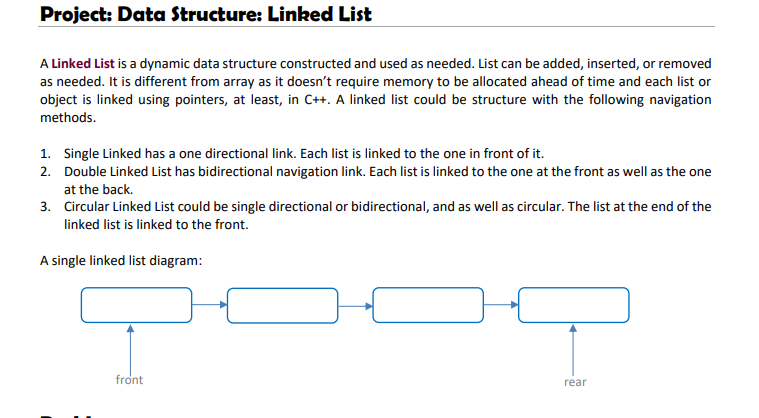
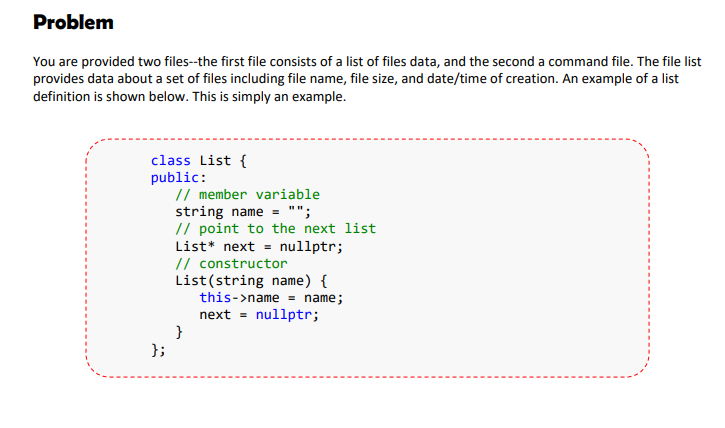
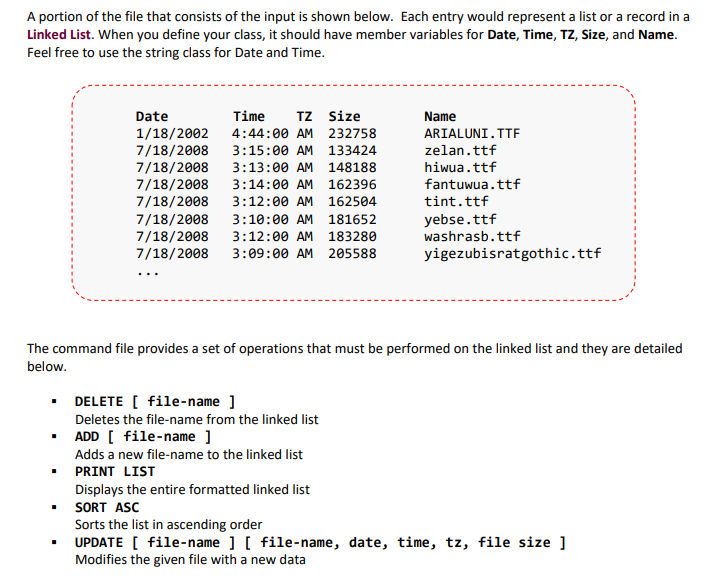
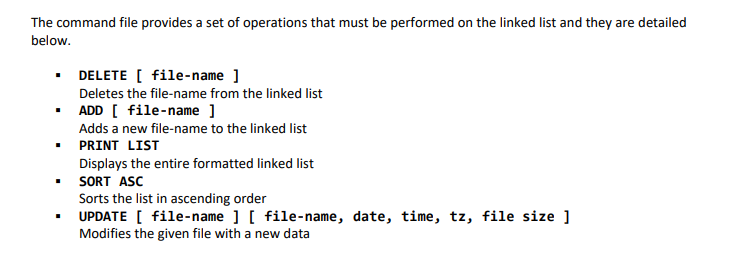
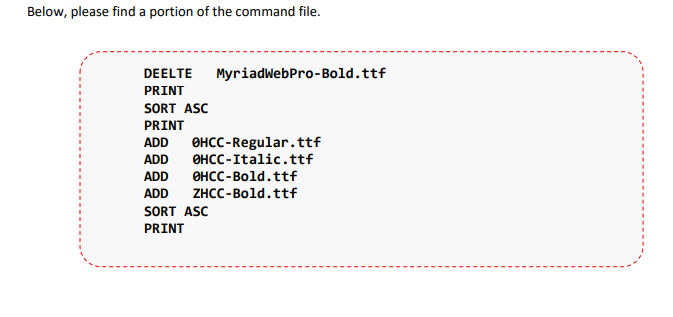
using namespace std; class File{ public: string Date, time, TZ, Name; int size; bool operator == (const File& s) const { return Name == s.Name; } bool operator != (const File& s) const { return !operator==(s); } bool operator &flist, string s){ File f; f.Name = s; flist.remove(f); } void print_list(list flist){ for(auto x:flist){ cout &flist, File* f, string old_name){ for(auto it = flist.begin(); it != flist.end(); it++){ if(it->Name == old_name){ *it = *f; } } } void add_new_filename(list &flist, string s){ File f; f.Name = s; flist.push_back(f); } class Comparator { // Compare 2 file objects using size bool operator ()(const File &file1, const File &file2) { return file1.size flist; char line[2048]; FILE *fp = fopen("data.txt","r"); while(fgets(line,2048,fp) != NULL){ File newFile; newFile.Date = strtok(line," "); newFile.time = strtok(NULL," "); newFile.TZ = strtok(NULL," "); newFile.size = stoi(strtok(NULL," ")); newFile.Name = strtok(NULL," "); flist.push_back(newFile); } fclose(fp); FILE *fp2 = fopen("command.txt","r"); while(fgets(line,2048,fp) != NULL){ string first_word = strtok(line, " "); if (first_word == "DELETE") { string s = strtok(NULL, " "); delete_file(flist, s); } else if (first_word == "PRINT") { print_list(flist); } else if (first_word == "ADD") { string s = strtok(NULL," "); add_new_filename(flist,s); } else if (first_word == "UPDATE") { string old_name = strtok(NULL, " "); File *f = new File; f->Name = strtok(NULL, " "); f->Date = strtok(NULL, " "); f->time = strtok(NULL, " "); f->TZ = strtok(NULL, " "); f->size = stoi(strtok(NULL, " ")); update_list(flist, f, old_name); } else { flist.sort([](const File & file1, const File & file2) { return file1.Name Project: Data Structure: Linked List A Linked List is a dynamic data structure constructed and used as needed. List can be added, inserted, or removed as needed. It is different from array as it doesn't require memory to be allocated ahead of time and each list or object is linked using pointers, at least, in C++. A linked list could be structure with the following navigation methods. 1. Single Linked has a one directional link. Each list is linked to the one in front of it. 2. Double Linked List has bidirectional navigation link. Each list is linked to the one at the front as well as the one at the back. 3. Circular Linked List could be single directional or bidirectional, and as well as circular. The list at the end of the linked list is linked to the front. A single linked list diagram: front rear Problem You are provided two files--the first file consists of a list of files data, and the second a command file. The file list provides data about a set of files including file name, file size, and date/time of creation. An example of a list definition is shown below. This is simply an example. class List { public: // member variable string name = ""; // point to the next list List* next = nullptr; // constructor List(string name) { this->name = name; next = nullptr; } }; A portion of the file that consists of the input is shown below. Each entry would represent a list or a record in a Linked List. When you define your class, it should have member variables for Date, Time, TZ, Size, and Name. Feel free to use the string class for Date and Time. Date 1/18/2002 7/18/2008 7/18/2008 7/18/2008 7/18/2008 7/18/2008 7/18/2008 7/18/2008 Time TZ Size 4:44:00 AM 232758 3:15:00 AM 133424 3:13:00 AM 148188 3:14:00 AM 162396 3:12:00 AM 162504 3:10:00 AM 181652 3:12:00 AM 183280 3:09:00 AM 205588 Name ARIALUNI.TTF zelan.ttf hiwua.ttf fantuqua.ttf tint.ttf yebse.ttf washrasb.ttf yigezubisratgothic.ttf The command file provides a set of operations that must be performed on the linked list and they are detailed below. DELETE [ file-name] Deletes the file-name from the linked list ADD [ file-name] Adds a new file-name to the linked list PRINT LIST Displays the entire formatted linked list SORT ASC Sorts the list in ascending order UPDATE [ file-name ] [ file-name, date, time, tz, file size ] Modifies the given file with a new data The command file provides a set of operations that must be performed on the linked list and they are detailed below. DELETE [ file-name] Deletes the file-name from the linked list . ADD [ file-name] Adds a new file-name to the linked list PRINT LIST Displays the entire formatted linked list SORT ASC Sorts the list in ascending order UPDATE [ file-name ] [ file-name, date, time, tz, file size ] Modifies the given file with a new data Below, please find a portion of the command file. DEELTE MyriadWebPro-Bold.ttf PRINT SORT ASC PRINT ADD OHCC-Regular.ttf ADD OHCC-Italic.ttf ADD OHCC-Bold.ttf ADD ZHCC-Bold.ttf SORT ASC PRINT Project: Data Structure: Linked List A Linked List is a dynamic data structure constructed and used as needed. List can be added, inserted, or removed as needed. It is different from array as it doesn't require memory to be allocated ahead of time and each list or object is linked using pointers, at least, in C++. A linked list could be structure with the following navigation methods. 1. Single Linked has a one directional link. Each list is linked to the one in front of it. 2. Double Linked List has bidirectional navigation link. Each list is linked to the one at the front as well as the one at the back. 3. Circular Linked List could be single directional or bidirectional, and as well as circular. The list at the end of the linked list is linked to the front. A single linked list diagram: front rear Problem You are provided two files--the first file consists of a list of files data, and the second a command file. The file list provides data about a set of files including file name, file size, and date/time of creation. An example of a list definition is shown below. This is simply an example. class List { public: // member variable string name = ""; // point to the next list List* next = nullptr; // constructor List(string name) { this->name = name; next = nullptr; } }; A portion of the file that consists of the input is shown below. Each entry would represent a list or a record in a Linked List. When you define your class, it should have member variables for Date, Time, TZ, Size, and Name. Feel free to use the string class for Date and Time. Date 1/18/2002 7/18/2008 7/18/2008 7/18/2008 7/18/2008 7/18/2008 7/18/2008 7/18/2008 Time TZ Size 4:44:00 AM 232758 3:15:00 AM 133424 3:13:00 AM 148188 3:14:00 AM 162396 3:12:00 AM 162504 3:10:00 AM 181652 3:12:00 AM 183280 3:09:00 AM 205588 Name ARIALUNI.TTF zelan.ttf hiwua.ttf fantuqua.ttf tint.ttf yebse.ttf washrasb.ttf yigezubisratgothic.ttf The command file provides a set of operations that must be performed on the linked list and they are detailed below. DELETE [ file-name] Deletes the file-name from the linked list ADD [ file-name] Adds a new file-name to the linked list PRINT LIST Displays the entire formatted linked list SORT ASC Sorts the list in ascending order UPDATE [ file-name ] [ file-name, date, time, tz, file size ] Modifies the given file with a new data The command file provides a set of operations that must be performed on the linked list and they are detailed below. DELETE [ file-name] Deletes the file-name from the linked list . ADD [ file-name] Adds a new file-name to the linked list PRINT LIST Displays the entire formatted linked list SORT ASC Sorts the list in ascending order UPDATE [ file-name ] [ file-name, date, time, tz, file size ] Modifies the given file with a new data Below, please find a portion of the command file. DEELTE MyriadWebPro-Bold.ttf PRINT SORT ASC PRINT ADD OHCC-Regular.ttf ADD OHCC-Italic.ttf ADD OHCC-Bold.ttf ADD ZHCC-Bold.ttf SORT ASC PRINT
Step by Step Solution
There are 3 Steps involved in it

Get step-by-step solutions from verified subject matter experts
 Study Help