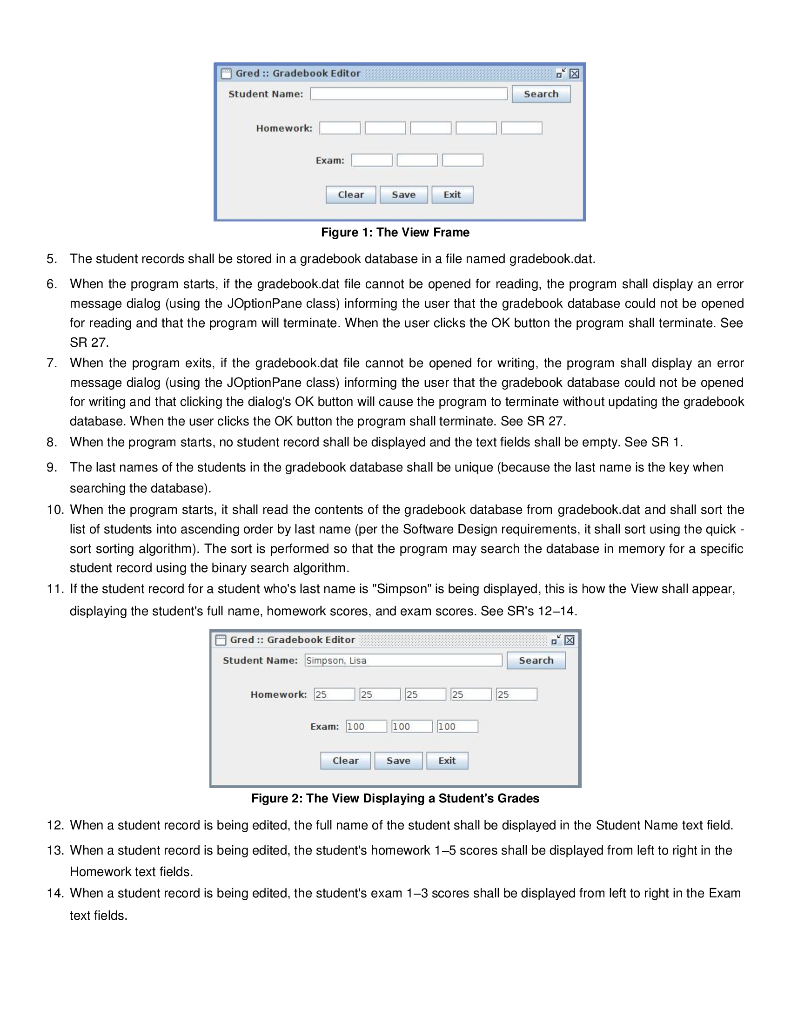
1 Submission Instructions Create a folder named asuriteid-p03 where asuriteid is your ASURTE user id (for example, if your ASURITE user id is jsmith6 then your folder would be named jsmith6-p03) and copy your .java source code files to this folder. Do not copy the .class files or any other files. Next, compress the asuriteid-p03 folder creating a zip archive file named asuriteid-p03.zip (e.g., jsmith6-p03.zip). Upload asuriteid-p03.zip to the Blackboard Project 3 submission link by the project deadline Please see the Course Schedule section in the Syllabus for the deadline. Consult the Syllabus for the late and academic integrity policies. 2 Learning Objectives 1 Complete all of the learning objects of the previous projects 2. To implement a GUI interface and respond to action events 3. To implement and use the binary search algorithm 4. To implement and use the quick sort algorithm. 5. To implement the java.lang.Comparable interface 3 Background This project shall implement a program which stores grade information for students in a class and allows that grade in formation to be edited. The data shall be stored in a database file named gradebook.dat. There shall be one student record per line, where the format of a student record is last-name first-name ex1 ex2 ex3 hw1 hw2 hw3 hw4 hw5 where last-name first-name ex1, ex2, ex3 The student's scores on three exams, may be zeros. Each exam is worth 100 pts. hw1-hw5 The student's last name. A contiguous string of one or more characters, with no spaces The student's first name. A contiguous string of one or more characters, with no spaces The student's scores on five homework assignments, may be zeros. Each assignment is worth 25 pts Here is an example gradebook.dat file Sample gradebook.dat Simpson Lisa 100 100 100 25 2525 25 25 Flintstone Fred 80 60 40 15 1722 18 23 Jetson George 70 83 81 20 21 22 23 25 Explosion Nathan 7 65 4 32 10 Muntz Nelson 60 70 50 20 15 105 8 Terwilliger Robert Flanders Ned 85 95 75 12 14 1723 16 Bouvier Selma 16 16 16 16 16 16 16 16 Spuckler Cletus12345678 Wiggum Clancy 18 1614 12 10 84 2 Skinner Seymour 78 83 99 19 2321 24 18 80 90 95 2321 19 17 23 3 Software Requirements 1. The GUl shall be implemented in a class named View. When the program starts the View frame shall appear as shown in Fig. 1 The View frame shall be 525 pixels wide and 225 pixels high The program shall display the program name in the title bar. You may change the name of the program to anything you wish The X close button in the title bar shall be disabled, i.e., when it is clicked the program shall not exit and the View shall remain unchanged. 2. 3. 4. Gred:: Gradebook Editor Student Name: Search Homework: Exam: Clear Exit Figure 1: The View Frame 5. The student records shall be stored in a gradebook database in a file named gradebook.dat. 6. When the program starts, if the gradebook.dat file cannot be opened for reading, the program shall display an error message dialog (using the JOptionPane class) informing the user that the gradebook database could not be opened for reading and that the program will terminate. When the user clicks the OK button the program shall terminate. See SR 27 7. When the program exits, if the gradebook.dat file cannot be opened for writing, the program shall display an error message dialog (using the JOptionPane class) informing the user that the gradebook database could not be opened for writing and that clicking the dialog's OK button will cause the program to terminate without updating the gradebook database. When the user clicks the OK button the program shall terminate. See SR 27 When the program starts, no student record shall be displayed and the text fields shall be empty. See SR 1 The last names of the students in the gradebook database shall be unique (because the last name is the key when searching the database) 8. 9. 10. When the program starts, it shall read the contents of the gradebook database from gradebook.dat and shall sort the list of students into ascending order by last name (per the Software Design requirements, it shall sort using the quick - sort sorting algorithm). The sort is performed so that the program may search the database in memory for a specific student record using the binary search algorithm 11. If the student record for a student who's last name is "Simpson" is being displayed, this is how the View shall appear displaying the student's full name, homework scores, and exam scores. See SR's 12-14 Gred:: Gradebook Editor Student Name: son. Lisa Search Homework: 25 25 25 Exam: 100 100 100 Save Exit Figure 2: The View Displaying a Student's Grades 12. When a student record is being edited, the full name of the student shall be displayed in the Student Name text field 13. When a student record is being edited, the student's homework 1-5 scores shall be displayed from left to right in the Homework text fields 14. When a student record is being edited, the student's exam 1-3 scores shall be displayed from left to right in the Exam text fields 15. When the Search button is clicked, if there are values being displayed in the homework and exam fields, then those fields shall be cleared, ie, set to empty, before the search begins 16. When the user clicks the Search button and the Student Name text field is empty, an error message dialog shall be dis-played, requesting that the user enter a student's last name. The Student Name and numeric text fields shall all re-main empty 17. When the user enters a name in the Student Name text field and then clicks the Search button, the gradebook data base in memory shall be searched for a student who's last name matches the name in the text field. Per the Software Design requirements, the search function shall be implemented either using either iterative binary search or recursive binary search 18. If the search discussed in SR 17 fails because there are no students who's last name matches the name in the Student Name text field, then an error message dialog shall be displayed informing the user that a student with that last name could not be found in the gradebook. After the user clicks OK to close the dialog, the Student Name text field shall be cleared and the numeric text fields shall remain empty 19. If the search discussed in SR 17 succeeds, then the Homework and Exam text fields shall be updated with the stu dent's homework and exam scores. The Student Name text field shall continue to display the student's full name per SR 12 20. When the user is editing the homework and or exam scores for a student and then clicks the Save button, the student record in memory shall be updated with the new scores 21. See SR 20. These changes shall remain stored in memory and shall not be written to the gradebook database until the program exits 22. When no student record is being edited (the homework and exam text fields are empty) and the user clicks the Save button, nothing shall happen 23. When the user is editing the information for a student and clicks the Clear button, without first clicking the Save button, then the student record in memory shall not be updated even if the homework and/or exam text fields had been modified. 24. When no student information is being displayed or edited, and the user clicks the Clear button, then nothing shall happen. 25. When the user is editing and has modified the information for a student and then clicks the Exit button, the student record (and all of the other student records) shall be written to the gradebook database before the program termi - nates. See SR 7 for how write failures are handled. 26. Whether the user is editing student information or not, when the Exit button is clicked, all of the student records shall be written to the gradebook database and then the program shall terminate 27. Any error message dialogs shall be displayed centered within the View frame and display a message and one button labeled OK 4 Software Design Requirements 1. All classes shall be declared in a package named proj3 2. The UML class diagram in UMLet fomat can be found in the project archive's uml folder. The img folder contains the class diagram in PNG format. Your program shall implement all of the classes (including methods, declaring instance and class variables, and so on) of this design. Deviation from the design may result in project score deduc tion 3. Class Main. A template source code file for Main is included in the project archive. The Main class shall contain the main) method which shall instantiate an object of the Main class and then call run() on that object. You shall com plete the code by reading the comments and implementing the pseudocode, while using the UML class diagram for Main as a guide Main.run) shall catch the FileNotFoundException which may get thrown by GradebookReader.readGradebook) and shall terminate the program by displaying an error message diagram which informs the user that the gradebook data base could not be opened for reading; it shall then terminate the program. See SR 6 Main.exit) shall catch the FileNotFoundException which may be thrown by GradebookWriter.writeGradebook() when the gradebook database cannot be opened for writing; the handler shall display an error message dialog informing the user that the gradebook database file could not be opened for writing and that the gradebook will not be updated; it shall then terminate the program. See SR 7 The parameter to Main.search() is the last name of a student and search) shall call Roster.getStudent) to search the Roster for a student with that last name. If the student is found, it will return a Student object which search) shall return. There are five homework assignments, so Main.getNumHomeworks) is a class method which shall return the constant 5. Similarly, Main.getNumExams() shall return the constant 3. The remainder of the methods in Main are accessori mutator methods for various data members Class GradebookReader. The constructor of this class creates a Scanner object which is used to read the gradebook database (the Scanner object is stored in instance variable mln so that it may be used in the various read methods) Since the file open may fail, this constructor shall throw the FileNotFoundException to Main.run() which shall catch the exception This class reads the gradebook information from the gradebook database file gradebook.dat when readGradebookO) is called. It then calls readRoster() to read each student record from the input file and then returns the created Roster object. The readRoster) method first instantiates a Roster object, then uses a while loop to read student records from the input file. For each student record, it reads the student's last and first names from the input file, creates a Student object, passing the last name and first name to the Student constructor, and then calls readHomework) and read- Exam) to read the student's homework and exam scores. Then it calls Roster.addStudent) to add the Student object to the Roster. Finally, it returns the Roster object that was created, back to readGradebook(), which then returns the Roster back to Main.run) which called readGradebook() in the first place Note that after reading the Roster but before returning the Roster to Main.run, readGradebook) calls Roster.sort Roster) to sort the Roster Class GradebookWriter. This class writes the gradebook information to gradebook.dat before the program exits. It is a subclass of java.io.PrintWriter so the GradebookWriter constructor must call the PrintWriter constructor to open the file for writing. Since the open may fail, PrintWriter will return the FileNotFoundException to GradebookWriter() which will throw it back to Main.exit() which will catch and handle it The gradebook database is written when writeGradebook) is called. This is a very simple method which just iterates over the Roster, writing each Student object to the file Class Roster. The class roster is implemented as an ArrayList of Student objects. addStudent() is called from Grade- bookReader.readRoster() to add a Student to the Roster's ArrayList. getStudent) is called from Main.search), which is called by View.actionPerformed) when the user clicks the Search button in the View. getStudent) calls Searcher.search), passing the Student's last name as the key; search) searches 4. 5. 6. the ArrayList for the student with a matching last name using the binary search algorithm. You shall implement either the iterative or recursive version of the algorithm. If a Student with matching last name is found, then get-Student) returns the Student object; otherwise, it returns -1 which represents the "not found" condition. sortRoster) is called from GradebookReader, see that class for a discussion. sortRoster) calls the class method Sorter sort() passing the ArrayList of Students as the parameter. Upon return, the ArrayList will have been sorted Note that Roster overrides the inherited toString) method and it returns a String representation of the Roster. The string representation is just the string representation of each Student in the ArrayList, which is formed by calling Stu dent.toString() on each Student object. Roster.toString) is primarily implemented for use as a useful method to call to print out the Roster during debugging. Roster.getStudentList) and Roster.setStudentList) are accessor/mutator methods for the mStudentList instance variable Class Searcher. This class shall implement one public class method int search(ArrayList pList, String pKey) which searches the Roster for a student with the specified last name stored in pKey. Since the roster is sorted into ascending order by last name, you shall implement either the iterative or recursive binary search algorithm. The method returns the index of the student in the list or -1 if the student is not found. Template not provided; use the UML class diagram as a guide and the binary search lecture notes 7. 8. Class Sorter. A class which implements the quicksort algorithm. All of the method are static and sort(ArrayList pList) is the only public method and calls private quickSort(pList, 0, pList.size) 1) to sort the list. Template not provided; use the UML class diagram and the quicksort lecture notes 9. Class Student. The Student class stores the information for one student. Read the comments and implement the pseudocode. See the comments for Student.toString) and make sure to implement this method correctly. It is called while writing the gradebook database to write out each Student record. During grading, we wll be using the Linux dif command to compare your output files to our output files to check for differences. If there are mismatches, that are more than minor formatting issues, then if the method does not correctly output the Student information, then dif will fail and the test case will fail which will cause you to lose points 10. Class View. The View implements the GUI. Read the comments and implement the pseudocode 5 Additional Project Requirements 1. Format your code neatly. Use proper indentation and spacing. Study the examples in the book and the examples the instructor presents in the lectures and posts on the course website Put a comment header block at the top of each method formatted thusly: 2. " A brief description of what the method does. '/ 3. Put a comment header block at the top of each source code file formatted thusly: CLASS: classname (classname.java) COURSE AND PROJECT INFO CSE205 Object Oriented Programming and Data Structures, semester and year Project Number: project-number AUTHOR your-name (your-email-addr) 1 Submission Instructions Create a folder named asuriteid-p03 where asuriteid is your ASURTE user id (for example, if your ASURITE user id is jsmith6 then your folder would be named jsmith6-p03) and copy your .java source code files to this folder. Do not copy the .class files or any other files. Next, compress the asuriteid-p03 folder creating a zip archive file named asuriteid-p03.zip (e.g., jsmith6-p03.zip). Upload asuriteid-p03.zip to the Blackboard Project 3 submission link by the project deadline Please see the Course Schedule section in the Syllabus for the deadline. Consult the Syllabus for the late and academic integrity policies. 2 Learning Objectives 1 Complete all of the learning objects of the previous projects 2. To implement a GUI interface and respond to action events 3. To implement and use the binary search algorithm 4. To implement and use the quick sort algorithm. 5. To implement the java.lang.Comparable interface 3 Background This project shall implement a program which stores grade information for students in a class and allows that grade in formation to be edited. The data shall be stored in a database file named gradebook.dat. There shall be one student record per line, where the format of a student record is last-name first-name ex1 ex2 ex3 hw1 hw2 hw3 hw4 hw5 where last-name first-name ex1, ex2, ex3 The student's scores on three exams, may be zeros. Each exam is worth 100 pts. hw1-hw5 The student's last name. A contiguous string of one or more characters, with no spaces The student's first name. A contiguous string of one or more characters, with no spaces The student's scores on five homework assignments, may be zeros. Each assignment is worth 25 pts Here is an example gradebook.dat file Sample gradebook.dat Simpson Lisa 100 100 100 25 2525 25 25 Flintstone Fred 80 60 40 15 1722 18 23 Jetson George 70 83 81 20 21 22 23 25 Explosion Nathan 7 65 4 32 10 Muntz Nelson 60 70 50 20 15 105 8 Terwilliger Robert Flanders Ned 85 95 75 12 14 1723 16 Bouvier Selma 16 16 16 16 16 16 16 16 Spuckler Cletus12345678 Wiggum Clancy 18 1614 12 10 84 2 Skinner Seymour 78 83 99 19 2321 24 18 80 90 95 2321 19 17 23 3 Software Requirements 1. The GUl shall be implemented in a class named View. When the program starts the View frame shall appear as shown in Fig. 1 The View frame shall be 525 pixels wide and 225 pixels high The program shall display the program name in the title bar. You may change the name of the program to anything you wish The X close button in the title bar shall be disabled, i.e., when it is clicked the program shall not exit and the View shall remain unchanged. 2. 3. 4. Gred:: Gradebook Editor Student Name: Search Homework: Exam: Clear Exit Figure 1: The View Frame 5. The student records shall be stored in a gradebook database in a file named gradebook.dat. 6. When the program starts, if the gradebook.dat file cannot be opened for reading, the program shall display an error message dialog (using the JOptionPane class) informing the user that the gradebook database could not be opened for reading and that the program will terminate. When the user clicks the OK button the program shall terminate. See SR 27 7. When the program exits, if the gradebook.dat file cannot be opened for writing, the program shall display an error message dialog (using the JOptionPane class) informing the user that the gradebook database could not be opened for writing and that clicking the dialog's OK button will cause the program to terminate without updating the gradebook database. When the user clicks the OK button the program shall terminate. See SR 27 When the program starts, no student record shall be displayed and the text fields shall be empty. See SR 1 The last names of the students in the gradebook database shall be unique (because the last name is the key when searching the database) 8. 9. 10. When the program starts, it shall read the contents of the gradebook database from gradebook.dat and shall sort the list of students into ascending order by last name (per the Software Design requirements, it shall sort using the quick - sort sorting algorithm). The sort is performed so that the program may search the database in memory for a specific student record using the binary search algorithm 11. If the student record for a student who's last name is "Simpson" is being displayed, this is how the View shall appear displaying the student's full name, homework scores, and exam scores. See SR's 12-14 Gred:: Gradebook Editor Student Name: son. Lisa Search Homework: 25 25 25 Exam: 100 100 100 Save Exit Figure 2: The View Displaying a Student's Grades 12. When a student record is being edited, the full name of the student shall be displayed in the Student Name text field 13. When a student record is being edited, the student's homework 1-5 scores shall be displayed from left to right in the Homework text fields 14. When a student record is being edited, the student's exam 1-3 scores shall be displayed from left to right in the Exam text fields 15. When the Search button is clicked, if there are values being displayed in the homework and exam fields, then those fields shall be cleared, ie, set to empty, before the search begins 16. When the user clicks the Search button and the Student Name text field is empty, an error message dialog shall be dis-played, requesting that the user enter a student's last name. The Student Name and numeric text fields shall all re-main empty 17. When the user enters a name in the Student Name text field and then clicks the Search button, the gradebook data base in memory shall be searched for a student who's last name matches the name in the text field. Per the Software Design requirements, the search function shall be implemented either using either iterative binary search or recursive binary search 18. If the search discussed in SR 17 fails because there are no students who's last name matches the name in the Student Name text field, then an error message dialog shall be displayed informing the user that a student with that last name could not be found in the gradebook. After the user clicks OK to close the dialog, the Student Name text field shall be cleared and the numeric text fields shall remain empty 19. If the search discussed in SR 17 succeeds, then the Homework and Exam text fields shall be updated with the stu dent's homework and exam scores. The Student Name text field shall continue to display the student's full name per SR 12 20. When the user is editing the homework and or exam scores for a student and then clicks the Save button, the student record in memory shall be updated with the new scores 21. See SR 20. These changes shall remain stored in memory and shall not be written to the gradebook database until the program exits 22. When no student record is being edited (the homework and exam text fields are empty) and the user clicks the Save button, nothing shall happen 23. When the user is editing the information for a student and clicks the Clear button, without first clicking the Save button, then the student record in memory shall not be updated even if the homework and/or exam text fields had been modified. 24. When no student information is being displayed or edited, and the user clicks the Clear button, then nothing shall happen. 25. When the user is editing and has modified the information for a student and then clicks the Exit button, the student record (and all of the other student records) shall be written to the gradebook database before the program termi - nates. See SR 7 for how write failures are handled. 26. Whether the user is editing student information or not, when the Exit button is clicked, all of the student records shall be written to the gradebook database and then the program shall terminate 27. Any error message dialogs shall be displayed centered within the View frame and display a message and one button labeled OK 4 Software Design Requirements 1. All classes shall be declared in a package named proj3 2. The UML class diagram in UMLet fomat can be found in the project archive's uml folder. The img folder contains the class diagram in PNG format. Your program shall implement all of the classes (including methods, declaring instance and class variables, and so on) of this design. Deviation from the design may result in project score deduc tion 3. Class Main. A template source code file for Main is included in the project archive. The Main class shall contain the main) method which shall instantiate an object of the Main class and then call run() on that object. You shall com plete the code by reading the comments and implementing the pseudocode, while using the UML class diagram for Main as a guide Main.run) shall catch the FileNotFoundException which may get thrown by GradebookReader.readGradebook) and shall terminate the program by displaying an error message diagram which informs the user that the gradebook data base could not be opened for reading; it shall then terminate the program. See SR 6 Main.exit) shall catch the FileNotFoundException which may be thrown by GradebookWriter.writeGradebook() when the gradebook database cannot be opened for writing; the handler shall display an error message dialog informing the user that the gradebook database file could not be opened for writing and that the gradebook will not be updated; it shall then terminate the program. See SR 7 The parameter to Main.search() is the last name of a student and search) shall call Roster.getStudent) to search the Roster for a student with that last name. If the student is found, it will return a Student object which search) shall return. There are five homework assignments, so Main.getNumHomeworks) is a class method which shall return the constant 5. Similarly, Main.getNumExams() shall return the constant 3. The remainder of the methods in Main are accessori mutator methods for various data members Class GradebookReader. The constructor of this class creates a Scanner object which is used to read the gradebook database (the Scanner object is stored in instance variable mln so that it may be used in the various read methods) Since the file open may fail, this constructor shall throw the FileNotFoundException to Main.run() which shall catch the exception This class reads the gradebook information from the gradebook database file gradebook.dat when readGradebookO) is called. It then calls readRoster() to read each student record from the input file and then returns the created Roster object. The readRoster) method first instantiates a Roster object, then uses a while loop to read student records from the input file. For each student record, it reads the student's last and first names from the input file, creates a Student object, passing the last name and first name to the Student constructor, and then calls readHomework) and read- Exam) to read the student's homework and exam scores. Then it calls Roster.addStudent) to add the Student object to the Roster. Finally, it returns the Roster object that was created, back to readGradebook(), which then returns the Roster back to Main.run) which called readGradebook() in the first place Note that after reading the Roster but before returning the Roster to Main.run, readGradebook) calls Roster.sort Roster) to sort the Roster Class GradebookWriter. This class writes the gradebook information to gradebook.dat before the program exits. It is a subclass of java.io.PrintWriter so the GradebookWriter constructor must call the PrintWriter constructor to open the file for writing. Since the open may fail, PrintWriter will return the FileNotFoundException to GradebookWriter() which will throw it back to Main.exit() which will catch and handle it The gradebook database is written when writeGradebook) is called. This is a very simple method which just iterates over the Roster, writing each Student object to the file Class Roster. The class roster is implemented as an ArrayList of Student objects. addStudent() is called from Grade- bookReader.readRoster() to add a Student to the Roster's ArrayList. getStudent) is called from Main.search), which is called by View.actionPerformed) when the user clicks the Search button in the View. getStudent) calls Searcher.search), passing the Student's last name as the key; search) searches 4. 5. 6. the ArrayList for the student with a matching last name using the binary search algorithm. You shall implement either the iterative or recursive version of the algorithm. If a Student with matching last name is found, then get-Student) returns the Student object; otherwise, it returns -1 which represents the "not found" condition. sortRoster) is called from GradebookReader, see that class for a discussion. sortRoster) calls the class method Sorter sort() passing the ArrayList of Students as the parameter. Upon return, the ArrayList will have been sorted Note that Roster overrides the inherited toString) method and it returns a String representation of the Roster. The string representation is just the string representation of each Student in the ArrayList, which is formed by calling Stu dent.toString() on each Student object. Roster.toString) is primarily implemented for use as a useful method to call to print out the Roster during debugging. Roster.getStudentList) and Roster.setStudentList) are accessor/mutator methods for the mStudentList instance variable Class Searcher. This class shall implement one public class method int search(ArrayList pList, String pKey) which searches the Roster for a student with the specified last name stored in pKey. Since the roster is sorted into ascending order by last name, you shall implement either the iterative or recursive binary search algorithm. The method returns the index of the student in the list or -1 if the student is not found. Template not provided; use the UML class diagram as a guide and the binary search lecture notes 7. 8. Class Sorter. A class which implements the quicksort algorithm. All of the method are static and sort(ArrayList pList) is the only public method and calls private quickSort(pList, 0, pList.size) 1) to sort the list. Template not provided; use the UML class diagram and the quicksort lecture notes 9. Class Student. The Student class stores the information for one student. Read the comments and implement the pseudocode. See the comments for Student.toString) and make sure to implement this method correctly. It is called while writing the gradebook database to write out each Student record. During grading, we wll be using the Linux dif command to compare your output files to our output files to check for differences. If there are mismatches, that are more than minor formatting issues, then if the method does not correctly output the Student information, then dif will fail and the test case will fail which will cause you to lose points 10. Class View. The View implements the GUI. Read the comments and implement the pseudocode 5 Additional Project Requirements 1. Format your code neatly. Use proper indentation and spacing. Study the examples in the book and the examples the instructor presents in the lectures and posts on the course website Put a comment header block at the top of each method formatted thusly: 2. " A brief description of what the method does. '/ 3. Put a comment header block at the top of each source code file formatted thusly: CLASS: classname (classname.java) COURSE AND PROJECT INFO CSE205 Object Oriented Programming and Data Structures, semester and year Project Number: project-number AUTHOR your-name (your-email-addr)




