







Question: 1. When you press the Open button, the user will choose a text file (containing one number in each line) using the open file
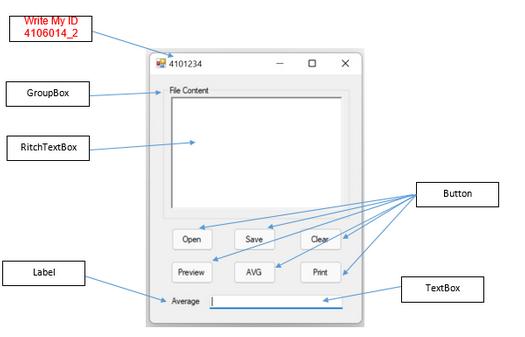
1. When you press the Open button, the user will choose a text file (containing one number in each line) using the open file dialog and showing file content in RitchTextBox. 2. When you press the Save button, the program will save the contents of RitchTextBox (number one in each line) in a text file by choosing the user using a file-saving dialog. 3. When you press the AVG button, the program will open the indicated file by the Open or Save button , calculate the average numbers in the file and show the result in TextBox. 4. When you press the Clear button, the contents of RitchTextBox and TextBox will be cleared. 5. When you press the Preview button, a page preview tool with numbers in RitchTextBox will be shown. 6. When you press the Print button, a page print tool with numbers in RitchTextBox will be shown. Write My ID 4106014 2 GroupBox RitchTextBox Label 4101234 FleContent Open Preview Average Save AVG O Clear Print X Button TextBox
Step by Step Solution
There are 3 Steps involved in it
It seems like youre asking for a program that incorporates a GU... View full answer

Get step-by-step solutions from verified subject matter experts
 Study Help