







Question: 1need help how to work on 14b, 14c, 14d, 14e. Franklin Gothic Boo V111 LeCopy Paste * Format Painter B 1 UvvoA Clipboard IN Font
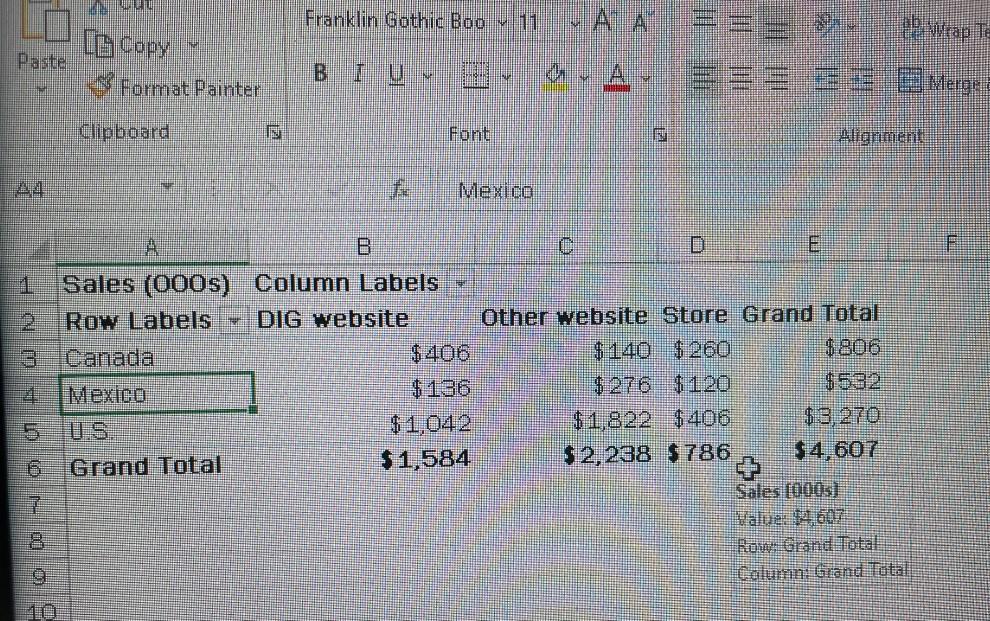
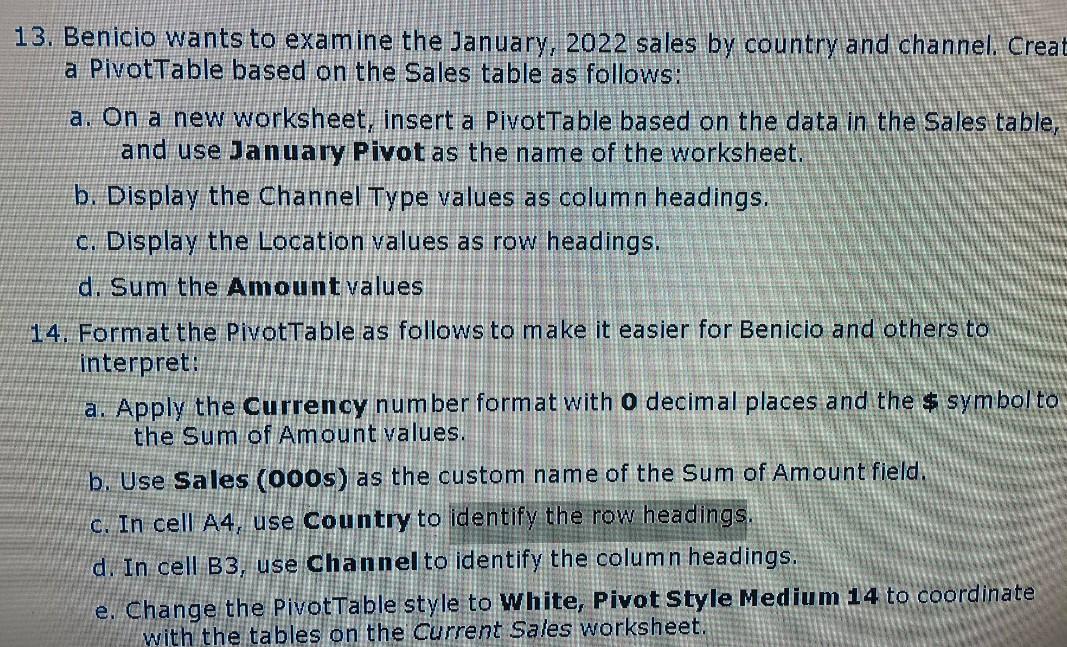 1need help how to work on 14b, 14c, 14d, 14e.
Franklin Gothic Boo V111 LeCopy Paste * Format Painter B 1 UvvoA Clipboard IN Font Alignment Mexico F 1 A E Sales (000s) Column Labels Row Labels DIG website Other website Store Grand Total Canada $406 $ 140 $260 $806 Mexico $ 136 $ 276 $120 $1,042 $1,822 $406 $3,270 Grand Total $1,584 $2,238 $ 786 $4,607 Sales (0005) Value 14 607 Rom Grand Total Column: Grand Total 7 13. Benicio wants to examine the January, 2022 sales by country and channel. Creat a PivotTable based on the Sales table as follows: a. On a new worksheet, insert a PivotTable based on the data in the Sales table, and use January Pivot as the name of the worksheet. b. Display the Channel Type values as column headings. c. Display the Location values as row headings. d. Sum the Amount values 14. Format the PivotTable as follows to make it easier for Benicio and others to interpret: a. Apply the Currency number format with o decimal places and the $ symbol to the Sum of Amount values. b. Use Sales (000s) as the custom name of the Sum of Amount field. c. In cell A4, use Country to identify the row headings. d. In cell B3, use Channel to identify the column headings. e. Change the Pivottable style to White, Pivot Style Medium 14 to coordinate with the tables on the current Sales worksheet. Franklin Gothic Boo V111 LeCopy Paste * Format Painter B 1 UvvoA Clipboard IN Font Alignment Mexico F 1 A E Sales (000s) Column Labels Row Labels DIG website Other website Store Grand Total Canada $406 $ 140 $260 $806 Mexico $ 136 $ 276 $120 $1,042 $1,822 $406 $3,270 Grand Total $1,584 $2,238 $ 786 $4,607 Sales (0005) Value 14 607 Rom Grand Total Column: Grand Total 7 13. Benicio wants to examine the January, 2022 sales by country and channel. Creat a PivotTable based on the Sales table as follows: a. On a new worksheet, insert a PivotTable based on the data in the Sales table, and use January Pivot as the name of the worksheet. b. Display the Channel Type values as column headings. c. Display the Location values as row headings. d. Sum the Amount values 14. Format the PivotTable as follows to make it easier for Benicio and others to interpret: a. Apply the Currency number format with o decimal places and the $ symbol to the Sum of Amount values. b. Use Sales (000s) as the custom name of the Sum of Amount field. c. In cell A4, use Country to identify the row headings. d. In cell B3, use Channel to identify the column headings. e. Change the Pivottable style to White, Pivot Style Medium 14 to coordinate with the tables on the current Sales worksheet
Step by Step Solution
There are 3 Steps involved in it

Get step-by-step solutions from verified subject matter experts
 Study Help