







Question: 3 . 3 Automating the estimates Once we have a process for doing the estimation we would like to automate it . For this part
Automating the estimates
Once we have a process for doing the estimation we would like to automate it For this part generate signals for tin
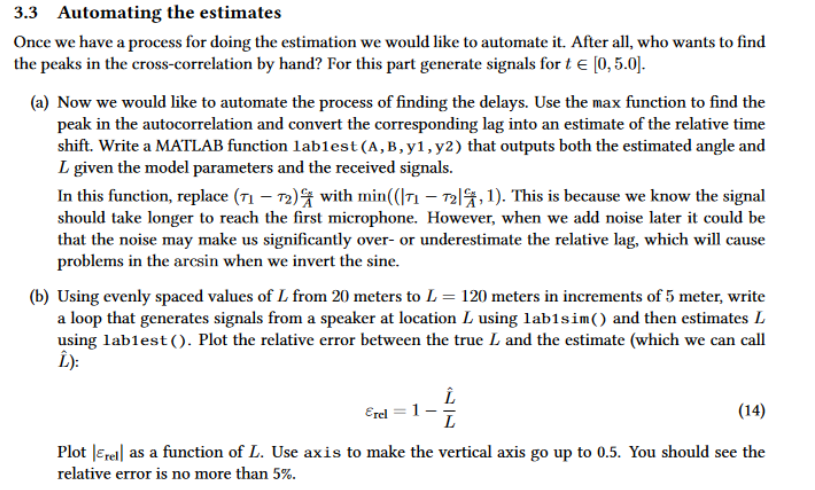
a Now we would like to automate the process of finding the delays. Use the max function to find the
peak in the autocorrelation and convert the corresponding lag into an estimate of the relative time
shift. Write a MATLAB function labest A B y y that outputs both the estimated angle and
L given the model parameters and the received signals.
In this function, replace tau tau cA with
b Using evenly spaced values of L from meters to L meters in increments of meter, write
a loop that generates signals from a speaker at location L using labsim and then estimates L
using labest Plot the relative error between the true LhatL :
epsi rel hatLL
Plot epsi rel as a function of L Use axis to make the vertical axis go up to You should see the
relative error is no more than Here is my code so far but it doesn't work and is very scrambled. Parameters A ; Vertical distance between microphones in meters B ; Horizontal distance from microphones to sound source in meters fs e; Sampling frequency Hz Signal function st sig @t cos pi theavisidet heavisidet e; Initialize storage for L estimates Lvalues ::; True distances from m to m in increments of m estimatedLvalues zerossizeLvalues; Preallocate for estimated L Loop through each true L value to estimate Lhat for i :lengthLvalues Ltrue Lvaluesi; Current true L value Generate the signals using labsim ysig, ysig labsimA B Ltrue, sig; Generate time vector for simulation t :fs:e; ms of data Compute yt and yt yt ysigt; yt ysigt; Ensure yt and yt are column vectors for xcorr compatibility yt yt:; yt yt:; Estimate angle and L using Labest function ~ Lest LabestA B yt yt fs; Capture the estimated L Store the estimated L estimatedLvaluesi Lest; end
figure; plotLvalues, estimatedLvalues, o 'LineWidth', ; Plot estimated L hold on; plotminLvalues maxLvaluesminLvalues maxLvaluesr 'LineWidth', ; Diagonal line for perfect estimation xlabelTrue L meters; ylabelEstimated hatLmeters; titleTrue L vs Estimated hatL; grid on; legendEstimated hatL 'Perfect Estimation'; hold off; Calculate and display relative error relativeerror absestimatedLvalues Lvalues Lvalues; dispRelative Error for Each True L Value:; disprelativeerror; Function to generate signals with delays function ysig, ysig labsimA B L sig Creates tau and tau using the A B and L in meters tsqrtBL A; tsqrtBL A; Creates ysig and ysig by using the input signal sig and delays it ysig @t sigt t; ysig @t sigt t; end Function to estimate theta and L using crosscorrelation function thetahat, Lhat LabestA B yt yt fs Calculate the crosscorrelation between yt and yt c lags xcorryt yt; Normalize the crosscorrelation by the energy of the two signals cNorm c sqrtsumyt sumyt; scales crosscorrelation between and Convert lags to time by dividing by fs lagsfs lags fs; Plot the normalized crosscorrelation c versus time lags figure; plotlagsfs cNorm; xlabelTime Lag s; ylabelNormalized CrossCorrelation'; titleNormalized CrossCorrelation between yt and yt; grid on; Find the peak in the crosscorrelation to estimate the relative time shift ~ peakindex maxcNorm; Find the index of the maximum value in cNorm relativetimeshift lagsfspeakindex; Convert the peak index to time shift Calculate the estimated angle thetahat using the relative time shift cs ; Speed of sound in air in ms ratio mincs relativetimeshift A; thetahat asinratio; Estimate the distance L Lhat A costhetahat B; fprintfEstimated thetahat: f radians
thetahat;
fprintfEstimated Lhat: f meters
Lhat;
end
Step by Step Solution
There are 3 Steps involved in it
1 Expert Approved Answer
Step: 1 Unlock

Question Has Been Solved by an Expert!
Get step-by-step solutions from verified subject matter experts
Step: 2 Unlock
Step: 3 Unlock
 Study Help